
ZimaBoardエコシステム:ホームサーバー&電源セットアップ

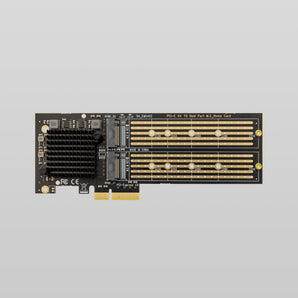 PCIe 3.0 x4 - デュアルNVMe M.2 SSDアダプターカード $169.00 USD /

 8GB DDR3L 1600 MT/s 204ピン SODIMM メモリ(予約注文) $19.90 USD /

 ホームサーバーとパーソナルクラウド向けZimaBoard 2ミニNASキット 開始価格: $469.00 USD /

 Lekuo USB4 40Gbps M.2 NVMe SSDケース $59.00 USD /

 PCIe - 4チャンネルUSBアダプター $14.90 USD /

 ZimaBoardおよびZimaBoard 2用120W 12V/10A GaN電源アダプター $43.90 USD /

 5GHz/2.4GHzデュアルバンド対応Wi-Fi 6 USBアダプター $17.90 USD /

 800W OCuLink GPUドッキングステーション – 高性能外付けGPUエンクロージャー $179.90 USD /

 Mini DisplayPortオス - HDMIメスケーブル 4K 60Hz $12.90 USD /

 PCIe - 4ポート 2.5G Ethernetアダプター Intel I226チップセット $99.90 USD /

 PCIe - NVMe&NGFF SSDアダプター $14.90 USD /

 Intel AX210 WiFi 6E PCIeカード 8dBiアンテナセット付き $39.90 USD /


Building a High-Performance ZimaBoard 2 Ecosystem
Establishing a robust home lab requires more than just a single device; it necessitates a coordinated environment of hardware, expansion modules, and reliable power. The ZimaBoard 2 Ecosystem represents a departure from closed-box computing, offering a modular approach to personal servers. By utilizing the x86 architecture, this ecosystem ensures that users can run standard Linux distributions, Windows, or specialized operating systems like CasaOS with full compatibility. Whether the goal is to deploy a network security gateway, a localized media hub, or a massive storage array, the synergy between the core board and its specialized accessories provides a stable foundation for long-term digital sovereignty.
Core Hardware: The ZimaBoard 2 Single Board Server
The heart of this environment is the ZimaBoard 2 Single Board Server. Unlike ARM-based alternatives that often face driver limitations, this x86-powered unit handles complex computational tasks with ease. It functions as a silent, high-efficiency node capable of 24/7 operation.
- Processor Architecture: Intel-based x86-64 bit silicon for broad software support.
- Networking Capability: Integrated dual Gigabit Ethernet ports for advanced routing.
- Expansion Potential: Exposed PCIe x4 slot for direct hardware customization.
- Thermal Management: Passive cooling design eliminates mechanical fan failure risks.
- Energy Profile: Optimized for low power consumption during continuous uptime.
Specialized Kits for Targeted Server Applications
For users who prefer a ready-to-deploy solution, we have curated several kits that bundle the ZimaBoard 2 with essential components tailored for specific use cases. These packages remove the guesswork from hardware selection.
Securing Networks with the Firewall Kit
The ZimaBoard 2 832 Firewall Kit provides the necessary tools to build a dedicated security appliance. By running software like pfSense or OPNsense, you can manage traffic, block intrusive tracking, and establish encrypted tunnels for remote access without relying on consumer-grade routers with limited features.
Establishing a localized Mini NAS
Storage-heavy workflows benefit from the ZimaBoard 2 Mini NAS Kit for Home Server. This setup facilitates the creation of a private cloud, allowing for automated backups of mobile devices and workstations. It serves as a centralized repository for 4K media and sensitive documents, keeping data within your physical control.
Smart Home and Professional Mastery
The ZimaBoard 2 1664 Smart Home Kit is engineered for automation enthusiasts who need to host Home Assistant or Zigbee bridges. For those requiring the maximum specifications available, the ZimaBoard 2 1664 Master Kit includes a comprehensive selection of peripherals to ensure you have every tool needed for complex development environments.
Expanding Horizons with PCIe and Storage Accessories
The true strength of the ZimaBoard 2 Ecosystem lies in its ability to grow alongside your requirements. The exposed PCIe interface allows for professional-grade hardware modifications that are typically impossible on standard single-board computers.
- Massive Storage Expansion: The PCle to 5-Port SATA III Adapter (JMB585 Chipset) enables the connection of up to five high-capacity hard drives, perfect for building a large-scale RAID array.
- High-Speed Data Caching: Use the PCle 3.0 x4 to Dual NVMe M.2 SSD Adapter Card to add ultra-fast solid-state drives for read/write caching or high-speed application hosting.
- Graphical Processing: For AI tasks or media transcoding, the GPU Docking Station bridges the gap between a compact server and desktop-class graphics performance.
- Physical Drive Management: The 2-Bay HDD Rack Tray for ZimaBoard 2 provides a stable, organized structure for mounting large 3.5-inch or 2.5-inch drives alongside the main unit.
Enhancing Reliability with Dedicated Power Solutions
A server is only as reliable as its power source. Standard adapters often fail under the load of multiple hard drives or PCIe expansion cards. The 120W 12V 10A GaN Power Adapter for ZimaBoard utilizes Gallium Nitride technology to deliver high wattage with minimal heat. This ensures that even when the system is fully loaded with five HDDs and a PCIe card, the voltage remains stable, preventing data corruption or unexpected reboots.
Wireless Connectivity and System Maintenance
In environments where Ethernet cabling is impractical, the Wi-Fi 6 USB Adapter with 5GHz 2.4GHz Dual Band provides high-throughput wireless access. This allows the ZimaBoard 2 to function as a wireless access point or a remote node in a mesh network. Additionally, for users looking to maximize their existing hardware, we offer the ZimaBoard 2 Upgrade Fee service to assist in transitioning to higher-tier specifications within the ecosystem.
Designing a Silent and Aesthetic Workspace
ZimaSpace hardware prioritizes an unobtrusive presence. By removing fans, we eliminate the high-pitched whine common in enterprise rack servers. This allows the ZimaBoard 2 to sit on a desk or in a living room without affecting the acoustic environment. The aluminum casing acts as a heat sink, radiating thermal energy away from the processor while maintaining a sleek, professional appearance that fits modern SOHO (Small Office Home Office) aesthetics.
Zimaの世界を体験しよう。


