


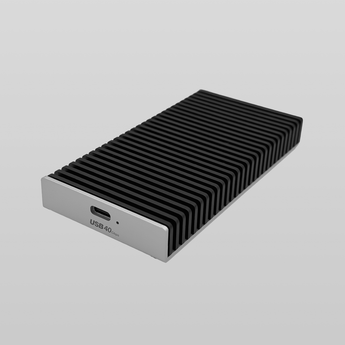


Lekuo USB4 40Gbps M.2 NVMe SSDケース
特長
- USB4 40Gbps high-speed transfer for fast backups, media files, and project storage.
- PCIe 4.0 x4 NVMe bridge for high-performance external SSD access.
- Supports M.2 NVMe 2230 / 2242 / 2260 / 2280 SSDs.
- Aluminum-alloy shell helps dissipate heat during sustained transfers.
- Compatible with Thunderbolt 5/4/3, USB4, Windows, macOS, and Linux.
- Ideal for ZimaCube 2 users who need fast portable storage, file transfer, and backup workflows.
箱の中身は何ですか?
- Lekuo USB4 40Gbps M.2 NVMe SSD Enclosure
- 30cm USB-C to USB-C cable
- Screwdriver
- Cooling pad
- Triangular pry shim
Note: M.2 NVMe SSD is not included.
配送
Ships within 72 business hours.
Delivery usually takes 8–10 business days for most countries after dispatch. Tracking information will be sent once the order ships.
お支払い方法


保証とサポート
受け取り可能状況を読み込めませんでした
製品紹介
Lekuo AA24M11 USB4 40Gbps M.2 NVMe SSDケースは、M.2 NVMe SSDをコンパクトで高速なポータブルドライブに変え、高速バックアップ、プロジェクト保存、クリエイティブな作業に最適です。
USB4 40GbpsインターフェースとPCIe 4.0 x4 NVMeブリッジを搭載し、対応するUSB4およびThunderbolt 5/4/3ホストで使用できます。M.2 NVMe 2230、2242、2260、2280 SSDに対応し、アルミニウム合金製シェルが長時間のデータ転送時の放熱を促進します。
高性能なUSB4/TBホスト、高品質なケーブル、高速なNVMe SSDを使用した場合、読み取り速度は最大3125MB/sに達します。実際のパフォーマンスは、ホストデバイス、ポート、ケーブル、SSDによって異なる場合があります。
SSDは付属しません。
主な特長
- USB4 40Gbpsの高速パフォーマンス: 対応するUSB4またはThunderboltホストでの高速ファイル転送、メディア編集、プロジェクトキャッシュ、迅速なバックアップに最適です。
- PCIe 4.0 x4 NVMeブリッジ: ASM2464コントローラーを搭載し、コンパクトな外付けケースで高性能なNVMeアクセスを実現します。
- 幅広いM.2 NVMe SSDに対応: 2230、2242、2260、2280の各サイズのM.2 NVMe SSDに対応し、幅広い容量をサポートします。
- アルミニウム合金製冷却シェル: 放熱を促進し、長時間のデータ転送中も安定したパフォーマンスを維持します。
- 幅広いシステム互換性: Windows、macOS、Linuxで動作します。速度は低下しますが、USB 3.xとの下位互換性があります。
仕様
|
素材
|
アルミニウム合金
|
|
入力
|
USB Type-C
|
|
対応インターフェース
|
Thunderbolt 5/4/3 ,USB4
|
|
速度
|
40Gbps(最大)
|
|
SSDインターフェース
|
NVMe M.2 M Key & B+M key
|
|
対応SSDサイズ
|
2230/2242/2260/2280
|
|
対応OS
|
macOS/Windows/Linux
|
|
付属
|
30cm USB-C - USB-Cケーブル
|
|
ドライバー/冷却パッド/三角形のこじ開け工具
|
|
|
寸法
|
115.5 x 58.5 x 15 mm
|
よくある質問
-
Choose Standard for personal cloud, media libraries, backups, and lighter self-hosting or editing workflows. Choose Pro if you want more CPU headroom, 10GbE, and faster SSD expansion for heavier multitasking or more demanding active projects. Choose Creator Pack if you need the most powerful setup, with 64GB RAM, 1TB SSD, and dedicated GPU support for more advanced creative or AI workflows.
-
Yes. ZimaCube 2 is built on standard hardware and follows a zero-lock-in approach. It comes with ZimaOS Plus preinstalled, while remaining compatible with a wide range of other operating systems and self-hosting setups. This openness is also a core part of the official product positioning.
-
ZimaCube 2 uses a redesigned thermal system built for cooler and quieter operation. According to the recent launch materials, full-load CPU temperatures are reduced by nearly 30%, while system noise stays around 30 dB.
-
For many everyday workflows, especially lighter or single-stream 4K work, Standard is generally a solid fit. If your setup involves heavier multitasking, faster shared storage needs, or more demanding editing workloads, Pro offers more headroom with a stronger processor, 10GbE, and faster SSD expansion.
-
The 7th bay is designed for high-speed SSD expansion. On Standard, the shared bandwidth is around 800 MB/s, which is generally suitable for lighter active workflows and fast-access storage. On Pro and Creator Pack, the 7th bay reaches around 3200 MB/s, making it better suited for more demanding editing, scratch storage, and performance-focused workflows.
-
Yes. A practical setup is to use faster SSD storage for active projects, while keeping larger-capacity drives for long-term storage and archive. This matches creative workflows well and makes ZimaCube 2 easier to use as both active workspace and long-term storage.
-
ZimaCube 2 is compatible with most mainstream hard drive brands and capacities on the market. You can check the full compatibility list here: Compatibility List
-
Inside the chassis, ZimaCube 2 supports low-profile GPUs for SFF single-slot or dual-slot installation, with TDP below 75W. For larger or higher-power graphics cards, we recommend using an external GPU dock.


