
Top 10 Open-Source AI Agent Skills on GitHub


Open-source AI agent skills are becoming one of the most practical ways to make coding agents more reliable. Instead of relying on long prompts every time, developers can use reusable GitHub-hosted skill packages that teach agents how to test web apps, review code, follow framework rules, debug production issues, or build agent tools.
This guide explains the top open-source AI agent skills on GitHub, how they work, and which ones are worth trying first if you use Claude Code, Cursor, GitHub Copilot, Codex-style agents, Gemini CLI, or local AI workflows.
Quick Answer
The best open-source AI agent skills on GitHub are reusable
SKILL.md packages or skill repositories that help AI agents perform specific development workflows. The strongest examples include frontend-design, webapp-testing, mcp-builder, react-best-practices, tdd, static-analysis, sentry-fix-issues, ai-ready, web-perf, and fastify.| Rank | Open-Source Skill | Best For | GitHub Source |
| 1 | frontend-design | Frontend UI and visual polish | Anthropic frontend-design skill |
| 2 | webapp-testing | Browser testing and frontend QA | Anthropic webapp-testing skill |
| 3 | mcp-builder | Building MCP servers and agent tools | Anthropic mcp-builder skill |
| 4 | react-best-practices | React and Next.js performance review | Vercel react-best-practices skill |
| 5 | tdd | Test-driven development | Matt Pocock tdd skill |
| 6 | static-analysis | Security review and SAST workflows | Trail of Bits static-analysis skill |
| 7 | sentry-fix-issues | Production debugging | Sentry fix issues skill |
| 8 | ai-ready | Repository setup for AI agents | GitHub ai-ready skill |
| 9 | web-perf | Web performance and Core Web Vitals | Cloudflare web-perf skill |
| 10 | fastify | Node.js backend and Fastify APIs | mcollina fastify skill |
The key distinction is that these are not broad abilities like “debugging” or “code review.” They are concrete skill packages that developers can inspect, copy, install, fork, and adapt.
What Counts as an Open-Source AI Agent Skill?
An open-source AI agent skill is a reusable workflow package, usually hosted on GitHub, that helps an AI agent perform a specialized task. In most cases, it includes a
SKILL.md file with a name, description, and instructions. Some skills also include scripts, references, templates, examples, or tool-specific files.A normal prompt tells an agent what to do once. A skill teaches an agent how to perform a repeatable workflow. That is why skills are especially useful for coding, where repeatability matters.
| Concept | What It Does | Example |
| Prompt | Gives one-time instructions | “Review this code like a senior engineer” |
| Custom instruction | Sets persistent preferences | “Use TypeScript and avoid any” |
| AGENTS.md | Gives repo-level guidance | Project conventions and coding rules |
| MCP server | Connects an agent to external tools | GitHub, browser, filesystem, database |
| Agent skill | Packages a reusable workflow | webapp-testing, tdd, static-analysis |
For developers, the most useful skills are narrow enough to be actionable. A skill called “coding” is too broad. A skill called
webapp-testing, tdd, or static-analysis is easier to evaluate because it maps to a real workflow.Top 10 Open-Source AI Agent Skills on GitHub
The following skills were selected because they are concrete, searchable, GitHub-hosted, and useful for real development workflows.
1. frontend-design
frontend-design is one of the clearest examples of a real AI agent skill for frontend developers. It helps an agent make stronger UI decisions instead of producing generic interface output.Use it when you want an agent to improve layout, spacing, typography, visual hierarchy, component structure, or overall UI taste.
Best use cases:
-
Landing page design
-
Dashboard UI refinement
-
React and Tailwind interface polish
-
Reducing generic “AI-looking” UI
-
Turning a rough component into a more intentional design
Good anchor text for external link: frontend-design AI agent skill
2. webapp-testing
webapp-testing is useful when an AI agent needs to verify a web app in a browser instead of only editing code. It supports frontend testing workflows such as launching a local app, checking UI behavior, inspecting browser logs, and capturing screenshots.This is important because many coding agents can write a fix but do not always verify whether the fix actually works in the browser.
Best use cases:
-
Frontend QA
-
Browser-based debugging
-
UI regression checks
-
Playwright-style verification
-
Local web app testing
Good anchor text for external link: webapp-testing skill for AI coding agents
3. mcp-builder
mcp-builder is a skill for creating MCP servers and agent tools. It is especially useful for developers who want their coding agents to connect with external APIs, internal systems, or local tools.This skill matters because the future of coding agents is not only code generation. Agents also need tools, connectors, and structured access to real systems.
Best use cases:
-
Building MCP servers
-
Creating agent tool integrations
-
Connecting agents to APIs
-
Local tool automation
-
Self-hosted agent workflows
Good anchor text for external link: mcp-builder skill for creating MCP servers
4. react-best-practices
react-best-practices from Vercel is a strong example of a framework-specific agent skill. Instead of telling an agent to “write better React,” this skill gives it structured guidance for React and Next.js performance patterns.This kind of skill is valuable because AI agents often rely on outdated or generic framework knowledge. A framework-specific skill can encode current best practices around rendering, data fetching, bundle size, accessibility, and performance.
Best use cases:
-
React component review
-
Next.js performance optimization
-
Frontend architecture cleanup
-
Bundle size review
-
Data fetching and rendering decisions
Good anchor text for external link: Vercel react-best-practices skill
5. tdd
tdd is a test-driven development skill from Matt Pocock’s skills collection. It helps agents follow a red-green-refactor loop instead of rushing directly into implementation.This is one of the most practical coding skills because it changes the agent’s behavior. Instead of simply generating tests after the fact, the agent is encouraged to write a failing test first, make the implementation pass, and then refactor.
Best use cases:
-
Test-first feature development
-
Bug fixes with regression tests
-
Integration test planning
-
Safer refactoring
-
Behavior-driven development
Good anchor text for external link: tdd skill for agentic coding
6. static-analysis
static-analysis from Trail of Bits is useful for security-focused coding workflows. It gives agents a more structured way to work with security scanning, SAST-style analysis, CodeQL, Semgrep, SARIF output, and vulnerability review.This skill is much more concrete than asking an agent to “check security.” It gives the agent a workflow for looking for evidence and organizing findings.
Best use cases:
-
Security review
-
Static analysis
-
SAST workflows
-
Vulnerability triage
-
Code audit preparation
Good anchor text for external link: Trail of Bits static-analysis skill
7. sentry-fix-issues
sentry-fix-issues is designed for production debugging. Instead of debugging from code alone, this type of skill gives the agent context from real errors, stack traces, breadcrumbs, traces, and issue metadata.This is valuable because production debugging is different from local debugging. The agent needs to understand what actually failed, where it failed, and how the error relates to the codebase.
Best use cases:
-
Fixing production errors
-
Investigating runtime exceptions
-
Working from Sentry issues
-
Error triage
-
Production-informed debugging
Good anchor text for external link: Sentry AI coding assistant skills
8. ai-ready
ai-ready from GitHub’s Awesome Copilot collection helps prepare a repository for AI-assisted development. It can generate files such as AGENTS.md, Copilot instructions, CI workflows, issue templates, and other context files.This is an important skill because many coding agents fail not because the model is weak, but because the repository lacks clear context. A repo-readiness skill makes project standards easier for agents to follow.
Best use cases:
-
Preparing a repo for AI agents
-
Creating
AGENTS.md -
Adding Copilot instructions
-
Improving issue templates
-
Making project context explicit
Good anchor text for external link: GitHub ai-ready skill
9. web-perf
web-perf from Cloudflare is focused on web performance. It is useful when an agent needs to reason about Core Web Vitals, network behavior, browser performance, frontend bottlenecks, or optimization opportunities.This kind of skill is useful because performance optimization needs measurable evidence. A good performance skill should push the agent toward concrete signals rather than vague advice.
Best use cases:
-
Core Web Vitals review
-
Frontend performance optimization
-
Network and bundle analysis
-
Web app speed improvements
-
Performance audit workflows
Good anchor text for external link: Cloudflare web-perf skill
10. fastify
fastify from Matteo Collina’s skills collection is a backend-focused skill for Fastify and Node.js development. It gives AI agents more specific backend framework guidance instead of generic JavaScript advice.This is valuable because backend agents need to understand runtime conventions, routing patterns, plugin architecture, schema validation, error handling, and production behavior.
Best use cases:
-
Fastify APIs
-
Node.js backend services
-
Server-side TypeScript
-
API architecture
-
Backend performance and maintainability
Good anchor text for external link: Fastify AI agent skill
How to Choose the Right GitHub Agent Skill
The best GitHub agent skill is the one that maps to a real recurring workflow in your development process. Do not install a skill only because it is popular. Start with your actual pain point.
| Your Workflow Problem | Best Skill to Try First |
| UI looks generic | frontend-design |
| Agent does not verify browser behavior | webapp-testing |
| You want custom agent tools | mcp-builder |
| React or Next.js code feels inefficient | react-best-practices |
| Agent writes code without tests | tdd |
| You need security review | static-analysis |
| You need production debugging | sentry-fix-issues |
| Your repo lacks AI context | ai-ready |
| Web app is slow | web-perf |
| Backend code needs framework-specific rules | fastify |
A simple stack for developers might look like this:
| Layer | Suggested Skill |
| Repository setup | ai-ready |
| Frontend quality | frontend-design or react-best-practices |
| Testing | webapp-testing or tdd |
| Security | static-analysis |
| Debugging | sentry-fix-issues |
| Backend | fastify |
| Agent tooling | mcp-builder |
This layered approach is better than installing many skills at once. Each skill should solve one clear problem.
Where AI NAS Fits Into Open-Source Agent Skill Workflows
An AI NAS is useful when you want to experiment with open-source agent skills near your own code, documents, logs, and local knowledge base. It gives developers a private place to store repositories, test artifacts, documentation, embeddings, screenshots, and workflow outputs.
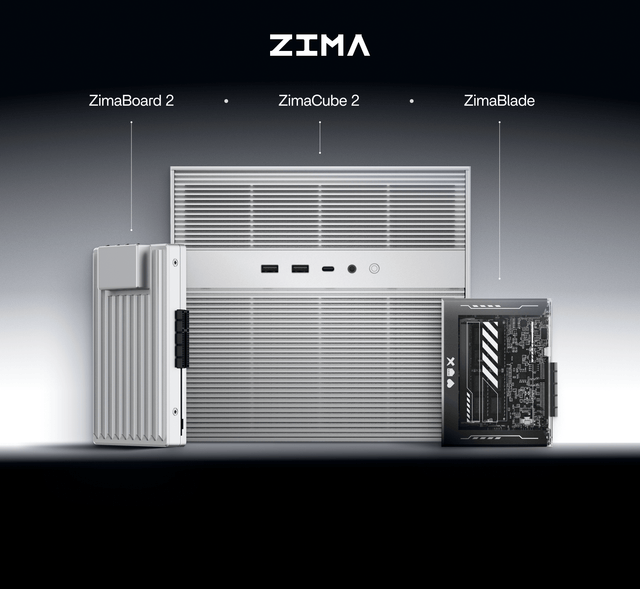
For example, if you have an AI NAS workflow with ZimaCube 2, you can use it as a local workspace for trying open-source agent skills, storing project documentation, keeping test artifacts, and building private AI assistant workflows around your own files.
This does not mean every AI agent skill needs a NAS. Many skills can run on a laptop or cloud IDE. But local infrastructure becomes useful when you care about:
-
Private code repositories
-
Long-term project memory
-
Local knowledge bases
-
Test screenshots and logs
-
Self-hosted automation
-
Local AI model experiments
-
Team-level AI workflow storage
The natural connection is this: GitHub gives you the open-source skill ecosystem, while an AI NAS gives you a private environment where those skills can interact with your own data more safely.
How to Use Open-Source Agent Skills Safely
Open-source agent skills should be treated like software dependencies, not harmless prompt snippets. A skill can affect how an agent reads files, runs commands, calls tools, edits code, or interprets repository context.
Before using a third-party skill from GitHub, check:
-
Is the repository trustworthy?
-
Is the
SKILL.mdeasy to inspect? -
Does the skill include executable scripts?
-
Does it ask the agent to run risky commands?
-
Does it access credentials, terminals, browsers, cloud APIs, or production systems?
-
Is the skill recently maintained?
-
Can you test it in a disposable project first?
A good team workflow is to keep approved skills in a version-controlled internal folder. Review third-party skills through pull requests, test them in sandboxes, and document which agents are allowed to use them.
This is especially important for development teams because coding skills may touch source code, Git history, CI/CD, package managers, production logs, or cloud infrastructure.
Conclusion
The best open-source AI agent skills on GitHub are practical, narrow, inspectable, and tied to real developer workflows. Instead of thinking about “skills” as vague abilities like debugging or testing, developers should look for concrete packages such as
frontend-design, webapp-testing, mcp-builder, react-best-practices, tdd, static-analysis, sentry-fix-issues, ai-ready, web-perf, and fastify.The larger shift is from prompt-based coding assistance to package-based agent workflows. Open-source skills make agent behavior easier to reuse, audit, customize, and improve.
For developers building local or private AI workflows, tools like GitHub-hosted skills and AI NAS infrastructure can work together: GitHub provides reusable agent capability, while local storage and compute give those skills a safer place to operate on real project context.
FAQ
What is an open-source AI agent skill?
An open-source AI agent skill is a reusable workflow package, usually hosted on GitHub, that helps an AI agent perform a specific task. It often includes a
SKILL.md file plus optional scripts, references, templates, or assets.Are AI agent skills the same as prompts?
No. A prompt is usually a one-time instruction. An AI agent skill is a reusable package that can be installed, copied, forked, versioned, and reused across workflows. Skills are better for repeatable tasks such as testing, frontend review, security analysis, or production debugging.
Which open-source AI agent skill should developers try first?
Most developers should start with
ai-ready for repository context, then add a workflow-specific skill such as frontend-design, webapp-testing, tdd, react-best-practices, or static-analysis depending on the project.Are GitHub AI agent skills safe to install?
They can be useful, but they should be reviewed carefully. Always inspect the
SKILL.md file, check whether scripts are included, review the repository owner, and test the skill in a sandbox before using it on sensitive code or production systems.Do I need an AI NAS to use open-source AI agent skills?
No. You can use many skills on a normal laptop, IDE, or cloud coding environment. However, an AI NAS such as ZimaCube 2 can be useful if you want a private local workspace for repositories, documentation, test artifacts, self-hosted automation, and local AI workflows.

AI HUB
More to Read
2026 AI Agent Skills for Local Knowledge Bases
A practical guide to AI agent skills for local knowledge bases, covering RAG, PDFs, vector search, private document workflows, and ZimaCube 2 AI NAS...
2026 Top AI Agent Skills for Document Search and RAG
A practical guide to AI agent skills for document search and RAG, covering PDFs, DOCX files, vector search, private knowledge bases, and AI NAS...

2026 Best AI Agent Skills for Content Creators
A practical guide to the best AI agent skills for content creators in 2026, covering research, writing, SEO, slides, PDFs, media workflows, and AI...


