
Does Dedicated Hardware Acceleration Give Home Assistant a Meaningful Advantage?


Dedicated hardware acceleration gives Home Assistant a meaningful advantage only when a companion workload—such as video decode, object detection, local voice, or compatible inference—can offload a measured CPU bottleneck. Ordinary entity updates, automations, dashboards, and most integrations do not become faster merely because a GPU, NPU, or Coral is installed.
The default purchase is therefore no accelerator. Upgrade only after identifying a supported operation, proving that it delays or destabilizes the required service, and testing the complete driver, container, device-passthrough, power, and fallback path.
Gate the Workload Before Buying an Accelerator
Name the operation before naming the device: decode specified camera streams, run a detector at a target frame rate, transcribe a voice command, or execute a supported local model. Record CPU use, latency, dropped work, temperature, and power under the same input.
A user comparison of accelerated video workload shows that acceleration questions are meaningful for Frigate pipelines, not for Home Assistant Core as a single undifferentiated workload.
Reject the purchase when no supported task is saturated or when the task already meets its deadline with recovery headroom.
Ordinary Automation Usually Gets No Direct Benefit
Home Assistant's control path is dominated by event handling, integration callbacks, templates, network and radio waits, database operations, and client rendering. A video accelerator cannot shorten a Zigbee retry or a slow cloud response.
More CPU or faster storage may help a measured general-purpose bottleneck, but dedicated acceleration changes only code written for that device and API. Idle accelerator capacity is not reserve capacity for arbitrary automation.
Keep the baseline when the complaint survives with the candidate accelerated service stopped, because that result points to another boundary.
Video and Inference Can Cross the Threshold
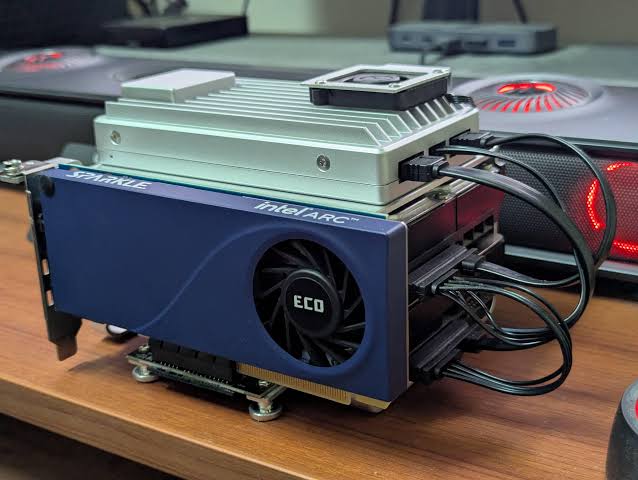
Multi-camera decode and object detection can keep general-purpose CPU busy continuously. A supported GPU or media engine can offload decode; a compatible Coral or other accelerator can move detector inference, leaving CPU for orchestration and fallback work.
A practical Coral inference deployment documents the configuration and model constraints behind that gain. It supports the mechanism, not a promise that every stream, codec, model, or host will improve equally.
Acceleration wins when the same camera set meets target latency and frame processing with lower CPU pressure, acceptable power, and stable detection accuracy.

Compatibility and Passthrough Can Erase the Advantage
The device must be supported by the host kernel, runtime, application, codec or model, and container or VM configuration. Drivers, IOMMU groups, USB stability, permissions, and mapped device nodes can turn a theoretical advantage into a brittle dependency.
A Home Assistant community setup thread illustrates device-passthrough friction around integrated graphics and containers. Treat installation, upgrades, and fallback as part of the benchmark.
Use the local-control dependency map to check whether acceleration is even on the failing path.
Upgrade Only After the Accelerated Path Passes
Run the fixed workload on the baseline and candidate with identical streams, models, retention, clients, and automation load. Record percentile inference or decode latency, dropped frames, action latency, CPU, memory, temperature, power, errors, and behavior after the accelerator is removed.
Buy acceleration when the supported offload clears a measured deadline and the fallback preserves critical control. Buy general-purpose compute when the bottleneck is ordinary code. Buy neither when the system already passes or an external dependency dominates.
The meaningful advantage is spare general-purpose capacity and lower task latency for one compatible heavy workload—not a universal increase in Home Assistant responsiveness.

Produtos recomendados

Comparações de Produtos
Mais para Ler
SSD vs HDD Metadata Storage for Home Assistant: What Changes in Daily Use?
SSD usually suits active Home Assistant metadata; HDD suits bulk backups and media. Confirm the choice with identical workload and restore tests.
Self-Hosting Home Assistant vs Using a Managed Service: Which Costs Less to Own?
Self-hosting usually minimizes cash cost; a managed extension can cost less overall when it replaces valued remote-access, support, or maintenance work.
GPT-6 vs Gemini 3: qual é o melhor modelo de IA para IA multimodal e dados pessoais?
O Gemini adapta-se a fluxos de trabalho da Google ricos em multimédia; o GPT-6 adapta-se à execução orientada por computador. A segurança dos dados...


