


A First ZimaOS Media Server: Jellyfin, Pi-hole and a RAID Plan


Thank you to u/Freeariello for sharing a first ZimaOS homelab built around an Intel Core i5-8400, 16 GB DDR4 and a home media library. Jellyfin, media-management applications and Pi-hole gave a familiar desktop computer several practical jobs, while storage expansion became the next decision to resolve.
The original Reddit post includes both the machine and its dashboard. In the discussion, the creator says the contribution was connected to a ZimaOS contest and followed about two months of use. That context belongs with the account: this is an early user experience shared through a community activity.
Compare Plans
ZimaOS
- Core features
- Zima Client for Mobile & PC
- Thunderbolt Support
- Developer Mode
- 4 Disks
- 3 Members
ZimaOS+
Effortless expansion
- Everything in Free
- Unlimited Disks
- Unlimited Users
A Desktop Platform Made the First Installation Concrete
Freeariello was beginning to explore homelabs and Docker, and chose ZimaOS for an approachable introduction. The hardware was a desktop-class system with a separate 128 GB NVMe SSD dedicated to the operating system and two 4 TB WD Red drives used together for data.

| Part of the build | Configuration reported by the creator |
|---|---|
| CPU | Intel Core i5-8400 |
| Memory | 16 GB DDR4 |
| Operating-system storage | 128 GB NVMe SSD |
| Data storage at posting | Two 4 TB WD Red drives in RAID 0 |
| Main applications | Jellyfin, an arr media-management stack and Pi-hole |
| Planned storage change | A five-drive RAID 5 array, with additional drives ordered |
The table separates what was already installed from what was coming next. The five-drive array was a plan, not a completed result. The post does not establish the exact WD Red model numbers, drive recording technology, measured streaming capacity or a tested recovery time.
This is also a different case from the i5-8400 server shared by SirPro. That account discusses a reused PC with a GTX 1060 and a drive-purchasing lesson. Freeariello’s contribution focuses on a first media workflow and an explicitly described RAID expansion plan.
The Interface Lowered the Barrier Without Removing Container Details
The creator valued having storage management, a file interface and application deployment in one environment. Preconfigured App Store templates made it easier to begin, while importing custom Docker Compose files offered a route beyond the initial defaults.
That combination explains the choice more usefully than a broad claim that one operating system is best for every homelab. The desired starting point was a manageable personal project. The source describes a first experience with Linux and an interest in learning, rather than an established virtualization cluster needing replacement.
Templates still create real container deployments with settings and retained data. The Docker Compose volume reference helps explain one important part: access to persistent volumes is assigned to services. Readers adjusting a template need to understand what an application reads and where it writes, even when the first installation uses a graphical interface.
For a media collection, that means checking the host location, the path visible inside the application and the permissions required for its role. These are planning considerations for a similar build; the post does not publish a complete Compose file that could be reproduced without further configuration.
Jellyfin Gave the Server a Household Purpose
Media was the main focus. Jellyfin supplied the library and playback side, with an arr application collection supporting media management. The dashboard visibly includes Jellyfin, Radarr, Sonarr and Bazarr alongside other tools.

The useful relationship is between the applications and their shared collection. A management tool can organize files that a media server later indexes. If they do not agree on file locations or access permissions, having both applications installed does not complete the workflow.
The source does not supply a concurrent-stream test. Nor does the processor name alone establish which codecs, subtitles or clients will require conversion. Jellyfin’s transcoding documentation explains why a server may convert media when a playback client cannot use the original format directly.
A reader assessing an existing PC should therefore test representative files on the actual playback devices. A dashboard with moderate CPU use at capture time cannot predict a different session with conversion and subtitles. The point of this story is that a working media environment was approachable, not that every video workload has been measured.
Pi-hole Added a Shared Network Dependency
Freeariello also ran Pi-hole as a private DNS service for filtering unwanted destinations across the network. It gave the server a role that extends beyond the media library and affects other devices.
The official Pi-hole overview describes DNS-level filtering. That scope matters: filtering hostnames is different from modifying every page or removing every advertisement. A similar installation also needs a clear understanding of which clients actually use the selected resolver.
For a household server, this adds an operational question. If the machine is restarted for a storage change, services depending on its DNS may be affected as well as media playback. The post does not describe a secondary resolver or a tested outage procedure, so neither should be added to the creator’s configuration by assumption.
The Pi-hole-to-family-server account provides another example of this gradual broadening. An application that starts as a personal experiment can become a service other people quietly depend on.
RAID 0 Made the Expansion Plan Worth Reading Carefully
The installed data arrangement was two 4 TB drives in RAID 0. That combines their capacity without drive-failure redundancy: losing a member can make the array’s data unavailable. The comments challenged that choice, and the creator reiterated the intention to move to RAID 5.
RAID 5 adds parity and can tolerate a single member failure in a healthy array, but that does not make it a backup. Deletion, application errors or damage affecting the server can still require an independent recoverable copy. The proposed five-drive array addresses a different question from whether the owner can recover an accidentally removed collection.
The source does not document a completed conversion method. A reader should not infer that adding disks automatically transforms this RAID 0 installation into the planned layout. Before changing an existing array, establish a separate verified copy, check the supported procedure for the installed software version, and decide how files and application data will return if rebuilding is required.
Keeping the OS on its own NVMe device makes its location distinct from the data disks, but it does not by itself preserve every container setting or database. A replacement operating-system installation and a recovered media collection are related tasks with different retained data.
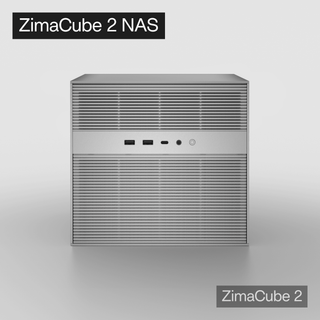
For readers comparing a dedicated storage enclosure, the ZimaCube 2 personal cloud NAS is a separate hardware option. Freeariello’s actual server remains the desktop PC shown above. The comparison should begin with drive accommodation, service requirements and recovery arrangements.
FAQ
Was the five-drive RAID 5 array already running?
No. The creator said additional drives had been ordered and described RAID 5 as the next upgrade. The documented installation used two 4 TB drives in RAID 0.
Does the post prove a particular Jellyfin streaming capacity?
No. It identifies the processor, memory and applications, but supplies no controlled playback benchmark or complete hardware-acceleration configuration.
Was this contribution connected to a community contest?
Yes. The creator clarified that connection in the original discussion and said ZimaOS had been in use for about two months. The article preserves that context.
Can the old pricing and feature comments be treated as current specifications?
No. They describe the software at the time of the post. Check the current ZimaSpace documentation for today’s capabilities and supported storage procedures.
Conclusion
Freeariello’s first homelab gave a desktop PC a clear purpose: serving a media collection, organizing its supporting applications and providing network DNS filtering. The original photographs and dashboard make that early installation visible.
The next step was already more demanding than installing another app. Moving from a two-drive RAID 0 arrangement to a larger protected array required thinking about the transition and the data that must survive it. That unfinished decision is an important part of the user story.
Welcome to the ZimaSpace community! Share your setup, ask questions, and explore practical build guides, real user stories, and product updates with fellow self-hosters.

Recommended products
Zima Campaign Hub
More to Read
A ZimaBlade TrueNAS Storage Host in a Shelf-Sized Apartment Homelab
An apartment homelab puts ZimaBlade TrueNAS storage beside a Raspberry Pi, Mac mini and automated fans, with two 14 TB disks and a separate...
From Rack Servers to a Living-Room ZimaCube 2 Homelab
A ZimaCube 2 Pioneer participant consolidates containers, GitHub Actions runners and mixed storage beside the TV, with an owner-reported UPS test.

A ZimaBoard SE NAS with an RTX 3060 and USB Database Storage
A ZimaBoard SE owner combines an RTX 3060, hard drives and USB database storage for Immich and Plex after a replacement-unit experience.


