
AI NAS vs Traditional NAS: What Changes?


Quick Answer
An AI NAS does not replace the storage functions of a traditional NAS. It still stores, shares, protects, and serves files across a network. What changes is that the system can add content processing around those files, including OCR, semantic search, media recognition, document retrieval, background classification, and sometimes local RAG or model inference.
The practical difference is:
- A traditional NAS is mainly optimized for reliable storage, backup, file sharing, media serving, permissions, and remote access.
- An AI NAS keeps those functions but adds software and compute that help users search, classify, interpret, or act on stored content.
- A NAS for AI may remain primarily a storage system while supplying datasets, model files, documents, or media to a separate AI workstation or server.
The important question is not whether a product includes an AI label. It is whether the added processing solves a real problem, such as finding private documents, organizing a large media library, filtering camera events, or maintaining an always-on local knowledge system.
For the broader definition and technical architecture, see how the shift from traditional NAS to AI NAS works .
Traditional NAS vs AI NAS: What Actually Changes?
A traditional NAS is primarily a centralized file server. IBM describes network attached storage as a centralized system that allows users and devices to store, retrieve, and share files over a network.
An AI NAS builds on that storage foundation. It can process files close to where they are stored, generate additional machine-readable context, and expose search or automation interfaces that go beyond folder browsing.
| Dimension | Traditional NAS | AI NAS |
|---|---|---|
| Primary role | Store, back up, share, and serve files | Store and protect files while adding indexing, recognition, retrieval, or local inference |
| File access | Folders, shares, filenames, and applications | Folders plus content-aware and natural-language interfaces |
| Search model | Filename, path, metadata, tags, and exact text | OCR, semantic search, embeddings, hybrid retrieval, and optional RAG |
| Media workflow | Manual albums, dates, folders, and metadata | People grouping, object recognition, OCR, scene search, and event filtering |
| Document workflow | Store, open, browse, and read files manually | OCR, classification, semantic retrieval, summaries, and source-grounded Q&A |
| Automation | Backups, sync jobs, snapshots, permissions, and folder rules | Background indexing, transcription, classification, recognition, and detection |
| Hardware profile | Low-power CPU, modest RAM, and capacity-focused storage | More CPU and RAM, faster application storage, and optional AI acceleration |
| Software requirements | File services, backup tools, media apps, and storage management | AI-aware applications, model runtimes, indexes, databases, drivers, and retrieval tools |
| Main risk | Weak backup, permissions, security, or storage planning | AI claims that are not supported by useful software, suitable hardware, or recoverable workflows |
Traditional NAS Stores and Serves Files
A traditional NAS gives multiple devices and users a central location for files, backups, shared folders, media libraries, and application data.
This role remains valuable. Many users mainly need:
- Computer and phone backups
- Shared family or team folders
- Media storage and streaming
- Snapshots and version history
- User permissions
- Remote file access
- Reliable, low-power, always-on operation
For these workloads, a traditional NAS may be simpler, quieter, less expensive, and easier to maintain.
AI NAS Adds Processing Around Stored Files
An AI NAS can generate information that did not exist in the original folder structure. Depending on its software, it may:
- Extract text from scans and screenshots
- Create embeddings for semantic retrieval
- Recognize people, objects, or scenes in media
- Transcribe speech in audio and video
- Classify documents and suggest metadata
- Filter security footage by detected objects
- Retrieve source passages for a private assistant
This can change the user’s question from “Where did I save this file?” to “Which file contains this information?”
AI NAS vs NAS for AI: They Are Not the Same
The GSC query “NAS for AI” can represent a different architecture from an integrated AI NAS.
| Category | Primary Role | Typical Workflow |
|---|---|---|
| Traditional NAS | Reliable network storage | Backup, file sharing, snapshots, media storage, and application hosting |
| AI NAS | Storage with integrated content intelligence | Files are ingested, processed, indexed, searched, and presented through AI-aware applications |
| NAS for AI | Shared storage for external AI compute | A GPU server or workstation reads documents, media, datasets, models, or embeddings from NAS storage |
| AI server with storage | Compute-first local AI system | Models and AI tools run on a dedicated server that also exposes local disks or shared folders |
IBM notes that NAS can support AI workloads by giving training and inference systems shared access to data, while NAS systems can also incorporate capabilities such as automated classification and natural-language file search.
The first model is NAS for AI. The second is closer to an AI NAS.
A split architecture is not inferior. It may be more flexible when AI compute changes faster than the storage system.

Six Dimensions That Change
The Passive-to-Intelligent NAS Matrix can be reduced to six practical differences that users will notice in daily operation.
| Dimension | What Changes | Why It Matters |
|---|---|---|
| File access and search | Users move from folder navigation toward content-aware retrieval | Large or inconsistently named archives become easier to search |
| Content understanding | The system creates OCR text, labels, transcripts, embeddings, or descriptions | Files can be retrieved according to their content instead of only their location |
| Background automation | New files can be processed and indexed automatically | Searchable context stays closer to the current file library |
| Hardware requirements | More memory, compute, active storage, and sometimes acceleration are needed | The NAS must support more than ordinary file serving |
| Software ecosystem | AI applications, databases, indexes, runtimes, and drivers become important | Hardware is useful only when applications can use it |
| Data boundaries | Permissions, model access, cloud dependencies, and source visibility must be managed | An AI index can expose information beyond the original folder interface if poorly designed |
File Access and Search
Traditional file access usually begins with a share, folder, filename, application, or known date. This remains the fastest approach when users know what they are looking for.
AI-aware search adds another option. Users may search for:
- “Beach photo with the dog”
- “Contract explaining early termination”
- “Receipt for the water heater installation”
- “Video clip containing a delivery vehicle”
AI search should complement rather than eliminate filename, metadata, exact-text, and folder search.
The guide to searching NAS files by content instead of filename explains when to use metadata, full-text, OCR, semantic retrieval, hybrid search, or RAG.
Content Understanding
Traditional NAS metadata describes how a file is stored: its name, path, size, date, owner, and format.
AI applications can create additional context, such as:
- Extracted document text
- Recognized people or objects
- Speech transcripts
- Document categories
- Image or text embeddings
- Generated descriptions and summaries
This does not mean the NAS understands a file in the same way a person does. It means the system has created representations that make classification and retrieval possible.
Background Automation
Traditional NAS automation usually covers backups, synchronization, snapshots, retention, permissions, and scheduled scripts.
AI-aware background processing may add:
- OCR after a scan enters a watched folder
- Face and object recognition after a photo upload
- Document classification and tagging
- Embedding generation after a file changes
- Speech transcription
- Camera event detection
The meaningful change is not simply that the task is automated. It is that the task analyzes file content.
Hardware Requirements
A traditional NAS is often optimized for quiet operation, low power consumption, disk capacity, and reliable file access.
An AI NAS may need additional resources for:
- Application databases
- OCR and document parsing
- Photo or video indexing
- Vector search
- Local model inference
- Continuous camera analysis
| Requirement | Traditional NAS Tendency | AI NAS Tendency |
|---|---|---|
| RAM | Enough for file services and ordinary applications | Additional memory for databases, indexes, models, and containers |
| CPU | Low-power CPU may be sufficient | More sustained compute for OCR, indexing, data preparation, and applications |
| Acceleration | Often unnecessary | GPU, iGPU, NPU, TPU, or another supported detector may help |
| Storage | HDD capacity is often the priority | HDD archive plus faster SSD or NVMe space for databases, indexes, cache, and models |
| Network | 1GbE may be enough for normal sharing | Faster networking can help external AI servers, large media, and multiple users |
| Cooling | Designed for light, predictable, always-on loads | Sustained indexing or inference may require more thermal headroom |
The workload should determine the hardware. An accelerator badge does not guarantee useful performance if the application, runtime, driver, or container cannot access it.
Before upgrading, identify whether the real limitation is compute, memory, storage, or network .
Software Ecosystem
Traditional NAS software focuses on shares, accounts, permissions, snapshots, backup jobs, remote access, media applications, and storage management.
An AI NAS also depends on:
- Compatible AI applications
- Model runtimes
- OCR and parsing tools
- Vector or search databases
- Hardware drivers
- Container access to accelerators
- Index update and recovery processes
A strong processor does not compensate for an immature application ecosystem.
Users building their own stack can compare Docker-based local AI with native AI applications before deciding how much setup flexibility and maintenance they want.
Data and Permission Boundaries
A traditional file share usually applies permissions when a user opens a folder or file. An AI system may create another path to the same information through snippets, thumbnails, search results, embeddings, or generated answers.
A well-designed AI NAS should ensure that:
- Search follows the permissions of the original files.
- Restricted filenames and snippets remain hidden.
- Generated answers do not use documents the current user cannot access.
- Results link back to the original file, page, or timestamp.
- Local and cloud processing boundaries are clearly documented.
Where the Difference Becomes Useful
Large Photo and Video Libraries
A traditional NAS can centralize years of family photos and videos, but users may still depend on folders, dates, and manually created albums.
The official Immich searching documentation provides a practical example of content-aware media search. Its search options can include recognized people, contextual visual content, filenames, paths, OCR text, locations, dates, tags, cameras, and media types.
That kind of workflow illustrates the difference between merely storing media and building a searchable media library around it.
For a focused implementation guide, see how a NAS with AI photo recognition can combine backup, people grouping, OCR, contextual search, and family access.
Private Documents and Scanned Files
A traditional NAS can preserve PDFs, receipts, manuals, contracts, notes, and scans, but image-based documents may contain no searchable text.
The Paperless-ngx usage documentation shows how a document system can watch an intake directory, run OCR when a document has no text, index the extracted content, apply metadata, and preserve an archival copy.
An AI NAS can extend this workflow with semantic retrieval or source-grounded question answering, but the value still depends on extraction quality, permissions, and source verification.
The complete document architecture is covered in the guide to searching internal documents with AI locally .
Local Security Camera Analysis
A traditional NAS or NVR can store large volumes of video. AI-assisted detection can add filters for people, vehicles, animals, packages, zones, and other event types.
Frigate explains that a supported object-detection accelerator can reduce inference latency and CPU load. Its documentation also shows that support differs across Intel, Nvidia, AMD, Apple Silicon, Rockchip, Hailo, and other hardware paths.
This demonstrates why AI NAS performance cannot be judged from an NPU or GPU name alone. Detector support, video decoding, model compatibility, camera count, resolution, and recording retention all affect the result.
See the guide to local AI security cameras and private NVR architecture for a more detailed workflow.
What Does Not Change From Traditional NAS?
AI changes how stored data can be processed and retrieved. It does not remove the fundamental responsibilities of network storage.
Storage Reliability Still Comes First
Users should still evaluate:
- Drive and storage-pool health
- Snapshots and version history
- Independent backups
- Offsite protection
- File permissions
- Database backups
- Restore procedures
A searchable archive is not useful when the original files or application database cannot be recovered.
The home NAS backup and file recovery guide explains the different roles of RAID, synchronization, snapshots, version history, backup repositories, and offsite copies.
RAID Is Not Backup
RAID can help a storage pool remain available after supported disk failures. It does not independently protect against:
- Accidental deletion
- Corrupted files
- Ransomware
- Application or administrator error
- Theft
- Fire or local disaster
- Loss of the complete storage system
A practical 3-2-1 backup plan for home NAS users keeps three total copies, separates them across independent devices or failure paths, and places at least one copy outside the home.
Permissions and File Governance Still Matter
AI search should not become an excuse for disorganized or unrestricted storage.
Good file governance still includes:
- Clear user and group permissions
- Appropriate folder structure
- Retention policies
- Version control for important files
- Documented ownership
- Backup and restore testing
AI should add another discovery layer without destroying the structure and access controls beneath it.
A NAS Still Needs to Be Quiet, Efficient, and Always On
Many NAS systems operate continuously in homes or small offices. Heavy indexing and inference may increase:
- Power consumption
- Fan noise
- Temperature
- Memory pressure
- SSD and database activity
- Competition with backup or media workloads
If AI workloads make the storage system unstable, loud, or difficult to maintain, separate compute may be the better architecture.
Which Architecture Should You Choose?
| Main Requirement | Recommended Starting Architecture | Reason |
|---|---|---|
| Backups, file sharing, Plex, snapshots, and remote access | Traditional NAS | Storage reliability matters more than AI processing |
| One focused feature such as photo search or OCR | Traditional NAS plus one AI-aware application | Users can test the workflow before buying more compute |
| Photo recognition, document retrieval, semantic search, and continuous indexing | Integrated AI NAS | The workloads are closely connected to stored files |
| Large local LLMs, image generation, multi-camera AI, or multiple users | NAS plus separate AI server | Compute can be upgraded independently without disrupting storage |
| Occasional access to high-capability models | NAS with selective cloud AI | Local storage can be combined with limited external processing |
Choose a Traditional NAS When Storage Is the Main Problem
A traditional NAS is usually the better choice when users need more capacity, reliable backups, central file access, media streaming, snapshots, and simple application hosting.
Well-organized files may already be easy to retrieve through folders, metadata, and full-text search. Adding embeddings and local models may create maintenance without solving a meaningful problem.
Choose an AI NAS When Search and Understanding Are the Main Problems
An AI NAS becomes more relevant when the archive is:
- Large
- Visually oriented
- Scanned
- Inconsistently named
- Shared by several users
- Difficult to search through normal methods
The broader guide to practical home AI server use cases can help identify whether a real storage-adjacent workflow exists.
Choose NAS Plus Separate AI Compute for Heavy Workloads
A separate mini PC, workstation, used server, or dedicated AI machine may be more suitable for:
- Larger local language models
- Image and video generation
- Multi-camera real-time detection
- Several simultaneous users
- Frequent model and driver changes
- Experimental AI applications
The used server vs mini PC vs NAS comparison covers compute, storage, expansion, power, noise, backup, and maintenance tradeoffs.
You can also review when AI workloads should run outside the NAS before deciding whether to keep storage and compute in one enclosure.
Use Cloud Storage as an Offsite Layer, Not a Simple Opposite
NAS and cloud storage solve different problems. A NAS provides local control, fast local access, and self-managed applications. Cloud storage can provide geographical separation and simpler offsite protection.
The NAS vs cloud storage security comparison explains why the safest design often combines local storage, snapshots, and an offsite copy rather than treating one option as universally safer.
Common Misconceptions
AI NAS Does Not Always Mean a Large GPU Server
Photo indexing, OCR, metadata extraction, lightweight embeddings, and background classification may run on CPUs, integrated graphics, NPUs, TPUs, or other supported accelerators.
Larger models, image generation, multi-user inference, and continuous high-resolution video processing may need substantially more compute.
One AI Application Does Not Transform the Entire NAS
A traditional NAS can run an application with AI features without every storage workflow becoming intelligent.
The distinction depends on whether AI is meaningfully connected to:
- File intake
- Content extraction
- Permissions
- Index updates
- Search and source previews
- Backup and recovery
The AI NAS qualification checklist provides seven tests for judging whether those pieces are genuinely integrated.
AI Hardware Is Useful Only With Software Support
An NPU, GPU, TPU, or fast CPU adds potential. It does not guarantee that the user’s preferred application supports the device, driver, model format, operating system, or container configuration.
Hardware and software should be evaluated together.
AI NAS Is Not Automatically Better
A traditional NAS may be the better system when users value:
- Lower cost
- Lower power consumption
- Quiet operation
- Predictable updates
- Simple maintenance
- Mature backup and storage features
The decision should be based on actual value rather than the label. See whether an AI NAS is worth the additional cost for a buyer-focused analysis.
Conclusion
The difference between traditional NAS and AI NAS is not that storage stops mattering. Storage remains the foundation.
A traditional NAS is optimized for dependable file storage, backup, sharing, permissions, remote access, and media services. An AI NAS adds content-processing layers that can extract text, recognize media, build indexes, retrieve information by meaning, and support local assistants or detection workflows.
That additional capability also changes the requirements. AI NAS needs stronger application support, more compute and memory, clearer data boundaries, and a plan for backing up databases, indexes, settings, and user-created metadata.
Users should choose:
- Traditional NAS when the main problem is storage, backup, or file access.
- AI NAS when the main problem is finding, understanding, classifying, or reviewing stored content.
- NAS plus separate AI compute when the workload is heavy, experimental, GPU-dependent, or likely to change frequently.
The best system is not the one with the strongest AI label. It is the one that solves the correct problem without weakening storage reliability.
FAQ
What is the main difference between traditional NAS and AI NAS?
A traditional NAS focuses on storing, sharing, backing up, and serving files. An AI NAS adds content-aware processing such as OCR, semantic search, media recognition, classification, detection, or local retrieval.
What is the difference between AI NAS and NAS for AI?
An AI NAS integrates AI processing with the files stored on the NAS. A NAS for AI may mainly provide shared datasets, documents, media, models, or application data to an external AI server.
Can a traditional NAS run AI applications?
Yes. A traditional NAS with sufficient CPU, RAM, storage performance, container support, and compatible software may run photo recognition, OCR, indexing, or lightweight local AI applications.
Running one application does not necessarily mean the complete storage system has become an integrated AI NAS.
Do I need a GPU or NPU for an AI NAS?
Not always. OCR, metadata extraction, background photo indexing, and smaller embedding workloads may run on CPU hardware or modest acceleration.
A GPU, NPU, TPU, or another detector becomes more useful for larger models, real-time video, high-volume indexing, or multiple users. Application compatibility matters as much as the accelerator specification.
Is AI NAS better than traditional NAS?
Not for every user. Traditional NAS may be better for backup, sharing, media storage, lower power consumption, and simpler maintenance.
AI NAS becomes more useful when search, recognition, document retrieval, or local analysis solves a recurring problem.
Should AI run inside the NAS or on a separate server?
Light, storage-adjacent workloads may run efficiently on the NAS. Heavy local LLMs, image generation, several camera streams, or frequently changing AI software may be better on a separate machine.
Does local storage mean all AI processing is local?
No. An application may store source files locally while sending prompts, images, OCR text, embeddings, or retrieved passages to an external service.
Users should verify where parsing, recognition, indexing, inference, and generation occur.
Does AI NAS replace a backup strategy?
No. AI can make files easier to find, but it does not protect them from deletion, corruption, ransomware, hardware failure, theft, or local disaster.
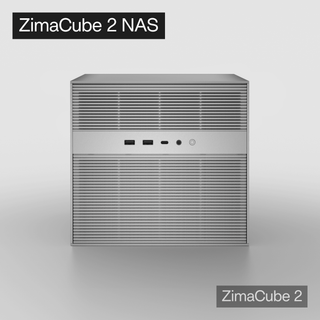
How should ZimaCube 2 be evaluated in this comparison?
ZimaCube 2 AI NAS should first be evaluated as a storage system: capacity, expansion, networking, application support, permissions, backup options, and recoverability.
Its AI NAS value then depends on whether its compute, memory, SSD options, containers, and expansion capabilities support the user’s intended workflow, such as media indexing, private document search, or self-hosted AI services.
For heavier local LLM or image-generation workloads, it can also remain the storage layer while a separate machine provides additional AI compute.
References

Recommended products
Tech & AI HUB
More to Read
What Causes an AI Agent Planner to Repeat Steps It Already Completed?
Trace repeated planner steps through state persistence, completion evidence, tool-result parsing, context retention, retries, replanning, and stop conditions.
What Causes Permission Errors Only Inside AI Agent Subprocesses?
Compare parent and child identity, filesystem view, environment, capabilities, security policy, and executable path to diagnose subprocess-only denial.
What Causes CPU Saturation When Hardware Transcoding and Video AI Run Together?
Trace CPU saturation across codec offload, pixel conversion, frame copies, AI preprocessing, audio, subtitles, storage, and process scheduling.


