
Does Dedicated Hardware Acceleration Give Jellyfin a Meaningful Advantage?


Dedicated media hardware gives Jellyfin a meaningful advantage when video transcoding is a recurring workload; for mostly Direct Play libraries, the advantage can be small.
First Gate: Does Your Workload Actually Transcode Video?
Direct Play sends the source to a compatible client without video re-encoding, so a dedicated GPU or media engine has almost nothing to accelerate in that path. Network and storage are usually more important.
When the client cannot handle the source codec, bitrate, subtitle path, or HDR format, the server may need video conversion. That is the workload where fixed-function decode and encode hardware can change the performance and power profile dramatically.
Jellyfin’s transcoding documentation makes this dependency explicit: client capabilities and constraints determine whether a conversion path is requested. Measure that frequency before treating hardware acceleration as mandatory.
Hardware Acceleration Wins When Video Encode and Decode Are the Bottleneck
Jellyfin can offload compatible video decoding, processing, and encoding to Intel, NVIDIA, AMD, Apple, or Rockchip media hardware. This reduces reliance on general-purpose CPU execution for the stages that the hardware and software stack support.
The official hardware acceleration guide notes that partial acceleration is possible because some pipeline stages may remain on CPU due to hardware, driver, or software limitations. The real comparison is therefore full path versus partial path, not simply GPU present versus GPU absent.
If CPU-only video conversion already misses real-time speed or consumes resources needed by other services, dedicated acceleration has high decision value. If the CPU is barely used because every client Direct Plays, it has low decision value.
HDR Tone Mapping and Subtitle Burn-In Make the Advantage More Workload-Specific
HDR-to-SDR tone mapping and subtitle burn-in can add processing stages beyond basic decode and encode. Support varies by GPU generation, operating system, codec, and subtitle path, so a nominally accelerated server can still show high CPU usage on difficult files.
Jellyfin documents hardware-accelerated tone mapping on supported platforms, but it also lists format and driver limitations. A buying decision should include your hardest representative file, not only a common H.264 SDR sample.
Run a controlled test with the client and media combination most likely to trigger conversion. If that stream stays real-time with comfortable headroom and leaves the CPU available for other services, the acceleration path is delivering a meaningful advantage for your workload.

Integrated Media Engines Often Beat a Discrete GPU on Simplicity and Idle Cost
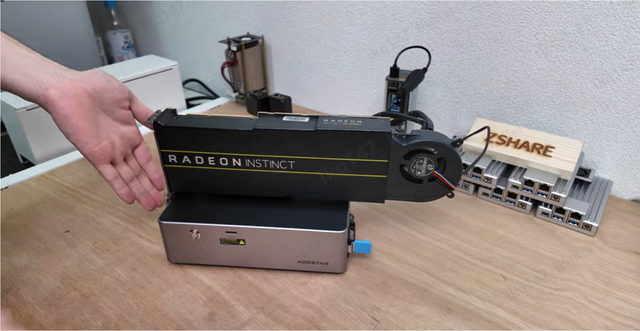
Dedicated hardware acceleration does not always mean a separate graphics card. Modern integrated graphics can expose fixed-function media engines that Jellyfin can use, avoiding the space, power, cooling, and driver complexity of an added discrete GPU.
Jellyfin’s hardware selection guide currently recommends several integrated platforms for new servers and emphasizes modern codec support. This is a strong third option between CPU-only processing and installing a large discrete card.
A discrete GPU becomes easier to justify when you need a codec capability, media-engine throughput, or another GPU workload that the integrated option cannot satisfy. If the iGPU passes your real transcode tests, the discrete card may be unnecessary overhead.
Software Support Can Flip the Winner
Hardware capability only matters when the host driver, kernel or operating system, container device mapping, permissions, and Jellyfin FFmpeg stack can use it. A theoretically strong GPU with a fragile software path can lose to a modest integrated engine that works reliably.
ZimaSpace’s hardware-accelerated streaming guide shows a practical GPU-backed deployment and the device-access steps that make acceleration usable in a real server.
The separate verification guide explains how to prove the active stream is actually using hardware rather than assuming the configuration succeeded.
Make the purchase conditional on a supported and maintainable path for your OS and container model. If you cannot verify that path, hardware acceleration should not be counted as a guaranteed benefit.
Conditional Verdict: Acceleration Wins for Conversion, Not for Every Jellyfin Server
Choose hardware acceleration when multiple clients regularly force video conversion, remote bandwidth requires lower-bitrate outputs, HDR-to-SDR conversion is common, or CPU-only transcoding interferes with other services.
Stay with Direct Play and existing hardware when representative clients already consume the library natively and CPU use remains low. In that case, money spent on network reliability, storage, backup, or a better client can produce a larger user-visible improvement.
Choose an integrated media engine before a discrete GPU when it meets the codec and throughput requirement. Move to a discrete option only when a measured workload crosses the integrated path’s boundary.

Recommended products

Product Comparisons
More to Read
More CPU Cores for Jellyfin: When Do They Actually Make It Faster?
More cores change Jellyfin only after a controlled lower-core candidate becomes CPU-bound and the same workload scales on the larger processor.
Direct Remote Exposure vs Private VPN Access for Jellyfin: Which Route Is Safer?
Use a private VPN for your own managed clients; use a hardened public HTTPS route only when client compatibility or sharing requires public reachability.
SATA SSD vs NVMe SSD for Jellyfin: Which Specification Changes Results?
For most Jellyfin servers, HDD-to-SSD is the big jump; NVMe beats SATA only when app-state or shared-host I/O actually reaches SATA's latency or queue...


