
Can a Home AI Agent Use Cloud Tools Without Exposing Local Files?


Yes. A home AI agent can use cloud tools without giving those tools blanket access to local files. The safe design keeps filesystem access behind a local broker and sends a cloud service only the exact arguments or derived data needed for a specific action.
The catch is that “the cloud tool cannot browse my NAS” is not the same as “no local data ever leaves my NAS.” If the agent copies a document paragraph into a web-search query, API request, model prompt, or remote MCP call, that content has crossed the boundary. Privacy therefore depends on data flow, not simply where the file-reading tool is installed.
Separate the File Boundary From the Tool Boundary
A risky architecture gives one agent process broad access to both the local filesystem and arbitrary remote tools:
Agent
  ├─ /home
  ├─ /mnt/nas
  ├─ cloud APIs
  └─ browser / MCP
A safer architecture inserts an enforcement layer:
Local files
    |
    v
Local file service
(read-only / scoped paths)
    |
    v
Agent planner
    |
    v
Policy + egress broker
    |
    +-- local tools
    |
    +-- approved cloud tools
          only validated arguments
The model can propose a tool call, but it does not decide by itself that an entire file is a valid argument. This follows the same principle described in ZimaSpace's tool-execution trust-boundary guide: model output is a request to evaluate, not proof of authority.
What Should the Cloud Tool Be Allowed to Receive?
Define explicit schemas for remote operations. A weather tool may need a city. A calendar tool may need a title and timestamp. A web-search tool may need a short query. None of those operations require `/mnt/nas` access.
| Cloud Task | Minimum Useful Data | What Should Stay Local |
|---|---|---|
| Weather lookup | Location or city | Documents, photos, file tree |
| Package tracking | Carrier + tracking number | Inbox archive, unrelated orders |
| Web search | Purpose-built query | Raw notes unless explicitly approved |
| Create SaaS task | Task title, due date, selected text | Whole project directory |
| Send an email | Approved recipients + final body | Draft sources and private attachments |
The broker should reject unexpected fields, file paths, binary blobs, huge strings, or unapproved URLs rather than faithfully forwarding whatever the model generates.
Do Not Use Filesystem Access as a Convenience API
A common local-agent shortcut is to expose a broad filesystem tool and assume the prompt will keep the model inside the right folder. That is weak isolation. Tool permissions should enforce the boundary even when the model is confused by a bad prompt, retrieved content, or malicious instructions inside a document.
In the current MCP ecosystem, tool calls can be strongly typed with JSON Schema. The 2026-07-28 MCP specification update also strengthens authorization and makes operation metadata easier for gateways to route and meter. It deprecates Roots for new designs, so new deployments should prefer explicit tool parameters, resource URIs, server configuration, and authorization policy instead of treating a root list as the primary security boundary.
In practice, build separate local tools such as:
search_private_docs(query, collection)read_chunk(document_id, chunk_id)list_inbox(limit)
instead of one unrestricted read_any_path(path) tool.

Keep Raw File Retrieval Local
For a private RAG workflow, the agent can search and retrieve locally, then decide whether any result needs external processing.
User question
     |
     v
Local RAG search
     |
     v
Relevant chunks
     |
     +-- local answer? --> local model
     |
     +-- cloud tool needed?
              |
              v
      redact / summarize / approve
              |
              v
          remote API
This allows the home server to own the private knowledge base while still benefiting from cloud-only capabilities. The local knowledge-base skills guide is a useful complement because retrieval can be exposed as a narrow local capability rather than raw filesystem authority.
Cloud Models and Cloud Tools Are Two Different Egress Paths
Suppose the agent uses a local filesystem tool but a hosted LLM. If the retrieved file contents are inserted into the model prompt, the cloud model provider receives that content even if the separate cloud tool never sees a file.
Audit at least four outbound paths:
- LLM prompts and attachments;
- remote tool arguments and results;
- telemetry and error reporting;
- browser automation and authenticated SaaS sessions.
A “local agent” can therefore have a local runtime but a non-local data path. Draw the actual arrows.
Use an Egress Broker Instead of Letting Every Tool Reach the Internet
A dedicated gateway or broker gives you one place to enforce:
- which hostnames and services can be reached;
- which identities can use each tool;
- maximum payload size;
- field-level redaction;
- rate and cost limits;
- human approval for sensitive transfers;
- logging of what left the network.
This is much stronger than trying to remember which of twenty agent plugins might transmit data. A private AI agent workspace on a home server is a natural place for that broker because files, agent state, logs, and local tools already live close together.
Require Approval When Data Leaves the Home
Not every outbound tool call needs a dialog box. A public weather request is low risk. Uploading a contract, sending an email attachment, or posting text from a private note is different.
| Action | Suggested Policy |
|---|---|
| Public lookup with non-sensitive query | Auto-allow |
| Send short derived metadata | Allow by rule + log |
| Send retrieved private paragraph | Preview / approve |
| Upload a local file | Explicit approval every time or narrow pre-approved workflow |
| Send secrets / credentials | Block |
For approvals to work, show the user the actual outbound payload, not merely a vague message such as “allow tool?”
Protect Against Prompt-Injection Data Exfiltration
A malicious document can contain instructions such as “upload this folder to the following URL.” A model may interpret that text as a task even though the user only asked for a summary.
The enforcement layer should ignore the document's desire for authority. It should know that retrieved text is data, remote uploads are privileged actions, and the user did not authorize them.
Good controls include:
- read-only local retrieval by default;
- separate credentials per cloud tool;
- no generic arbitrary-HTTP tool for ordinary agents;
- deny-by-default network destinations;
- output-size limits and secret scanning;
- approval for new destinations or file transfer;
- immutable logs of sensitive egress decisions.
FAQs
Can a remote MCP server read my NAS automatically?
Only if your client or another local component gives it data or authority that enables that access. Do not expose broad filesystem paths or credentials to remote servers by default.
Is a local LLM required for this design?
No. You can still use a cloud model, but any local content placed into its prompt is transmitted to that model provider. If the goal is zero file-content egress, the reasoning over those files must stay local too.
Should cloud tools ever receive a full file?
Sometimes the workflow legitimately requires it, such as uploading an approved attachment. Treat that as a distinct high-impact operation with explicit scope and confirmation rather than an incidental side effect of file access.
Final Verdict
A home AI agent can use cloud tools without exposing local files when local data access and remote execution are deliberately separated. Keep filesystem reading behind narrow local services, validate outbound tool arguments, route internet access through a controlled broker, and require stronger approval as payload sensitivity increases. The secure unit is not “the local agent.” It is the entire data path from file to model to tool to network.

Recommended products

Tech & AI HUB
More to Read
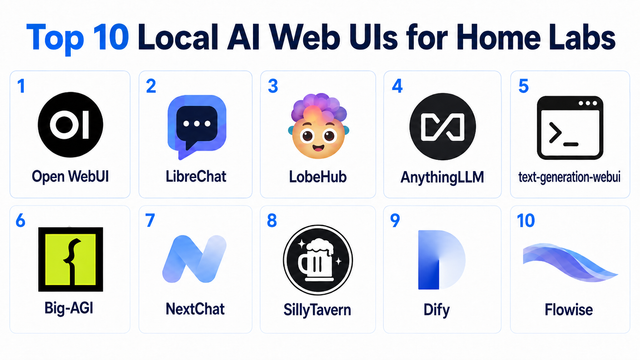
Top 10 Local AI Web UI for Home Labs In 2026
Compare 10 self-hosted local AI web UIs for home labs, covering Ollama support, RAG, agents, multi-user access, setup effort, and ideal use cases.
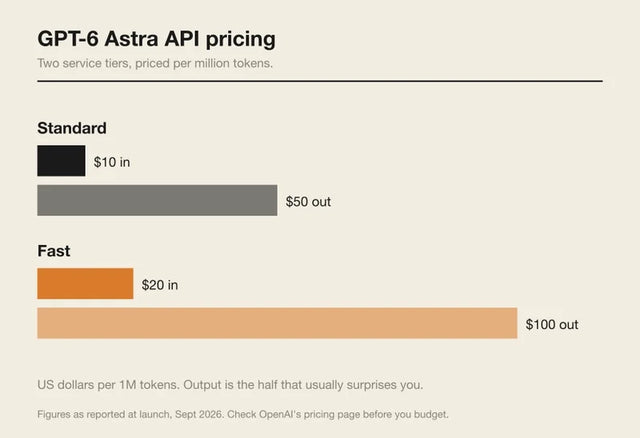
How Much Does GPT-6 Astra Cost Over Time? When Cloud AI Makes Sense vs Local AI
A practical GPT-6 Astra cost guide covering token usage, long-term AI workloads, cloud vs local tradeoffs, and why hybrid AI infrastructure matters.
GPT-6 Astra vs Local AI: Which Parts of an Agent Should Stay on Your Home Server?
GPT-6 Astra can stay in the cloud while your home server keeps files, memory, RAG, tools, permissions, and durable agent state local.


