
How ZimaCube 2 Turns a NAS Into an AI Beast


At ZimaSpace, we’re always exploring how modern hardware can push beyond traditional expectations. In this article, we take a closer look at what ZimaCube 2 can truly deliver, through a hands-on overview shared by the creator behind the Alpha Nerf Tech channel, who walks through its hardware design, ZimaOS experience, remote access capabilities, and real-world workflows.
We’d like to thank Alpha Nerf Tech for the detailed demonstration and practical insights. This piece is adapted from their video, “Zima Cube 2 Pro Creator Overview,” and restructured to show how ZimaCube 2 evolves beyond a traditional NAS into a flexible personal cloud and self-hosting platform.
Here's what you'll learn:
- Full hardware specs and what makes advanced configurations possible
- A hands-on tour of Zima OS and its App Store
- How remote access and backup work from anywhere in the world
Overview: What Is the ZimaCube 2?
ZimaCube 2 is built for more than storage. It combines NAS storage, personal cloud, self-hosting, and high-performance expansion in one compact system.
Unlike traditional NAS devices, it is designed as a modular platform—with support for dual PCIe slots for expansion, high-speed networking, and flexible storage configurations that adapt to different workloads.
Depending on how you configure it, ZimaCube 2 can scale from a reliable home server to a powerful creator workstation.
"This is just not a replacement as a basic NAS system. This is a self-hosting powerhouse." — Video Host
Spec Overview (Creator-Level Configuration Example)
The video showcases a high-performance configuration of ZimaCube 2, demonstrating what the platform is capable of at its upper limits:
| Specification | Detail |
|---|---|
| Processor | 12th Gen Intel i5, 10-core |
| Memory | 64 GB (dual 32 GB Crucial DDR4) |
| OS Storage | 1 TB NVMe SSD (Gen 4.0) |
| GPU | Nvidia RTX 2000 Ada, 16 GB VRAM |
| Networking | 10 GbE + dual 2.5 GbE (Intel) |
| HDD Bays | 6 × 3.5"/2.5" bays |
| M.2 Slots | 4 × NVMe SSD (plus OS drive = 5 total) |
| PCIe Expansion | Dual PCIe slots |
Hardware: Built to Scale With Your Needs
GPU & AI Capability (Optional Expansion)
Popping the top off the ZimaCube 2, the Creator configuration shown in the video includes an Nvidia RTX 2000 Ada GPU. With 16 GB of VRAM, it can run serious AI models locally—from LLMs via Ollama to image generation and inference workloads.
It’s important to note:
GPU is optional via PCIe expansion, not required for all users
This flexibility is what makes ZimaCube 2 suitable for both:
- Lightweight home server setups
- Advanced AI and creator workflows

Memory & Storage Architecture
ZimaCube 2 supports a hybrid storage strategy designed for real-world workflows:
- 6 HDD bays for bulk storage
- 4 M.2 NVMe slots for high-speed workloads
- Dedicated OS SSD
In the video setup:
- RAID 5 HDD array → data protection
- RAID 0 NVMe → high-speed editing
- Resilio Sync → automatic backup
This structure allows you to balance performance + redundancy, which is critical for creators and homelab users.
Expansion: Where ZimaCube 2 Stands Out
Here is where ZimaCube 2 truly differentiates itself.
Dual PCIe slots give you expansion options that go far beyond traditional NAS systems:
- Add GPU for AI workloads
- Add 10 GbE NIC
- Expand NVMe storage
- Connect external devices
This makes it a long-term platform—not a fixed-function device.
Zima OS: Simple, Yet Powerful
Zima OS transforms ZimaCube 2 into an accessible self-hosting platform.
Dashboard & Monitoring
A clean dashboard displays:
- CPU / RAM / GPU usage
- Storage status
- Network activity
This makes system monitoring intuitive—even for beginners.
Storage & User Management
- Multi-user access control
- SMB support for cross-platform use
- Clear storage pool management
Even complex setups like RAID + sync workflows are easy to manage.
App Ecosystem (387+ Apps)
The built-in App Store includes:
- Media: Plex, Jellyfin
- AI: Ollama, Open Web UI
- Backup: Resilio Sync, Nextcloud
- Remote: Tailscale
- Smart home: Home Assistant
"Zima's just super user-friendly, easy to use. Anyone can pick up on this." — Video Host

Remote Access: Your Server Anywhere
ZimaCube 2 is designed for true personal cloud access.
With the Zima Remote App, you can:
- Access files like a local drive
- Open your dashboard remotely
- Trigger backups instantly
Performance testing showed stable speeds suitable for serious remote workflows, even over long distances.
Zima OS vs. Unraid
Zima OS focuses on simplicity, while Unraid offers deeper control.
| Zima OS | Unraid |
|---|---|
| Beginner-friendly | More customizable |
| App Store-driven | Steeper learning curve |
| Faster setup |
For most users, Zima OS provides a faster path to a working system.
Why ZimaCube 2 Works for More Than NAS
ZimaCube 2 is designed as a multi-role system:
- Personal cloud
- Media server
- Self-hosting platform
- Expandable AI workstation
With:
- Upgraded Intel performance
- PCIe + Thunderbolt expansion
- Quiet, efficient cooling
- No OS lock-in
It adapts to your workflow instead of limiting it.
Ready to Build Your Personal Cloud?
ZimaCube 2 is far more than a NAS—it’s a flexible platform that grows with your needs, whether you're starting simple or building a high-performance setup.
Ready to build your personal cloud?
FAQ
Q1. Can the ZimaCube 2 run AI models locally?
Yes. With optional GPU expansion, it can run LLMs, image generation, and other AI workloads locally.
Q2. Do I need Zima OS Plus?
The free version is sufficient for most users. Zima OS Plus adds advanced features like expanded storage and cloud access.
Q3. Can I access it remotely without a VPN?
Yes. The Zima remote app enables direct remote access without complex setup.
Q4. What operating systems are supported?
ZimaCube 2 supports ZimaOS, TrueNAS, Unraid, Proxmox, Debian, pfSense, and more.
Q5. How scalable is storage?
Up to 6 HDDs + 4 NVMe SSDs, supporting large-capacity storage setups.

Recommended products
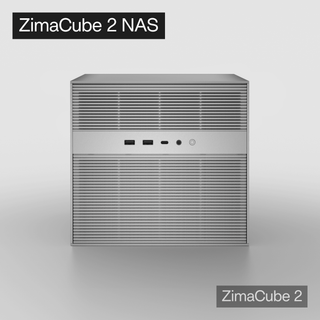
Zima Campaign Hub
More to Read
Self-Hosting Day 2026: Why September 25 Belongs to the Self-Hosting Community
Discover what Self-Hosting Day 2026 is, why September 25 matters, what people self-host, and how to share your own server story.
Cybersecurity Awareness Month 2026: How Secure Is Your Digital Life at Home?
Use Cybersecurity Awareness Month 2026 to audit five layers of your digital home: identity, devices, network, data, and recovery.
How SjslTech Builds an R36S Cloud Gaming Server With ZimaOS
SjslTech compares three ways to host an R36S game library over SMB: a Windows PC, ZimaOS running on ZimaBlade, and another R36S handheld. The...


