
Top 10 MCP Gateways and Proxies for Local AI in 2026


One MCP server is easy. Ten of them can turn every AI client into a mess of endpoints, tokens, tool schemas, transport quirks, and duplicated permissions.
An MCP gateway puts one control point in the middle. Your agents connect once; the gateway handles which servers they can reach, which tools they can see, how credentials are injected, and how every tool call is routed or audited.
What Is an MCP Gateway, and Why Does Local AI Need One?
Model Context Protocol gives AI clients a standard way to discover and call tools, resources, and prompts. The protocol does not require every deployment to have a gateway.
If you run one AI client and one or two MCP servers, direct connections are usually simpler:
AI Client
   |
   +---- Filesystem MCP
   |
   +---- GitHub MCP
The problem appears when both sides multiply.
Claude Code ----\
Codex -----------\
OpenClaw ---------> MCP Gateway
Cline ------------/      |
                     +----+-------+-------+
                     |            |       |
                  GitHub       Files    Database
                    MCP         MCP       MCP
Instead of configuring GitHub, filesystem, database, browser, automation, and internal MCP servers separately in every client, the gateway becomes the shared control layer.
This is especially useful for local AI agents. The model may run on your own hardware, but once it can call privileged tools, locality alone does not solve authentication, authorization, isolation, or audit.
The more important architectural question becomes:
Model intent
     |
     v
MCP Gateway
     |
Auth / Policy / Tool Filter
Credentials / Logs / Routing
     |
     v
Privileged tools
That gateway layer is closely related to the tool-execution trust boundary: a model can request an action, but a separate execution layer should decide whether that action is actually allowed.
How We Ranked the Best MCP Gateways and Proxies
This is not a GitHub-star leaderboard, and the ten projects do not all solve exactly the same problem.
Some are full MCP platforms. Others are security gateways, aggregators, agent gateways, or lightweight transport proxies. We ranked them around the things that matter most for local and self-hosted AI:
- Self-hostability: Can you run the gateway on infrastructure you control?
- MCP aggregation: Can multiple MCP servers appear behind one endpoint?
- Tool filtering: Can you limit which tools an agent actually sees?
- Authentication and authorization: Does it support client identity, OAuth, tokens, RBAC, ACLs, or policy engines?
- Credential handling: Can secrets be centralized instead of copied into every AI client?
- Transport support: Can it work across stdio, SSE, Streamable HTTP, or other deployment patterns?
- Isolation: Can MCP servers or tool execution be separated from the host?
- Observability: Are logs, traces, metrics, or audit records available?
- Deployment flexibility: Does it fit a laptop, home server, Docker host, VM, or Kubernetes cluster?
- Current direction: Is the project still relevant to the rapidly changing 2026 MCP stack?
The numerical order is editorial rather than a synthetic benchmark score.
Top 10 MCP Gateways and Proxies for Local AI at a Glance
| Rank | Gateway / Proxy | Best For | Self-Hosted | Aggregation | Security / Policy | Key Difference |
|---|---|---|---|---|---|---|
| 1 | Docker MCP Gateway | Docker-based local AI | Yes | Yes | Strong | Container isolation + lifecycle management |
| 2 | ToolHive | Managed self-hosted MCP platforms | Yes | Yes | Strong | Gateway + registry + runtime + portal |
| 3 | agentgateway | Unified agent infrastructure | Yes | Yes | Strong | MCP + LLM + A2A gateway |
| 4 | MCPJungle | Simple shared MCP endpoint | Yes | Yes | Moderate to strong | Clean local-to-team migration path |
| 5 | IBM ContextForge | Protocol and API federation | Yes | Yes | Strong | MCP + A2A + REST/gRPC federation |
| 6 | Microsoft MCP Gateway | Kubernetes MCP infrastructure | Yes | Yes | Strong | Session-aware routing + lifecycle management |
| 7 | OpenZiti MCP Gateway | Zero-trust remote MCP access | Yes | Yes | Strong | No public ports required |
| 8 | MetaMCP | Reducing tool-schema context | Yes | Yes | Focused | Collapses many MCP tools into four meta-tools |
| 9 | Kong AI Gateway | Existing enterprise gateway stacks | Yes, deployment-dependent | Yes | Strong | API + AI + MCP governance |
| 10 | Supergateway | MCP transport conversion | Yes | Limited | Basic | stdio ↔ Streamable HTTP / SSE / WebSocket |
1. Docker MCP Gateway — Best Overall for Docker-Based Local AI
Docker MCP Gateway is one of the most natural starting points for a local AI environment because MCP servers are ultimately programs that need somewhere safe and predictable to run.
Docker's gateway sits between AI clients and MCP servers, centralizing configuration, credentials, routing, authentication, and server lifecycle management.
The important feature for self-hosters is isolation. Instead of installing every MCP server and its dependencies directly on the host, Docker can run servers inside restricted containers with controls around privileges, network access, CPU resources, and secrets.
The gateway can also expose only selected tools instead of dumping every tool from every server into the client. Docker's MCP tooling includes profile and tool controls designed to reduce noise and unnecessary token use.
A client can connect to one gateway:
{
  "mcpServers": {
    "MCP_DOCKER": {
      "command": "docker",
      "args": ["mcp", "gateway", "run"]
    }
  }
}
while Docker handles the MCP server processes behind it.
This fits a home server particularly well:
Claude Code / Codex / Cline
            |
     Docker MCP Gateway
            |
    +-------+-------+
    |       |       |
 Filesystem GitHub  n8n
 Container  Server  Server
Best for: local AI users already running Docker who want one gateway plus isolated MCP server execution, secret handling, tool filtering, and centralized logs.
Trade-off: Docker now has several related MCP experiences, including MCP Toolkit, Gateway, Sandboxes, and newer governance features. Some Docker AI Governance functionality is separately gated, so verify which feature set your deployment actually includes rather than assuming every Docker MCP capability is available in every edition.
2. ToolHive — Best Full Self-Hosted MCP Management Platform
ToolHive goes well beyond a lightweight proxy.
Its architecture is split into several layers:
- Gateway: expose controlled MCP endpoints to clients;
- Registry: maintain a catalog of approved MCP servers and skills;
- Runtime: deploy and operate MCP servers;
- Portal: provide a management and discovery interface.
The gateway can aggregate multiple tools, integrate with OAuth/OIDC identity providers, apply access policies, filter tools and descriptions, and centralize auditing.
The runtime can launch MCP servers locally through Docker or Podman, while the Kubernetes Operator extends the same approach into larger clusters. OpenTelemetry and Prometheus support give it a much stronger operations story than a basic reverse proxy.
This makes ToolHive particularly interesting for teams. A developer no longer needs to find an arbitrary MCP repository, install it manually, paste credentials into a client config, and hope everyone else repeats the same setup correctly.
Instead:
Trusted Registry
      |
    Runtime
      |
 MCP Servers
      |
   Gateway
      |
+-----+------+------+
Claude     Codex   VS Code
Best for: teams that want MCP discovery, deployment, security, policy, observability, and gateway access to live in one self-hosted platform.
Trade-off: ToolHive is substantially more platform than a single-user setup needs. If you only want five servers behind one endpoint, MCPJungle is simpler.
3. agentgateway — Best for MCP, LLM, and Agent-to-Agent Traffic in One Layer
agentgateway is one of the most important projects to watch because it asks a larger question:
Why build one gateway for MCP, another for LLM APIs, and another for agent-to-agent traffic?
Its architecture combines three increasingly important traffic classes:
Agent
  |
  +--> LLM Gateway
  |
  +--> MCP Gateway
  |
  +--> A2A Gateway
For MCP, it supports tool federation along with stdio, HTTP, SSE, and Streamable HTTP transports. Authentication options include OAuth, JWT, and API keys, while fine-grained RBAC, rate limiting, TLS, and OpenTelemetry provide the governance layer.
It also has a direct local-AI angle: agentgateway can route inference toward self-hosted models and Kubernetes inference infrastructure instead of assuming every model call goes to a cloud provider.
The project is also actively adapting to newer MCP protocol generations, including the much larger 2026 protocol changes and the compatibility problem created when clients and servers update at different times.
Best for: advanced self-hosted AI infrastructure where agents need one connectivity layer for models, tools, and other agents.
Trade-off: if your only problem is consolidating a few local MCP servers, agentgateway can be more architecture than you need.
4. MCPJungle — Best Simple Self-Hosted Gateway for Multiple MCP Servers

MCPJungle is probably the easiest project on this list to explain:
register your MCP servers once, then let your AI clients connect to one endpoint.
GitHub MCP ------\
Postgres MCP -----\
Filesystem MCP ----> MCPJungle ----> /mcp
Browser MCP -------/                    |
n8n MCP ----------/          +----------+---------+
                              Claude   Cursor   Codex
The project supports remote and stdio MCP servers while providing unified discovery for tools, prompts, and resources.
Tool Groups allow a deployment to expose only a curated subset of available tools to a particular use case, rather than giving every client the entire tool catalog.
MCPJungle also has a useful progression from personal to shared infrastructure. You can begin with Docker Compose and a local endpoint, then move toward client identities, access tokens, explicit server allowlists, PostgreSQL, and OpenTelemetry as the deployment becomes more important.
That makes it particularly suitable for a home lab. You do not have to begin by installing Kubernetes or building an enterprise identity architecture.
Best for: developers and small teams who want one clean MCP endpoint without adopting a much larger AI infrastructure platform.
Trade-off: more advanced governance features are tied to its production/enterprise-oriented modes, and its security model is not as broad as ToolHive, agentgateway, or a mature API gateway.
5. IBM ContextForge — Best for Federating MCP With Existing APIs and Agents
IBM ContextForge becomes especially useful when your infrastructure is not neatly composed of MCP servers.
Real environments usually contain a mix:
MCP Server
REST API
gRPC Service
A2A Agent
Legacy Internal API
       |
       v
  ContextForge
       |
       v
   AI Clients
ContextForge acts as a registry, proxy, and federation layer across MCP, A2A, REST, and gRPC services.
Its current architecture includes tool gateway functions, API translation, agent routing, plugin extensibility, rate limiting, authentication, retries, and OpenTelemetry-based observability.
The project reached a 1.0 general-availability milestone in 2026 with additional security hardening, protocol work, catalog improvements, and production-focused deployment changes.
It can run through Python packaging or Docker and scale toward Kubernetes and multi-cluster deployments.
Best for: organizations or advanced home labs that need to expose existing REST/gRPC systems to agents without rewriting every service as a dedicated MCP server.
Trade-off: ContextForge is broader than an MCP-only gateway. That flexibility adds operational complexity compared with MCPJungle or Supergateway.
6. Microsoft MCP Gateway — Best for Stateful MCP Servers on Kubernetes
Microsoft MCP Gateway is most relevant when MCP servers themselves need to become managed infrastructure.
The project combines a data gateway with a control plane.
The data layer routes MCP traffic, while the management layer can represent servers as managed resources and handle deployment, update, and deletion operations.
Its standout feature is session-aware stateful routing.
Some MCP servers are not interchangeable stateless HTTP endpoints. A client session may need to continue reaching the same backend instance. Microsoft MCP Gateway can route requests sharing a session ID back to the same server instance while still allowing multiple instances behind the gateway.
Client Session A ----> Gateway ----> MCP Pod 1
Client Session A ----> Gateway ----> MCP Pod 1

Client Session B ----> Gateway ----> MCP Pod 2
The project also includes authorization, telemetry, access-control integration, and lifecycle management designed around Kubernetes environments.
Best for: teams already using Kubernetes and running stateful or dynamically managed MCP server fleets.
Trade-off: this is not the obvious choice for a single home server. Docker MCP Gateway or MCPJungle will normally be much easier to operate.
7. OpenZiti MCP Gateway — Best for Zero-Trust Remote Access to Private MCP Tools

OpenZiti MCP Gateway solves one of the most practical local-AI problems:
What happens when the agent and the MCP server are not on the same LAN?
A common private setup looks like this:
Laptop / AI Client
        |
      Internet
        |
 Home Server / NAS
        |
 Private MCP Tools
The conventional answer is often to expose an HTTPS endpoint, configure firewall rules, set up a VPN, or put another reverse proxy in front of the service.
OpenZiti takes a zero-trust overlay approach instead. Its MCP Gateway can expose internal tools as dark services that do not listen on public IP addresses and do not require traditional port forwarding.
Cryptographic identities, mTLS, per-client isolation, and tool-level controls form the access layer. The project can also aggregate multiple backends and bridge local stdio servers into remotely accessible MCP services.
That makes it particularly relevant to a private AI agent workspace where the agent runtime, files, and services live on an always-on home server but need to be accessed safely from another device.
Best for: users who want remote access to private MCP tools without directly exposing those tools to the public internet.
Trade-off: you are adopting the OpenZiti/zrok networking model as part of the solution. If a conventional private LAN or existing VPN already solves the connectivity problem, this may be unnecessary.
8. MetaMCP — Best for Reducing Tool-Schema Context Overhead
MetaMCP attacks a different MCP scaling problem.
Suppose an agent connects directly to:
Playwright MCP      52 tools
Database MCP        20 tools
GitHub MCP          30 tools
Filesystem MCP      15 tools
Monitoring MCP      18 tools
The model may need to receive a large collection of JSON tool schemas before it even begins doing useful work.
That consumes context and can make tool selection noisier.
MetaMCP puts those child servers behind a small stable interface. Its current design exposes four primary meta-tools for discovery, provisioning, calling, and multi-step execution instead of exposing every downstream tool schema directly.
The architecture becomes:
               +-- Playwright
               +-- GitHub
Local LLM --> MetaMCP -- Database
               +-- Files
               +-- More servers

Model sees: 4 meta-tools
This is especially interesting for local models. Frontier cloud models increasingly have large contexts and strong tool-selection behavior, but smaller self-hosted models can be more sensitive to prompt size and large tool catalogs.
MetaMCP's documentation shows how schema overhead can remain roughly constant as additional child MCP servers are added, rather than growing linearly with every downstream tool.
Best for: local AI deployments with many MCP servers where tool schemas are consuming too much context or confusing model tool selection.
Trade-off: abstraction changes how the model interacts with tools. You gain context efficiency but add another discovery and routing layer between the model and the real MCP tools.
9. Kong AI Gateway — Best When You Already Run an API Gateway
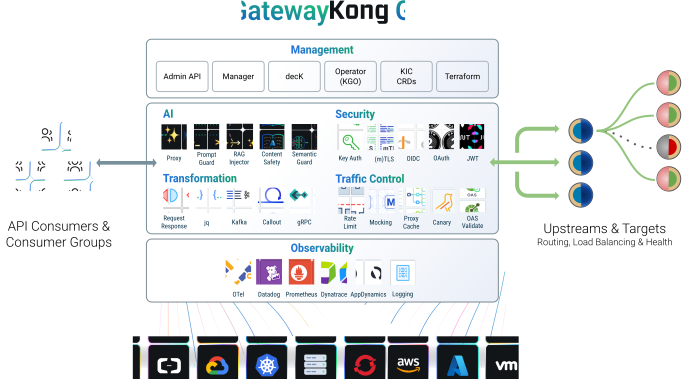
Kong AI Gateway is a different proposition from the home-lab-first projects above.
If your organization already uses Kong for APIs, authentication, routing, or service governance, adding MCP to the same control plane can be more attractive than deploying a completely separate MCP platform.
Kong's current AI Gateway architecture recognizes MCP and A2A alongside conventional model traffic. Its MCP server configuration supports aggregation and tool-level access control, while existing gateway capabilities can provide authentication, routing, metrics, and wider governance.
A useful pattern looks like this:
AI Clients
     |
Kong AI Gateway
     |
+----+-------+--------+
|            |        |
MCP A       MCP B    REST API
|            |
Tools       Tools
This becomes particularly valuable when the same platform already governs normal application APIs and AI model traffic.
Best for: teams already using Kong that want MCP governance to fit into an existing API and AI gateway strategy.
Trade-off: Kong's MCP feature availability varies by deployment and product configuration, and some newer secure-MCP recipes currently have Konnect-specific constraints. It is not the simplest choice for a small local Docker server.
10. Supergateway — Best Lightweight MCP Transport Bridge
Supergateway belongs on this list for a much narrower reason: transport compatibility.
A large amount of early MCP software was built around stdio. That is convenient when the MCP server runs as a child process on the same machine as the AI client.
It becomes awkward when the server should live on a NAS, VM, container host, or another machine on the network.
Supergateway can bridge between MCP transports such as:
stdio
  |
  +--> SSE
  |
  +--> WebSocket
  |
  +--> Streamable HTTP
and it can translate remote Streamable HTTP back into stdio for clients that still expect a local process.
For example, a local stdio filesystem server can be exposed as Streamable HTTP:
npx -y supergateway \
  --stdio "npx -y @modelcontextprotocol/server-filesystem ./data" \
  --outputTransport streamableHttp \
  --port 8000
It also supports headers, bearer authentication, health endpoints, stateful Streamable HTTP sessions, and several deployment options.
Best for: developers who already have working MCP servers but need to bridge transport differences between local and remote clients.
Trade-off: Supergateway is a transport proxy, not a full governance platform. It is not a replacement for ToolHive, Docker MCP Gateway, or agentgateway when you need centralized policy, identity, lifecycle management, and audit.
Which MCP Gateway Should You Choose?
| If You Need... | Start With | Why |
|---|---|---|
| Docker-based local MCP servers | Docker MCP Gateway | Container isolation, lifecycle, secrets, profiles, and tool filtering |
| A complete MCP management platform | ToolHive | Gateway, registry, runtime, policy, and portal in one stack |
| MCP + model + agent-to-agent routing | agentgateway | Unifies three agentic traffic layers |
| One simple self-hosted MCP endpoint | MCPJungle | Low-friction aggregation with a clean team upgrade path |
| REST, gRPC, MCP, and agents together | IBM ContextForge | Federates existing APIs instead of requiring MCP-only infrastructure |
| Kubernetes MCP fleets | Microsoft MCP Gateway | Session-aware routing and server lifecycle management |
| Remote private tools without open ports | OpenZiti MCP Gateway | Zero-trust overlay connectivity |
| Fewer tool schemas in model context | MetaMCP | Collapses large tool catalogs into meta-tools |
| MCP governance inside an existing API gateway | Kong AI Gateway | Uses established auth, ACL, routing, and gateway infrastructure |
| stdio / HTTP transport conversion | Supergateway | Simple transport bridge without a full platform |
Docker MCP Gateway vs ToolHive vs MCPJungle
These are three of the most relevant choices for a self-hosted environment, but they target different levels of complexity.
| Area | Docker MCP Gateway | ToolHive | MCPJungle |
|---|---|---|---|
| Primary idea | Run and govern containerized MCP servers | Operate an MCP platform | Put many MCP servers behind one endpoint |
| Home-lab fit | Excellent | Good | Excellent |
| Server isolation | Strong Docker integration | Docker / Podman / Kubernetes | Deployment dependent |
| Registry | Docker MCP ecosystem | First-class registry | Registered server catalog |
| Identity / policy | Strong controls | Strong, team-oriented | Client access control |
| Observability | Logging and tracing | OpenTelemetry / Prometheus | OpenTelemetry options |
| Best fit | Docker users | Teams / platform engineering | Personal server to small team |
Choose Docker MCP Gateway when Docker is already the foundation of your self-hosted AI stack and container isolation matters.
Choose ToolHive when several developers need a trusted MCP catalog, centralized deployment, identity integration, policy, and monitoring.
Choose MCPJungle when your main problem is simply that Claude, Codex, Cursor, and other clients should stop carrying duplicate MCP configurations.
MCP Gateway vs Proxy vs Aggregator vs Transport Bridge
The terminology around MCP infrastructure is still inconsistent, so product names alone can be misleading.
| Layer | Main Job | Example |
|---|---|---|
| Gateway | Central entry point with routing, identity, security, and governance | Docker MCP Gateway, ToolHive |
| Proxy | Forward MCP traffic while adding selected controls | Kong, lightweight security proxies |
| Aggregator | Combine multiple MCP servers behind one endpoint | MCPJungle |
| Meta-router | Hide large downstream tool catalogs behind a smaller interface | MetaMCP |
| Transport bridge | Convert stdio, SSE, Streamable HTTP, or other transports | Supergateway |
| Agent gateway | Govern MCP plus model and agent-to-agent traffic | agentgateway, ContextForge |
A project may perform several of these jobs at once. The useful question is not what the repository calls itself, but which control problem it actually solves.
How to Build a Local MCP Gateway Architecture
A practical local setup does not need to begin with a giant platform.
Start with four layers:
AI Clients
Claude Code / Codex / OpenClaw
             |
             v
        MCP Gateway
             |
    +--------+--------+
    |        |        |
 Files     GitHub   Automation
 MCP       MCP       MCP
    |
Local Storage / NAS
Keep the Gateway Close to the Tools
If most MCP servers access local files, Docker, Home Assistant, databases, Git repositories, or private APIs, the gateway usually belongs on the same trusted server network rather than on every developer laptop.
This mirrors the architecture in a private AI agent workspace: the client can move, but the private storage, runtime, logs, and automation services remain on an always-on host.
Separate Model Hosting From MCP Hosting
The MCP gateway does not have to run on the same machine as the LLM.
Agent Host             GPU Server
    |                       |
MCP Gateway              Ollama
    |                     vLLM
Local Tools
    |
Files / DB / APIs
This matters because MCP traffic is usually lightweight compared with inference. A modest always-on server can host gateway and tool services while a workstation or GPU node handles the model.
Use Curated Tool Sets Instead of Exposing Everything
A coding agent probably does not need smart-home controls. A research agent probably does not need Docker administration. A personal knowledge assistant should not automatically inherit production database access.
Build separate profiles or tool groups:
coding
  - github
  - filesystem-dev
  - docs

research
  - browser
  - papers
  - local-knowledge

home-ops
  - monitoring
  - home-assistant
  - docker-readonly
This fits naturally with local AI workflows: the MCP layer determines what capabilities exist, while skills and agent instructions determine how and when those capabilities should be used.
Why Tool Filtering Matters for Local Models
Security is only one reason to limit tools.
Context is another.
Every tool may contribute a name, description, arguments, JSON schema, and other metadata to the model's available tool surface.
With a handful of tools, this is trivial.
With hundreds, it can become part of the prompt budget:
5 MCP servers
x 20 tools
= 100 tool schemas

20 MCP servers
x 20 tools
= 400 tool schemas
That can reduce the context available for conversation, repository code, retrieved documents, reasoning, and output.
It can also make tool selection harder. If an agent sees several similarly named search, query, fetch, read, or execute tools, choosing the right one becomes another reasoning task.
There are three main solutions:
- Tool filtering: expose only the tools relevant to a specific agent.
- Tool groups or profiles: provide different catalogs to different clients.
- Meta-routing: expose a small discovery and call interface, then resolve downstream tools on demand.
Docker MCP Gateway and ToolHive emphasize filtering and curated exposure. MCPJungle provides Tool Groups. MetaMCP goes furthest by turning many child tools into a tiny stable meta-tool surface.
This matters even more when MCP connects to a local knowledge base, because tool schemas now compete with documents and retrieved context for the same model window.
MCP Gateway Security Checklist for Local AI
A gateway is not useful merely because all traffic passes through it. The value comes from what the gateway actually enforces.
Authenticate the Client
The gateway should know whether the caller is Codex on a developer machine, an always-on agent, a CI process, or another service.
Do not treat “inside my LAN” as identity.
Authorize Servers and Tools Separately
Access to the GitHub MCP server does not necessarily mean access to every GitHub tool.
A useful policy may allow:
read_issue
list_pull_requests
search_code
while denying:
merge_pull_request
delete_repository
change_branch_protection
Keep Credentials Out of Agent Config Files
One of the biggest benefits of a gateway is moving API keys and service credentials away from every individual AI client.
The ideal flow is:
Agent
  |
Tool request
  |
Gateway
  |
Inject scoped credential
  |
MCP Server
The model does not need to see the underlying token.
Isolate Untrusted MCP Servers
An MCP server is executable software.
If a server is installed from a third-party repository, treat it like any other software dependency. Review the package, pin versions when practical, restrict network and filesystem access, and use containers or other isolation where appropriate.
Log Tool Calls, Not Just HTTP Errors
When an agent changes a file or updates an external system, you need enough information to reconstruct:
- which client made the request;
- which tool was selected;
- which arguments were approved;
- what result was returned;
- whether the side effect actually completed.
This is why observability is a first-class ranking factor rather than an enterprise-only extra.
Remove Bypass Paths
A carefully configured MCP gateway does not define the real security boundary if the same agent also has:
- an unrestricted host shell;
- a writable Docker socket;
- administrator credentials;
- direct database root access;
- another unrestricted MCP connection.
The tool-execution trust boundary is only meaningful when privileged actions actually pass through it.
Do You Actually Need an MCP Gateway?
Probably not if your setup looks like this:
One AI client
   |
Two MCP servers
Adding a gateway would create another service to install, update, secure, monitor, and debug.
A gateway begins to make sense when several of these become true:
- you use multiple AI clients;
- you have several MCP servers;
- the same MCP servers are configured repeatedly;
- credentials are duplicated across client machines;
- different agents should see different tools;
- remote devices need access to private MCP services;
- you need audit logs;
- some MCP servers should run in isolation;
- tool schemas are consuming too much model context;
- you need to bridge stdio and network transports;
- the deployment is becoming shared infrastructure.
A useful rule is:
1 client + 2 servers
        ↓
Direct MCP is fine

Several clients + several servers
        ↓
Gateway starts to help

Teams + credentials + policies + audit
        ↓
Gateway becomes infrastructure
Where Soth MCP Proxy Fits
Soth MCP Proxy is also worth watching, especially if your priority is placing a security policy layer in front of an existing MCP deployment.
Its current design includes OPA/Rego policy enforcement, persistent audit logging, session controls, Prometheus metrics, health endpoints, and TLS.
That is a useful architecture:
Agent
  |
Soth Policy Proxy
  |
Existing MCP Server
We have not placed it in the primary Top 10 because it is still a much earlier project than most of the gateways above and several transport and administration capabilities remain part of its roadmap.
For now, treat it as a promising lightweight security proxy rather than a mature MCP management platform.
The 2026 Shift: MCP Gateway Is Becoming Agent Infrastructure
The earliest MCP question was:
How do I connect my AI assistant to this tool?
The newer question is:
How do I govern every tool used by every agent?
That changes the architecture.
2025

Agent
  |
MCP Server
  |
Tool


2026

Agents
  |
Agent / MCP Gateway
  |
Identity
Policy
Routing
Credentials
Tool Discovery
Observability
Protocol Translation
  |
Many MCP Servers
  |
APIs / Files / Databases / Services
This is why projects such as agentgateway and ContextForge are no longer stopping at MCP. They are expanding toward model routing and agent-to-agent protocols as well.
The gateway is becoming the connectivity and governance layer between probabilistic AI reasoning and the systems that can actually perform work.
For users already experimenting with AI CLI tools and coding agents, this is likely to become increasingly important. A coding agent with five tools is an application. Ten agents sharing fifty tools is infrastructure.
Final Verdict
Choose Docker MCP Gateway if your local AI stack already runs on Docker and you want a practical combination of MCP server lifecycle, container isolation, credentials, filtering, and centralized access.
Choose ToolHive if MCP is becoming shared team infrastructure and you need a registry, runtime, gateway, policy, and observability layer rather than a single proxy.
Choose agentgateway if you expect MCP traffic, model traffic, and agent-to-agent communication to converge behind one AI-native gateway.
Choose MCPJungle if you want the simplest path from scattered MCP client configs to one self-hosted endpoint.
Choose IBM ContextForge if your environment contains existing REST or gRPC APIs that should become usable alongside MCP and agent services.
Choose Microsoft MCP Gateway if your MCP server fleet already belongs in Kubernetes and needs session-aware routing and lifecycle control.
Choose OpenZiti MCP Gateway if agents need remote access to private MCP tools without exposing those services on public ports.
Choose MetaMCP if your bigger problem is not connectivity but the number of tool schemas consuming context and confusing local models.
Choose Kong AI Gateway when MCP should become another governed traffic class inside an existing Kong-based API and AI platform.
Choose Supergateway when you simply need a clean bridge between stdio and network MCP transports.
The best MCP gateway is therefore not necessarily the one with the longest feature list. It is the smallest control layer that solves the problem your agent stack has actually reached.
FAQ
What is an MCP gateway?
An MCP gateway sits between AI clients and MCP servers. It can aggregate multiple servers behind one endpoint and add capabilities such as routing, authentication, access control, credential handling, tool filtering, logging, observability, isolation, or transport conversion.
Do I need an MCP gateway for local AI?
Not always. A single AI client connected to one or two MCP servers usually works well without a gateway. Gateways become more useful when multiple clients share multiple MCP servers, credentials, policies, remote access, or audit requirements.
What is the best MCP gateway for a home server?
Docker MCP Gateway and MCPJungle are two of the strongest starting points. Docker MCP Gateway fits users already running Docker and provides container isolation and lifecycle management. MCPJungle is attractive when the primary goal is putting multiple MCP servers behind one clean endpoint.
What is the difference between an MCP gateway and an MCP proxy?
A proxy primarily forwards traffic and may add selected controls. A gateway usually acts as a broader control plane with routing, identity, policy, aggregation, credential handling, discovery, observability, or lifecycle management. In practice, projects often use the terms interchangeably.
Can one MCP gateway connect multiple AI clients?
Yes. One of the main advantages of a gateway is letting Claude, Codex, Cursor, Cline, OpenClaw, or custom agents reuse a shared MCP infrastructure instead of configuring every MCP server separately in every client.
Can an MCP gateway reduce token usage?
Yes, if it filters or abstracts tool schemas before they reach the model. Docker MCP Gateway and ToolHive can expose curated tool sets, MCPJungle supports Tool Groups, and MetaMCP reduces a large downstream tool catalog to a small set of meta-tools.
What is the best MCP gateway for local models?
For general local AI, Docker MCP Gateway and MCPJungle are practical options. MetaMCP is especially interesting when smaller local models struggle with large tool catalogs, while agentgateway is relevant when self-hosted inference routing and MCP governance need to live in the same infrastructure layer.
Can I expose a stdio MCP server over HTTP?
Yes. Supergateway can convert stdio MCP servers to Streamable HTTP, SSE, or WebSocket transports. Other gateways can also bridge or proxy local stdio servers into network-accessible MCP endpoints.
How do I securely access an MCP server outside my home network?
Use an authenticated private network or a gateway designed for remote access instead of simply forwarding a public port. OpenZiti MCP Gateway is specifically designed to make private MCP services remotely accessible through a zero-trust overlay without directly exposing the server on a public IP.
Is an MCP gateway a security boundary?
It can be part of one, but only if privileged tool access actually passes through it. If the same AI agent also has unrestricted shell access, administrator credentials, a writable Docker socket, or direct connections that bypass the gateway, the gateway does not define the true execution boundary.
Should MCP servers run in Docker?
Containers are useful for isolating MCP server dependencies, filesystem access, network access, and resource usage. Docker MCP Gateway and ToolHive both make containerized MCP operation a central part of their approach, but containers do not replace authentication, authorization, tool filtering, or audit.
What is the difference between MetaMCP and a normal MCP gateway?
A conventional gateway typically aggregates and governs MCP servers while exposing their tools. MetaMCP goes further by hiding large downstream tool catalogs behind a very small set of meta-tools, reducing schema overhead in the model context.

Recommended products

Tech & AI HUB
More to Read
Home NVR Storage in 2027: Why Event Embeddings Will Change Video Retention
A mechanism-first explanation of home nvr storage, its shared-resource tradeoffs, three query-fanout FAQs, and a practical verification protocol.

Self-Hosted AI Authentication in 2027: Why Workload Identity Will Replace Shared Keys
A mechanism-first explanation of self-hosted ai authentication, its shared-resource tradeoffs, three query-fanout FAQs, and a practical verification protocol.

Local Model Delivery in 2027: Why Content-Addressed Distribution Will Matter
A mechanism-first explanation of local model delivery, its shared-resource tradeoffs, three query-fanout FAQs, and a practical verification protocol.


