
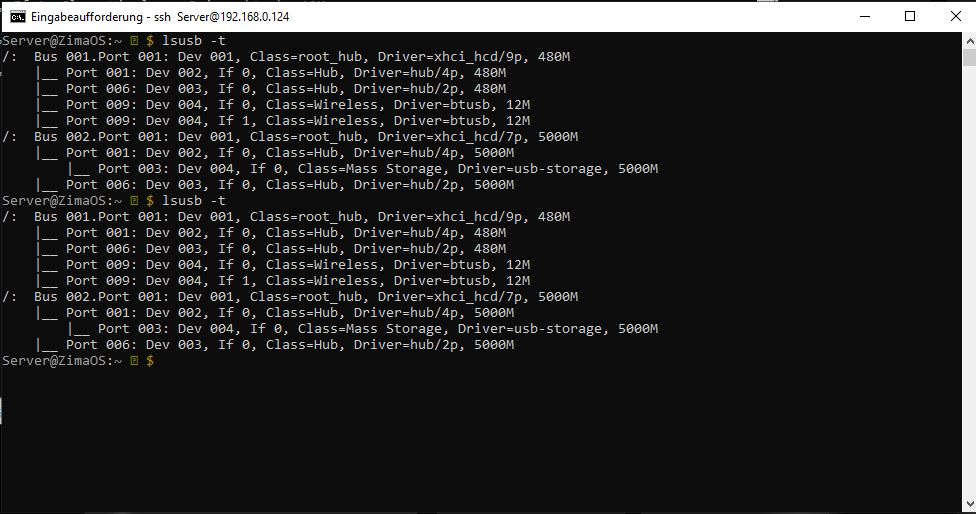
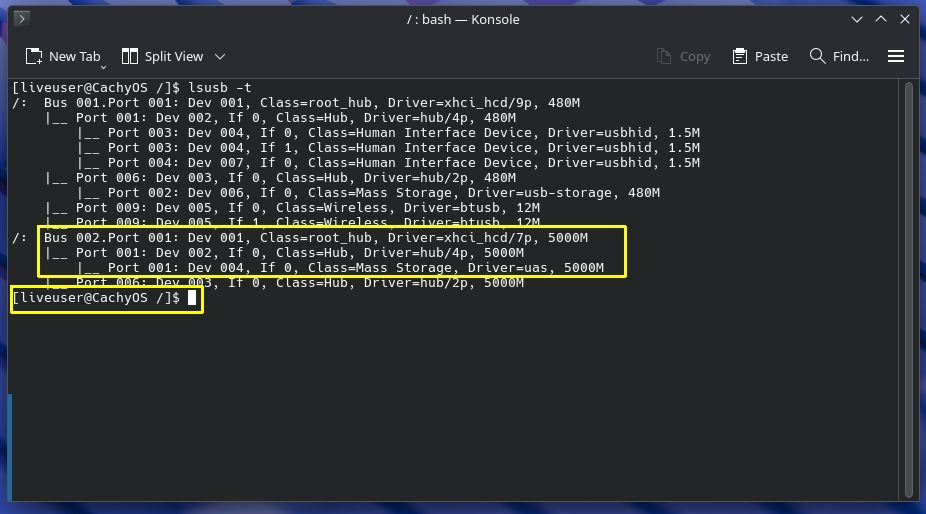
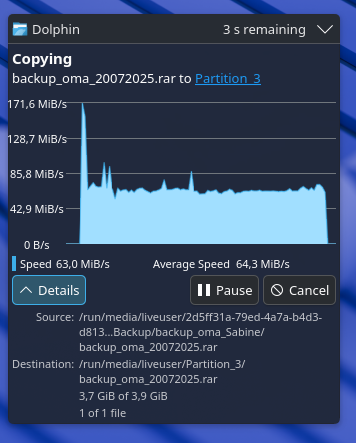
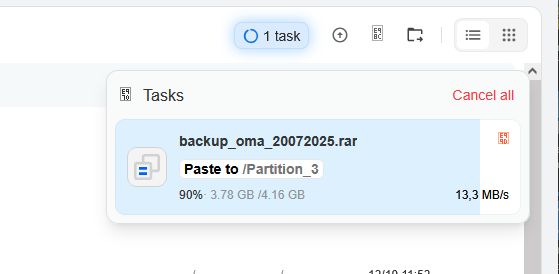
The old USB performance report was not a simple “USB2 link” problem: ZimaOS negotiated 5Gbps, but the JMicron JMS566 enclosure used the legacy usb-storage driver while CachyOS used uas. That driver difference is a much stronger explanation for the 13MB/s vs ~64MB/s gap than the physical USB link speed alone.
The thread stopped before IceWhale posted a fix, so current users should retest on ZimaOS 1.7.1 before assuming the same bridge/driver behavior remains. Preserve the exact controller, filesystem, and driver evidence when comparing systems.
Check the USB Link and Driver Separately
lsusb -tLook for both the negotiated speed, such as 5000M, and the driver. USB3 speed with usb-storage is different from a USB2 connection, even if throughput is still disappointing.
Why UAS Can Matter
UAS supports more efficient command queuing and SCSI semantics than the older bulk-only USB storage driver. On the source hardware, CachyOS used uas while ZimaOS used usb-storage.
Check the Bridge Chip
The enclosure used a JMicron JMS566 bridge. USB storage quirks are often applied per bridge chipset because some devices behave badly with UAS. Do not force UAS without understanding why the kernel selected or blacklisted a driver.
NTFS Adds Another Performance Variable
The source disk was NTFS. Compare the same drive and enclosure with another filesystem only if you can do so without destroying important data. Filesystem overhead can compound a USB transport bottleneck.
Benchmark Outside the Files UI
Use a large sequential file and measure from the shell so browser/front-end overhead is removed. Also compare read and write separately.
Retest on Current ZimaOS
Current ZimaOS uses a newer kernel and storage stack than the 1.4.2/1.4.4 beta builds in the source thread. The current ZimaOS storage guide says USB drives are normal supported storage devices.
Do Not Force UAS Blindly
If the kernel intentionally falls back to usb-storage for a bridge quirk, forcing UAS can cause resets or corruption. First compare current ZimaOS behavior, kernel logs, and the same enclosure on another Linux system.
The NAS performance checklist provides a broader speed diagnostic.
Check Kernel Logs for UAS Quirks or Resets
dmesg | grep -Ei 'usb|uas|jms|reset|xhci' | tail -150Look for repeated resets, UAS fallback, device quirks, or transport errors. A stable 5Gbps link can still perform poorly if the bridge repeatedly retries commands.
Use the Same File for Cross-OS Testing
Compare ZimaOS and another Linux distribution with the same enclosure, cable, disk, filesystem, and multi-gigabyte test file. Changing several variables at once makes the driver comparison much weaker.
Try Another Enclosure Before Replacing the Host
If a second UAS-capable enclosure performs normally on the same ZimaOS machine, the JMS566 bridge/quirk path becomes a stronger suspect than the Wyse USB controller itself.
FAQ
Does 5000M mean the disk should reach 500MB/s?
No. It is the USB link rate, not the HDD's real transfer speed.
Why was CachyOS faster on the same hardware?
The screenshots show CachyOS using UAS while ZimaOS used legacy usb-storage, plus the same NTFS disk.
Should I change from NTFS?
Only after testing and backing up. The driver difference is already a major clue.
Should I force the UAS driver?
Not without checking kernel quirks and stability for that bridge chipset.


