


ZimaCube 2 Review: Storage, Thunderbolt and Jellyfin Tests


Thank you to Elevated Systems for testing ZimaCube 2 beyond the specification sheet. His June 5, 2026 review follows the Standard edition from unboxing through RAID expansion, network transfers, Thunderbolt networking, and Jellyfin transcoding. The result is a useful mixture of capable hardware, measurable connection limits, and software experiences that deserve attention before purchase.
This article follows that review and its test conditions; the measurements belong to Elevated Systems. The sample uses an Intel Core i3-1215U, 8GB of RAM, and a 256GB system SSD. Its storage and PCIe arrangement differs from the Pro and Creator Pack, so the results should not be applied to every ZimaCube 2 configuration.
Watch the original review: Elevated Systems's ZimaCube 2 Review: Storage, Thunderbolt and Jellyfin Tests.
Unboxing: a serviceable enclosure with some rough edges
The box includes a 240W external power supply, Ethernet cable, mounting hardware, tools, and small heatsinks for the NVMe drives. The cube combines a metal enclosure and internal frame with plastic front and rear pieces. Access to drives and expansion hardware is part of its appeal: this is a system intended to change as the owner adds storage or services.
Elevated Systems also documents problems with his particular sample. The outer packaging arrives damaged, some small heatsinks are loose, and the plastic front cover has a crack. He finds the magnetic cover and its removal less convincing than the main enclosure. These observations do not establish a failure rate, but they belong in a review alongside the attractive drive layout. Inspect the cover, trays, accessories, and connectors before beginning a long storage migration.

The six SATA bays accept the bulk-storage side of the build. The reviewer finds the trays relatively flexible, particularly when mounting smaller SSDs. That does not make them unusable; it means drive installation deserves care. The separate system SSD also matters: operating-system storage and the data pools can be planned independently instead of consuming a front SATA bay just to boot the machine.
Understand the Standard edition's storage paths
The i3-1215U provides six cores and eight threads. The review unit has one 8GB memory module with the second slot available, leaving room for a later memory upgrade. CPU capability, memory capacity, and storage bandwidth are separate buying decisions. More RAM can support additional services, but it does not turn a narrow PCIe connection into a wider one.
The four-drive NVMe carriage is especially important. On the Standard hardware described in this review, its individual drive connections are PCIe Gen 3 x1 behind a switch, with a shared path described at approximately 800MB/s. Four fast SSDs therefore do not automatically provide four independent desktop-class x4 connections. The motherboard M.2 paths and add-in slots have their own lane assignments as well. The reviewer distinguishes a physically x16 slot operating at Gen 4 x4 from a physically x8 slot operating at Gen 3 x2.

That distinction changes the recommendation. A home server holding documents, photos, and media can benefit from the flexible layout without needing maximum NVMe throughput. A workstation owner expecting several SSDs to sustain their individual advertised speeds should examine the exact edition and lane allocation first. The current ZimaCube 2 configuration page is the place to compare the offered configurations against this Standard-edition test.
Build the pool, then restrict the shares
The initial HDD pool uses four 4TB WD Red Plus drives in RAID 5, giving roughly 12TB of nominal usable capacity before formatting and capacity-reporting differences. Initial array preparation takes about 18 hours. Adding another two 4TB drives expands the six-drive arrangement to roughly 20TB nominal usable capacity, with the expansion and rebuild taking around 16 hours in this setup.
The added drives are recognized without a reboot. That is a useful demonstration of the expansion workflow, although the long rebuild is just as relevant as successful detection. Schedule maintenance, keep the machine powered reliably, and verify an independent backup before changing an array. RAID 5 provides a degree of drive-failure tolerance; it cannot recover a file deleted from every synchronized copy.
After creating storage, the reviewer examines account access. His administrator connection can reach more than the intended shared data, including system storage. He demonstrates using a dedicated account with narrower folder permissions. A convenient first connection should therefore be followed by an explicit check of what a normal user can read and write.

The practical order is to create the pool, organize the data folders, assign a restricted sharing account, and test that account from another computer. Keep application data, shared files, and the system drive distinct in your plan. Our Smart Life private-cloud walkthrough explores the same progression from connected storage to a backup routine, using a smaller ZimaBoard 2 build.
App installation and backup need a verification step
The June review does not present every app as a successful one-click installation. An Immich deployment fails to open, and several app-store attempts need troubleshooting. Elevated Systems eventually runs services including Syncthing and Jellyfin, but the distinction between an installed tile and a working service remains important. These are observations from his tested software build, rather than a claim that every current installation has the same problem.

For each essential service, verify that its interface opens, its persistent folders are on the intended pool, and it continues to work after a restart. For a photo library, add a small test collection before importing everything. For synchronization, check how deletion propagates. For backup, restore a deliberately changed test file and confirm which historical version is available.
The reviewer questions how clearly the tested backup interface communicates retention and deletion behavior. Current features can evolve, so use the official ZimaOS 3-2-1 backup instructions when planning a present-day installation. A second folder or pool inside the same enclosure remains exposed to loss of the whole machine.
Performance: compare workloads and connections separately
Over 2.5GbE, the short Blackmagic sequential tests reach approximately 261MB/s for both reads and writes with either storage pool. The mixed-file workload is more revealing: the same 25.88GB dataset produces different results from a simple sequential benchmark. The following figures are the reviewer's reported transfer rates, rounded as presented.
| Connection and workload | HDD pool write / read | NVMe pool write / read |
|---|---|---|
| 2.5GbE, mixed-file dataset | 110 / 210MB/s | 151 / 217MB/s |
| Direct Thunderbolt network, mixed-file dataset | 170 / 340MB/s | 287 / 862MB/s |
The Thunderbolt test connects to a Mac Studio using a network link and a network share. It is not simply mounting the RAID as a USB-style external block device. The host needs the appropriate network path and share connection. ZimaSpace's Thunderbolt direct-connection instructions explain that workflow; check the ports and support of your exact hardware generation and edition.

Short 1GB Blackmagic tests show much higher read figures, including roughly 1.7–1.9GB/s over the direct connection. The reviewer himself questions the contribution of caching because those readings exceed the stated shared NVMe-path figure. They should not be advertised as a sustained raw-SSD ceiling. Dataset size, cache state, file count, source storage, and the client all affect an observed copy.
These results also do not constitute a 10GbE test. A faster Ethernet upgrade is a separate configuration with its own adapter, lane allocation, switch, and client requirements. For a household already on 2.5GbE, replacing HDDs with SSDs will not remove the network ceiling from a large sequential transfer.
Jellyfin, power, temperatures, and noise
Jellyfin exposes a different bottleneck. Software transcoding of the selected 10-bit HEVC 4K material pushes CPU use close to 100% and produces occasional dropped frames. Enabling Intel Quick Sync improves the demonstrated playback. The reviewer also runs three selected files simultaneously—10-bit HEVC 4K, H.264, and MPEG-4—with CPU utilization staying below about 80% in that test.
This is evidence for those files and settings, rather than a universal stream-count guarantee. Codec profile, subtitles, tone mapping, output quality, and client support can change the load. Follow Jellyfin's hardware-acceleration documentation and verify that the actual transcode uses the GPU.
Under sustained CPU work, the review reports an approximately 24–25W CPU power limit, clocks around 2.4–2.7GHz, and a peak CPU temperature near 85°C. Drive temperatures remain below 50°C during the observed access, array-build, and rebuild operations. The stated sub-15W idle and roughly 30W peak base-system power figures exclude the added storage load; they should not be used to budget a populated six-HDD system.
The reviewer describes the system as quiet in his room, but the reported noise readings and ambient conditions do not establish a controlled acoustic comparison. Drive model, seeking activity, room placement, and measurement distance matter. Treat the listening impression as part of his experience, rather than a guaranteed decibel figure for every installation.
FAQ
Which ZimaCube 2 edition was tested?
The Standard edition with an i3-1215U, 8GB of RAM, and a 256GB boot SSD. HDD and NVMe data pools were added for the review.
Does Thunderbolt make this a conventional external drive?
The demonstrated connection is Thunderbolt networking with file sharing. Its addressing and share access differ from attaching a USB disk.
Will four NVMe drives each run at full x4 speed?
That is not the Standard arrangement described here. The carriage uses narrower individual connections and a shared upstream path, so inspect the exact edition's topology.
Is RAID 5 enough protection for the only copy of my files?
No. Maintain a separate backup and test a restore before expanding or rebuilding the array.
How does this compare with the Creator Pack experience?
Our IT-Connect Creator Pack review focuses on applications, virtual machines, and custom containers on a different hardware configuration.
Conclusion
Elevated Systems finds a flexible Standard-edition NAS with useful drive expansion, effective hardware-assisted media playback, and a faster direct-network option for a nearby workstation. His review also makes the compromises visible: shared storage bandwidth, imperfect sample finish, and app and backup workflows that require validation. Choose it around the storage path and services you will actually use, then confirm permissions, recovery, and performance with your own workload before moving the only copy of important data.

Recommended products
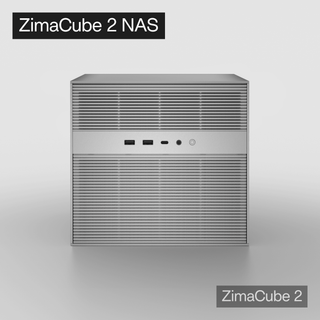
Zima Campaign Hub
More to Read
A First ZimaBlade 7700 NAS: Two 8 TB Drives and Learning CasaOS
A first ZimaBlade 7700 build pairs two 8 TB drives with CasaOS, raising practical questions about temperatures, shutdown and a recoverable backup workflow.
A Lenovo M80q ZimaOS Server for a Child’s Minecraft World
A reused Lenovo M80q runs ZimaOS and a child’s Minecraft server beside a 16 TB disk. Original photos show the hardware, dashboard and storage...
A P360 Ultra Homelab with ZimaOS Storage and Cockpit-Managed VMs
A P360 Ultra combines Ubuntu, Cockpit-managed VMs, ZimaOS storage and remote access, with a mirrored enclosure and a clear inventory of separate roles.


