
10 Best NAS Operating Systems for Beginners in 2026


Your first NAS should not require a weekend course in ZFS, Docker networking, RAID math, and Linux permissions. A good beginner NAS operating system should get storage online quickly, make common mistakes harder to make, and still leave room to grow later.
That is why the easiest NAS OS is not always the most powerful one. Synology DSM wins on complete appliance simplicity, ZimaOS stands out for first-time DIY builders, while Unraid, OpenMediaVault, and TrueNAS become stronger as you want more control.
What Makes a NAS Operating System Beginner-Friendly?
For this ranking, “beginner-friendly” does not mean “has the fewest settings.” A good beginner NAS should simplify the decisions that matter early while still exposing enough information to help users understand what they are building.
We focused on seven practical areas:
- Initial setup: how quickly a new user can install or initialize the system and reach the management interface;
- Storage setup: how clearly the OS explains disks, redundancy, pools, and usable capacity;
- File sharing: how much work is required before Windows, macOS, phones, and other devices can reach the storage;
- App installation: whether Plex, Jellyfin, Immich, Home Assistant, backup tools, and other applications require manual container work;
- Remote access: whether accessing the NAS away from home requires networking knowledge;
- Day-to-day maintenance: how updates, disk health, notifications, users, and applications are managed;
- Room to grow: whether the OS still makes sense after the user learns Docker, VMs, snapshots, faster networking, or more advanced storage.
We did not rank these systems by the number of enterprise features, filesystem options, or storage controls they expose.
Disclosure: ZimaOS is developed by ZimaSpace, the publisher of this article. It therefore does not receive an automatic top ranking. Every operating system below is evaluated against the same beginner-focused criteria, which is why Synology DSM takes the overall #1 position while ZimaOS ranks #1 specifically for first-time DIY NAS builders.
10 Best NAS Operating Systems for Beginners at a Glance
| Rank | NAS OS | Best For | DIY Hardware | Learning Curve | Main Strength |
|---|---|---|---|---|---|
| 1 | Synology DSM | Complete beginners buying a NAS appliance | No | Very Low | Hardware and software designed together |
| 2 | ZimaOS | First-time DIY NAS builders | Yes | Very Low | Appliance-like UX on user-controlled hardware |
| 3 | Unraid | Beginners who want room to grow | Yes | Low to Medium | Mixed drives, apps, Docker, and VMs |
| 4 | OpenMediaVault | Free NAS on old PCs and small servers | Yes | Low to Medium | Free, lightweight, Debian-based |
| 5 | TrueNAS Community Edition | Beginners who want to learn ZFS | Yes | Medium | Deep storage and data-protection features |
| 6 | HexOS | Users who want TrueNAS with more guidance | Yes | Low | Guided storage and app experience |
| 7 | QNAP QTS | Beginners buying a QNAP appliance | No | Low | Large app ecosystem and traditional NAS workflow |
| 8 | Rockstor | DIY users interested in Btrfs | Yes | Medium | Btrfs-focused storage appliance |
| 9 | XigmaNAS | Traditional FreeBSD NAS users | Yes | Medium to High | Lightweight, mature network-storage features |
| 10 | CasaOS | Simple home-server apps and light file storage | Yes | Very Low | Friendly app-first personal cloud interface |
1. Synology DSM — Best Overall NAS OS for Complete Beginners
Synology DiskStation Manager, or DSM, remains the easiest overall NAS operating system to recommend to someone who wants to buy a complete NAS rather than build one.
The biggest advantage is not one individual software feature. It is that Synology controls the hardware, firmware, storage workflow, mobile apps, package ecosystem, and support documentation together.
That removes a large category of first-NAS problems before they happen. You do not need to ask whether a particular SATA controller works with the OS, whether the network card has a driver, or whether the motherboard will boot the installer.
Synology's current DSM 7.4 environment also makes onboarding particularly forgiving. DS finder can locate supported NAS devices on the local network, install DSM, help initialize storage, and uses Synology Hybrid RAID as a default option on supported systems to simplify initial disk allocation.
Remote access is similarly approachable. QuickConnect allows supported Synology applications to connect over the internet without requiring a beginner to configure traditional port forwarding.
The Package Center and DSM package ecosystem then cover the jobs most first-time buyers actually care about: file sync, photos, media, backup, surveillance, productivity, containers, and other NAS applications.
Best for: someone who wants to buy a NAS, install drives, follow a wizard, and spend as little time as possible thinking about the operating system itself.
Trade-off: much of DSM's simplicity comes from the appliance model. Official DSM is designed around Synology hardware, so it is not the answer if your goal is turning an old PC, custom mini-ITX build, or spare x86 server into a NAS.
2. ZimaOS — Best NAS OS for First-Time DIY Builders

If DSM is the easiest route when you are buying the hardware and software together, ZimaOS is one of the strongest options when you want a similarly approachable experience on hardware you control.
That distinction is why it ranks #2 overall but #1 for first-time DIY NAS users.
ZimaOS can be installed on compatible x86 hardware, and the post-install experience tries to remove several traditional NAS setup chores. ZimaClient automatically discovers a ZimaOS device on the local network, shared storage is available over SMB, and the same client establishes encrypted peer-to-peer remote access without requiring manual router configuration or port forwarding.
The storage workflow is intentionally scenario-driven. The current ZimaOS Storage Setup guide begins from common use cases and explicitly tells new users that they do not need to understand RAID beforehand.
For example, a family archive can begin with RAID 1 on two matching disks, while larger multi-disk storage can move toward RAID 5. Disk health and array status remain visible in the UI, and a failed member moves the array into a degraded state with a guided rebuild path.
Applications are another reason the OS works well for beginners. The ZimaOS App Store provides straightforward installation paths for tools such as Jellyfin, Plex, Immich, AI applications, and other self-hosted services. More advanced users can later import Docker Compose YAML and manage multi-container workloads without leaving the platform.
The progression therefore looks more like:
Install ZimaOS
      |
Open ZimaClient
      |
Device discovered
      |
Configure storage
      |
Files available
      |
Install apps
rather than asking a new NAS owner to learn every underlying storage and networking concept before the server becomes useful.
Best for: beginners who want to build or reuse their own x86 NAS hardware but prefer an appliance-like setup experience.
Trade-off: simplicity is not always an advantage. TrueNAS exposes much deeper ZFS administration, while Unraid has a long-established enthusiast ecosystem and a particularly flexible mixed-drive storage model. Users who already understand those systems may prefer having more storage decisions exposed directly.
If mismatched drives are already part of your build, our CasaOS vs ZimaOS vs Unraid mixed-drive comparison goes deeper into how the storage models differ.
3. Unraid — Best Beginner NAS OS You Can Grow Into

Unraid occupies an unusually strong middle ground between beginner NAS and enthusiast home server.
The recommended installation path uses the Unraid USB Creator, followed by browser-based onboarding. Once the base server is working, the official getting-started path points users toward Community Apps, Unraid Connect, and virtual machines.
Its biggest storage advantage is flexibility with mismatched drives. Unraid's array architecture is particularly attractive to beginners who already own disks of different capacities and expect to add another drive later rather than purchasing an identical matched set upfront.
The application ecosystem is another major strength. Community Apps makes installing Plex, Home Assistant, Pi-hole, AdGuard, backup software, and many other containers considerably less intimidating than writing Docker configurations manually.
And unlike a NAS OS that a beginner may eventually outgrow, Unraid can continue into:
- multiple storage pools;
- Docker applications;
- virtual machines;
- GPU passthrough;
- home automation;
- media servers;
- developer and homelab workloads.
Best for: someone who wants an easy first NAS but expects that NAS to gradually become a larger home server or homelab.
Trade-off: Unraid is paid software, and its array/parity/cache architecture has its own concepts to learn. It is easy to use once understood, but it is not simply traditional RAID with a friendlier interface.
4. OpenMediaVault — Best Free Lightweight NAS OS for Old Hardware
OpenMediaVault is one of the strongest answers to a very common beginner question:
“Can I turn the old PC I already own into a NAS without buying a NAS license?”
OpenMediaVault 8 is based on Debian and supports x86-64 and ARM platforms. It provides a full web administration interface and manages SMB/CIFS, NFS, FTP, users, groups, permissions, storage, notifications, and system services through that UI.
The project itself describes the system as an out-of-the-box NAS solution intended to be administered without expert-level networking or storage knowledge.
Installation is more traditional than DSM or ZimaOS. On x86-64 hardware, the normal path is to write the OMV ISO to boot media, install to a dedicated system drive, read the assigned IP address, and then connect to the web interface.
That little bit of extra setup buys substantial flexibility. Because OMV sits on Debian, it works well on a wide variety of commodity hardware and has a modular plugin architecture. Users can later expand the server with additional services or containers when they are ready.
Best for: a free NAS built from an old desktop, low-cost mini PC, SBC, or other hardware where efficiency and flexibility matter more than a polished appliance experience.
Trade-off: OpenMediaVault feels more like administering a friendly Linux NAS than using a consumer appliance. Some advanced app and Docker workflows rely on additional components or community tooling, so the beginner may eventually need more Linux knowledge than with DSM or ZimaOS.
If reusing hardware is part of the plan, see our DIY NAS guide for 2026 before buying a completely new platform.
5. TrueNAS Community Edition — Best for Beginners Who Want to Learn ZFS Properly
TrueNAS Community Edition is sometimes described as “not beginner-friendly,” but that is too simplistic.
The current web interface, setup documentation, pool wizard, application catalog, and tutorials make TrueNAS much easier to approach than the older FreeNAS stereotype suggests.
The difference is that TrueNAS asks beginners to understand storage architecture earlier.
Its official first-time workflow includes creating a storage pool, creating datasets or zvols, configuring shares, managing users and permissions, backing up system configuration, and selecting storage for applications.
That is more work than a system that hides most of those decisions, but the concepts are real and useful:
Physical Disks
     |
    VDEVs
     |
   ZFS Pool
     |
  Datasets
     |
SMB / Apps / Snapshots / Replication
If your goal is not only “make a NAS work” but also “understand how serious storage works,” this is arguably a feature.
TrueNAS is also the strongest system in this ranking when the long-term priority is deep ZFS management, snapshots, replication, storage topology, and data-protection workflows.
The official hardware guidance is more demanding than lightweight NAS operating systems, currently recommending at least 8 GB of memory, a dedicated boot device, and two similarly sized storage devices as the basic starting point.
Best for: beginners willing to accept a steeper first week in exchange for deeper storage knowledge and a long-term ZFS platform.
Trade-off: TrueNAS exposes more decisions before the first NAS is fully configured. If the user simply wants family photos, SMB shares, and Jellyfin online quickly, that depth can initially feel like friction.
Our CasaOS vs TrueNAS guide explores this difference from the home-server side.
6. HexOS — Best Guided TrueNAS Experience
HexOS exists largely because the TrueNAS storage foundation is powerful but can present too many concepts to a first-time home user.
The idea is to keep the serious storage foundation while adding a more guided user experience around common tasks.
Current HexOS features include simplified storage configuration, user and folder permissions, one-click application deployment, virtual machines, remote management, and recovery-oriented features such as snapshots and system-to-system backup workflows.
HexOS is built around TrueNAS SCALE underneath, so the value proposition is not inventing another storage stack. It is providing a simpler interaction layer above an established one.
That makes it an attractive choice for someone thinking:
“I want TrueNAS, but I would prefer not to learn TrueNAS on day one.”
There is one major 2026 caveat: HexOS 1.0 is still offered under an Early Access program. Some capabilities continue to evolve, and the current lifetime license is sold per server.
Best for: users who like the TrueNAS storage foundation but want a more guided home-NAS experience.
Trade-off: it is newer and less mature than TrueNAS itself, and buyers are paying for a simplifying layer over software they could otherwise learn to operate directly.
7. QNAP QTS — Best Synology Alternative for Appliance Buyers
QNAP QTS belongs next to DSM in the appliance category.
QNAP's own beginner guidance explicitly recommends QTS for most first-time users, particularly on lower-memory systems where its ext4/LVM storage model is simpler and lighter than the company's ZFS-based QuTS hero alternative.
QTS gives beginners a traditional desktop-like NAS interface, App Center, shared folders, backup utilities, phone applications, multimedia tools, and cloud integration.
Remote access through myQNAPcloud Link can also avoid manual router changes for supported use cases.
QNAP's advantage is breadth. The hardware range is large, the App Center is mature, and users can grow into containers, virtualization, faster networking, snapshots, surveillance, and more advanced services.
Best for: someone buying a QNAP appliance who wants a conventional NAS experience with a broad application ecosystem.
Trade-off: the breadth of QNAP's interface can become visually and conceptually busier than DSM. As with Synology, QTS is primarily an appliance choice rather than a generic DIY NAS operating system.
8. Rockstor — Best Beginner-Friendly Btrfs NAS
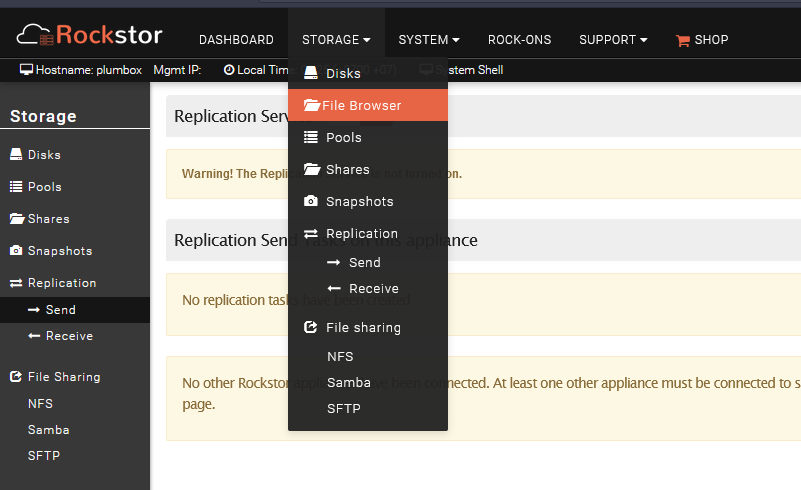
Rockstor is an open-source Linux NAS distribution built around Btrfs.
That makes it interesting for beginners who want a storage-first operating system but prefer Btrfs concepts and flexibility over a ZFS-centered platform.
Rockstor provides web-based administration and describes itself as an easy-to-deploy DIY NAS appliance for commodity hardware. Its Rock-ons subsystem adds Docker-based applications, allowing the system to move beyond basic SMB and storage duties.
The project also remains active in 2026, with core development continuing through August.
Best for: DIY users specifically interested in Btrfs storage and an open-source NAS appliance built around it.
Trade-off: the community and documentation footprint is smaller than Unraid, TrueNAS, or OpenMediaVault. A beginner troubleshooting unusual hardware or a niche storage problem may therefore find fewer step-by-step community answers.
9. XigmaNAS — Best Traditional FreeBSD NAS for Lightweight Hardware
XigmaNAS represents a more traditional school of NAS design.
It is based on FreeBSD and provides a full web management interface with network storage protocols including SMB/CIFS, NFS, FTP, SFTP, rsync, and other classic services.
Its basic system requirements can also be extremely light compared with modern application-heavy NAS platforms, although ZFS use naturally benefits from substantially more memory.
XigmaNAS makes sense when the NAS is primarily expected to behave like a NAS:
Disks
  |
Storage
  |
SMB / NFS / FTP
  |
Users and Clients
rather than becoming a graphical Docker and AI application platform.
Best for: users who value a traditional lightweight storage appliance and are comfortable with a more technical FreeBSD-oriented workflow.
Trade-off: it is not where we would send a beginner whose main priorities are one-click media applications, container stacks, polished remote access, or modern home-server UX.
10. CasaOS — Best Home-Server-First Option for Simple Apps and File Use
CasaOS earns the final position with an important qualification:
CasaOS is better understood as a personal-cloud and home-server layer than as a full storage-first NAS operating system.
That distinction matters.
CasaOS is typically installed on top of a Linux system such as Debian or Ubuntu. Its strengths are the friendly dashboard, simple drive and file management, and an app-first experience designed around one-click Docker deployments.
The project supports x86-64 and ARM hardware, including NUCs, Raspberry Pi systems, old computers, and many other inexpensive home-server platforms.
For a beginner whose goal is:
- store a few files;
- run Jellyfin;
- install Home Assistant;
- use AdGuard;
- experiment with Docker apps;
that simplicity can be more valuable than a deep RAID administration interface.
But if the primary requirement is a multi-drive storage system with native redundancy workflows, failure handling, snapshots, and long-term storage administration, use a storage-first platform instead.
Our CasaOS vs TrueNAS comparison explains exactly where that dividing line sits.
Best for: beginners building an app-oriented home server with light NAS duties.
Trade-off: CasaOS should not be mistaken for a direct replacement for TrueNAS, Unraid, or another storage-first NAS operating system when data protection is the main objective.
Which NAS Operating System Should a Beginner Choose?
| If You Want... | Start With | Why |
|---|---|---|
| The easiest complete NAS experience | Synology DSM | Hardware and software arrive as one supported appliance |
| The easiest DIY NAS | ZimaOS | Low-friction storage, sharing, apps, and remote access on x86 hardware |
| A NAS that can grow into a homelab | Unraid | Mixed disks, Docker, applications, VMs, and strong community support |
| A free NAS for an old PC | OpenMediaVault | Lightweight Debian platform with broad hardware support |
| To learn ZFS properly | TrueNAS | Deep storage controls, datasets, snapshots, and replication |
| TrueNAS with more hand-holding | HexOS | Simplifies a TrueNAS-based storage foundation |
| A QNAP appliance | QTS | Beginner-oriented QNAP interface and large app ecosystem |
| A Btrfs-focused DIY NAS | Rockstor | Linux NAS built around Btrfs |
| A traditional lightweight FreeBSD NAS | XigmaNAS | Strong classic network-storage feature set |
| A simple app-first home server | CasaOS | Friendly Docker and personal-cloud interface |
Synology DSM vs ZimaOS vs Unraid vs TrueNAS
These four systems make the beginner trade-offs easiest to see.
| Beginner Question | Synology DSM | ZimaOS | Unraid | TrueNAS |
|---|---|---|---|---|
| First setup | Excellent | Excellent | Very Good | Good |
| DIY hardware | No | Yes | Yes | Yes |
| Storage concepts required early | Low | Low | Medium | Higher |
| App installation | Excellent | Excellent | Excellent | Very Good |
| Remote-access setup | Easy | Easy | Easy | More user-managed |
| Mixed-drive flexibility | Appliance dependent | More conventional RAID/storage | Excellent | Requires more planning |
| ZFS depth | Not the focus | Available for advanced users | Available through pools | Excellent |
| Best fit | Buy and use | First DIY NAS | Growing home server | Storage-first learner |
Choose DSM if you want the vendor to make most hardware and compatibility decisions for you.
Choose ZimaOS if you want similar onboarding simplicity but want to choose or reuse your own compatible x86 hardware.
Choose Unraid if the NAS is likely to become a bigger homelab and mixed-capacity drives are part of the plan.
Choose TrueNAS if storage architecture, ZFS, snapshots, and learning how the system works matter more than minimizing first-day configuration.
DIY NAS OS vs Appliance NAS: Which Is Easier?
An appliance OS has one major advantage that software comparisons often underestimate: the hardware question has already been answered.
Buying a Synology or QNAP means the operating system is already designed around the motherboard, drive bays, cooling, boot environment, network interfaces, and supported expansion options.
A DIY NAS gives you much more freedom:
- reuse an old PC;
- choose your own motherboard;
- add more SATA ports;
- use faster networking;
- install a GPU;
- choose a custom chassis;
- upgrade CPU or RAM later.
But every one of those freedoms is also another decision.
That is why DSM ranks #1 overall for a complete beginner while ZimaOS ranks #1 for DIY beginners. They solve slightly different versions of the same problem.
For a deeper cost and ownership comparison, see whether a DIY NAS is still worth building in 2026.
Do Beginners Need RAID, ZFS, or Neither?
You do not need to choose a NAS OS by filesystem acronym before you know what your data needs.
Start with three separate questions:
Do You Need Redundancy?
If the NAS stores replaceable media and nothing important, a single disk may be enough to begin.
If it stores family photos, work files, business documents, or other valuable data, redundancy becomes much more useful.
Two matching disks in a mirrored configuration are one of the easiest beginner storage designs to understand:
Drive A = Data
Drive B = Same Data
If one drive fails, the other remains available.
Do You Need ZFS?
ZFS is excellent when you want checksums, snapshots, storage pools, replication, and a strong data-integrity model.
But ZFS does not automatically make one NAS better than another for a beginner.
If you want to learn and actively manage storage architecture, TrueNAS is the strongest learning platform here. If your first priority is simply creating a safe family share, you do not need to begin by mastering VDEV topology.
Do You Have a Backup?
RAID is not a backup.
RAID can help the system remain available after a disk failure. It does not protect you from:
- accidental deletion;
- ransomware;
- filesystem mistakes;
- theft;
- fire;
- electrical damage;
- deleting the wrong folder and synchronizing that deletion everywhere.
A beginner NAS plan should therefore include an independent second copy before it includes an exotic storage topology.
Which NAS OS Is Best for an Old PC?
If you already own the hardware, the shortlist changes.
OpenMediaVault is one of the best free choices because it is lightweight, Debian-based, and designed for commodity hardware.
ZimaOS is stronger when you want a more graphical, app-oriented experience and the existing machine is compatible x86 hardware.
Unraid makes particular sense when the old PC contains several mismatched disks collected over time.
TrueNAS is attractive when the hardware has enough memory, proper storage connectivity, and you are willing to design the ZFS layout intentionally.
CasaOS makes more sense when the old machine is primarily becoming an app server with some file sharing rather than a storage-first NAS.
Before choosing only by OS screenshots, our storage-layout-first guide explains why the drive topology can narrow the OS choice before installation begins.
Which Beginner NAS OS Is Best for Apps and Docker?
NAS systems increasingly do much more than SMB file sharing.
A modern home NAS may run:
- Jellyfin or Plex;
- Immich;
- Home Assistant;
- AdGuard Home or Pi-hole;
- Nextcloud;
- download managers;
- backup services;
- developer tools;
- local AI applications.
For the easiest app-store experience, DSM, ZimaOS, and Unraid are particularly strong.
CasaOS is arguably even easier for pure Docker-app discovery, but its storage layer is not as comprehensive.
TrueNAS now has a strong containerized applications ecosystem, but applications still sit inside a more explicitly storage-managed system. The first time Apps is configured, TrueNAS requires an Apps storage pool to be selected before installation begins.
The important beginner lesson is not to choose the NAS OS solely by the number of applications in its store.
Storage comes first.
An app can usually be reinstalled. A badly planned 20 TB storage layout is much more annoying to rebuild.
Which NAS OS Is Best for Local AI?
Local AI changes the NAS question because storage and compute begin to overlap.
You may want one server to store:
- models;
- PDFs and private documents;
- embeddings;
- vector databases;
- agent memory;
- media;
- Docker application data.
while also running Ollama, Open WebUI, RAG pipelines, or other services.
ZimaOS is particularly approachable when the user wants a graphical app-first path into local AI and Docker.
Unraid is excellent when GPU passthrough, VMs, containers, and flexible storage all matter.
TrueNAS is attractive when the AI server is also expected to provide serious ZFS storage and snapshots.
OpenMediaVault can work well when the user is comfortable assembling more of the AI stack manually on Debian.
For an example of the storage-plus-compute direction, our local AI homelab guide shows how NAS storage and AI workloads can share one expandable platform.
Beginner Mistakes to Avoid Before Installing a NAS OS
Choosing the OS Before Planning the Drives
The filesystem and storage model can determine which disk combinations are sensible. Decide how many disks you have, their capacities, what data matters, and how you intend to expand before committing to the operating system.
Assuming RAID Means Backup
Redundancy solves a drive-failure problem. Backup solves a data-loss problem. They overlap much less than beginners often expect.
Exposing SMB Directly to the Internet
Remote file access should go through a properly authenticated remote-access system, private networking layer, VPN, or another secure service. Do not forward SMB ports simply because accessing files from outside the house sounds convenient.
Installing Every App Before Organizing Storage
Applications create databases, caches, thumbnails, configurations, and persistent Docker volumes. Decide where important app data belongs before the system becomes difficult to reorganize.
Buying for Features You Do Not Understand Yet
The OS with the longest feature list is not automatically the safest beginner choice.
The better first system is usually the one that helps you understand:
Where is my data?
How is it protected?
Who can access it?
Where is my backup?
What happens when a disk fails?
Once those answers are clear, advanced features become much easier to evaluate.
Final Verdict
Synology DSM is our #1 overall NAS OS for complete beginners because buying the appliance removes hardware compatibility from the problem, while DSM provides mature setup, remote access, file management, applications, mobile tools, and storage guidance in one ecosystem.
ZimaOS is our #1 choice for a first DIY NAS and #2 overall. It offers a similarly low-friction path into storage, file sharing, remote access, and applications while allowing users to build around compatible x86 hardware they control.
Unraid is the strongest choice for beginners who expect their NAS to grow into a larger homelab, particularly when mixed-size disks, Docker, and VMs matter.
OpenMediaVault remains one of the best free ways to repurpose ordinary hardware.
TrueNAS asks more of a beginner but teaches more in return, making it the strongest choice for someone who wants to understand ZFS and storage architecture properly.
HexOS is worth watching if you want that TrueNAS foundation with more guidance, while QNAP QTS remains a strong appliance alternative to DSM.
Rockstor, XigmaNAS, and CasaOS make the most sense when your requirements align with their specific strengths rather than because they are universal beginner recommendations.
The easiest NAS OS is therefore not the one with the fewest buttons. It is the one that gets you to a safe, understandable storage system without forcing you to learn the wrong things in the wrong order.
FAQ
What is the easiest NAS operating system for beginners?
Synology DSM is one of the easiest overall choices if you are buying a complete NAS appliance because the hardware and software are designed together. For a DIY NAS built on compatible x86 hardware, ZimaOS offers one of the easiest onboarding experiences.
What is the best NAS OS for a beginner building their own NAS?
ZimaOS is our first choice for a first-time DIY builder because it combines guided storage, SMB sharing, automatic device discovery, remote access, an app store, and Docker flexibility without requiring the user to understand every storage concept before getting started.
Is TrueNAS too difficult for beginners?
No, but it has a steeper learning curve than DSM or ZimaOS. TrueNAS asks users to understand pools, VDEVs, datasets, storage for applications, permissions, and ZFS concepts relatively early. That additional learning is valuable if long-term storage control is the goal.
Is Unraid easier than TrueNAS?
For many first-time home-server users, yes. Unraid's application ecosystem and storage workflow are approachable, particularly with mismatched disks. TrueNAS is more storage-architecture focused and exposes ZFS concepts earlier.
What is the best free NAS OS for an old PC?
OpenMediaVault is one of the strongest options because it is free, Debian-based, relatively lightweight, and supports a wide range of commodity x86-64 hardware. TrueNAS is another strong free option when the system has enough memory and suitable storage hardware.
Is ZimaOS free to install on my own hardware?
ZimaOS can be installed on compatible x86 devices. Check the current ZimaOS documentation and licensing terms before deployment because supported features and plan limits can change over time.
Is CasaOS a real NAS operating system?
CasaOS is better described as a personal-cloud and home-server layer running on top of Linux. It provides easy file management and Docker applications, but it is not as storage-first as TrueNAS, Unraid, ZimaOS, or OpenMediaVault.
Should a beginner use RAID 1 or RAID 5?
RAID 1 is easier to understand and is a strong starting point for two-drive home NAS systems. RAID 5 becomes relevant with three or more drives when usable capacity matters more, but every RAID design should still be paired with an independent backup.
Is ZFS necessary for a home NAS?
No. ZFS provides excellent data-integrity, snapshot, and storage-management features, but many home NAS users can build safe systems using other filesystems and redundancy models. Backup strategy matters more than selecting a filesystem because of its reputation alone.
Which NAS OS is best for Plex or Jellyfin?
DSM, ZimaOS, Unraid, TrueNAS, OpenMediaVault, QTS, and CasaOS can all run media-server workloads. ZimaOS and Unraid are particularly approachable for DIY users who want storage and Docker applications in the same system.
Which NAS OS is best for Docker?
Unraid is one of the strongest beginner-to-advanced Docker platforms. ZimaOS offers an easier app-store-first experience with Docker Compose available as users become more advanced. CasaOS is very simple for Docker apps but has a lighter storage-management layer.
Should I buy a Synology or build a DIY NAS?
Buy a Synology if minimizing setup and maintenance is more important than hardware freedom. Build a DIY NAS if you want to reuse hardware, choose your own components, add PCIe or faster networking, expand drive capacity differently, or learn more about the underlying system.

Recommended products

Tech & AI HUB
More to Read
LFM2.5-24B-A2B Explained: What Total and Active Parameters Mean for Local AI Agents
LFM2.5-24B-A2B combines 24B total and 2B active parameters. Understand memory, agent tooling, local execution, and how a NAS fits the workflow.
IBM Granite Speech 5.0 Explained: What Compact ASR Means for Private Audio Archives
Granite Speech 5.0 TurboCTC is a compact ASR model with a multilingual update. Learn how local transcription can fit a NAS-backed audio archive.

Claude Duet Explained: Proactive Tasks, Connected Apps, and Personal Files
Claude Duet is a proactive-agent research preview. Learn about background tasks, connected accounts, review boundaries, and NAS-backed personal files.


