
How Much Storage Should a Home NAS Have in 2026?


Most homes should not choose NAS capacity by copying someone else’s Plex library or buying the largest drives available. The better starting point is your current data: photos, phone backups, PC or Mac backups, documents, media, work files, VM images, and anything you expect the NAS to keep for the next few years.
For 2026, a practical rule is to plan for about 2–3× your current data as usable capacity, then add raw capacity for redundancy, snapshots, app data, backup versions, and free headroom. A light household may be fine with 4–8TB usable. A media-heavy family may want 12–24TB usable. A creator, home lab, or local AI user may need 20TB+ usable and room to expand.
Start With Usable Capacity, Not Drive Labels
The first mistake happens before the NAS is even ordered. A user sees two 12TB drives and assumes the NAS will provide 24TB of usable space. That may be true in a non-redundant layout, but most home NAS users want at least some protection against a single drive failure, so the actual usable capacity can be much lower.
Drive labels show raw capacity. NAS planning depends on the storage layout. A 2-bay mirror gives you roughly one drive of usable capacity. A parity layout in a larger NAS reserves part of the raw space for redundancy. Snapshots, app data, metadata, and reserved free space also reduce what you should treat as safe working capacity.
That is why the better question is not “Should I buy 12TB, 16TB, or 20TB drives?” The better question is “How much usable capacity do I need for the next three to five years?” Once that number is clear, you can work backward to drive size, bay count, and redundancy layout.
Measure Your Current Data Before Picking a NAS Size
Most people underestimate their current data because it is scattered. Photos may be on phones, iCloud, Google Photos, old SD cards, a MacBook, a Windows desktop, an external drive, and a folder called “Archive” that nobody has opened in two years. A NAS purchase forces those scattered piles into one place.
Separate the data by type before you choose capacity. Documents and scanned files grow slowly. Phone photos grow steadily. PC and Mac backups grow with version history. Media libraries grow in large jumps. Home lab data, Docker volumes, VM images, local AI model files, and private RAG documents can expand faster than expected once the NAS becomes part of daily use.
A practical first pass is simple: add up today’s data, round up, then apply a growth multiplier. Light users can often plan around 2× current data. Families with multiple devices, media, and backups should think closer to 3×. Creators, media collectors, and home lab users should add a separate allowance for project growth instead of treating all files as slow-growing documents.
2026 Capacity Targets by User Type
There is no single “right” NAS size for 2026 because households are not storing the same things. A couple with documents, phone photos, and laptop backups has a different storage curve from a family running Plex, Time Machine, RAW photo archives, and a private cloud.
The purpose of a capacity target is not to predict the future perfectly. It is to avoid buying a NAS that is too small on day one or so oversized that drive budget replaces backup budget. In practice, the useful number is usable capacity, not raw drive capacity.
Use the table below as a starting range, then adjust upward if you know your data grows in large chunks. Media, video projects, VM images, and local AI data are the categories most likely to make a “reasonable” NAS feel small after one year.
| User Type | Typical Data | Practical Usable Target |
| Light household | Photos, documents, phone backup, small media | 4–8TB usable |
| Family backup NAS | Multiple phones, PCs, documents, photos | 8–16TB usable |
| Media-heavy household | Plex/Jellyfin, 4K video, backups | 12–24TB usable |
| Creator / photographer | RAW photos, video projects, archive | 20TB+ usable |
| Home lab / local AI user | VM images, containers, model files, RAG docs | 12–30TB+ usable |
Raw Capacity and Usable Capacity Are Not the Same
A four-bay NAS with four 12TB drives may look like a 48TB purchase, but that does not mean you should expect 48TB of safe working storage. In a parity or mirrored layout, part of the raw space is used to survive drive failure. In a more conservative layout, even more capacity is reserved for resilience.
TrueNAS explains storage around pools, VDEVs, and redundancy layouts, which is why ZFS storage pool layout matters when planning capacity. The layout you choose changes both usable space and failure tolerance, so two NAS systems with the same raw drive total can have very different practical capacity.
The right way to size a NAS is to decide the usable target first, then choose a layout that fits your risk tolerance. If you need about 12TB usable, do not buy exactly 12TB raw and hope the math works. Buy enough raw capacity to cover redundancy, snapshots, future growth, and emergency space.
Leave Free Headroom for Snapshots, Apps, and Performance
A NAS rarely fills up all at once. It fills slowly through phone backups, Time Machine history, Windows backup versions, downloaded media, photo imports, Docker volumes, surveillance clips, project archives, and snapshots that quietly accumulate in the background.
Free space is not just cosmetic. Storage systems need room for writes, deletes, metadata, snapshots, and rebuilds. The OpenZFS workload tuning documentation recommends keeping pool free space above 10% to avoid allocation behavior that can hurt I/O performance, which makes NAS free space headroom part of capacity planning rather than a nice extra.
For home NAS planning, a safer practical range is to leave about 10–20% free depending on workload. If your three-year estimate says you need 10TB usable, do not design a system that becomes full at exactly 10TB. Plan closer to 12–14TB usable so snapshots, app data, and unexpected growth do not break the system early.
2-Bay NAS Is Simple, but 4-Bay NAS Gives More Growth Room
A 2-bay NAS is attractive because it is simple, quiet, and easy to understand. Two large drives in a mirror can be a very reasonable setup for family documents, photos, and light backups. For users who want low maintenance and predictable growth, that simplicity has value.
The limit is expansion. A 2-bay mirror gives you roughly one drive of usable capacity, so two 12TB drives provide about 12TB usable before overhead and headroom. When that fills up, expansion usually means replacing both drives with larger ones. A 4-bay NAS gives you more ways to grow and can use parity layouts more efficiently.
If you are sure the next few years will stay under 4–8TB usable, a 2-bay NAS can be enough. If media, backups, home lab files, or local AI data are likely to grow, a 4-bay NAS usually gives a safer path because you are not forced to replace every drive just to escape a small starting configuration.
| Setup | Better For | Capacity Reality |
| 2-bay mirror | Simple family NAS, documents, photos | Easy, but usable capacity is close to one drive |
| 2-bay large drives | Quiet, low-maintenance storage | Good if growth is predictable |
| 4-bay with 2 drives first | Growth without buying all drives day one | More flexible upgrade path |
| 4-bay parity layout | Media, backups, larger home data | Better usable-capacity efficiency |
| 6-bay+ NAS | Creator, lab, large media archive | More room, but higher cost and noise |
Media Libraries Change the Number Fast
A household with documents, scanned files, and phone photos may grow slowly for years. A household with Plex, Jellyfin, camera footage, Blu-ray rips, 4K videos, or family video projects can burn through capacity in jumps. One media import can change the storage plan overnight.
Media growth is different from document growth. Documents may add a few gigabytes at a time. A movie folder, video editing project, downloaded season, camera dump, or 4K family archive can add hundreds of gigabytes or several terabytes. That makes today’s folder size a weak guide if the NAS is about to become the main media library.
If media is a core NAS use case, plan for the library you are likely to build, not only the files you have now. Larger drives, more bays, and free headroom matter more than chasing the smallest starter price. A media NAS that fills in one year usually becomes a migration problem, not a bargain.
Backups Need More Space Than the Original Files
A common planning error is assuming a 2TB laptop needs exactly 2TB of NAS backup space. That may be true for a single full copy, but most useful backup systems keep versions, histories, deleted-file windows, or multiple device states.
Time Machine, Windows backup tools, phone backups, versioned folders, and snapshot-based backup workflows can grow beyond the original data size. The more devices you protect, the more this matters. A household with two laptops, two phones, and one desktop may need much more NAS backup space than the active files suggest.
Capacity planning for backups should include retention. Ask how long old versions should be kept, how many computers will back up to the NAS, whether old device backups will be retained, and whether snapshots are part of the recovery plan. Backup storage is not just today’s data; it is today’s data plus time.
RAID Helps Availability, but Backup Still Needs Separate Capacity
RAID, mirroring, RAIDZ, or parity can help a NAS survive a drive failure, but that is only one risk. Accidental deletion, ransomware encryption, file corruption, NAS failure, theft, fire, flood, bad sync rules, and user mistakes can still damage or remove data.
The ZimaOS documentation for 3-2-1 backup capacity plan follows the familiar idea of keeping multiple copies across different media, with one copy offsite. That matters for NAS sizing because backup capacity is separate from primary NAS capacity.
If your NAS will store important files, do not spend the entire budget on the primary pool and leave no plan for backup. An external drive, second NAS, cloud/offsite target, or rotated copy may require additional capacity. A full NAS with no backup is still a single place where data can fail.
Drive Size Strategy: Fewer Larger Drives vs Filling Every Bay
When buying a NAS, small drives can look cheaper at checkout. Four smaller drives may seem like a better deal than two larger drives, especially when the NAS has empty bays waiting. The problem is that bays are also a limited resource.
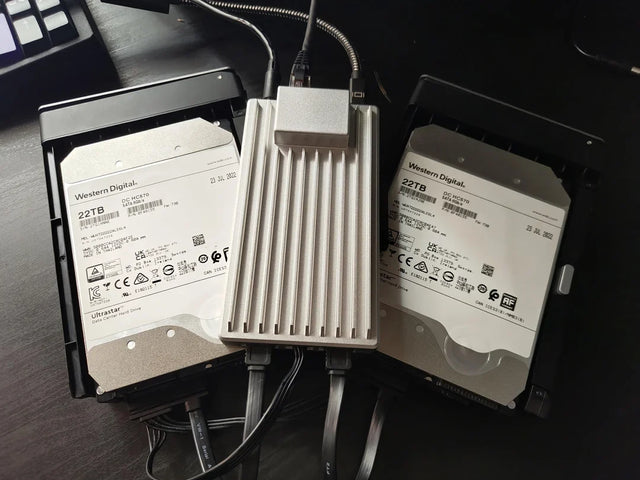
High-capacity NAS drives are widely available in 2026, and Seagate lists IronWolf Pro models up to 32TB for NAS and RAID environments. That does not mean every home should buy the largest disk, but it does make high-capacity NAS drives part of a realistic growth strategy.
If you buy a 4-bay NAS, filling every bay with small drives on day one can make expansion harder later. A more flexible plan is often to start with fewer larger drives and keep one or two bays open, as long as the chosen RAID or storage layout supports that growth path safely.
Hard Drive Reliability Should Shape the Plan, Not Create Panic
Drive reliability matters because a NAS is meant to stay on for years. But reliability data should not push users into panic buying or overcomplicated layouts. Drives fail, but different models, workloads, ages, temperatures, and fleet conditions affect results.
Backblaze publishes large-scale drive statistics that help show failure rates in the real world, and its hard drive reliability data is useful context for understanding that disks are consumable parts, not permanent storage guarantees.
The practical lesson is not to chase one perfect drive model and ignore the rest of the system. Choose NAS-appropriate drives, monitor drive health, keep enough free space, avoid overheating, plan replacement paths, and maintain backup. Capacity planning should assume that drives can fail and that recovery must be designed before failure happens.
A Practical Sizing Formula
At some point, capacity planning needs a number. A useful formula is: target usable capacity equals current data multiplied by a growth factor, plus backup or version overhead, plus free headroom. This keeps the decision tied to your real data instead of drive sales.
For a light household with 2TB of current data, 4–6TB usable may be enough, but a 2-bay mirror with 8TB or 10TB drives gives more breathing room. For a family with 6TB of mixed media and backups, 12–18TB usable may be more realistic. For a creator, media collector, or home lab user already above 10TB, 20TB+ usable and a 4-bay or larger NAS is a safer starting point.
The formula should not be treated as exact math. It is a planning discipline. If your data grows slowly, you can be more conservative. If your data grows in large batches, buy more headroom and more bay flexibility. The goal is to avoid both early migration and unnecessary overbuying.
Decision Checklist
The real question is not “How much storage should a home NAS have in 2026?” The better question is “How much usable capacity do my files, growth, redundancy, snapshots, and backups require?” That framing prevents raw drive labels from misleading the decision.
If you are a light user, 4–8TB usable can still be practical. If your family has multiple phones, PCs, and backup histories, 8–16TB usable is a more comfortable range. If media, creator files, home lab workloads, or local AI data are part of the plan, 12–30TB+ usable becomes more realistic.
When in doubt, avoid the two extremes. Do not buy the smallest setup that only fits today. Do not spend the whole budget on primary capacity and forget backup. Choose a NAS that covers the next few years, leaves free headroom, and has a path to grow.
| Question | Planning Direction |
| Current data under 2TB? | 4–8TB usable may be enough |
| Multiple phones and PCs? | Plan 8–16TB usable |
| Plex/Jellyfin media library? | Plan 12–24TB usable |
| RAW photos or video projects? | Plan 20TB+ usable |
| Home lab / local AI files? | Add VM, model, and RAG growth |
| 2-bay NAS? | Expect mirror capacity limits |
| 4-bay NAS? | Better long-term growth |
| Unsure about growth? | Leave bays and free headroom |
| Important data? | Budget for backup capacity too |
Final Takeaway
For most homes in 2026, NAS capacity should start from usable storage, not raw drive labels. Add up what you store today, multiply by 2–3× for growth, then account for redundancy, snapshots, apps, backup versions, and free headroom.
A light household may be fine with 4–8TB usable. A family with multiple devices may want 8–16TB usable. A media-heavy household may need 12–24TB. Creators, home lab users, and local AI users should often plan 20TB+ usable and choose a NAS with room to grow.
The best NAS capacity is not the biggest number on the box. It is the amount that protects your data, leaves room for the next few years, and still leaves budget for backup.
FAQ
Is 4TB enough for a home NAS in 2026?
It can be enough for a light household with documents, small photo libraries, and limited backups. It is usually tight for multiple computers, media libraries, or long backup retention.
Is 8TB enough for a family NAS?
8TB usable can work for many families if the NAS is mainly for photos, documents, and moderate device backups. It may feel small if you add 4K media, large Time Machine histories, or multiple PC image backups.
Should I buy a 2-bay or 4-bay NAS?
A 2-bay NAS is simple and works well for mirror-based family storage. A 4-bay NAS gives better long-term growth and more flexible parity layouts, especially for media, backups, home lab files, and larger data sets.
How much free space should I leave on a NAS?
Plan to leave at least 10% free, and often 15–20% for a home NAS with snapshots, backups, app data, or media growth. Running a NAS nearly full can make maintenance, snapshots, and recovery harder.
Does RAID reduce usable capacity?
Yes. Mirroring and parity use part of the raw drive capacity for redundancy. That space is not wasted; it buys drive-failure resilience. But it means raw capacity and usable capacity are not the same.
Is RAID the same as backup?
No. RAID helps with drive failure, but it does not protect against deletion, ransomware, theft, fire, flood, corruption, or bad sync rules. Important NAS data still needs a separate backup plan.
Should I fill all NAS bays on day one?
Not always. Filling every bay with small drives can make future expansion harder. Starting with fewer larger drives can leave room to grow, as long as the storage layout supports that path safely.
How much NAS storage do I need for Plex or Jellyfin?
For a small direct-play library, 8–12TB usable may be enough. For a growing 4K library, 12–24TB usable is more realistic, and heavy collectors may need more. Media libraries grow in large jumps, so plan extra headroom.

Recommended products

Support & Tips
More to Read
Signs That a Home Assistant Database Needs Maintenance or Replacement
A large Home Assistant database usually needs retention or purge work; repeated corruption or integrity errors are stronger replacement signals.
How Many Concurrent Users Can Home Assistant Handle Before It Slows Down?
Home Assistant has no fixed useful user limit: benchmark active clients with real dashboards and entity updates, then stop before repeatable latency appears.
Can Home Assistant Use an External Database Without Breaking Upgrades?
An external Recorder database can survive upgrades, but adds its own availability, schema-migration, backup, restore, and version responsibilities.


