
Can One Home Server Replace Google Photos, Shared Drives, and a Streaming Box?


One home server can replace parts of Google Photos, shared drives, and a streaming box, but only when storage, apps, clients, and recovery remain separate.
The useful goal is not to imitate three commercial products inside one dashboard. It is to create three household workflows: automatic photo intake with a searchable originals library, private and shared file access across devices, and reliable playback on televisions and mobile clients. One machine can host those services, but it should not become the only copy of family data or the only route to administration and recovery.
Define Which Functions Are Actually Being Replaced
Google Photos combines phone upload, timeline browsing, search, albums, sharing, and an off-site account. A shared drive combines personal storage, collaborative folders, remote access, and versioning. A streaming box provides a television client, decoding support, remote control, and access to media services. A server does not replace all of those functions merely because it stores photos, documents, and movies.
TechRadar’s recent examination of home-server adoption notes that people are using small local systems to reduce dependence on subscriptions for personal cloud storage, media libraries, and other household services. That subscription-replacement pattern is a starting point, not proof that every hosted function becomes equivalent.
Write a replacement checklist for each workflow. Name the devices involved, the data that must survive, the features the family uses weekly, the acceptable outage, and the fallback. This prevents “one server replaces everything” from hiding several unrelated requirements.
Build Three Service Paths, Not One Interdependent Super-App
The photo application, shared-file service, and media server may run on the same host while retaining different data paths, accounts, update schedules, and recovery units. They can share the network and storage pool, but one failed index, database, or proxy should not make the originals, household files, and movies simultaneously unavailable.
A Tom’s Hardware home-server case study describes one compact system handling a family photo library and computer backups with separate storage roles and redundant copies. That multi-service but role-separated layout is closer to a durable consolidation plan than storing every function inside one writable folder.
| Household workflow | Persistent state | Independent failure boundary |
|---|---|---|
| Photo library | Originals, database, albums, metadata, accounts | Originals remain accessible when indexing fails |
| Shared files | Private folders, shared libraries, permissions, versions | File access does not depend on the media application |
| Media streaming | Media files, library database, profiles, watch history | A media update cannot modify photo or backup data |
Document startup order and dependencies. Storage should mount before applications start, but the photo service should not be required for file sharing, and the media server should not control the only account capable of recovery.
Replacing Google Photos Requires More Than Phone Uploads
A convincing photo replacement needs automatic uploads for each family member, separate private spaces, deliberate shared albums, searchable metadata, preserved originals, and a recovery path for the application database. The server must also account for background-upload limits on mobile devices and the growth rate of phone video.
WIRED’s NAS setup guide presents a local server as a way to centralize family photos, videos, documents, and backups that would otherwise remain scattered across devices and cloud accounts. That centralized-family-library workflow still requires an independent copy outside the server.
Keep originals in one authoritative storage path and place app state, thumbnails, and machine-generated indexes in separate paths. Test one phone and one account before migrating the household. Preserve the existing cloud library until item counts, capture dates, videos, edits, and restored originals have been validated.

Replacing Shared Drives Requires Personal and Household Storage Zones
A shared-drive replacement should not turn every file into household property. Each person needs a private folder and device-backup path. Shared libraries should exist for workflows such as family documents, selected photos, school files, and collaborative projects. Administrative data and backup repositories should remain outside ordinary shares.
Cloudwards’ comparison of local storage, NAS, and cloud services emphasizes that NAS provides local ownership and control while cloud services reduce infrastructure work and simplify remote access. That control-versus-managed-access trade-off defines what the household must take over when shared drives move home.
Create individual accounts and role-based groups rather than one shared login. For each shared area, define who can read, add, edit, delete, and restore. A photo viewer, document contributor, backup service, and administrator should not inherit the same permissions.
A Media Server Does Not Always Replace the Television Client
The server stores and serves media, but the television still needs a client capable of navigating the library and decoding the selected audio and video formats. A smart television may run the required app directly; an older television may still need a streaming box for responsive navigation, codec support, subtitles, or reliable updates.
Lifewire’s Plex overview separates the media server that organizes content from the client applications that play it on televisions, phones, and computers. That server-versus-client distinction means the home server can replace the media source without necessarily replacing every playback device.
Test direct play, subtitles, audio compatibility, remote control, and user profiles on the actual television. Keep the streaming box when it provides a better client experience or prevents the server from transcoding formats the television cannot decode.
Size the Host Around Concurrent Work, Not the App Count
Photo indexing, file synchronization, backups, thumbnail generation, media scans, and video transcoding can overlap. Storage latency, network bandwidth, memory, and hardware video support often matter more than the number of app icons installed. A lightly used file share and a 4K transcode are not equal workloads.
Puget Systems’ NAS guide recommends evaluating capacity, network performance, backup use, and application demands together rather than treating the NAS as a passive drive enclosure. That combined workload-sizing approach applies when one server carries photos, files, and streaming.
| Observed workload | Likely resource pressure | Setup response |
|---|---|---|
| Several phone uploads | Small writes, indexing, database activity | Keep app state on low-latency storage |
| Laptop backup during file use | Capacity throughput and version growth | Separate backup datasets and set schedules |
| Local direct-play media | Mostly storage and network throughput | Prefer compatible television clients |
| Concurrent video transcodes | CPU or hardware video engine | Measure streams before consolidating more users |
Run representative tasks at the same time before retiring existing services. The server is ready only when backup, browsing, and playback remain usable together and temperatures, capacity, and response time stay within the intended operating range.
Consolidation Must Not Consolidate Every Recovery Copy
Putting all three workflows on one host increases the value of that host and the impact of a single administrative mistake. Mirrored drives can preserve availability after one disk failure, but they do not protect against deletion, ransomware, theft, fire, filesystem damage, or a failed update.
Backblaze’s 3-2-1 strategy separates working data from additional local and off-site copies. That independent-copy requirement becomes more important when photos, shared files, and media-state databases live on the same machine.
Protect irreplaceable originals and household documents off-site. Back up photo and media databases consistently. Keep recovery notes and keys outside the server. Replaceable movies may receive a different policy from family videos, but the backup scope should be written rather than assumed.
Know When One Box Should Become Two Roles
One server remains reasonable while the services share similar maintenance windows, capacity needs, and availability expectations. Split roles when storage rebuilds interrupt essential applications, experimental containers threaten household files, media transcoding competes with backups, or the photo archive requires more bays and longer retention than the app host.
ServeTheHome’s compact-server project demonstrates how a small dedicated node can be designed around a bounded compute, storage, and networking role. That role-specific node model supports keeping applications on one small server while a storage-first system owns larger family datasets.
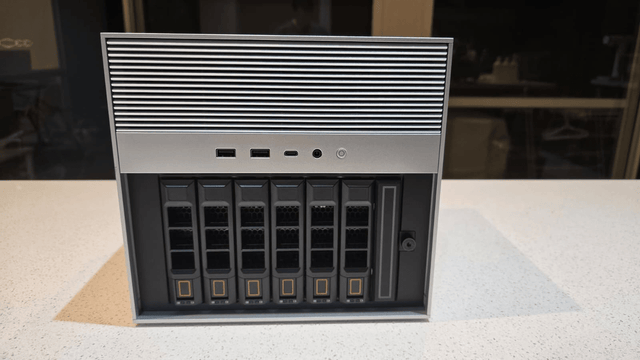
The ZimaSpace guide on choosing the first three home-server services helps limit the initial consolidation. A ZimaBoard 2 Mini Home Server fits a compact app-first combination when attached storage and concurrent demand remain bounded. A ZimaCube 2 AI NAS is the clearer base when several drives, multiple family accounts, longer retention, and storage-first recovery define the combined system.
One server is a successful replacement when each household workflow remains usable, maintainable, and recoverable on its own—not merely when all three applications can start on the same hardware.

Recommended products

NAS & Server Setup
More to Read
How New Home Assistant Features Change Home-Server Architecture
New Home Assistant features change service, network, data, and recovery roles. Protect core control, then integrate or isolate each feature by measured need.
Where to Place a Home Assistant Server for Cooling, Cabling, and Maintenance
The best Home Assistant location passes hot-day airflow, cable, radio, UPS, and maintenance drills. Ventilate, separate, or relocate when a hard gate fails.
How to Size a Home Server for Home Assistant and Internet Outages
An outage-ready Home Assistant setup sizes compute, network, UPS, storage, and recovery together, then expands only where an acceptance test fails.


