




ZimaBoard SE – Home Server Made Simple
Features
-
Start with ZimaOS. Make it yours.
ZimaOS+ comes pre-installed for an easier start, but you're free to install another compatible operating system. -
Your apps and files, under your control.
Run your favorite apps, manage files, and build your own personal cloud, all on hardware you own. -
Ready with the essentials.
Choose 8GB or 16GB RAM pre-installed, with 64GB eMMC storage, a power adapter, and essential cables included. -
Small, silent, and energy-efficient.
Compact and fanless, designed for quiet, low-power operation at home. -
Built to expand, ready to explore.
Add storage with dual SATA ports, explore more possibilities with PCIe, or choose the NAS Kit for easier dual-drive expansion.
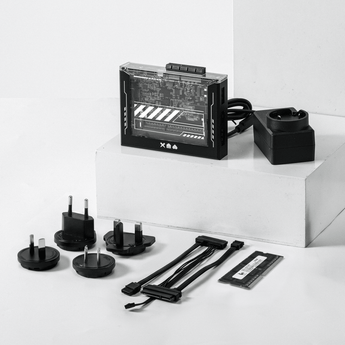
What's in the box
Starter Kit
- 1 × ZimaBoard SE (8GB or 16GB RAM pre-installed)
- 64GB eMMC with ZimaOS+ pre-installed
- 1 × USB-C 60W Power Adapter
- 1 × SATA Y Cables
NAS Kit
Everything in the Starter Kit, plus:
- 1 × 2-Bay Rack Tray
- 1 × 4K Mini DP Cable
Notes:
- RAM capacity depends on the selected model (864 or 1664).
- HDDs/SSDs are not included.
Shipping
- Orders are usually arranged within 72 hours after payment (holidays excluded)
- Delivery to most countries takes around 8–10 business days
- Questions about the product or shipment? Contact shop@icewhale.org or reach us via the online chatbox
Ways to Pay


Warranty & Support
- 2 years for deliveries within the EU
- 1 year for all other regions
Couldn't load pickup availability

ZimaBoard SE
Your first home server.
Small, silent, always on.
WHAT IT CAN DO
One small board. Three everyday jobs.One small board.
Three everyday jobs.

NAS & Backups
Your photos and files,
on your own drives.

Home Apps · Docker
Run the apps you’d
otherwise rent.

Media · Plex & Jellyfin
Movie night from
your own shelf.
Built to Stay On
No fan. No noise. Leave it on all year.No fan. No noise.
Leave it on all year.
A 6W quad-core chip and a passive heatsink, in a case you can see through.

Wire two drives straight to the board. No USB enclosures.
A PCIe 2.0 x4 slot. Add a network card or NVMe storage when you need it.
Comes with 8GB or 16GB of DDR3L pre-installed. No extra RAM to buy.
Gigabit Ethernet, USB 3.0, USB-C and Mini DisplayPort 1.2.


The OS Inside
ZimaOS Ties It All Together.
Pre-installed and ready on first boot. Manage drives, apps and backups from one dashboard, or from your phone with Zima Client.

Files brings your server, external drives and cloud storage together,
making files easy to find and organize.Files brings your server, external drives and cloud storage together,
making files easy to find and organize.
Explore your gallery like a museum show, load full-res details instantly,
and share your favorite moments in a tap.Explore your gallery like a museum show,
load full-res details instantly, and share your favorite moments in a tap.
Zima Client for Desktop mounts server folders in Finder,
letting you browse, open and edit files like local ones.Zima Client for Desktop mounts server folders in Finder,
letting you browse, open and edit files like local ones.
Access your self-hosted apps from your phone,
with floating windows that let you move easily between everyday tasks.Access your self-hosted apps from your phone, with floating
windows that let you move easily between everyday tasks.
Scan to connect your ZimaBoard SE,
then check storage and system status from your phone, wherever you are.Scan to connect your ZimaBoard SE, then check storage and system
status from your phone, wherever you are.


BEYOND OUR WORDS
Real builds. Real reviews.
Creators put this board to work, from a first home server to local AI.
Pick Yours

ZimaBoard SE 864 Starter Kit
· Quad-core · 8GB DDR3L · 64GB eMMC
· Power adapter included
8GB DDR3L · 64GB eMMC
For backups, file sharing and a handful of apps.
· Backups
· File sharing
· A handful of apps
ZimaBoard SE 1664 Starter Kit
Most Popular· Quad-core · 16GB DDR3L · 64GB eMMC
· Power adapter included
16GB DDR3L · 64GB eMMC
For more containers, a virtual machine and room to grow.
· More containers
· A virtual machine
· Room to grow
Complete Kit
Unbox. Plug in. Done.

In the box
 ZimaBoard SE
 8GB or 16GB DDR3L memory
 19V USB-C power adapter
 SATA Y cable


Up and Running in Minutes

Plug in power and Ethernet
Plug in power
and Ethernet

Find your device with Zima Client

Set up your ZimaBoard SE
Specification
Pre-installed OS
ZimaOS Plus
Compatible OS
Proxmox / TrueNAS / Unraid / Debian / Ubuntu / Windows / OpenWrt / pfSense

ZimaBoard SE 864 (8GB RAM + 64GB eMMC)ZimaBoard SE 8GB

ZimaBoard SE 1664 (16GB RAM + 64GB eMMC)ZimaBoard SE 16GB
After You Click Buy

Discord Community
Build, learn and share with 30,000+ membersBuild, learn and share with 30,000+ members

Easy Returns
14-day money-back guarantee14-day money-back guarantee

Easy Payments
Pay your way with fast, secure methodsPay your way with fast, secure methods

24/7 Support
Dedicated customer service

Lifetime ZimaOS PlusLifetime ZimaOS+
Buy once, ZimaOS Plus forever

Fast Delivery
Orders ship in 72 hours, with most deliveries arriving in 8-10 daysOrders ship in 72 hours, with most deliveries arriving in 8-10 days

Warranty Protection
1-year worldwide warranty. 2-year warranty for EU customers1-year worldwide 2-year for EU

Free Shipping
Free shipping on orders over $100 to most countriesFree shipping on orders over $100 to most countries
Frequently Asked Questions
-
ZimaBoard SE brings the familiar ZimaBlade hardware platform into the ZimaBoard family, with a refreshed name and a more complete out-of-box experience.
The core hardware remains largely unchanged, while ZimaBoard SE now includes 8GB or 16GB RAM pre-installed, 64GB eMMC storage, ZimaOS, and essential accessories.
It's about making your home server easier to get started with, rather than introducing a new generation of hardware.
-
Yes! With RAM and ZimaOS already installed, there's less setup to worry about.
Simply connect your device, complete the initial ZimaOS setup, and start exploring apps and features. No need to install RAM or an operating system from scratch.
-
Both kits include a ZimaBoard SE with pre-installed RAM and ZimaOS, a USB-C PD power adapter, and a SATA-Y cable.
The NAS Kit adds a 2-bay drive rack tray and a 4K Mini DP cable, making it easier to build your own dual-drive storage setup.
HDDs and SSDs are not included in either kit.
-
ZimaBoard SE comes with 64GB eMMC storage and ZimaOS pre-installed, so you can get started without installing a separate system drive.
For larger photo libraries, media collections, or backups, we recommend adding HDDs or SSDs through the dual SATA ports.
-
Yes! The included power adapter and SATA-Y cable support powering two 3.5-inch SATA HDDs, so you don't need a separate power supply for the drives.
Just connect your compatible drives to start building your storage setup. HDDs are sold separately.
-
Absolutely. ZimaBoard SE is built on an open x86 platform, so you're not limited to ZimaOS.
While ZimaOS comes pre-installed for an easier start, you can install other compatible operating systems, such as Ubuntu or Debian. Compatibility and setup requirements may vary.
-
Yes! With two SATA 3.0 ports, ZimaBoard SE can be used as a compact NAS for personal files, backups, and media storage.
Choose the NAS Kit for a convenient 2-bay drive mounting solution, or build your own storage setup with compatible drives and accessories.
-
Yes! With ZimaOS, you can install Docker-based apps and explore services like Plex, Jellyfin, Home Assistant, and more.
Performance depends on your RAM configuration, workload, and media formats. For heavy multitasking or demanding transcoding, a more powerful server may be a better fit.
-
Of course! ZimaBoard SE features two SATA 3.0 ports for storage expansion and a PCIe 2.0 x4 interface for compatible accessories.
Whether you're adding storage, experimenting with networking, or building your next project, there's room to explore.
-
It depends on what you want to do!
ZimaBoard SE is ideal for everyday self-hosting, personal cloud storage, lightweight apps, and small home server projects, offering an accessible way to get started.
ZimaBoard 2 is designed for users who need more processing power, faster networking, and greater expansion capabilities.
Your cart is currently empty.
Start Shopping-

 ZimaBoard SE – Home Server Made Simple From $159.00 USD /
-

 ZimaBoard 2 - Mini Home Server for Your Big Idea From $339.00 USD /
-

 ZimaCube 2 Personal Cloud Home NAS From $799.00 USD /


