Built for more than storage. ZimaCube 2 combines personal cloud, media workflows, self-hosting, and expansion in one powerful system.
More power where it matters. Upgraded Intel processors bring stronger multitasking, smoother media handling, and better everyday responsiveness.
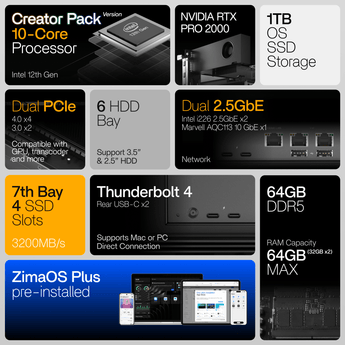
High-speed expansion, built in. Dual Thunderbolt 4, PCIe support, and fast SSD expansion give you more room for demanding setups.
Cooler, quieter, and ready to stay on. A redesigned thermal system keeps performance stable while reducing noise for home or studio use.
Still zero lock-in. Run ZimaOS Plus or choose the operating system that fits the way you want to build.
시작하기 전에
Q: Which ZimaCube 2 model should I choose? A: Choose Standard for personal cloud, media libraries, backups, and lighter self-hosting or editing workflows. Choose Pro if you want more CPU headroom, 10GbE, and faster SSD expansion for heavier multitasking or more demanding active projects. Choose Creator Pack if you need the most powerful setup, with 64GB RAM, 1TB SSD, and dedicated GPU support for more advanced creative or AI workflows.
Q: Can I run my own OS? A: Yes. ZimaCube 2 is built on standard hardware and follows a zero-lock-in approach. It comes with ZimaOS Plus preinstalled, while remaining compatible with a wide range of other operating systems and self-hosting setups. This openness is also a core part of the official product positioning.
Q: Is the Standard model enough for me? A: For many users, yes. ZimaCube 2 Standard is a strong fit for personal cloud, backups, media libraries, Docker apps, and lighter creative or self-hosting workflows. If your work involves heavier multitasking, faster active project storage, or more demanding editing and expansion needs, Pro version gives you more room to grow.
Q: What does the 7th bay mean in practice? A: The 7th bay is designed for high-speed SSD expansion. On Standard, the shared bandwidth is around 800 MB/s, which is generally suitable for lighter active workflows and fast-access storage. On Pro and Creator Pack, the 7th bay reaches around 3200 MB/s, making it better suited for more demanding editing, scratch storage, and performance-focused workflows.
Q: How quiet is it? A: ZimaCube 2 uses a redesigned thermal system built for cooler and quieter operation. According to the recent launch materials, full-load CPU temperatures are reduced by nearly 30%, while system noise stays around 30 dB.
배송 및 배송 안내
Orders are usually arranged within 72 hours after payment (holidays excluded)
For ZimaCube 2, shipments are handled via express carriers such as DHL, FedEx, or UPS. Delivery to most countries takes around 5–7 business days
Questions about the product or shipment? Contact shop@icewhale.org or reach us via the online chatbox
I got pretty annoyed at my previous home Nas as it just stopped working over nothing. This one just works and it is gloriously powerful. Good purchase!
Y
YONGIL L. (Uiwang-si, KR)
New Gitlab server is running
it is great for my purpose of gitlab server in the developemnt team
Reviews in Other Languages
자주 묻는 질문
개인용 클라우드, 미디어 라이브러리, 백업, 그리고 가벼운 셀프 호스팅이나 편집 작업에는 Standard를 선택하세요. 더 많은 CPU 여유, 10GbE, 더 빠른 SSD 확장을 통해 여러 작업을 동시에 처리하거나 성능을 더 많이 요구하는 진행 중인 프로젝트를 수행하려면 Pro를 선택하세요. 64GB RAM, 1TB SSD, 전용 GPU 지원을 갖춘 가장 강력한 구성이 필요하고 고급 크리에이티브 또는 AI 작업을 하려면 Creator Pack을 선택하세요.
네. ZimaCube 2는 표준 하드웨어를 기반으로 제작되었으며, 특정 생태계에 종속되지 않는 방식을 따릅니다. ZimaOS Plus가 사전 설치되어 있지만, 다양한 운영체제 및 셀프 호스팅 환경과도 호환됩니다. 이러한 개방성은 공식 제품 포지셔닝의 핵심 요소이기도 합니다.
ZimaCube 2는 더 낮은 온도와 조용한 작동을 위해 열 관리 시스템을 새롭게 설계했습니다. 최근 출시 자료에 따르면, 최대 부하 시 CPU 온도는 거의 30% 낮아지고 시스템 소음은 약 30 dB를 유지합니다.
특히 가벼운 작업이나 단일 스트림 4K 작업 등 일상적인 워크플로에는 Standard가 대체로 적합합니다. 더 많은 멀티태스킹이나 빠른 공유 스토리지, 더 높은 성능이 필요한 편집 작업을 수행한다면, Pro는 더 강력한 프로세서와 10GbE, 더 빠른 SSD 확장 기능으로 한층 여유로운 성능을 제공합니다.
7번째 베이는 고속 SSD 확장을 위해 설계되었습니다. Standard에서는 공유 대역폭이 약 800 MB/s로, 일반적으로 비교적 가벼운 작업과 빠른 액세스가 필요한 스토리지에 적합합니다. Pro와 Creator Pack에서는 7번째 베이의 대역폭이 약 3200 MB/s에 달해, 더욱 까다로운 편집 작업, 스크래치 스토리지 및 성능 중심의 작업에 더 적합합니다.
네. 실용적인 구성은 진행 중인 프로젝트에는 더 빠른 SSD 저장 장치를 사용하고, 장기 보관과 아카이브에는 대용량 드라이브를 사용하는 것입니다. 이렇게 하면 크리에이티브 작업 흐름에 잘 맞고, ZimaCube 2를 작업 공간과 장기 저장 공간으로 더욱 편리하게 사용할 수 있습니다.
ZimaCube 2는 시중의 대부분의 주요 하드 드라이브 브랜드 및 용량과 호환됩니다. 전체 호환성 목록은 여기에서 확인할 수 있습니다: 호환성 목록
섀시 내부에서 ZimaCube 2는 SFF 싱글 슬롯 또는 듀얼 슬롯 설치용 로우 프로파일 GPU를 지원하며, TDP는 75W 미만이어야 합니다. 크기가 더 크거나 전력 소모가 더 높은 그래픽 카드는 외장 GPU 도크 사용을 권장합니다.




 ZimaBoard SE – 간편한 홈 서버 부터 $159.00 USD /

 ZimaBoard 2 - 큰 아이디어를 위한 미니 홈 서버

 ZimaCube 2 개인용 클라우드 홈 NAS 부터 $799.00 USD /


