
If the Search box disappears completely from ZimaOS Files, check the Search Index toggle before reinstalling anything. Go to Settings → General → Developer Mode → Search Index, enable it, then reload Files. In the verified 1.5.4 case, that restored the missing search interface immediately.
This issue should be kept separate from ZimaOS AI Search. Basic file search depends on indexing; the optional AI module adds richer local search features for media. A missing Search box does not automatically mean your hardware lacks a GPU or that the AI module is broken.
What the Missing Search UI Looks Like
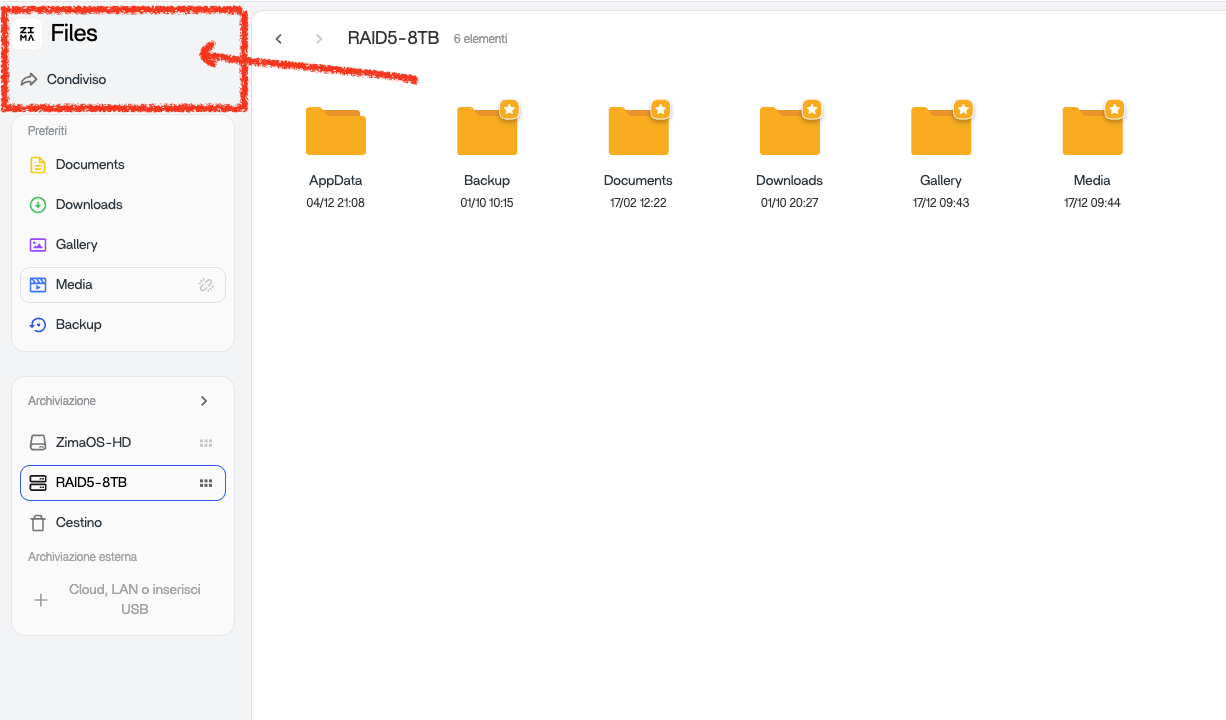
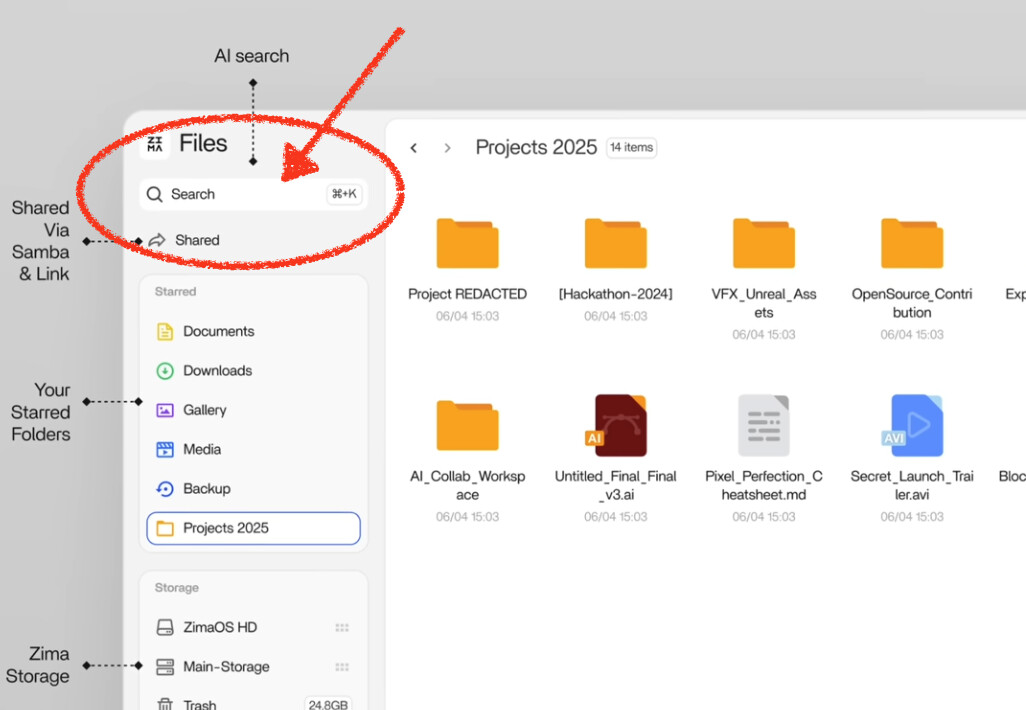
The useful clue is that the entire Search field is absent, not merely returning zero results. In the source case, refreshing the browser, logging out, rebooting, and updating ZimaOS did not help because Search Index remained disabled.
Step 1: Re-Enable Search Index
- Open Settings.
- Go to General.
- Enable Developer Mode if it is off.
- Scroll to the Search Index option.
- Turn it on.
- Reload or reopen the Files app.
The original user confirmed that this restored search. That makes it a verified fix for this symptom, not just a speculative forum workaround.
Step 2: Give the Index Time to Rebuild
If Search returns but newly added files do not appear immediately, indexing may still be catching up. Large libraries can create temporary CPU and disk activity while metadata is scanned.
Do not toggle the index repeatedly during that period. Let it stabilize, then test with a filename you know exists.
Step 3: Test Basic Search Before AI Search
Search for a simple exact filename or folder name first. If that works, the core file index is alive. Only then troubleshoot optional AI-enhanced search features.
The current ZimaOS AI Search guide explains the separate ZimaOS-AI module and its requirements.
Why a Reboot Alone May Not Fix the Missing Search Box
A disabled feature flag or service setting can survive a reboot exactly as configured. Restarting the server only repeats the same configuration. That is why checking the Search Index toggle is more useful than repeatedly rebooting when the UI element is completely absent.
What If the Search Index Toggle Is Already On?
Try a clean browser session
Use a hard refresh or private window to rule out stale frontend assets after an update.
Check whether the field is missing or search is merely empty
If the field exists but results are incomplete, focus on indexing state. If the field itself is gone, focus on feature/UI state.
Record the exact ZimaOS version
The solved case occurred on 1.5.4. If the same symptom happens on a current release, report it as a new regression rather than assuming every internal mechanism is identical.
How AI Search Changes the Picture
ZimaOS AI Search can use a local model to extract features from image, audio, and video files. That is an optional enhancement. You do not need to diagnose AI hardware just to restore a basic missing Search field.
If basic search works but AI-style media discovery does not, then move to the AI module, model, GPU/resource, and indexing requirements described in the current documentation.
Performance After Re-Enabling Search Index
Indexing can briefly increase resource usage on a large NAS. If CPU or storage remains unusually busy long after the index should have completed, check whether a specific directory is changing constantly or whether another application is also scanning the same library.
The NAS performance checklist is useful for sustained performance problems.
What Not to Do First
- Do not reinstall ZimaOS before checking the Search Index setting.
- Do not install the AI module merely to restore the basic search box.
- Do not assume the absence of a GPU explains a missing basic UI field.
- Do not repeatedly rebuild the index without first checking whether it is simply disabled.
FAQ
Where is the Search Index setting in ZimaOS?
Open Settings → General, enable Developer Mode, then find the Search Index toggle in that section.
Do I need a GPU for basic ZimaOS file search?
No. The missing-search-field case was resolved by re-enabling Search Index. GPU requirements relate to optional AI-enhanced search features, not the existence of the basic field.
Why did search disappear after an update?
The source case showed the index setting disabled after earlier updates, but it did not establish why that setting changed. Treat the verified fix separately from the unproven cause.
What if search still does not return after I enable the index?
Try a clean browser session, give the index time to rebuild, verify the current ZimaOS version, and then collect logs or report a new issue if the field remains absent.


