


Two ZimaBlades in a Printed Rack with Numbered Drive Drawers


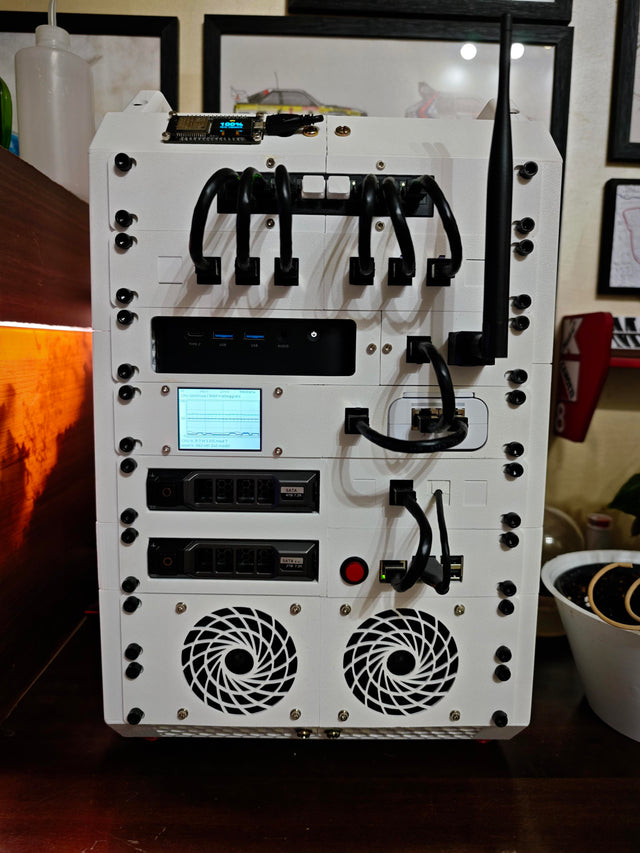
Thank you to u/DizzyKA143 for sharing a printed rack built around two ZimaBlades and numbered drive drawers. Both boards are running ZimaOS, and the first already has its NAS configured. The second is at a different stage: the owner is still working through AdGuard Home and Tailscale setup after many years away from Linux-based machines.
The original Reddit update and the creator’s replies explain how the drive trays connect and which finishing parts are still on order. This is a useful view of a homelab becoming operational one role at a time.
Two Boards Give the Rack Two Different Starting Points
The owner’s update begins with both machines having arrived and booted. That is an important milestone, but the post does not describe identical software readiness on the two boards. The NAS is configured on Blade 1, while application installation and configuration remain unresolved on Blade 2.
That distinction gives the photograph a practical context. The repeated board positions and matching drive drawers create a consistent physical system, even while the software work progresses unevenly. A tidy arrangement does not mean every named application is already serving the household.

In a reply, the creator identifies the standard ZimaBlade 7700 kit and explains that the rack, board mounts and drive drawers were printed separately. The assembly therefore combines a commercially supplied server kit with custom physical organization.
The Inventory Separates Working Roles from Unfinished Tasks
| Area | State described by the owner |
|---|---|
| Two ZimaBlades | Arrived and running ZimaOS |
| Blade 1 | NAS configured |
| Blade 2 | AdGuard Home and Tailscale installation or configuration still being worked through |
| Printed structure | Rack, board mounts and drive drawers made by the creator |
| Drive connections | Tray-mounted SATA extensions and the kit’s SATA Y cable |
| Finishing work | Connectors awaited for the top fan and reset/power-switch LEDs |
The matching product reference is ZimaBlade. The source does not provide the drive capacities, a RAID policy or a complete account of the applications installed on the NAS.
Our two-ZimaBlade printed homelab story follows a different creator with a more developed service collection. The useful comparison is how repeating small hardware can support distinct responsibilities, rather than an expectation that both projects use the same stack.
Drive Drawers Turn Cable Placement into Part of the Design
A commenter asks how the drives connect, and the creator describes mounting male-to-female SATA connections on the tray, then connecting them through the Y cable supplied with the kit. That reply is the evidence for the connection arrangement; it is more informative than guessing from the orange and black front panels.
The numbered drawers make the physical storage positions easy to identify. Numbering can become useful during maintenance when it corresponds to a written inventory. It does not, by itself, reveal a disk’s filesystem, pool membership or backup role.
The official ZimaBlade hardware guide provides the appropriate starting point for checking board connections and compatible setup procedures. The creator’s custom tray should be understood alongside those hardware requirements, rather than treated as a complete electrical assembly guide.
The owner says the print file is on MakerWorld, but the retrieved reply does not supply an exact model URL. This account therefore does not attach an unrelated rack model and imply it is the one used in the photograph.
AdGuard Home and Tailscale Solve Different Problems
The applications being explored on Blade 2 have different purposes. AdGuard Home provides network DNS filtering. Tailscale provides private network connectivity between enrolled devices. Installing one does not configure the other, even when both are intended to improve access to a home server.
The AdGuard Home getting-started guide separates installing the service from directing clients to use it. This is a helpful distinction for understanding why an application can be present while the household’s DNS traffic still follows another path.
The Tailscale quickstart describes connecting devices to a private network. It is a separate reference for the second application named by the owner. The post does not establish that either the installation or network configuration problem was resolved.
There are no logs or exact error messages in the update. It would therefore be inappropriate to invent a cause, such as a port conflict, and then present a fix as part of the creator’s experience. The honest endpoint is a working first NAS and further learning on the second board.
The Fan and Switch Lighting Are Still Finishing Work
The creator is waiting for connectors before hooking up the top fan and the LEDs associated with reset and power switches. These are explicitly described as pending tasks. The presence of mounting positions in the photo should not turn them into completed features.
This is a familiar stage in a custom enclosure project: the structure can be assembled before every peripheral connection is finished. Keeping a short list of the remaining connections helps distinguish the usable core from the parts still being completed.
For another builder, the practical question is how later maintenance will work. Can a drawer be reached without disturbing its neighbor? Can the board be disconnected while leaving the rack wiring understandable? The source does not publish measured clearances or a wiring diagram, so those questions need checking against the builder’s own components.
A Configured NAS Is a Starting Point for Recovery Planning
The first board’s NAS role gives the project an immediate use, but the update does not describe its data-protection policy. “NAS configured” does not tell a reader which files are stored, how permissions are assigned or whether a recovery copy exists elsewhere.
Our Proxbox backup-server story offers a related example of giving recovery an explicit place in the homelab. For a two-board setup, that discussion can help frame future decisions without pretending the second board is already a backup server.
A useful next milestone for a similar project would be a small, documented file test: record the location, read it from another device, then identify its independent recovery copy. That is an editorial planning suggestion, not a test result attributed to this creator.
FAQ
Are both ZimaBlades running ZimaOS?
Yes. The owner says both are up and running ZimaOS.
Do both boards already have working NAS configurations?
The update specifically confirms a configured NAS on Blade 1. It does not assign that same role to Blade 2.
Were the AdGuard Home and Tailscale issues fixed?
No verified resolution is provided in the update. They remain work in progress in this story.
Are drive capacities and RAID settings specified?
No. The creator explains the tray connections without publishing those storage details.
Conclusion
This dual-ZimaBlade rack shows why physical consistency and software readiness are different milestones. Printed mounts and numbered drawers give two small servers an organized home, while the first NAS provides a working base and the second board leaves room for learning. The project remains useful precisely because its completed roles and unfinished connections are easy to distinguish.
Welcome to the ZimaSpace community! Share your setup, ask questions, and explore practical build guides, real user stories, and product updates with fellow self-hosters.

Recommended products

Zima Campaign Hub
More to Read
A First ZimaOS Laptop Server for Photos and the Next Hardware Move
An old laptop becomes a first ZimaOS photo server, raising questions about moving data drives, learning containers and sharing Immich with family.
A ZimaBlade TrueNAS Mirror in a Printed Three-Machine Homelab
A printed rack gives ZimaBlade two mirrored 4 TB disks beside a Raspberry Pi and Ryzen mini PC, with front displays, drive bays and...

A Ryzen ZimaOS Media Server Built from Parts Already on Hand
A Ryzen 2700X tower starts with ZimaOS, Jellyfin, Pi-hole and Tailscale, while storage upgrades and energy readings stay in their reported context.


