
llama.cpp 0.8.0: New Models, Real-Time Voice, and Local AI Features


llama.cpp v0.8.0 is a meaningful update for local AI, especially multimodal inference. Released October 28, 2026, it adds support for the Liquid AI LFM3 family, new model architectures including DeepSeek V4.1 Flash, and experimental realtime audio capabilities through /v1/realtime and text-to-speech through POST /tts. It also improves model management, server tools and several memory paths. That does not mean every newly listed architecture or audio workflow is production-ready on every device.
For a home server, the most useful first action is to pin the release, run one known GGUF model, record peak memory and latency, and keep the API private. Only then test vision or audio. A new server endpoint is not a substitute for a compatible speech model, media frontend, microphone pipeline, access control or adequate GPU/CPU capacity.
| Release question | Answer for home-server users |
|---|---|
| When did v0.8.0 release? | October 28, 2026 (GitHub release tag). |
| Which new model family stands out? | Liquid AI LFM3 text, vision, audio and omni, plus additional architectures. |
| Is realtime voice supported? | New experimental streaming audio API and /v1/realtime server endpoint; actual capabilities depend on model/backend. |
| Is TTS available? | A POST /tts endpoint was added for compatible text-to-speech models. |
| Does v0.8.0 lower every model's RAM needs? | No. Improvements are workload/backend-specific; RAM remains determined by the selected model and serving settings. |
| Can this run on ZimaOS? | Potentially using a compatible Linux build/container; this article does not claim ZimaOS-package certification. |
What Is Actually New in llama.cpp 0.8.0?
The official v0.8.0 release notes group the changes into model compatibility, multi-modality, API/server updates, core memory management and backend optimizations. The best way to understand the release is to separate features available to a local user immediately from advanced features that require specific hardware or new integration code.
| Area | Verified change | What to test |
|---|---|---|
| Model support | LFM3-1.7B, LFM3-VL-2B, LFM3-Audio-2B and LFM3-Omni-2B; DeepSeek V4.1 Flash and others | Exact checkpoint, GGUF format and chat template. |
| Audio streaming | Experimental mtmd_audio_stream API |
Whether your chosen model handles live audio frames correctly. |
| Realtime server | New /v1/realtime conversation/transcription endpoint |
Client protocol, streaming behavior and failure recovery. |
| Speech output |
POST /tts for compatible TTS models |
Model compatibility, voice output quality and latency. |
| MoE memory | Host-resident expert caching changes from LRU to a 50/50 SLRU design | Peak RAM, disk/network pressure and real tokens/sec on the target MoE. |
| Server/router/UI | Device memory margin, better conversation tools, Hugging Face model browsing and downloads | Persistence, device limits and reproducible model selection. |
| Backends |
ggml v0.28.0 and CUDA/SYCL/OpenCL/Hexagon improvements |
Platform-specific regressions before deployment. |
The DeepSeek V4.1 Flash update explainer is useful for distinguishing a model update from a runtime's ability to load a model. A release note that says “supported” does not guarantee a specific quantization, GPU configuration or real-time user experience.
How Do Realtime Voice and Text-to-Speech Work in This Release?
Previously, many home-hosted voice assistants joined separate components: microphone capture, speech-to-text, an LLM request and speech synthesis. Version 0.8.0 introduces an experimental incoming audio stream path in the multimodal interface (mtmd) and exposes a realtime server endpoint using an OpenAI-style realtime protocol. The server also has a separate POST /tts endpoint for compatible models.
These are distinct capabilities. /v1/realtime is the entry point for conversation or transcription workflows with audio streaming; /tts produces speech from text through a compatible speech model. Neither creates an always-listening assistant by itself, and neither guarantees a particular language, round-trip latency, output audio format or platform integration without testing the actual checkpoint.

For a practical audio test, confirm microphone permissions, sample rate, codec conversion, partial-frame behavior, end-of-turn detection, cancellation and network timeout handling. Keep any audio recordings and transcripts under an explicit retention policy. If the user-facing app is on another machine, the fact that inference runs on a NAS does not mean audio never crosses a network.
Why Do the Memory and MoE Changes Matter?
v0.8.0 introduces a 50/50 segmented-LRU (SLRU) cache for mixture-of-experts weights stored in host memory. The goal is better handling of experts with different reuse patterns; actual benefit varies with expert routing, prompt distribution and memory residency. For ordinary small dense models, this change may have little or no effect.
Sparse-attention processing is also refactored, and the release includes cleaner no_alloc handling, new ggml operations and backend optimizations. These can influence memory allocation or throughput, but do not erase the basic model-serving equation: weight footprint + runtime buffers + KV/context state + multimodal tensors + concurrency + operating headroom.
A 4-bit 2B-class model may fit easily where a larger checkpoint cannot. Even so, serving longer prompts and multiple clients can overload a small NAS. Our model-footprint routing guide explains why total peak memory, not just the GGUF download size, belongs in capacity planning. The Kimi K3 deployment limits analysis shows the opposite extreme: runtime features cannot make a trillion-parameter checkpoint fit consumer memory.
Which New Models Can You Actually Try Locally?
If you want a quick, measured local experiment, LFM3-1.7B GGUF is a better starting point than an untested large multimodal checkpoint. Its official GGUF card documents compatible llama.cpp use. Move to LFM3-VL-2B when you need images or video, and test the correct projector and preprocessing. Audio/omni require their own model-specific integrations.
| Workload | Practical starting point | Don't assume |
|---|---|---|
| Text inference on a CPU-only 8 GB host | Small Q4 GGUF, 4K context, one request | Fast voice or 256K-context service. |
| Private document Q&A on 16 GB+ | Small model plus a separate retrieval/indexing service | The model automatically reads NAS files. |
| Vision on 16–32 GB+ or suitable GPU | VL model and verified vision projector | Image/video tokens cost the same as plain text. |
| Voice assistant on a capable test machine | Compatible audio model and experimental API client | Stable unattended 24/7 operation without client testing. |
| Shared ZimaCube 2 service | Separate storage, model cache and app data; cap resources | Disk size alone gives GPU-like inference speed. |
For more comparisons of local model sizes and quantization, see our consumer-hardware AI model guide. If you use the ZimaOS App Store, Ollama hardware requirements provide a different deployment option; Ollama packaging and llama.cpp upstream features are not interchangeable guarantees.
How Can You Install and Verify llama.cpp v0.8.0 on Linux?
The following is a source-build verification recipe, rather than an unsupported claim that v0.8.0 is already available in the ZimaOS App Store. It builds a CPU-capable server, pins the tag for reproducibility, uses a documented LFM3 GGUF, and binds only to loopback:
git clone https://github.com/ggml-org/llama.cpp.git
cd llama.cpp
git checkout v0.8.0
cmake -S . -B build
cmake --build build --config Release -j --target llama-server
./build/bin/llama-server \
  -hf LiquidAI/LFM3-1.7B-GGUF:Q4_K_M \
  -c 4096 --host 127.0.0.1 --port 8080
In a second terminal on the same host, check that the server actually loaded a model:
curl -s http://127.0.0.1:8080/v1/models
curl -s http://127.0.0.1:8080/v1/chat/completions \
  -H 'Content-Type: application/json' \
  -d '{"model":"local","messages":[{"role":"user","content":"Name two benefits of a local GGUF model."}],"max_tokens":128}'
Replace "local" with the exact model ID returned by /v1/models if needed. The release explicitly requires a model argument (--model or -hf) in current CLI usage, so an old launch script without either can stop working. See the upstream build instructions for supported CUDA, Vulkan, Metal and other backend choices. Do not expose port 8080 publicly until authentication, TLS, limits and trusted-client boundaries are in place.
On a container-based home server, you also need persistent model storage, resource limits, compatible CPU/GPU capabilities and a verified mount mapping. The best next reference is deploy a local LLM without breaking NAS apps; follow it before moving model downloads onto a shared boot drive.
What Should You Test Before Upgrading an Existing AI Server?
A feature-rich upstream release can change behavior even when the server starts cleanly. Keep the current binary or container image, model hash, old flags and at least one accepted response as a rollback reference. Then run a small regression matrix:
- Compatibility: record the tag, GGUF filename, checksum, backend and chat template; check for warnings at startup.
- Latency: run the same short and long prompts on both versions and record prefill time, decode speed and 95th-percentile latency, without changing the model or context.
- Memory: record peak host RAM, VRAM, model-unloading behavior, concurrent requests and whether other NAS apps stay responsive.
- Audio: separately validate realtime connection lifecycle, transcripts, TTS output, cancellation and reconnection if those features are relevant.
- Security and recovery: verify network binding, file permissions, persistent paths, restart behavior and rollback to the previous binary.
Use our model-file path verification checklist and the discussion of separating runtime state from weights. This matters especially when a model browser makes downloads more convenient: ease of downloading is not a substitute for tracking where several gigabytes of data actually landed.
FAQ
Is llama.cpp v0.8.0 the same as LFM3?
No. llama.cpp is an inference runtime. LFM3 is Liquid AI's family of model checkpoints. v0.8.0 adds new LFM3 integration support, but model files still need to be chosen and obtained separately.
Does v0.8.0 let me talk to any GGUF model in realtime?
No. The new audio paths are experimental and model-dependent. A text-only model does not acquire speech input/output simply because the server exposes /v1/realtime or /tts.
Is /v1/realtime a production-ready voice API?
Treat it as experimental at release. Test the chosen model, audio encoding, client compatibility, interruption behavior and stability under expected sessions before using it for unattended service.
Will upgrading reduce VRAM for all of my models?
Not necessarily. Some memory and backend changes can improve targeted workloads, but VRAM and RAM depend on weights, context, quantization, device backend and request count. Benchmark your exact setup rather than extrapolating from release notes.
Do I need an NVIDIA GPU to run llama.cpp?
No. It supports CPU inference and multiple GPU backends. CPU-only performance can be adequate for small models but much slower than well-matched acceleration. First check available RAM and model size, then select a backend.
Can I install v0.8.0 directly from the ZimaOS App Store?
This article does not verify the ZimaOS App Store package version or provide an official one-click installation. The guide covers a pinned upstream Linux source build and gives checks you can adapt to your hardware or container environment.
Will my old llama-server command keep working unchanged?
Check your flags and models. v0.8.0 notes that current CLI commands require --model or -hf. Pin the version, inspect startup logs, test API responses, and retain rollback files before changing a working service.
Final Takeaway
llama.cpp v0.8.0 is most immediately useful for broader model compatibility and a more capable local server; realtime voice is the exciting but still experimental part. A small LFM3 GGUF on a private loopback API is a sensible first verification target. Record the actual memory footprint and output quality before adding image inputs, audio streams or concurrent users.
For NAS owners, the winning architecture remains disciplined: model storage on a known volume, an inference runtime sized to real available RAM/VRAM, and protected applications consuming its API. ZimaCube 2 can serve as a private storage and application platform; do not market it as a guaranteed high-speed multimodal inference node without a measured hardware and backend configuration. If you are evaluating the newly supported model family, read our LFM3 local model and hardware guide alongside the actual runtime release notes.
Sources and Scope
Official documentation checked October 29, 2026: llama.cpp v0.8.0 notes, upstream build guide, LFM3-1.7B official GGUF, LFM3-VL official GGUF and Liquid AI launch explanation. Feature support comes from upstream release notes; ZimaSpace has not independently benchmarked this release or certified it on a particular ZimaOS build.
Cover image: ggml-org/llama.cpp, official GitHub v0.8.0 release card.

Recommended products

Tech & AI HUB
More to Read
Liquid AI LFM3 Explained: Can a 2B Multimodal Model Run Locally?
Liquid AI’s LFM3 is a family of compact open-weight text, vision, audio and omni models. Learn what the 1 GB 4-bit text footprint really...
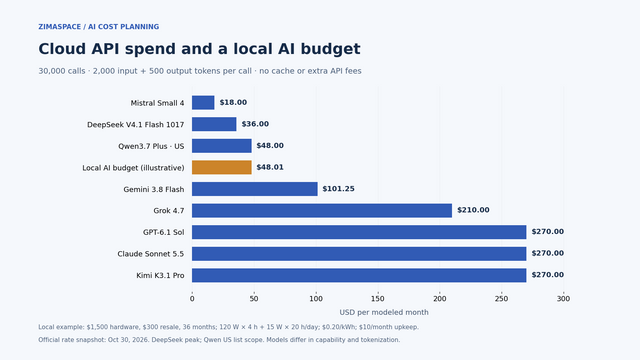
Cloud AI API Pricing vs Local AI: What Does Your Workload Really Cost?
Compare cloud API token charges with local AI hardware, electricity and upkeep. Work through a monthly example and use the free ZimaSpace cost calculator.
The Secret-Zero Problem: Why a Home AI Agent Still Needs an Initial Trust Root
A mechanism-first explanation of the secret-zero problem, its shared-resource tradeoffs, three query-fanout FAQs, and a practical verification protocol.


