
Why Small Offices Are Building Dedicated AI Servers in 2026


Small offices are starting to treat AI differently. At first, AI was just another subscription: one tool for writing, one for coding, one for search, one for meetings, and one for customer support. That was fine when only one person was experimenting. It becomes expensive and messy when the whole office starts using AI every day.
The bigger problem is not only cost. It is workflow fragmentation. A team asks ChatGPT for research, copies the answer into a document, sends it to another AI tool for rewriting, pastes it into email, saves notes in Notion, then repeats the same process the next day with almost no shared memory. The team thinks it is using AI, but the human is still the system connecting everything together.
This is why the idea of an AI Office is gaining attention. A recent discussion about AI Office replacing scattered AI subscriptions captured the shift clearly: small teams are moving from renting isolated AI tools toward building AI infrastructure they can own, connect, and improve over time.
Quick Answer: Why Do Small Offices Need a Dedicated AI Server?
Small offices need dedicated AI servers because AI is becoming shared office infrastructure, not just a personal chatbot. Once AI needs to remember company knowledge, search internal documents, draft customer replies, summarize meetings, connect to tools, and run workflows automatically, a single cloud chat window is no longer enough.
| Office Problem | Why Subscriptions Feel Limited | How a Dedicated AI Server Helps |
| Too many AI tools | Each app has its own history, model, cost, and workflow | Centralizes AI access, local models, cloud APIs, tools, and team knowledge |
| No shared memory | Every prompt starts from zero or only remembers one user’s chat | Builds a private knowledge base from documents, SOPs, notes, and project history |
| Manual copy-paste work | Humans still move information between apps | Uses automation workflows to trigger actions and pass context between tools |
| Privacy concerns | Office files may be sent to many different SaaS tools | Keeps sensitive documents, embeddings, and workflows on local infrastructure |
| Unpredictable AI spending | Per-seat and per-tool costs scale with every employee | Uses local AI for routine work and reserves cloud AI for high-value tasks |
The Real Shift: From AI Tools to an AI Office
A small office does not fail to benefit from AI because the models are weak. It fails because the workflow is still manual. Employees open one AI app, ask one question, copy the output, paste it into another system, then repeat the same work again tomorrow.
An AI Office changes the structure. Instead of one chatbot trying to do everything, the office has specialized AI workers: a research assistant, a support assistant, a sales assistant, a reporting assistant, and an operations assistant. Each one has a narrow job, access to the right knowledge, and a defined workflow.
This mirrors how a real business works. A company does not scale by asking one employee to do every job. It scales by creating roles, systems, and handoffs. A dedicated AI server gives small offices a place to run those roles as software.
Why AI Subscriptions Are Starting to Feel Like Office Rent
AI subscriptions are easy to start and hard to stop. One employee wants a writing assistant. Another wants coding help. Someone else needs meeting summaries. A manager wants AI inside email and spreadsheets. Soon, the company is paying for several AI layers without a clear shared system.
Microsoft’s own Microsoft 365 Copilot business pricing shows how AI is becoming a paid layer inside everyday office software such as Word, Excel, PowerPoint, Outlook, and Teams. That makes AI more convenient, but it also reinforces the per-user subscription model.
The issue is not that cloud AI is bad. Cloud models are still valuable for frontier reasoning, coding, research, and complex creative work. The issue is that many office tasks are repetitive: answering similar emails, searching documents, summarizing notes, preparing reports, updating CRMs, and drafting routine content. Those tasks do not always need a premium cloud model every time.
What Is a Dedicated AI Server for a Small Office?
A dedicated AI server is a local or private machine that runs the core AI infrastructure for an office. It can host local models, AI chat interfaces, document search, vector databases, automation workflows, and connectors to office tools.
For a small office, this does not mean training a frontier model. It usually means building a private operating layer around existing open-source and cloud-compatible tools. The AI server becomes the place where office memory, models, files, automations, and AI employees meet.
A simple AI office stack
| Layer | Example Tool | Role in the AI Office |
| Model runtime | Ollama | Runs local open-weight models for routine tasks |
| AI interface | Open WebUI | Gives the team a self-hosted AI workspace |
| Workflow automation | n8n | Triggers actions when emails, forms, files, or tasks arrive |
| Tool connection | MCP | Connects AI apps to files, databases, calendars, browsers, and internal tools |
| Memory layer | RAG / vector database | Lets AI search company knowledge before answering |
| Storage and compute | AI NAS or local server | Stores documents, models, logs, workflows, and long-term context |
Memory Is the Feature Small Offices Underestimate
Most teams think the next productivity jump will come from a smarter model. In practice, the bigger jump often comes from memory. An assistant that remembers the company’s products, customers, documents, workflows, tone, pricing, meeting notes, and decisions becomes more useful than a generic chatbot with no local context.
Without memory, every AI interaction starts from zero. With memory, the AI system can search office knowledge before answering. That is the difference between “write me a reply” and “draft a reply using our latest refund policy, this customer’s previous ticket, and the tone we use for enterprise clients.”
This is where a private RAG setup becomes valuable. Instead of uploading documents repeatedly into different tools, a small office can store its knowledge on a dedicated AI server and let different AI assistants query the same source of truth.
Tools Turn AI From a Chatbot Into an Employee
A model without tools can only talk. A model with tools can act. For small offices, that difference matters more than model benchmarks.
A support assistant becomes useful when it can read a new email, search documentation, draft a reply, update a CRM, and notify the team. A finance assistant becomes useful when it can read invoices, extract fields, update a spreadsheet, and flag missing data. A research assistant becomes useful when it can monitor sources, summarize changes, and save useful findings into a knowledge base.
The Anthropic Model Context Protocol announcement defines MCP as an open standard for building secure two-way connections between data sources and AI-powered tools. The official Model Context Protocol introduction also describes MCP as a way for AI applications to connect to external systems such as local files, databases, tools, and workflows.
Why n8n Becomes the Operations Layer
For an AI Office, the model is not enough. The office also needs triggers, routing, approvals, retries, notifications, and handoffs. This is where workflow automation matters.
The official n8n workflow automation documentation describes n8n as a workflow automation tool that combines AI capabilities with business process automation. For small offices, this makes n8n a practical operations layer: when something happens, the workflow decides what should happen next.
Example: AI support workflow for a small office
| Step | Action | AI Office Role |
| 1 | New customer email arrives | n8n triggers the workflow |
| 2 | Email is classified | AI support assistant detects topic and urgency |
| 3 | Knowledge base is searched | RAG retrieves policy, docs, and previous answers |
| 4 | Draft reply is created | Local or cloud model writes the response |
| 5 | Human reviews if needed | Approval gate prevents risky automation |
| 6 | CRM or ticket is updated | Workflow writes the result back to business systems |
This is very different from manually asking a chatbot what to say. The workflow, memory, and tool access turn AI into an operational system.
Why Open WebUI and Ollama Matter for Local AI Workflows
Many small offices do not want every routine prompt to depend on a public cloud model. They want a local workspace where staff can use internal documents, run open models, and connect tools without scattering company context across many apps.
Open WebUI self-hosted AI platform is useful here because it is designed as a self-hosted AI platform that can operate offline and supports Ollama and OpenAI-compatible APIs. This gives teams a single interface for both local and cloud-based models.
Ollama local model API documentation explains how Ollama’s API can run and interact with models through a local endpoint. In an office setting, that makes it practical to route routine tasks to local models and reserve cloud models for tasks that truly need frontier reasoning.
Cloud AI vs. Your Own AI Office
A dedicated AI server does not mean canceling every AI subscription. The better strategy is hybrid. Use cloud AI when you need the strongest reasoning, coding, or research. Use your own AI Office for repeatable internal workflows, private documents, long-term memory, and automation.
| Area | Cloud AI Subscription | Dedicated AI Server / AI Office |
| Best for | Frontier reasoning, complex coding, advanced research | Routine office workflows, local memory, private documents, automation |
| Cost model | Recurring per-user or usage-based spending | Hardware plus maintenance, with local models for repeatable work |
| Data location | External provider infrastructure | Local or private infrastructure |
| Memory | Often tied to one account or one product | Shared office knowledge base controlled by the team |
| Automation | Limited by each SaaS product | Can connect workflows, tools, files, and approvals |
| Ownership | Rented access | Owned infrastructure and reusable workflows |
The goal is not to reject cloud AI. The goal is to stop using expensive cloud AI for every repetitive task when a local AI server can handle much of the daily workflow.
What Can a Small Office Run on a Dedicated AI Server?
A small office AI server does not need to do everything on day one. The best first workflows are repetitive, low-risk, and easy to review.
Document search and private RAG
Store SOPs, PDFs, meeting notes, product documents, proposals, and support articles in one place. Let an AI assistant search those files before answering staff questions.
Email and customer support drafts
Use AI to classify incoming emails, retrieve relevant documentation, and prepare draft replies. Keep human approval for sensitive cases.
Meeting memory and reporting
Store meeting summaries, decisions, deadlines, and project notes. Let AI generate weekly updates based on actual office history.
Sales and operations workflows
When a new lead arrives, an AI workflow can enrich the lead, summarize context, draft a response, update a CRM, and notify the right person.
Local content and marketing research
For small agencies, AI can track sources, summarize trends, draft outlines, prepare social posts, and save reusable research into the knowledge base.
When Does an AI NAS Make Sense?
An AI NAS makes sense when the office wants both storage and AI workflows in one private environment. It is especially useful when company documents, project history, media assets, client files, embeddings, logs, and AI workflow outputs need to stay organized and accessible.
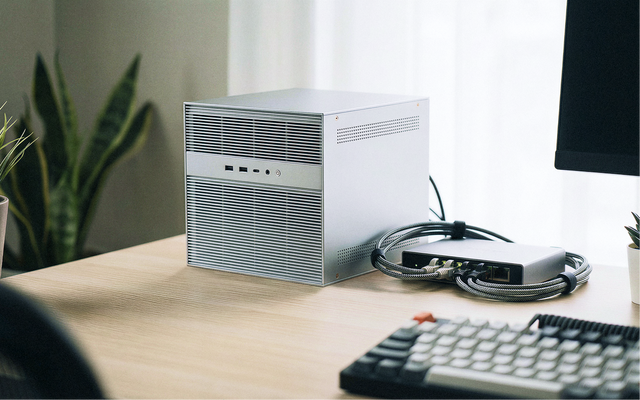
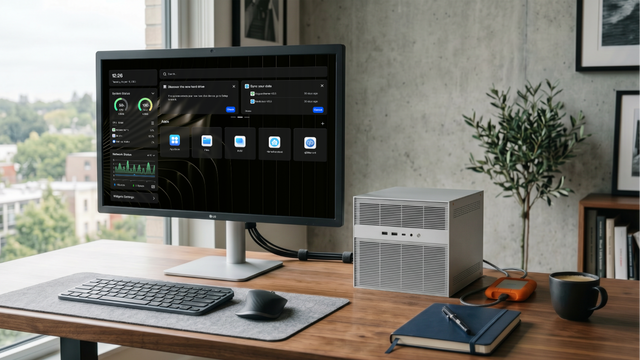
For a small office building local AI workflows, an AI NAS such as ZimaCube 2 can act as the local workspace for files, apps, models, and automation. The value is not only raw compute. It is having one always-on place where office knowledge, storage, and AI tools can live together.
What Hardware Does a Small Office AI Server Need?
The right hardware depends on the workload. A small team running lightweight local models, document search, and automation does not need enterprise infrastructure. But it does need enough RAM, fast storage, stable networking, and room to grow.
| Workload | Hardware Priority | Why It Matters |
| Document RAG | SSD storage and enough RAM | Speeds up indexing, retrieval, and knowledge search |
| Local LLM chat | RAM and optional GPU | Decides model size and response speed |
| n8n automation | Always-on reliability | Workflows should run even when laptops are offline |
| Team file storage | Drive bays, backups, and network speed | Office knowledge needs durable storage, not just a single boot disk |
| Multi-user access | 2.5GbE or better networking | Reduces bottlenecks when several people use the system |
Start Small: The First AI Server Workflow to Build
The best first AI Office project is usually not a full multi-agent company. Start with one workflow that saves time every week.
- Create a shared office knowledge folder.
- Add SOPs, FAQs, product notes, customer policies, and meeting summaries.
- Set up a local AI interface such as Open WebUI.
- Use a local model through Ollama for routine questions.
- Add a RAG or knowledge-search layer.
- Connect one automation workflow in n8n.
- Keep human approval before sending external messages.
Once this works, expand slowly. Add a support assistant, then a reporting assistant, then a research assistant. Each AI employee should have one responsibility and a clear workflow.
What Small Offices Should Not Automate Too Early
A dedicated AI server is powerful, but not every workflow should be automated immediately. Small offices should be careful with tasks involving payments, legal decisions, HR issues, customer refunds, production systems, private credentials, or irreversible changes.
The safer pattern is human-in-the-loop automation. Let AI collect context, draft outputs, summarize evidence, and recommend actions. Let a human approve the final decision when risk is high.
Final Takeaway: The AI Office Is Infrastructure, Not Another App
The most important AI shift for small offices is not just a better model. It is the move from isolated AI tools to connected AI infrastructure. A chatbot can answer one question. An AI Office can remember context, search documents, use tools, trigger workflows, and help multiple roles work together.
Small offices do not need to replace every employee or cancel every AI subscription. They need to stop rebuilding context manually every day. A dedicated AI server gives them a place to own their workflows, memory, and automation instead of renting scattered intelligence across many tools.
In 2026, the advantage will not only come from who has access to the smartest model. It will come from who has the best system around the model: the best memory, the cleanest workflows, the safest tool access, and the most useful AI employees for the business.
FAQ
What is a dedicated AI server for a small office?
A dedicated AI server is a local or private machine that runs AI tools, local models, automation workflows, document search, and office memory. It gives a small team one place to manage AI workflows instead of relying only on separate AI subscriptions.
Does a small office AI server replace ChatGPT or Claude?
No. A small office AI server is best used alongside cloud AI. Use cloud models for hard reasoning, coding, and advanced research. Use the local AI server for repetitive workflows, private documents, RAG, and automation.
Why is memory important for an AI Office?
Memory lets AI assistants search past documents, meetings, customer records, SOPs, and project history before answering. Without memory, every prompt starts from zero. With memory, the office AI system becomes more useful over time.
What tools are common in an AI Office stack?
A practical AI Office stack may include Ollama for local models, Open WebUI for the AI interface, n8n for automation, MCP for tool connections, a vector database for RAG, and an AI NAS or local server for storage and compute.
When should a small office build its own AI server?
A small office should consider an AI server when multiple people use AI every day, internal documents are important, subscription costs are growing, workflows involve repeated copy-paste steps, or privacy and local ownership matter.

Recommended products

AI HUB
More to Read
The Home AI Server Demand Forecast 2027: Why Private AI Workloads Are Moving Closer to Home
A 2027 forecast on why home AI server demand may grow as local LLMs, private RAG, media AI, automation, privacy needs, and cloud infrastructure...
What GPT-5.6 Means for Local AI, Home Servers, and Private Data
A practical guide to GPT-5.6, local AI, home servers, private data, hybrid workflows, RAG, tool calling, and safe cloud model use.
AI Agent at Home: What Can It Actually Automate?
A practical guide to home AI agents, covering smart-home control, local files, private RAG, server reports, approval gates, and safe automation.


