
CasaOS vs ZimaOS: Vilket operativsystem passar bäst för din NAS?


ZimaOS är ett förenklat, fokuserat och öppet NAS-operativsystem.
Communitydrivet operativsystem med Docker-ekosystemet – det här är CasaOS.

Både ZimaOS och CasaOS är centrala projekt från IceWhale-teamet. Medan du experimenterar med dina applikationer och njuter av din serverkonfiguration med CasaOS, väljer du ZimaOS när du konfigurerar en dedikerad NAS för en professionell, säker, högpresterande och färdig att använda upplevelse.

Vi har sett frågorna dyka upp på våra forum, på Discord och på webben: ”Varför finns det två operativsystem? Vad är skillnaden mellan CasaOS och ZimaOS? Vilket passar mig bäst?”
Det här är utmärkta frågor, och i dag vill vi ta itu med dem direkt. I grunden är vi ett communitydrivet företag. Din feedback, dina bidrag och även din förvirring formar våra produkter och vår färdplan. Att det finns två olika operativsystem är inte ett tecken på personlighetsklyvning, utan en återspegling av en evolutionär resa – en resa som du har varit en del av.
Det här inlägget förklarar filosofin bakom varje operativsystem och hjälper dig att välja den perfekta plattformen för dina personliga molnbehov.
CasaOS – få åtkomst till dina appar och filer

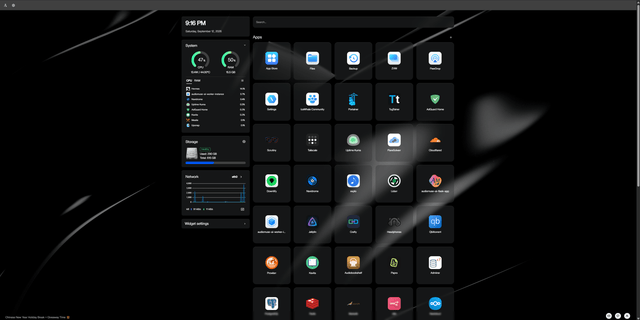
Se CasaOS som ett universellt applikationslager för din personliga server. Det är inte ett komplett operativsystem i sig. I stället är det en snyggt utformad hemöversikt som körs ovanpå en Linux-distribution som du redan har installerat och konfigurerat.
Dess slogan säger allt: ”En communitydriven programvara med öppen källkod som fokuserar på att erbjuda en enkel personlig molnupplevelse kring Docker-ekosystemet.”

CasaOS föddes ur en enkel idé: tänk om du kunde ta vilken maskin som helst, installera ett enkelt och elegant användargränssnitt på den och omedelbart få ett personligt moln och en appserver?
Viktiga egenskaper hos CasaOS:
-
Körs ovanpå ditt Linux: CasaOS är utformat för att installeras på ett befintligt Linux-system, där Debian och Ubuntu är de rekommenderade alternativen. Det ger dig full kontroll över det underliggande operativsystemet.
-
Bred hårdvarukompatibilitet: Eftersom det är ett programvarulager har CasaOS stöd för både x86_64- och ARM-arkitekturer. Det gör det till ett perfekt val för ett stort antal enheter, från en gammal bärbar dator till en Raspberry Pi eller andra enkortsdatorer (SBC).
-
Smidig installation: Glöm tidskrävande operativsysteminstallationer som tar en halvtimme. Det berömda enradskommandot
curl -fsSL https://get.casaos.io| sudo bashär allt som krävs för att förvandla din Linux-dator till ett personligt molnnav på mindre än fem minuter. Det är det snabbaste och smidigaste sättet att påbörja din selfhostingresa. -
Docker-centrerat: CasaOS är byggt kring Docker. Det har en fantastisk appbutik med över 500 populära applikationer (som Immich, Nextcloud och Jellyfin) som är redo att installeras med ett klick. Det har också fullt stöd för anpassade appar via Docker Compose, CLI och YAML-importer.
-
Helt öppen källkod: Både CasaOS-kodbasen och App Store-arkitekturen är öppen källkod. Du kan granska koden, bidra och till och med bygga din egen appbutik.

CasaOS är byggt för teknikentusiaster och hängivna pysslare som ser möjligheter i sin överblivna maskinvara men avskräcks av komplexiteten i traditionell self-hosting. Föreställ dig att du har en extra Raspberry Pi eller en gammal bärbar dator. I stället för att kämpa med kommandorader i timmar kör du ett enda kommando och förvandlar den på mindre än fem minuter till ett levande personligt moln med ett elegant webbgränssnitt. Därifrån är du bara ett klick i appbutiken från att starta en Jellyfin-mediaserver, konfigurera Immich för privat fotodelning eller komma åt filer från vilken enhet som helst.

Och hur är det med ZimaOS?
ZimaOS – ett förenklat, fokuserat och öppet NAS-operativsystem
Om CasaOS är det universella lagret, är ZimaOS det fullt integrerade, specialbyggda operativsystemet. Vi tog allt vi lärde oss från CasaOS och dess community och byggde om ett nästa generations NAS-operativsystem från grunden, särskilt för x86-arkitekturen. ZimaOS är inte en kontrollpanel, utan operativsystemet.
ZimaOS är där vårt aktiva utvecklingsarbete fokuseras. Det är vår vision för framtidens personliga moln: förenklat, fokuserat och öppet.
Det innehåller alla funktioner du gillar från CasaOS – appbutiken, det rena gränssnittet och filhanteringen – och lägger till en omfattande uppsättning kraftfulla funktioner på systemnivå. Faktum är att både ZimaOS och CasaOS är centrala projekt från IceWhale-teamet.

Viktiga framsteg i ZimaOS:
-
Ett komplett operativsystem: Du installerar ZimaOS direkt på din x86-maskin utan operativsystem. Du behöver inte installera Debian eller Ubuntu först.
-
Avancerad lagringshantering: Detta är en av systemets främsta styrkor. ZimaOS erbjuder GUI-baserad hantering för:
-
Avancerade filsystem: Btrfs, ext4 och ZFS.
-
RAID: Programvaru-RAID 0, 1, 5, 6 och JBOD för dataredundans och prestanda.
-
Professionella protokoll: Fullständigt SAMBA-stöd med ett grafiskt gränssnitt, samt NFS och iSCSI via kommandoraden.
-
-
Kraftfulla dataverktyg:
-
Robust säkerhetskopieringssystem: Skapa enkelt säkerhetskopieringsjobb från valfri källa (moln, USB, LAN, intern) till valfri destination (moln, USB, LAN, intern). Det stöder även en enda källa till två destinationer för en äkta 3-2-1-säkerhetskopieringsstrategi.
-
Datamigrering: Ett dedikerat verktyg för att flytta data som ger en fullständig migreringsrapport och erbjuder bättre integritet än en enkel kopiera-och-klistra-in-åtgärd.
-
AI-driven sökning: Filer-appen kan utföra intelligenta, kontextmedvetna sökningar.
-
-
Hårdvaruoptimering och virtualisering:
-
Stöd för Thunderbolt™: Optimerade drivrutiner som utnyttjar den fulla hastigheten hos Thunderbolt-utrustad hårdvara.
-
NvidiaGPU: Inbyggt stöd för vanliga Nvidia-kort som möjliggör lokal AI, omkodning och mycket mer.
-
ZVM: En inbyggd hanterare för virtuella maskiner som gör det enkelt att installera och köra andra operativsystem.
-
-
Zima Client och sömlös fjärråtkomst: ZimaOS används tillsammans med Zima Client (Windows, macOS, Android, iOS). Det här är inte bara en app, utan en intelligent anslutning.
-
Den hittar automatiskt ditt ZimaOS i det lokala nätverket.
-
När anslutningen har upprättats kommer den ihåg din enhet och skapar ett säkert, programvarudefinierat VPN för smidig fjärråtkomst från var som helst i världen. Ingen komplicerad nätverkskonfiguration krävs.
-
Desktopversionen utför automatisk optimering av nätverkssökvägen och väljer alltid den snabbaste tillgängliga anslutningen (t.ex. prioriteras en direkt Thunderbolt-anslutning framför LAN).
-

ZimaOS är det självklara svaret för hemm användare eller studior som har gått från ett hobbyprojekt till att bygga en seriös digital grund. Installera ZimaOS och skapa omedelbart en motståndskraftig RAID-lagringspool med schemalagda automatiska 3-2-1-säkerhetskopior för fullständig datasäkerhet.
De lagrar inte bara filer; de frigör maskinvarans fulla potential med optimerat stöd för Thunderbolt, GPU-acceleration för lokala AIuppgifter och virtuella maskiner med ett enda klick.
Ekosystemet kompletteras av Zima Client, som erbjuder fjärråtkomst utan konfiguration och automatiskt skapar en säker anslutning med hög prestanda till din NAS från var som helst i världen.
Det är inte bara en NAS – det är ett pålitligt, sömlöst anslutet ekosystem för hela ditt digitala liv.

Snabb jämförelse

En community, två scenarier, en gemensam vision
CasaOS var vårt grundläggande steg och bevisade att ett enkelt och elegant personligt moln var möjligt. Feedbacken och uppskattningen från dess community drev direkt på ambitionerna och funktionsuppsättningen för ZimaOS.
De representerar två olika scenarier för två olika typer av användare, men de delar samma DNA: ett engagemang för öppna principer, vacker design och att ge dig makten att ta kontroll över ditt digitala liv.

Oavsett om du ger en Raspberry Pi nytt liv med CasaOS eller bygger en datafästning med ZimaOS är du en del av vår community och vår berättelse. Vi kunde inte göra detta utan dig.
Vi hoppas att detta klargör saken! Delta i diskussionen på vårt forum och vår Discord, och följ vår X-kanal för att berätta vilket scenario du befinner dig i.
Lycka till med ditt servervärdskap!

Rekommenderade produkter

Zima Kampanjnav
Mer att läsa
ZimaBlade + OpenClaw: En AI-assisterad homelab-installation i verkligheten
Ett riktigt ZimaBlade-hemlabb med OpenClaw, Hermes, Docker, övervakning, smarta hem-verktyg och AI-assisterad serveradministration.

Tokyo Game Show 2026: Från spelkonsol till spelplattform
TGS 2026 fyller 30 år. Se hur spel nu omfattar enheter, beräkningskraft, data, molntjänster, AI och egenhostad infrastruktur.

Xen Summit 2026: Virtuell maskin kontra Docker kontra bare metal för självhosting
Välj VM, Docker eller bare metal utifrån isolering, maskinvaruägande och felgränser – inte bara CPU och RAM.


