Effortlessly access your media, projects, and files from any device, anywhere.
For makers and creators, ZimaBoard empowers individuals by returning data control to them, offering everyone the opportunity to enjoy data equality.
Transform Your Home Entertainment
Home Media Server
ZimaBoard turns your home into a powerful media hub. Enjoy seamless access and streaming of your entire media library, from movies and music to photos and more, all in stunning 4K resolution.
Transform Your Home Entertainment
Home Media Server
ZimaBoard turns your home into a powerful media hub. Enjoy seamless access and streaming of your entire media library, from movies and music to photos and more, all in stunning 4K resolution.
Home Firewall
Secure Your Home Network
ZimaBoard provides a robust and reliable home firewall solution, ensuring your home network is protected from external threats and unauthorized access.
Advanced Security
Utilize powerful firewall software like pfSense and OpenWrt to safeguard your network.
Dual Ethernet Ports
Enable efficient and flexible network management.
One Interface. Infinite Possibilities.
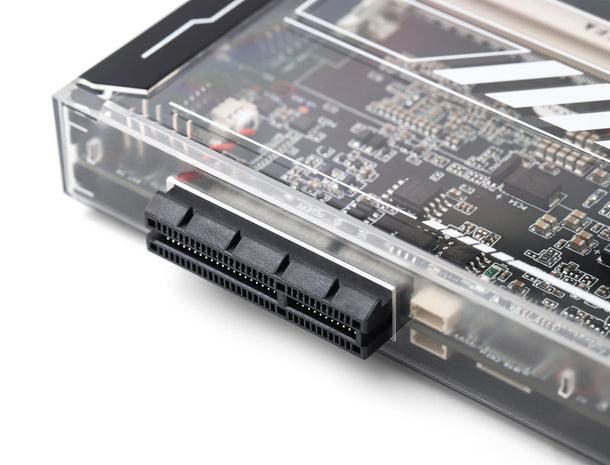
The PCIe interface is the bridge between a compact single-board server and a professional-grade workstation. Whether you are building a high-speed DIY NAS or an AI node, Zima's architecture provides the flexibility required for your projects.
Zima provides dedicated PCIe lanes directly from the CPU. We clearly define the electrical bandwidth (Lanes) versus physical slots, ensuring you choose the right model for your bandwidth-intensive tasks.
What is the advantage of an "Open-Ended" PCIe slot?+
An open-ended slot removes the physical back wall of the connector. This allows you to insert x8 or x16 cards into the x4 slot. While they run at board's rated electrical speeds, it provides massive compatibility for full-sized GPUs and professional RAID controllers.
Can I use this for 10GbE Networking?+
Absolutely. PCIe 2.0 x4 (on ZimaBlade) provides 2.0GB/s bandwidth, and PCIe 3.0 x2 (on ZimaBoard 2) provides approx 1.97GB/s. Both are more than enough to saturate a 10GbE card's 1.25GB/s requirement.
Does the slot provide enough power for GPUs?+
The slot follows standard power specs, but high-end GPUs exceed Zima's DC input limit. For stable operation with external GPUs, we strongly recommend using an external 12V ATX power supply to power the card directly.
Is NVMe Boot supported via the PCIe slot?+
Yes, all Zima models support UEFI booting from the PCIe slot via M.2 adapters. This allows you to install your OS on a high-speed NVMe drive for much faster system responsiveness compared to eMMC.
Is the PCIe slot compatible with riser cables?+
Yes, standard PCIe riser cables work perfectly. They are frequently used by our community to mount expansion cards outside the original casing for better cooling or unique space-saving setups.
Still have technical questions?
Our team and community are ready to help you build the perfect setup.
Efficient 6W TDP design for continuous operation without high energy costs.
Versatile Expandability
ZimaBoard’s onboard PCIe x4 interface offers unparalleled expandability, making it an ideal solution for custom industrial and specialized applications.
Industrial Customization
Tailor ZimaBoard to fit specific industrial needs, from automation systems to specialized data acquisition devices.
Rich Expandability
Compatible with a wide range of PCIe accessories, including NVMe SSDs, network cards, Wi-Fi dongles, and more.
Durable Design
Gunmetal blade design heatsink with passive cooling ensures reliable performance in demanding environments.
FAQ
What Can ZimaBoard Do for You?
ZimaBoard is ideal for DIY enthusiasts and developers seeking flexibility. It enables you to build a powerful home server, expand storage, or enhance your network setup. Featuring a quad-core x86 processor, Dual GbE LAN, PCIe expansion, and CasaOS—an easy-to-use, open-source cloud system—you can easily manage private applications and set up a personal server.For those preferring other systems, ZimaBoard supports Linux, Windows, OpenWrt, pfSense, Android, and LibreELEC, offering full freedom of choice.
Does ZimaBoard Support Wake on LAN?
Yes, ZimaBoard supports Wake on LAN (WoL), allowing you to remotely power it on or wake it up from sleep. TYou can enable or disable this feature through the BIOS settings. For step-by-step instructions, click here to learn more.
Does ZimaBoard Come with a Power Supply?
Yes, when you order ZimaBoard, it comes with a 12V 3A power adapter included. The adapter includes EU, UK, AU and US plug converters, making it convenient for use in various countries.
Does ZimaBoard Support Hardware RAID?
ZimaBoard does not currently support hardware RAID directly. While you can connect a RAID PCIe card, hardware RAID functionality is not built into the board itself. However, software RAID configurations are possible depending on your operating system.
Does ZimaBoard Work Without RAM?
No, ZimaBoard requires built-in DDR RAM to function properly. It cannot operate without it.
What kind of storage can I use with ZimaBoard?
ZimaBoard offers two SATA 6Gbps ports, allowing you to connect HDDs or SSDs for storage. It also supports PCIe storage expansion through the PCIe 2.0 4x slot, giving you flexibility to add NVMe drives or other PCIe devices, making it ideal for building a personal cloud or media server with significant storage capacity.
Does ZimaBoard support virtual machines or Docker containers?
Absolutely! ZimaBoard's x86 architecture allows you to run virtual machines or manage Docker containers, which makes it ideal for more advanced users who want to run multiple applications or services in isolated environments. This is particularly useful for DIY private cloud setups, VPNs, or running various home automation applications.
How do I connect ZimaBoard to a display?
ZimaBoard comes with a Mini DisplayPort that supports 4K resolution at 60Hz. This allows you to connect it to a monitor or TV for visual output, which is useful for both setup and media playback applications.
It is an amazing little device that works well with plex and jellyfin. I'm having trouble finding other things I can use it for.
T
Tim C. (Sydney, AU)
ZimaTastic!
My ZimaBoard has replaced my home built ESX server that gave up the ghost after 10 years of constant running. Now, instead of running ESX, I have one ZimaBoard running CasaOS running my Plex and download dockers, along with Twingate for remote access ZTNA. It runs faster and uses a fraction of the power, without being a dust sucker. I love this little thing. I think a future purchase will be a ZimaCube so I can also replace my QNAP for storage. Very cool. Well done, team! Love your work!
J
Joaquim J.D.F. (Antwerp, BE)
Good stuff
The hardware itself is pretty good. Casaos is kind of ok. But you still need to know what you’re doing. An ubuntu as a base os would be easier then Debian.
The included storage is pretty small so the following recommendations are based on that.
Some out of the box settings would be nice.
Place docker images on a different drive is one of them.
Also some clean up tasks like the sudo apt get. And cleanup for unused docker containers. Maybe be able to set a path for these things so the internal storage can’t be clogged up.
Further i noticed is that although gpu acceleration is supported (i configured everything as right as possible) the cpu still got used for lots of vids. I don’t think 2 people streaming at once would be a very feasible or maybe the limit depending on the video.
Some presets for jellyfin, plex, … would be nice to be found on your site. It would take a lot of trial and error (and fun and frustration) out of the setup.
That being said I am overall very happy and these were just some constructive pointers.
Most of them software related.
G
Guest C. (Gilbert, US)
A dedicated SpinRite rig
I have used the ZimaBoard as a dedicated SpinRite rig for hard drive data recovery and maintenance and couldn’t be happier!
Zimaboard modello 832.
Ottimi consumi energetici, indispensabili le 2 porte sata,
La CPU è OTTIMA per carichi di lavoro leggeri e duraturi come uso Nas, riproduzione in streaming oppure per filtrare la rete domestica, se si vuole utilizzare per lavori un po' più pesanti si rischia un po' di instabilità ma nulla di grave, una miglioria sarebbe avere o una frequenza della CPU leggermente più alta oppure 2 core in più per gestire più applicativi contemporaneamente.
Morale della favola è un prodotto ottimo per carichi relativamente leggeri, per qualcosa di più impegnativo la cpu fatica.




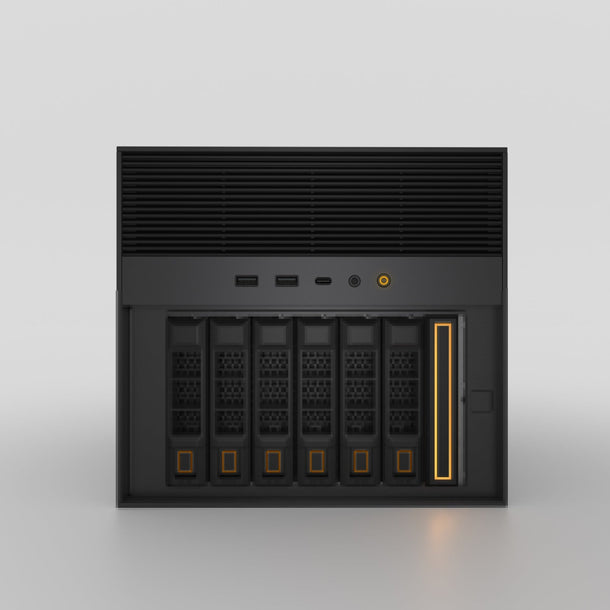


 ZimaCube 2 Personal Cloud Home NAS From $799.00 USD /
 ZimaBoard 2 - Mini Home Server for Your Big Idea
 ZimaBlade - Single Board Server for Cyber Native


