
This source has a useful official boundary: ZimaOS cannot reliably infer which arbitrary files on a NAS are “configuration,” so its uninstall cleanup is intentionally scoped around the app's AppData area rather than deleting unrelated storage paths. LinkLeong said data stored elsewhere would not be acted on by that cleanup rule.
The original poster's narrower complaint was that a badly misconfigured app sometimes did not present the normal uninstall cleanup flow, leaving its AppData folder behind. They then retested on ZimaOS 1.3.2-beta2 and explicitly confirmed the folder was deleted correctly even with the misconfiguration. That is a source-confirmed historical fix.
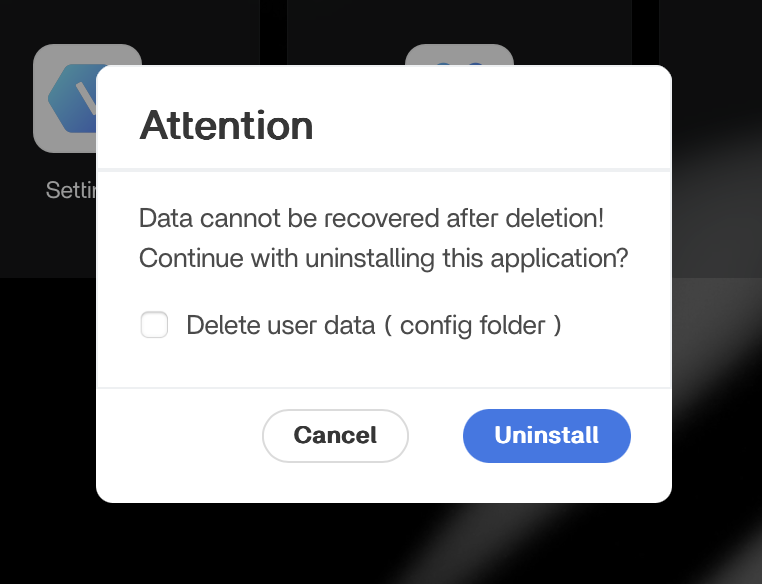
IceWhale Said AppData Is the Cleanup Boundary
LinkLeong explained that ZimaOS cannot accurately identify every “configuration file” in arbitrary locations. The rule was therefore to treat the app's AppData directory as the configuration/user-data scope for managed cleanup.
Data elsewhere on the NAS should be reviewed manually rather than automatically deleted as part of uninstall.
This Boundary Protects Shared Media and Storage
A Docker app may mount:
- configuration/database under AppData;
- movies/photos/documents on another storage pool;
- download folders shared with other apps;
- network or USB storage.
An uninstall routine that recursively followed every mapped path could destroy shared content, so the narrower AppData rule is safer.
The Source Problem Was Leftover AppData from a Broken Install
WuzzyFeasel said a new/misconfigured container that never started correctly sometimes did not expose the cleanup option and left its AppData directory behind.
This can matter when a bad configuration repeatedly causes a reinstall to inherit the same broken state.
The Poster Confirmed the Behavior Was Fixed in 1.3.2-beta2
After clarification, the OP retested and said that even with a misconfigured container, the folder was now deleted properly.
Therefore do not present the 2025 leftover-folder symptom as a current known ZimaOS limitation.
Current AppData Is Still a Critical Persistent-Data Area
Current ZimaOS documentation emphasizes that App Store containers are disposable but mapped host data is not. It also lets users inspect and change app storage paths and app-data locations.
Use the current ZimaOS app storage model.
Do Not Store Irreplaceable User Content Inside a Folder You Plan to Delete as AppData
Some applications combine configuration, database state, generated files, and user content under one tree. Before selecting Delete user data, inspect the app's host volume mappings and back up anything that cannot be regenerated.
Manual Cleanup Should Be Narrow and Evidence-Based
If an old AppData directory remains after uninstall, verify no active container still mounts it, back up any state you may need, then remove only that confirmed app directory. Do not recursively delete the entire AppData root to fix one failed app.
ZimaOS AppData Uninstall FAQ
What did IceWhale say the uninstall cleanup treats as configuration/user data?
The app's AppData directory.
Will the uninstall cleanup intentionally delete arbitrary media stored elsewhere?
According to the source explanation, data outside AppData is not automatically acted on by that rule.
Was the misconfigured-container cleanup issue later verified fixed?
Yes. The original poster confirmed it worked correctly in 1.3.2-beta2.


