
This source contains a clean third-party-hardware resolution: the UGREEN DXP2800 was not ultimately shown to be rebooting because of a confirmed ZimaOS kernel panic. The original poster discovered a BIOS setting called Watchdogs with a three-minute timer. After disabling it, they reported that the nonstop reboot behavior appeared to stop.
That result matters because IceWhale had initially suspected a kernel driver and removed some drivers in a subsequent build. The user tested the newer 1.4.1 release and still saw reboots, then independently found the firmware watchdog. The source therefore shows why appliance-specific firmware features must be checked before declaring an OS regression.
The DXP2800 Rebooted Almost on a Timer
The user installed ZimaOS 1.4.1 beta2 to a new NVMe drive and could access the dashboard, but the NAS restarted every few minutes even when idle. They later measured the interval at roughly two minutes and forty-five seconds.
IceWhale First Asked for Previous-Boot Kernel Logs
Zima-Jerry asked the user to collect journalctl -k -r -b -1 so the team could inspect the kernel messages from the previous boot.
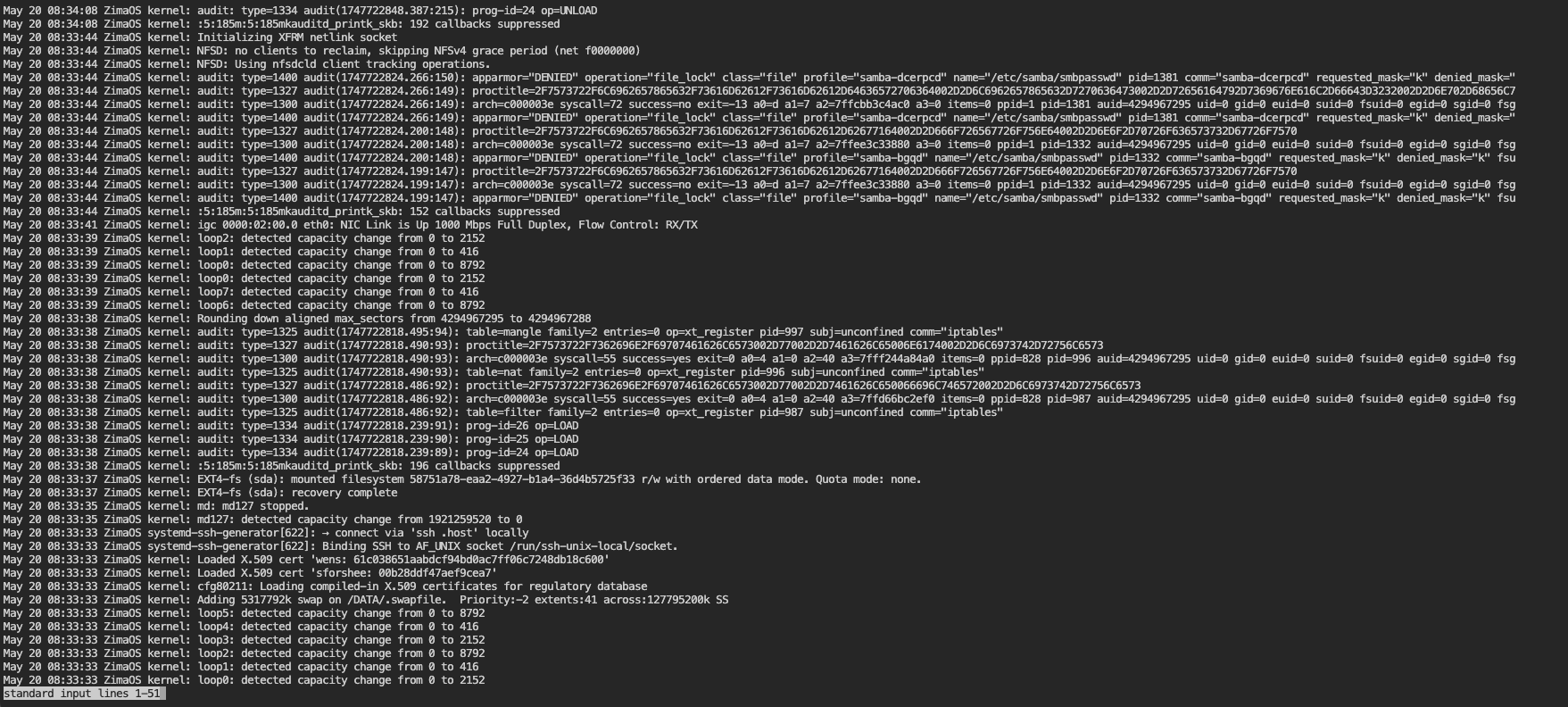
IceWhale Suspected a Kernel Driver, but That Was Not the Final Result
After watching the user's video, Zima-Jerry said some kernel drivers might be involved and that he had removed them in the next official release. The original poster then tested the new 1.4.1 and reported that the DXP2800 still rebooted.
The User Found a Three-Minute BIOS Watchdog
After more testing, the user found a BIOS feature named Watchdogs configured with a three-minute timer. They disabled it and said the system now seemed to work.
A community responder explained the mechanism: a hardware watchdog expects compatible software to periodically reset its timer; if it expires, the firmware assumes the system is hung and forces a reset.
UGOS Working Did Not Mean the Watchdog Was Disabled
The vendor UGOS system ran normally on the same hardware. A plausible explanation is that UGOS knows how to service the platform watchdog, while ZimaOS at that time did not. That is different from saying the hardware was unstable.
Current ZimaOS Supports Generic x86-64, but Vendor Watchdogs Are Hardware-Specific
IceWhale's current installation documentation supports generic x86-64 devices with UEFI and Secure Boot disabled. It does not certify every vendor-specific watchdog, fan controller, LED controller, or HDMI media feature.
Use the current generic x86 ZimaOS installation baseline and then validate appliance-specific firmware separately.
ZimaOS HDMI Behavior Was Different from UGOS
Zima-Jerry said ZimaOS had no specific HDMI playback application and would only show main system information on the attached display. The user explained that UGOS could send media to the NAS HDMI output from a phone. That vendor media-output feature was not reproduced by ZimaOS in this thread.
Front-Panel LEDs Needed Model-Specific Adaptation
The user also reported the DXP2800 LEDs continuously cycling. Zima-Jerry said specialized appliance LEDs require dedicated adaptation and that there might be no development plan for that hardware.
A Better Current DXP2800 Validation Checklist
- Disable or correctly configure vendor watchdog timers before blaming the OS.
- Install current stable ZimaOS on a separate disk.
- Verify repeated reboot and shutdown cycles.
- Check every NIC and SATA/NVMe device.
- Test sleep/power behavior if you intend to use it.
- Treat HDMI media output and front LEDs as separate model-specific features.
UGREEN DXP2800 FAQ
What stopped the repeated reboot in the source thread?
The original poster disabled a BIOS Watchdogs timer set to about three minutes.
Did IceWhale first suspect a kernel driver?
Yes, but the newer build still rebooted for the user, so that was not the final confirmed resolution.
Did ZimaOS provide UGOS-style HDMI media playback?
No. IceWhale said ZimaOS only exposed basic system information on HDMI at that time.


