
A Tailscale container can show as connected without functioning as a subnet router. In this April 2026 ZimaOS thread, Tailscale was running in Docker with host networking, privileged mode, and /dev/net/tun mounted, yet the Tailscale admin console reported that the machine exposed no routes. Navidrome worked on the local network but could not be reached remotely through the tailnet.
The thread did not end with a confirmed fix from the original poster. Instead, another community member shared a working BigBear Tailscale container configuration that advertised a LAN subnet successfully in their own ZimaOS environment. That configuration is useful as a troubleshooting reference, but it is not an IceWhale-supported guarantee for every Tailscale app package.
Connected to Tailscale Does Not Mean Subnet Routes Are Advertised
The original setup had already completed device authentication. The problem was specifically routing: the logs showed an empty route list, and the Tailscale admin console did not offer a subnet route to approve.
This distinction matters because a normal Tailscale node only joins the tailnet. A subnet router has additional responsibilities: it must advertise one or more LAN prefixes and satisfy the operating-system routing requirements needed to forward traffic between the tailnet and that LAN.
Current Tailscale documentation describes subnet routers as gateways that advertise private networks to tailnet devices. It also requires IP forwarding on Linux and route approval in the Tailscale admin console unless an autoApprovers policy handles approval automatically.
Tailscale subnet router documentation
The Working Community Reference Used TS_ROUTES
The reply from TomasSzwed used a BigBear Tailscale container and configured the subnet through environment variables rather than relying on a manual one-time command after startup. Important parts of that reference included:
-
network_mode: host; - privileged mode;
-
/dev/net/tunmounted into the container; -
TS_USERSPACE=false; -
TS_ROUTES=192.168.2.0/24for the LAN being advertised; -
TS_EXTRA_ARGS=--accept-routesin that user's configuration; - persistent Tailscale state under
/var/lib/tailscale.
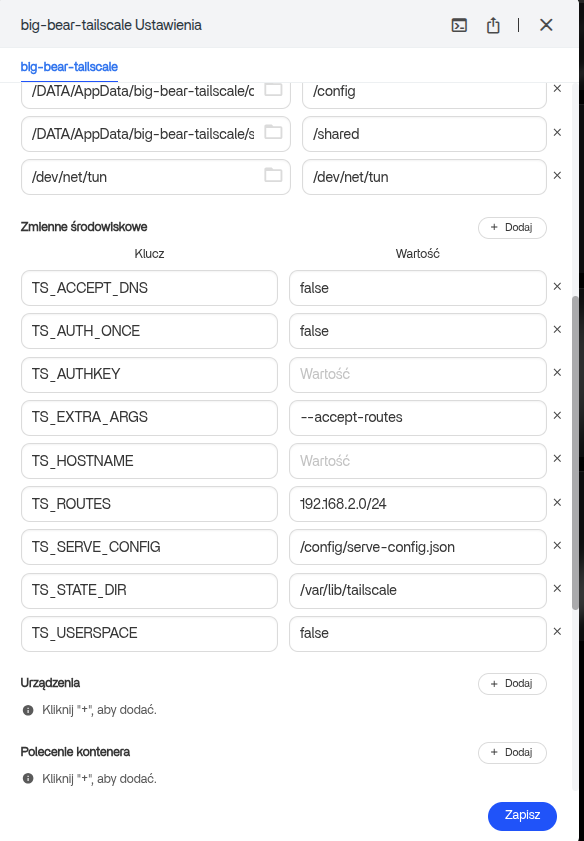
Use the Correct LAN Prefix for Your Network
The working example advertised 192.168.2.0/24. That value only makes sense for a LAN using that subnet. A different home network might use 192.168.1.0/24, 10.0.0.0/24, or another private prefix.
Advertising the wrong subnet can produce a Tailscale node that is healthy but still cannot route to the intended ZimaOS services. Determine the actual local network prefix before setting TS_ROUTES or an equivalent --advertise-routes option.
Advertised Routes Still Need to Become Active
Current Tailscale guidance separates route advertisement from route approval. Once the subnet router advertises a route, the route must be enabled in the Tailscale admin console unless the tailnet policy automatically approves it.
If the admin console says that the machine exposes no routes at all, focus first on the container's route-advertisement configuration. If the route appears but traffic still does not work, then review route approval, access-control policy, forwarding, and the destination service itself.
Docker Networking Changes What the Container Can Route
The original poster used host networking and mounted the TUN device. The community reference did the same. Current Tailscale documentation also supports running Tailscale in Docker, but Docker networking and Tailscale routing are separate layers that both need to be correct.
Tailscale Docker documentation
Do not assume that two Tailscale apps in the ZimaOS App Store use identical container definitions. The original poster specifically noticed that the shared example used the BigBear Tailscale package while their existing installation used the other Tailscale entry.
What This Means for Navidrome and Other Local Services
The goal in the source thread was to access Navidrome from an iPhone without public port forwarding. If Navidrome is already reachable on the local LAN, a functioning subnet router can make that LAN address reachable from authorized tailnet devices.
However, the thread does not confirm that the original poster completed the switch to the BigBear configuration or successfully reached Navidrome afterward. The page therefore documents a viable community reference and a diagnostic model, not a confirmed resolution for that exact installation.
ZimaOS Tailscale Subnet Routing FAQ
Why does Tailscale say connected but show no subnet routes?
Joining the tailnet and advertising a LAN route are different operations. In the source case, authentication succeeded but the route list remained empty.
Can Tailscale in Docker act as a subnet router on ZimaOS?
A community member reported that it worked in their ZimaOS setup and shared a BigBear Tailscale configuration. Tailscale itself also supports subnet routing and Docker deployments, but the exact ZimaOS app configuration still matters.
Do I need to approve the route in Tailscale?
Under current Tailscale behavior, advertised subnet routes normally need approval in the admin console unless an autoApprovers policy handles them automatically.
Should I copy 192.168.2.0/24 from the screenshot?
No. Use the actual subnet of the LAN you want to expose. The value in the screenshot belongs to another community member's network.


