
If you bought ZimaOS+ but cannot find a place to enter the code, first check whether the device already shows Plus. If Plus is already active, there is nothing to redeem. If it is still Community/Free, the normal flow is Get Plus → I have a code; if that control only redirects to pricing, update ZimaOS and rule out DNS/ad-blocking before contacting support.
Current ZimaOS+ is a lifetime, single-device license on third-party hardware. Official Zima hardware already includes automatic lifetime Plus and should reactivate after reinstall without consuming a purchased code.
Check Whether Plus Is Already Active
If Settings already displays Plus next to the ZimaOS version, do not try to force a code into the system. Community users in the same 1.5 era discovered they already had automatic Plus from an earlier-device benefit.
Normal Activation Flow for a Paid Code
IceWhale's community activation guidance is: open Settings, click Get Plus, choose I have a code, and enter the activation code.
Official Zima Hardware Activates Automatically
The current ZimaOS Plus pricing and licensing says ZimaBoard, ZimaBoard 2, ZimaCube, and ZimaBlade include automatic lifetime Plus.
Third-Party Hardware Uses Device Binding
A purchased Plus license is bound to one device. Do not activate the same code across multiple physical systems or rebuild hardware repeatedly while troubleshooting.
If Get Plus Only Opens the Pricing Page
First update to current stable ZimaOS. Then temporarily bypass Pi-hole, AdGuard, NextDNS, aggressive DNS filtering, or browser blockers. Historical community cases found that filtering could prevent activation checks from completing.
Do Not Look for a Terminal Activation Command
The source user asked whether activation could be done from terminal, but the documented flow is through the UI/license system. Avoid unofficial scripts that claim to modify entitlement locally.
Contact Support with the Right Evidence
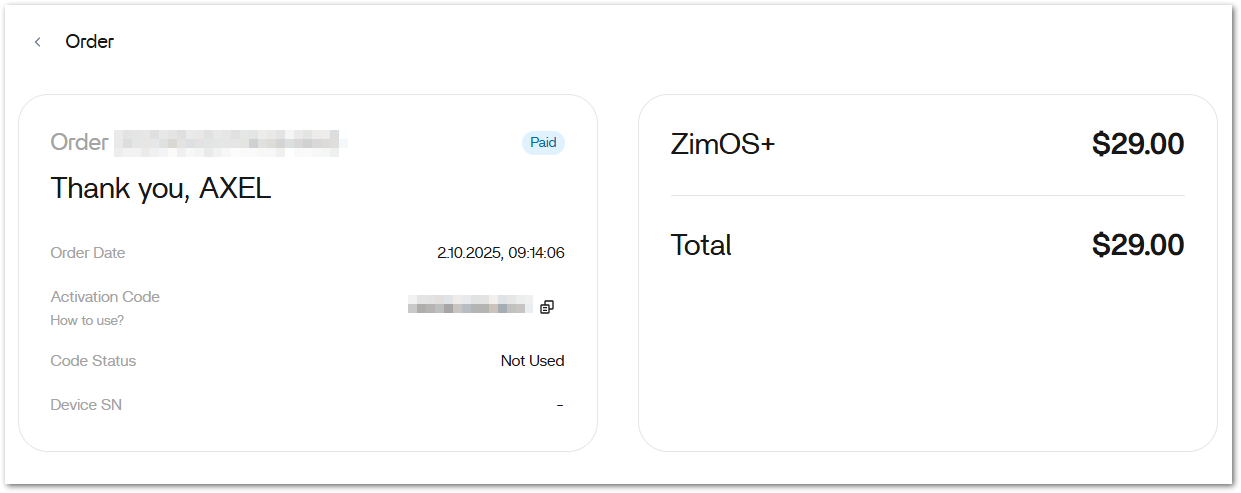
If your order still shows the code as unused but ZimaOS offers no redemption control, send the current device identity/version plus proof of purchase to IceWhale support rather than buying a second license.
The system identity checklist helps preserve activation evidence.
Check Network Access to the License Service
A working dashboard does not prove the server can reach every licensing endpoint. Verify DNS and general outbound HTTPS from ZimaOS before blaming the activation code itself.
Do Not Change the Boot Disk Mid-Troubleshooting
Plus is device-bound. Replacing the system disk or substantially changing hardware while activation is already unclear can introduce a second identity problem. Preserve the original installation until support confirms the entitlement state.
Save the Order Page Before Contacting Support
Keep a screenshot showing the order, code status, and purchase date, but redact the activation code before posting publicly. Send full purchase evidence only through official support channels.
FAQ
Why is there no Get Plus button?
The device may already have Plus, especially on official Zima hardware or older eligible installations.
Can I use one Plus code on two servers?
No. Current Plus licensing is single-device.
Will Plus survive reinstall on official Zima hardware?
Current official pricing says it auto-activates again.
Should I buy another code if mine says unused?
No. Troubleshoot activation and contact support with the order evidence first.


