
Plex can use media stored on another NAS, but a LAN share visible in the ZimaOS Files app is not automatically visible inside the Plex container. This 2025 thread started with a Synology share that worked in CasaOS through a manual mount but became confusing on ZimaOS because the base system is read-only and the Files UI showed a path that did not translate directly into Plex.
The thread eventually established two separate steps: first mount the remote SMB share into ZimaOS, then map the resulting host path into the Plex container. A later user also found that matching the container's user IDs to the ZimaOS account was necessary in their environment.
Mount the LAN Share in ZimaOS First
Zima-Giorgio's official reply says to add the remote storage as a LAN/SAMBA share in the ZimaOS Files app. Once mounted, the real host-side path is placed under /media, rather than the network-looking path displayed in some parts of the Files UI.
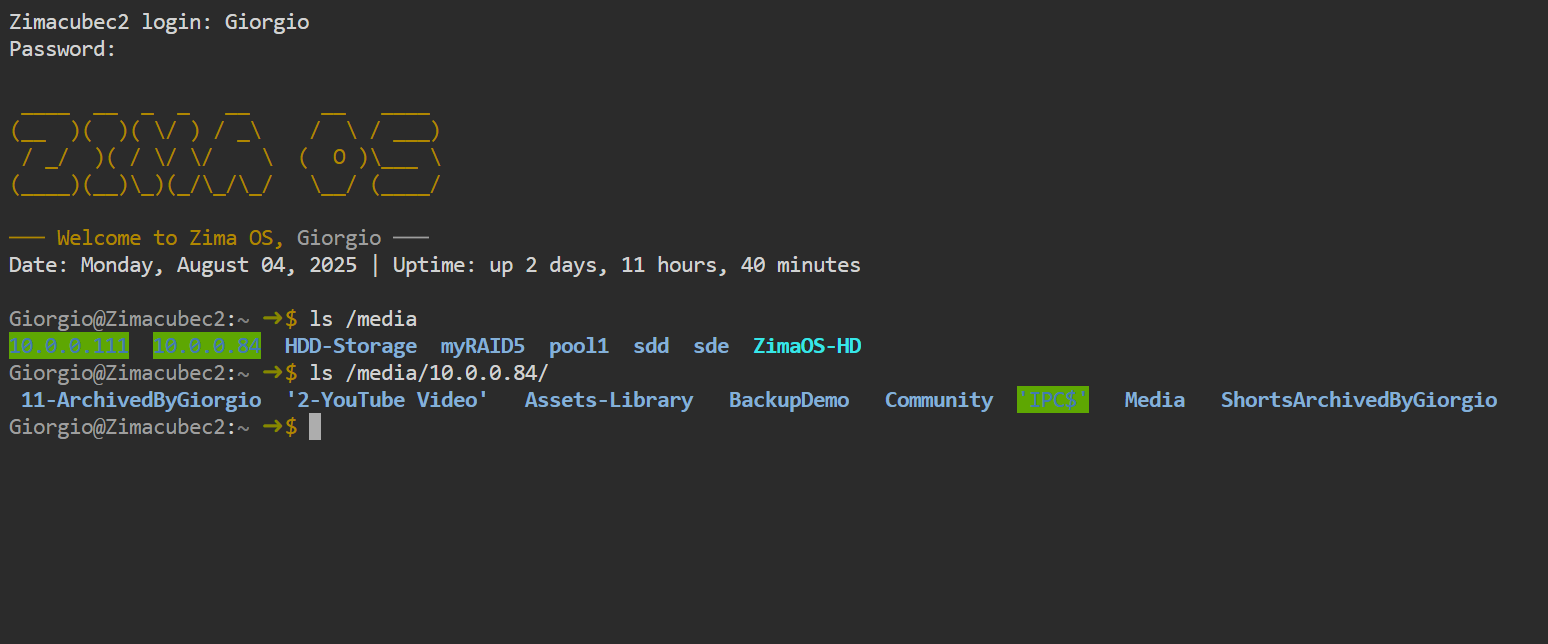
ls /media to reveal the actual host paths created for mounted LAN shares.The official troubleshooting command in the thread is:
ls /mediaThis matters because the host path that Plex needs is the mounted folder under /media, not simply an IP-address path copied from the Files interface.
Map the SMB Host Path into the Plex Container
Once the remote share exists on the ZimaOS host, open Plex app settings and add it as a volume. One community configuration mapped a host share such as /media/192.168.50.20/DrivePool to a simpler path such as /DrivePool inside Plex.
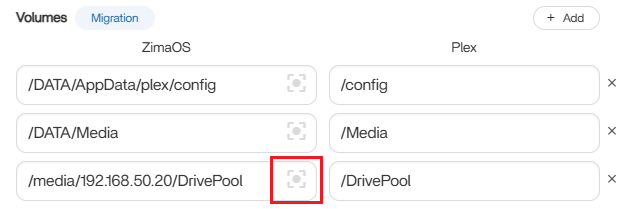
The current ZimaOS app model follows the same host-to-container concept. The current explanation of how ZimaOS maps storage folders into app containers is useful when choosing which side of a volume mapping Plex should see.
If Plex Sees an Empty Folder, Check User IDs
A later community participant could mount the share but Plex still saw an empty directory. Their working setup matched Plex's PUID and PGID environment values to the ZimaOS user that could access the SMB mount. In that example, the ZimaOS user had UID 999 and GID 1000.
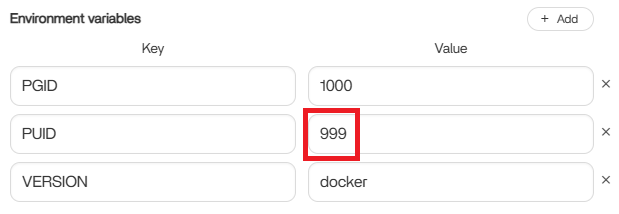
Do not copy 999 or 1000 blindly. Different users and installations can have different IDs, and SMB permissions also depend on how the remote server exposes the share.
Browse the Container Path from Plex
After the host share is mapped, Plex should use the container-side path when adding a library. In the solved community example, the user browsed into /DrivePool from the Plex folder picker and selected the media subfolder from there.
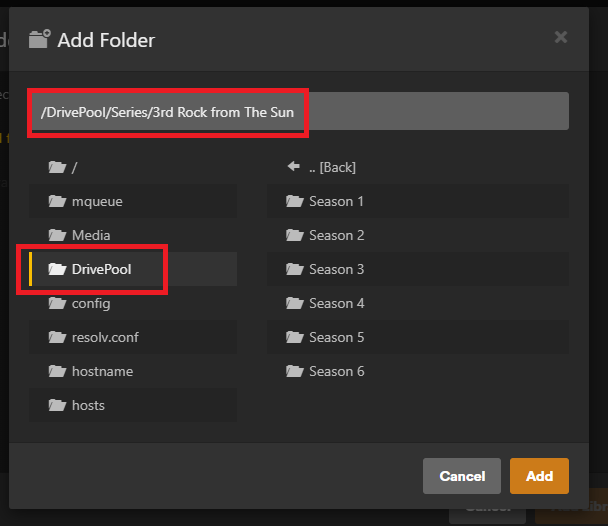
/DrivePool path normally.What the Thread Does Not Guarantee
The final PUID/PGID workflow was posted by a community member and confirmed by another user as solving their problem. IceWhale's official contribution was the ZimaOS-side path guidance under /media. The thread does not establish that every Synology, SMB server, filesystem permission model, or later ZimaOS release behaves identically.
Plex SMB Share FAQ
Why can ZimaOS Files see my NAS but Plex cannot?
Files sees the host-mounted share. Plex runs inside a container and needs that host path explicitly mapped into its own filesystem.
Where does ZimaOS mount LAN shares?
IceWhale's 2025 reply says mounted LAN shares can be found under the lowercase /media directory.
Which path should I add to the Plex library?
Use the container-side path created by the Plex volume mapping, not the original SMB address shown by the Files app.
Do I always need to change PUID and PGID?
No. That was the extra step required in one solved community case. Only change them when your container user does not have permission to read the mounted share.


