
This December 2025 tutorial is one of the more detailed community guides for Paperless-ngx on ZimaOS, but it is tied to a specific BigBear package and ZimaOS 1.5.3 Plus. The durable parts are the storage and configuration concepts: give the consume folder a clear persistent location, set the application URL correctly, configure OCR languages, and understand optional Tika/Gotenberg services.
Some source details need a current boundary. Paperless-ngx's upstream Docker setup has evolved, PostgreSQL is now recommended for new installations, current Compose files prompt for a superuser during first setup, and Tika/Gotenberg remain optional rather than mandatory for every document workflow.
The Source Tutorial Was Tested on a Modest ZimaBoard 2
The author documented an N150-based system with 16 GB RAM running ZimaOS 1.5.3 Plus. The goal was local-network or Tailscale access for home use, not direct public exposure.
That scope matters because a public Internet deployment needs a different HTTPS, reverse-proxy, authentication, and security plan.
The Guide Used BigBear Paperless-ngx Custom Install
The source workflow searched the App Store for the BigBear Paperless-ngx package, opened the install dropdown, and chose Custom Install so volumes and environment values could be edited before first start.
That is a package-specific workflow. A current app definition can add, remove, or rename services and variables.
Give the Consume Directory a Clear Persistent Host Path
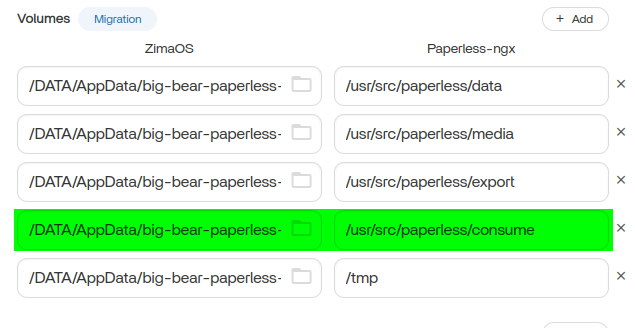
/usr/src/paperless/consume as the folder users are most likely to interact with when dropping in documents.Current upstream Paperless documentation still uses /usr/src/paperless/consume as the standard container destination and explicitly supports changing the host side of that bind mount.
The Tutorial Set Admin, Consumer, OCR, and URL Variables
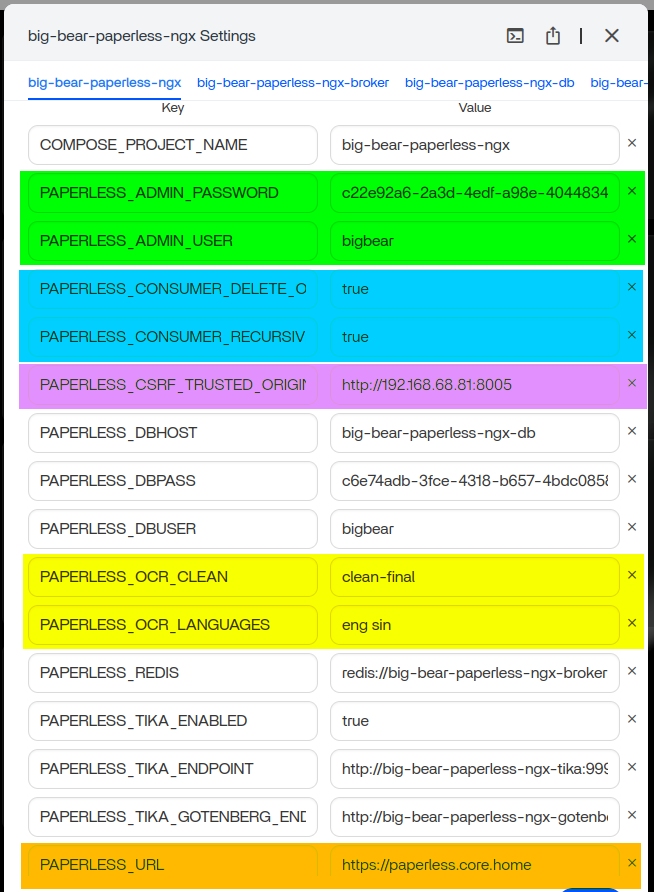
Key source choices included:
- custom admin username/password;
- recursive document consumption;
- deleting originals from the consume folder after successful ingestion;
- OCR cleanup and language settings;
- CSRF trusted origin and application URL;
- Tika/Gotenberg endpoints.
PAPERLESS_URL and CSRF Origins Must Match How You Actually Access Paperless
The tutorial warned that incorrect URL/origin configuration could cause a 403 CSRF verification failure. That remains conceptually correct.
Current Paperless documentation says PAPERLESS_URL should be set when the application is behind a reverse proxy and should represent the externally used domain/URL. Do not hard-code the source author's LAN address into another installation.
OCR Settings Were Also Adjusted Inside Paperless
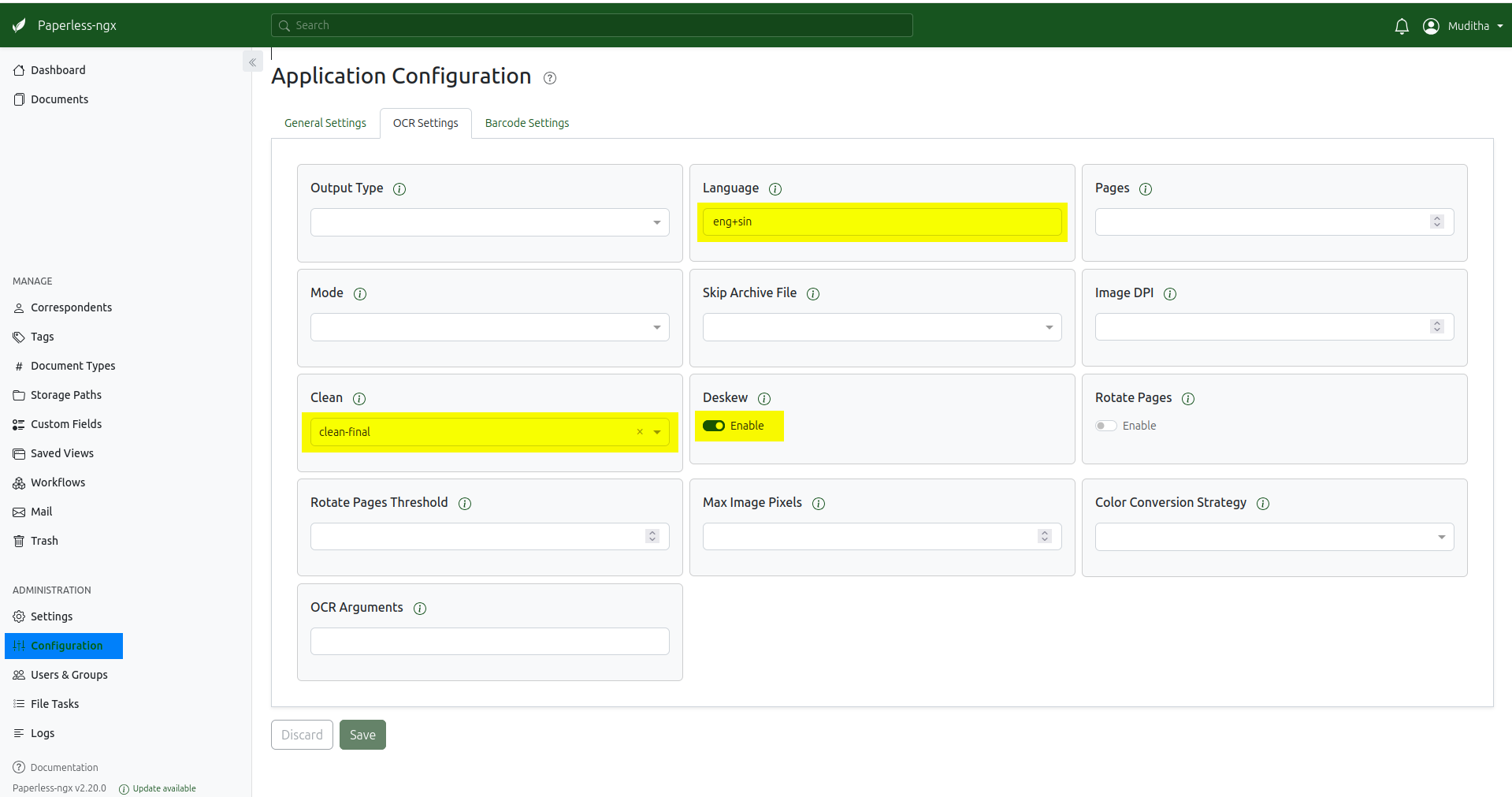
OCR languages must correspond to language packs available in the container. Adding languages can increase image size or change rootless-container requirements depending on the current package.
Restarting After Every Large Consume Batch Is Source Advice, Not an Upstream Requirement
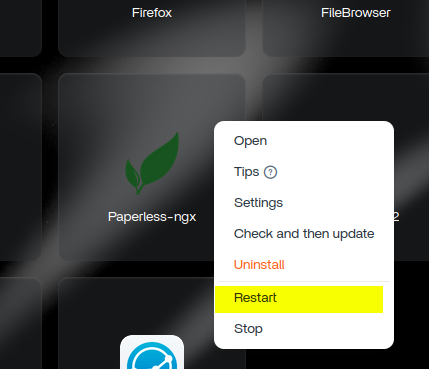
Current Paperless-ngx is designed to monitor the consume directory continuously. Upstream documentation does not state that large batches normally require a restart. If documents stop processing, inspect permissions, consumer logs, filesystem notification support, and the broker/worker state instead of making restart a mandatory ritual.
Current Upstream Setup Recommends PostgreSQL for New Installs
Paperless-ngx's current Docker setup recommends PostgreSQL for new installations, although SQLite and MariaDB remain available in supported configurations.
For a long-term document archive, this makes the current upstream Compose topology a better reference than assuming the exact BigBear 2025 database service remains unchanged.
Tika and Gotenberg Are Optional
Current Paperless documentation says Tika and Gotenberg are needed for parsing Office documents such as DOC/XLSX/ODT and email files. If you only ingest formats handled by the core Paperless stack, the feature can remain disabled.
Use the current Paperless-ngx Docker setup before rebuilding the historical BigBear stack manually.
Consume Folder Permissions Matter More Than Repeated Restarts
Current upstream setup exposes USERMAP_UID and USERMAP_GID so the container can write to host bind mounts. If Paperless sees a consume folder but cannot process or delete files, verify the mapped directory ownership and the container identity.
On ZimaOS, also verify that the host consume path is on the intended managed storage and not a read-only volume mapping.
Deleting Originals from /consume Is Not the Same as Deleting Archived Documents
The source enabled PAPERLESS_CONSUMER_DELETE_ORIGINALS=true. This controls what happens to the input file in the consume directory after successful ingestion. The archived document managed by Paperless remains in its media storage.
Test this behavior with disposable documents before pointing an automated scanner or sync service at a production folder.
Paperless-AI Replies Belong to a Separate Integration
Later replies discussed Paperless-AI reading documents through the Paperless API but failing to analyze/write tags with built-in OpenAI configuration. Users reported Mistral working and manual OpenAI configuration working around the problem.
Those replies do not prove the core Paperless-ngx installation is broken. Paperless-AI is a separate third-party integration with its own provider/API configuration.
Later 500 Errors and Password Questions Were Not Resolved in the Thread
A February 2026 user reported HTTP 500 during upload, and a May 2026 user could not get expected passwords to work. The public thread does not contain final diagnoses for those cases.
Do not turn the original tutorial's example credentials into a universal login recipe for later BigBear releases.
Export Paperless Data Before Major Package Changes
Current Paperless provides a document exporter that includes documents, thumbnails, metadata, and database-derived information for migration/backup workflows. Use application-aware export plus normal storage backups before replacing the database or Compose stack.
Paperless-ngx on ZimaOS FAQ
Is Tika required for every Paperless-ngx install?
No. It is optional and mainly needed for Office documents and email parsing.
Do large consume batches normally require a restart?
The source author recommended it from their experience, but current upstream documentation does not make restart a normal requirement.
What database does current Paperless recommend for new installations?
PostgreSQL is the recommended backend for new Docker deployments.
Is Paperless-AI part of Paperless-ngx itself?
No. It is a separate third-party integration discussed later in the thread.


