
If OneDrive or Dropbox disappears from ZimaOS Files, first determine whether the cloud mount is actually gone or only missing from the UI. A stale directory under /media does not prove the cloud drive is still mounted; use mount-state checks and the current cloud-drive UI before deleting anything.
The 2025 source case later gained important context: a 2026 OneDrive outage was traced by the community to an expired Microsoft Entra client secret used by the integration, and IceWhale acknowledged that issue. Current September 2026 ZimaOS documentation again lists Google Drive, Dropbox, and OneDrive as supported cloud drives, so that historical outage should not be treated as a permanent limitation.
What the Failure Looked Like
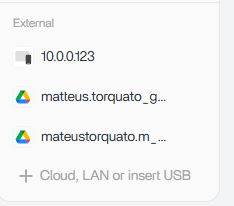


The user still had cloud-related directories under /media, but OneDrive and Dropbox no longer appeared in Files. Google Drive remained mounted. Re-adding the missing accounts did nothing and produced no visible error.
Step 1: Check Whether the Mount Is Real
Use:
findmnt | grep -i -E 'onedrive|dropbox|google'A directory existing under /media is not enough. If findmnt shows no mounted filesystem for the missing provider, treat it as an unmounted/stale path rather than active cloud storage.
Step 2: Check the Current Files Cloud-Drive List
The current ZimaOS cloud drive guide documents direct Files integration for Google Drive, Dropbox, and OneDrive. If your provider is missing on a current stable release, update first before using an old workaround.
Step 3: Hard-Refresh Before Reauthorizing
Use a hard refresh or private browser session. A stale frontend can make a valid backend state look broken after an update or auth change. If the mount appears in one browser but not another, the problem is likely UI/session state.
Step 4: Reauthorize Only If Authentication Is Actually Broken
If the UI still cannot connect, collect the backend error before removing credentials. Microsoft errors such as AADSTS7000222 indicate provider-side OAuth/client-secret failure rather than a bad local folder.
During the 2026 OneDrive incident, community diagnostics traced failures to an expired Azure/Entra client secret and IceWhale said it would fix the issue. That was a global integration problem, not a reason for each user to rewrite rclone.conf.
Do Not Manually Edit rclone.conf as the First Fix
Standard rclone remotes can be created manually, but ZimaOS Files and Backup may attach additional metadata and mount state around managed cloud accounts. A hand-built remote can work outside the UI while still failing to integrate cleanly with Files.
Use manual rclone only if you intentionally want an advanced custom workflow and are prepared to manage it independently.
Separate Files Mounting from Backup Tasks
A cloud account can be used as a Files mount and also as a backup destination. If a Backup task triggers the symptom, stop changing the backup policy until you confirm the cloud account itself can mount normally.
The backup workflow overview helps keep those two layers distinct.
How to Verify Recovery
- the provider appears again under External/Cloud in Files;
-
findmntshows an active mount; - you can browse a known cloud folder;
- a small test file opens successfully;
- Backup tasks using the provider run without reauth errors.
FAQ
Are my OneDrive files deleted if the mount disappears?
No. A missing ZimaOS mount does not delete the provider-side cloud data. Verify the account directly with OneDrive or Dropbox before taking recovery action.
Why do stale folders remain under /media?
The mount point directory can remain after the remote filesystem is detached. Use findmnt to distinguish a real mount from a leftover directory.
Should I reboot ZimaOS?
A reboot can clear stale mount state, but it will not fix an upstream OAuth credential failure. Check the actual error first.
Is OneDrive supported now?
Yes. Current September 2026 ZimaOS documentation lists OneDrive, Dropbox, and Google Drive in the Files cloud-drive workflow.


