
Immich can consume far more storage than the ZimaOS system drive is designed to hold, especially once phone uploads, thumbnails, encoded video, machine-learning models, and the PostgreSQL database begin to grow. The original IceWhale Community guide solved this in April 2025 by changing selected volume mappings during a ZimaOS Custom Install so Immich data would live on a RAID volume instead of the ZimaOS drive.
That workaround is useful for understanding how the container is wired, but it should not be treated as a universal current recipe. Later replies reported failed installs, repeated reboots, an unhealthy PostgreSQL container, and even corrupted photo uploads after experimenting with mappings. ZimaOS also added and refined built-in migration tools, while current Immich Docker Compose releases use host-side variables such as UPLOAD_LOCATION and DB_DATA_LOCATION. For a current system, use the built-in ZimaOS migration path first when it fits your goal, and reserve manual volume editing for cases where you specifically need a custom Immich storage layout.
What the Original 2025 ZimaOS Immich Guide Changed
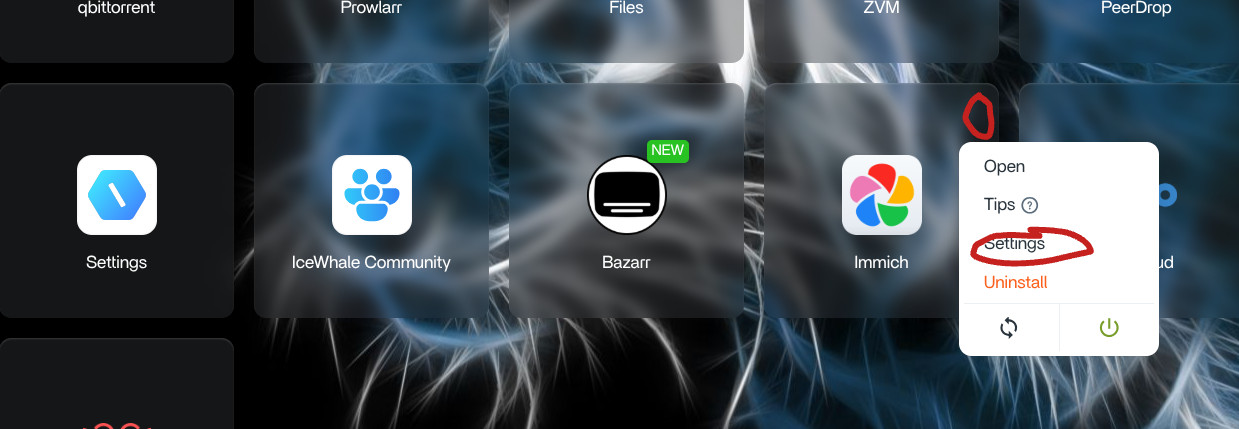
The community tutorial used ZimaOS Custom Install, or the app's Settings screen after installation, and worked through the service tabs one by one. Its goal was to redirect persistent Immich data to a larger RAID location while keeping the container-side paths that Immich expected.
Database: Move the Host Path, Keep the Container Path
In the database tab, the author changed the ZimaOS-side storage location to a RAID path and kept the database directory suffix. The important principle was not to rewrite the right-hand path inside the container. Changing the container destination can break the service because PostgreSQL expects its data at the path defined by that Immich package or Compose configuration.
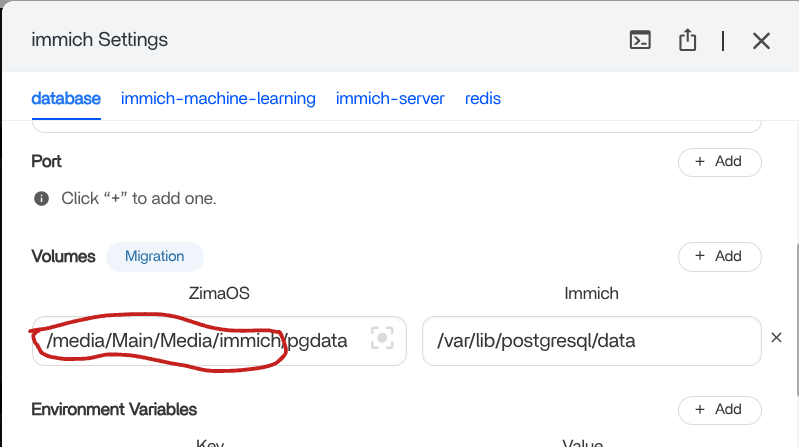
Current Immich Docker Compose documentation exposes this host location through DB_DATA_LOCATION. Immich also warns that network shares are not supported for the PostgreSQL database, so the database should stay on reliable locally attached storage rather than an SMB or NFS share.
Machine Learning: Redirect the Model Cache Only if Needed
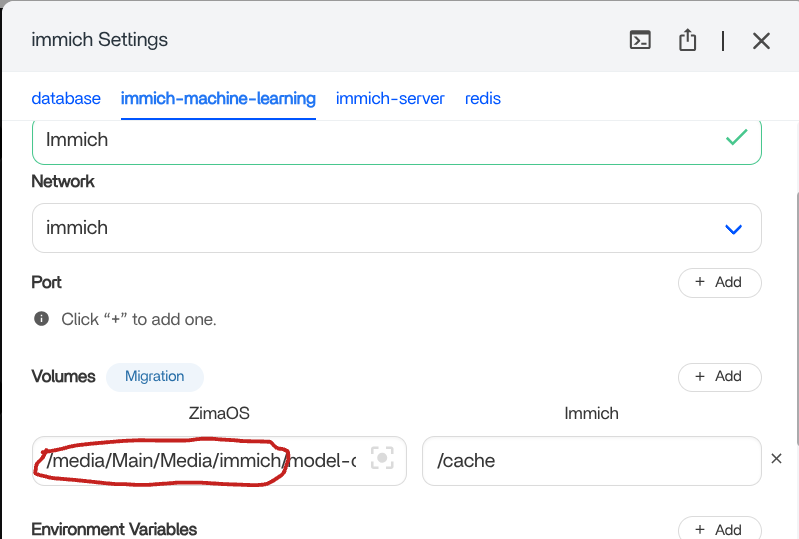
The original guide also redirected the host-side machine-learning model cache while leaving the container-side cache path unchanged. Moving this cache can save space on a small system disk, although it is less important than protecting the photo library and database because downloaded models can normally be recreated.
Immich Server: The Most Sensitive Volume Section
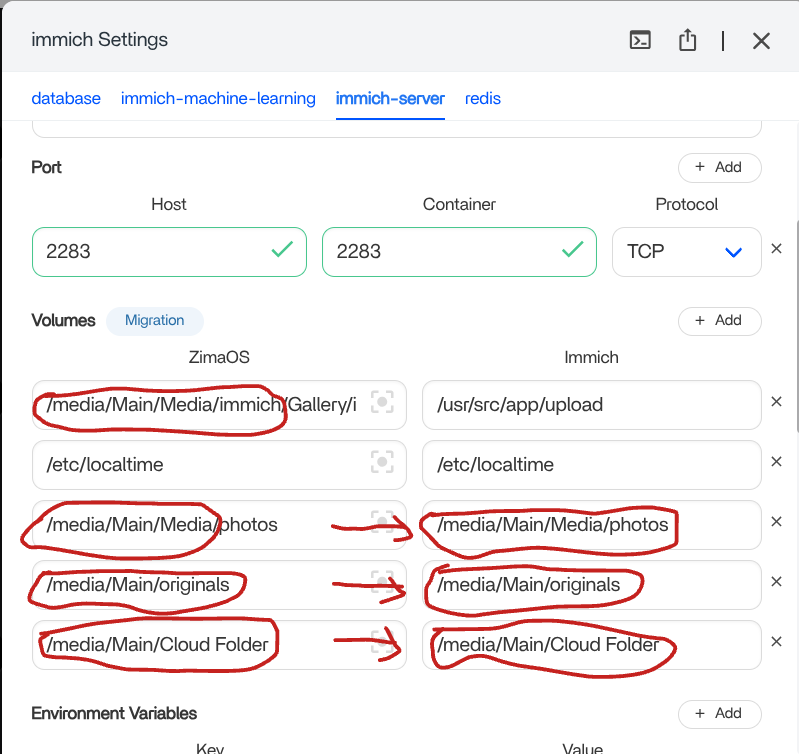
The Immich server tab was the part the author found easiest to break. Extra host mappings were added so uploads and other persistent media directories would resolve to the RAID storage. The thread repeatedly emphasizes that only the intended host-side locations should be changed and that container-side paths should not be altered casually.
The Redis tab did not require storage changes in the original walkthrough. This is another reason not to apply a blanket search-and-replace to every volume entry: different Immich services have different persistence requirements.
Use ZimaOS Data Migration First on Current Systems
The most important update from the later discussion is that ZimaOS now provides a dedicated migration workflow. An IceWhale team reply in the thread specifically warned that manually copying app data can cause errors and recommended using the migration function in most cases.
The current ZimaOS Data Migration guide lists three movable storage categories: Docker Images, Docker Application Data, and User Databases. The normal path is:
- Open Settings > Data Migration.
- Select the storage category you want to move.
- Choose Modify Location.
- Select the destination disk or storage space.
- Review the warning, start the migration, and wait for the completion report.

This built-in migration is the better starting point when your objective is simply to keep Docker application data away from the ZimaOS system drive. It also reduces the chance of leaving paths, permissions, or symbolic links inconsistent after a manual move.
What If You Want Immich on SSD but Photos on RAID?
A later question in the thread raised a more useful long-term layout: keep the application and performance-sensitive components on SSD, but place the large photo library on RAID. The original author had not tested that split configuration, so the thread itself does not provide a verified ZimaOS recipe for it.
Current Immich documentation does provide two concepts that help define the right layout. For uploaded Immich media, the official Docker Compose configuration uses UPLOAD_LOCATION as the host path for the media store. For an existing collection of photos that Immich should index without importing into its managed upload area, Immich supports External Libraries.
In a standard current Immich Compose deployment, the relevant environment values look conceptually like this:
UPLOAD_LOCATION=/path/to/large-media-storage
DB_DATA_LOCATION=/path/to/local-database-storage
Do not paste those paths blindly into an older ZimaOS app definition. First inspect the Compose or Custom Install configuration used by the exact Immich package you have installed. Immich's current official Compose file mounts ${UPLOAD_LOCATION} into the server container and ${DB_DATA_LOCATION} into PostgreSQL, while older releases and community packages may use different internal destinations.
For current upstream details, see the Immich Docker Compose installation guide and the Immich External Library guide.
Why Manual Volume Changes Can Break Immich
The replies show several failure modes after users changed storage mappings. One participant initially reported that the app broke and later said it started working after multiple reboots. Another user said repeated experiments broke Immich and that some phone uploads became corrupted. A later report described repeated installation failures involving an unhealthy PostgreSQL service.
Those reports do not prove a single shared bug. They do show why storage migration should be handled as a data-integrity operation rather than a cosmetic path change. Common causes worth checking include:
- Wrong container destination: the host path can be customized, but the path inside the container must match what that Immich deployment expects.
- Permissions: the destination must be writable by the container user or service that owns the files.
- Database placement: PostgreSQL needs reliable local storage and should not be placed on an unsupported network share.
- Incomplete moves: manually copying only part of an existing Immich data tree can leave the database and media store out of sync.
- Version mismatch: Immich's volume layout has evolved, so instructions written for an older package may not match Immich v2, v3, or a later ZimaOS App Store definition.
Safer Immich Storage Migration Checklist
- Back up the Immich database and irreplaceable media before changing any volume mapping.
- Confirm which Immich version and ZimaOS App Store package you are running.
- Decide whether you want to move all app data or only the large media library.
- If moving general ZimaOS app data, try Settings > Data Migration before editing individual container paths.
- If using a custom Immich layout, record every existing host path and container destination before changing anything.
- Keep container-side destinations unchanged unless the documentation for your exact Immich version explicitly requires a different path.
- Make sure the destination filesystem is mounted and writable before recreating the containers.
- Do not put the PostgreSQL data directory on an unsupported network share.
- After migration, upload a small test set and verify originals, thumbnails, video playback, metadata, and new mobile uploads before moving the rest of your library.
- Keep the old copy until you have verified both the database and the media files on the new storage.
What the Community Replies Added to the Original Guide
The most useful replies changed the interpretation of the original tutorial in three ways. First, they showed that the manual mapping could work but was sensitive to the exact app version, storage permissions, and restart state. Second, users wanted a split SSD-plus-RAID layout rather than moving every Immich component to the same array. Third, an IceWhale team member recommended the built-in migration function and warned that manual copying may produce errors.
That makes the original 2025 post best understood as a working community example for its time, not a frozen specification for every later Immich or ZimaOS release. If your current ZimaOS interface no longer exposes the same Custom Install fields shown in the screenshots, follow the current migration UI and inspect the installed app's Compose configuration rather than trying to recreate old fields.
ZimaOS Immich Storage FAQ
Can I install Immich on a RAID drive instead of the ZimaOS system drive?
Yes, but distinguish between moving ZimaOS application data and designing a custom Immich media layout. On current ZimaOS versions, use the built-in Data Migration function first when your goal is to relocate Docker application data. Manual volume mappings are better reserved for a deliberate split-storage design.
Should I change the right-hand Immich volume path in Custom Install?
Not unless the documentation for your exact Immich deployment tells you to. The original community guide changed host-side locations while preserving the container-side destinations. Rewriting an internal destination can prevent the service from finding its expected database, cache, or media directories.
Can I keep Immich on SSD and store only photos on RAID?
Yes in principle, and current Immich supports choosing a host upload location as well as mounting External Libraries. The exact ZimaOS mapping depends on the Immich package and version installed, so verify the current Compose definition before changing paths.
Why does PostgreSQL become unhealthy after changing the storage location?
Possible causes include an incorrect mount destination, missing permissions, incomplete database files, or unsupported storage. Check that the entire database directory moved correctly, that the destination is local and writable, and that the container destination still matches the installed Compose configuration.
Can I just copy the Immich AppData folder to another disk?
That is not the preferred current ZimaOS path. An IceWhale team member specifically warned in the thread that manual copying may cause errors and recommended the migration function for most app moves.
Is the April 2025 screenshot guide still current?
It remains useful as a historical explanation of ZimaOS volume mappings, but both ZimaOS migration features and Immich's Compose layout have changed since then. Treat the screenshots as a reference for the original setup, then verify the fields and paths shown by your current installation before applying any change.


