
If boredazfcuk/icloudpd creates a keyring but still fails authentication, rerun the container's documented initialization flow and focus on the MFA cookie—not just the saved password. This Docker image needs both persistent /config state and a valid Apple authentication session before unattended photo downloads can continue.
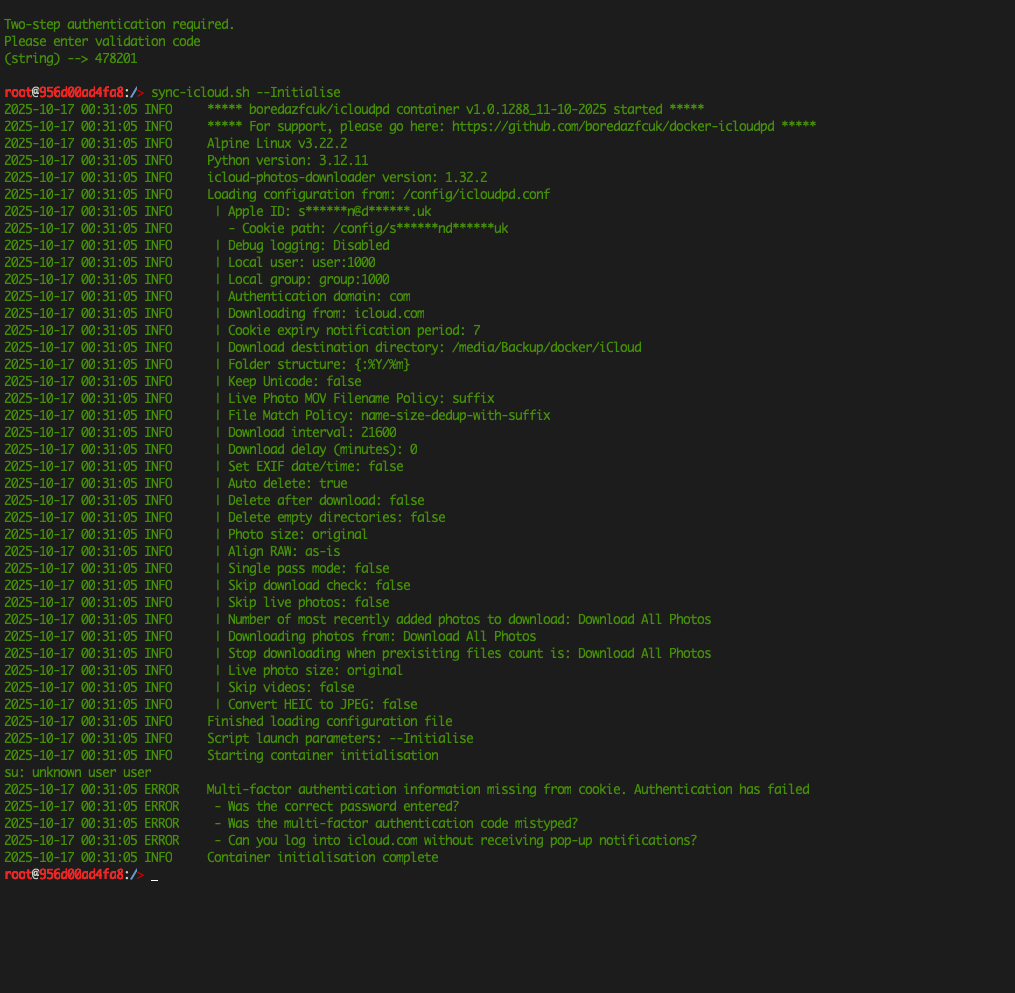
The source user had already created a keyring but still received “Multi-factor authentication information missing from cookie.” The current upstream container documentation explains exactly why: initialization stores the password and generates an MFA cookie, and that cookie later needs periodic re-authentication.
What Must Be Persistent
Map a host folder to the container's /config path. This directory stores the configuration, Python keyring files, authentication cookie, and state needed across container restarts.
Map a separate host folder for downloaded photos according to your chosen download_path. Do not put the photo library only inside the disposable container filesystem.
Run the Official Initialization Command
The upstream docker-icloudpd configuration guide documents:
docker exec -it icloudpd sync-icloud.sh --InitialiseReplace icloudpd if your ZimaOS container has a different name.
The Keyring Is Only One Part of Authentication
During initialization, the script asks for the Apple Account password and saves it to the keyring if you approve. It then handles two-factor authentication and creates a cookie under /config.
If the password is present but the cookie does not contain valid MFA state, the container can still fail exactly as the source screenshot shows.
Complete MFA from a Trusted Apple Device
When prompted, approve the sign-in on a trusted device and enter the current verification code in the interactive terminal. Do not reuse an expired code from an earlier attempt.
If Apple does not deliver or accept a validation code, confirm the Apple Account can sign in normally through iCloud.com before blaming Docker.
Check /config Ownership and Permissions
The container needs to write its keyring and cookie files to the persistent configuration folder. If you changed PUID/PGID or mapped a ZimaOS folder with incompatible ownership, authentication state may not survive.
After initialization, verify that new keyring/cookie files appear under the mapped config directory and remain after a container restart.
Re-Authenticate When Apple Expires the Session
Upstream documentation says modern Apple authentication can require re-authentication roughly every 30 days. The container provides:
docker exec -it icloudpd reauth.shBuild this into your maintenance expectations. A healthy container can stop downloading later even though nothing in ZimaOS changed.
If You Changed the Apple Account Password
The upstream wrapper provides a keyring-removal option. Remove the stale saved credential, then initialize again rather than repeatedly retrying with an invalid keyring entry.
Keep Your Photo Destination Separate from /config
Configuration state and downloaded photos have different backup needs. Back up the actual photo library independently, and keep /config protected enough that you can recreate the container without starting from zero.
The photo backup guide is useful for building a second local or offsite copy.
What If Apple Authentication Keeps Failing?
Enable the container's debug logging, inspect the exact authentication stage, and check the upstream issue/discussion tracker for current Apple-side changes. iCloud authentication is not a stable local protocol; Apple can change login behavior independently of ZimaOS.
FAQ
Why does icloudpd fail even though the password is in the keyring?
The wrapper also needs a valid two-factor authentication cookie. A saved password alone is not enough.
How often do I need to re-authenticate?
The current wrapper documentation describes periodic MFA re-authentication, commonly around 30 days.
Where should I store the authentication cookie?
Persist the container's /config folder on ZimaOS storage so keyring and cookie state survive recreation.
Is icloudpd an official Apple backup product?
No. It is a third-party downloader that relies on Apple's authentication behavior. Keep an independent backup of the downloaded library.


