
This thread started with a restart problem and ended as a detailed community experiment into how ZimaOS handles a full system disk, AppData migration, reinstalling apps, and storage recovery. The original user booted ZimaOS without a USB backup drive attached and then found that the normal login screen was replaced by a first-boot-style account screen. NFS data remained reachable, but the front end and file-related services were not behaving normally.
The most important discovery was that ZimaOS-HD had reached 100% usage. The user later updated the system to ZimaOS 1.5.2, but the full system volume remained the central problem. That makes this a useful historical troubleshooting case, but not a universal reinstall recipe.
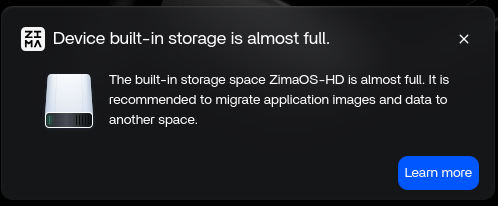
A 100% Full ZimaOS-HD Can Break More Than the Files App
In the source case, the user could still reach stored data over NFS while the dashboard, Files service, app indexing, and account-related UI became unreliable. A community participant linked these symptoms to the system partition being completely full.
The thread does not provide an IceWhale-authored cleanup command for safely recovering a 100% full system disk. The user had already removed containers and cleared logs without freeing enough space. That is important: do not convert speculative shell cleanup from a community thread into an official recovery procedure.
For current system and storage guidance, use the how current ZimaOS handles storage and recovery.
IceWhale Warned That the Default Layout Is Not Reinstall-Safe
Zima-Giorgio added an important correction to the discussion. He noted that most users keep the default layout, where the operating system and user data are on the same disk, and that reinstalling in that layout does not magically re-index and restore everything. He also emphasized the 3-2-1 backup rule.
This official caution matters because earlier community replies had made reinstall recovery sound more automatic than it really was. Whether a reinstall preserves data depends on how storage was laid out before the failure.
What the User's Migration Tests Actually Showed
The second page of the thread contains repeated reinstall tests with a dedicated OS disk and a separate NVMe data disk. The user's results showed several practical behaviors:
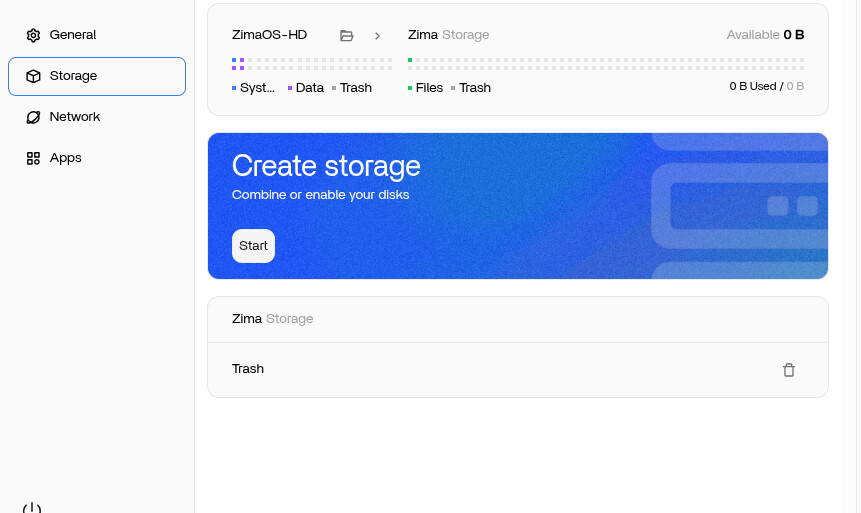
- after a fresh install, a previously used single NVMe storage disk may need to be enabled again;
- apps do not automatically reappear in the dashboard just because their old AppData folders exist;
- the app container or image still needs to be installed again from the App Store;
- persistent application data can survive if it was migrated to separate storage before reinstall;
- ZimaOS-level metadata such as custom ports, container names, network settings, permissions, and dashboard presentation should not be assumed to survive.
These were community tests on ZimaOS 1.5.2, not an IceWhale recovery guarantee. Treat them as observed behavior from that period.
Migration Is Not a Complete Container Backup
One of the most useful lessons from the thread is the difference between application data and ZimaOS app metadata. The user expected migrated data to recreate apps exactly as before. Their testing showed otherwise.
Migration helped preserve files and application-owned data, but it did not restore every setting that had been entered through the ZimaOS app editor. For example, custom port mappings or other container-level settings could still need to be recreated after reinstall.
This distinction explains why an application may reconnect to its existing database or media after reinstall while its ZimaOS dashboard configuration looks new.
Do Not Generalize Single-Disk Recovery to RAID
A major part of the thread explored whether a RAID 5 array would be automatically adopted after a fresh reinstall. The user found that the system still wanted to create or format storage rather than simply treating the old RAID as a ready-to-use app-data target.
The discussion therefore moved away from the earlier claim that every data volume would automatically survive and reattach. The safest conclusion from this thread is narrower: a separate single storage disk and a RAID array were not behaving identically in the tested ZimaOS 1.5.2 workflow.
Current ZimaOS storage behavior has changed since this 2025 thread. Review the latest storage documentation rather than using these RAID observations as present-day product behavior.
A Safer Reinstall Mindset from the Thread
- Back up important data before changing storage or reinstalling ZimaOS.
- Know which physical disk contains the operating system and which disks contain user data.
- Do not assume that migration equals a full backup of container configuration.
- After reinstall, verify storage is enabled and mounted before reinstalling apps.
- Expect to reinstall application containers or images even when their persistent data survives.
- Reapply ZimaOS-level app settings manually unless you have a separate export or backup for them.
ZimaOS Reinstall and Migration FAQ
Why did the front end fail while NFS data was still reachable?
In this case, the system volume was 100% full. The thread associated that condition with front-end and service failures while some data access continued to work.
Does migrating AppData make installed apps reappear automatically after reinstall?
No. The user's tests showed that the dashboard remained empty and apps still had to be installed again. Existing persistent data could then be reused.
Does migration preserve custom ports and ZimaOS app settings?
The thread's later testing says not to assume that. Migration protected application data better than it preserved the ZimaOS metadata describing each container.
Can I safely reinstall over a RAID setup based on this thread?
No universal guarantee was established. The RAID test behaved differently from the single-disk migration test, and the official reply stressed backups rather than promising automatic recovery.


