
This May 2026 thread began as a frustrated first impression after one long night with ZimaOS. AdGuard Home and Pi-hole appeared to run in isolated Docker networks instead of the user's 192.168.60.0/24 LAN, Jellyfin only worked after several attempts, and Time Machine backups from a MacBook Pro failed. After more testing, however, two of the original conclusions changed: AdGuard Home was made functional, and the Time Machine problem followed the MacBook to a TrueNAS share, pointing away from ZimaOS.
The thread is therefore more useful as a troubleshooting case study than as a verdict on the operating system. It shows why Docker networking, application templates, and client-side backup behavior need to be isolated before blaming the NAS platform itself.
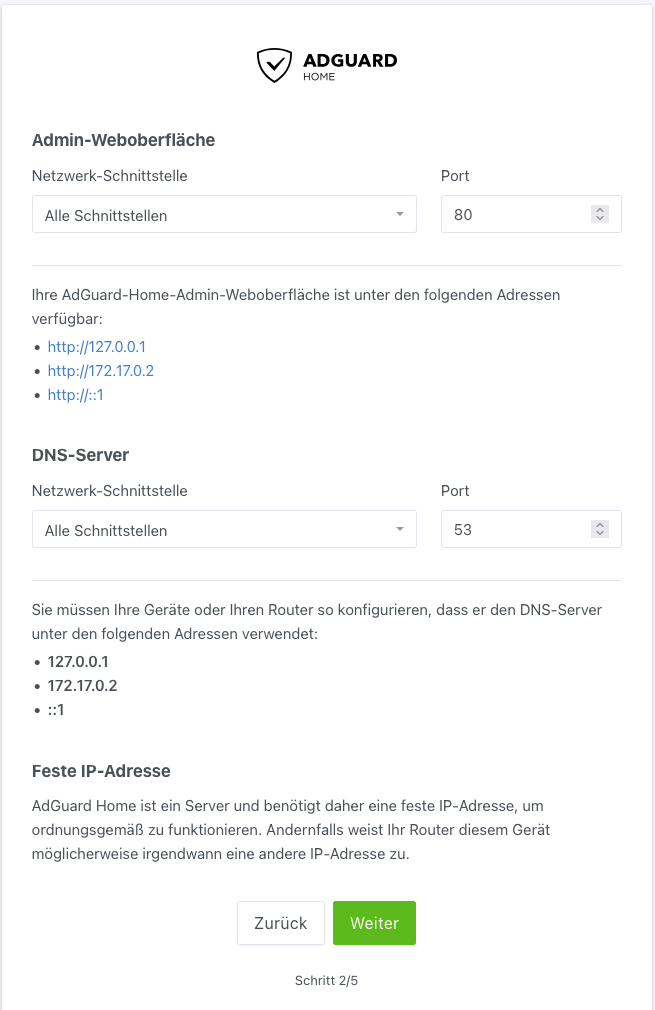
AdGuard's Setup Wizard Showed Docker Addresses Instead of the LAN IP
After a standard installation, the user's AdGuard Home setup screen showed addresses such as 127.0.0.1 and 172.17.0.2. The user expected to see the ZimaOS host's static LAN address, 192.168.60.241.
Switching to Host Networking Was Not a Clean Fix
The user found a community-style workaround that changed the Compose network mode to host. After also changing app settings, the installation became unreachable. That negative result matters because host networking changes both port ownership and the assumptions made by an App Store template.
Do not treat network_mode: host as a universal answer for DNS containers. It can be useful when the app genuinely needs host-level network visibility, but it can also create port conflicts with the ZimaOS dashboard, another DNS resolver, or another container.
The User Eventually Got AdGuard Working with a Different App Variant
The original poster later updated the thread after finding instructions that used the Network version of the AdGuard app rather than the default package and added the required web-interface port mappings. They said the setup assistant still did not show the expected 192.168.60.x address, but AdGuard worked.
This confirms an important diagnostic principle: the container does not need to display the host's LAN address in its setup wizard in order to answer DNS requests for LAN clients. What matters is whether the published DNS and web ports are reachable from the network.
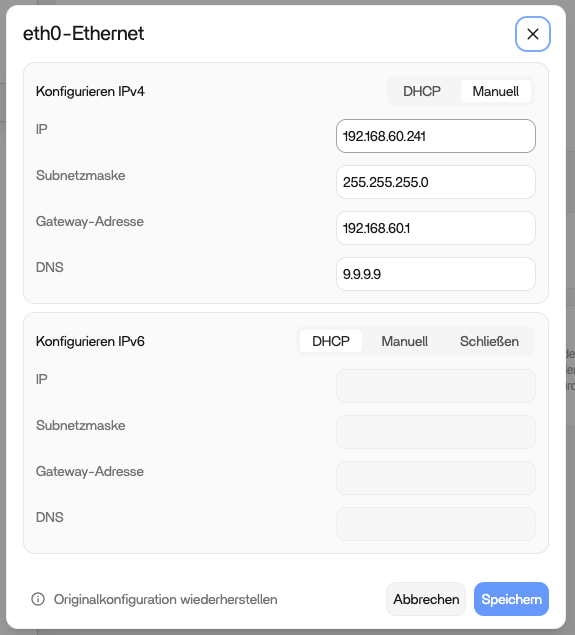
The ZimaOS Host Itself Had a Valid Static Network Configuration
DNS Containers Need the Correct Ports More Than the Correct-Looking Wizard Address
AdGuard Home and Pi-hole are more sensitive to networking than an ordinary web application because clients need to reach DNS on port 53, usually over both UDP and TCP. The management UI uses separate web ports.
If a DNS app is marked healthy but LAN clients cannot use it, check the actual published ports and whether another service already owns port 53 before changing the host's static IP.
Jellyfin Working Helped Rule Out a Total Docker or Storage Failure
The user said Jellyfin eventually worked. That did not prove AdGuard's networking was correct, but it did show that ZimaOS could run Docker applications and access media storage on the same installation. Troubleshooting could therefore stay focused on application-specific network configuration rather than treating the entire container stack as unusable.
The Time Machine Failure Followed the MacBook to TrueNAS
The strongest correction in the thread came the next day. The user wiped and reinstalled ZimaOS, then tested Time Machine again. Their older Mac mini on Monterey backed up successfully, while the newer MacBook still failed.
They then tried a TrueNAS Time Machine share and the MacBook failed there too. That cross-test shifted the likely cause from ZimaOS to the MacBook or its macOS/SMB behavior.
Why Cross-Testing Another NAS Is So Valuable
If the same client fails against two independent NAS platforms while another Mac works against the ZimaOS target, the evidence no longer supports “ZimaOS Time Machine is broken” as the simplest explanation.
This is a useful general rule for NAS troubleshooting: change one side of the connection at a time. A second server or second client can quickly reveal whether the failure follows the server, the client, or a specific combination.
Current ZimaOS Should Be Evaluated with Current Storage and App Settings
The source thread reflects ZimaOS in May 2026. The platform has continued to change since then, including app configuration, YAML editing, storage management, and backup behavior. For a new installation, start from the current ZimaOS feature and storage model rather than assuming every 2026 App Store template is unchanged.
A Better Fresh-Install Test Sequence
- Set up storage and app-data location before installing many apps.
- Verify one simple app such as Jellyfin or another web service.
- For DNS apps, verify port 53 separately from the WebUI.
- Do not switch to host networking until the existing bridge/port mapping is understood.
- For Time Machine, test another Mac or another SMB Time Machine target when possible.
- Only after the failure follows one component should you treat that component as the likely root cause.
Fresh ZimaOS Troubleshooting FAQ
Was AdGuard Home ultimately working for the source user?
Yes. The user said the Network app variant plus additional port configuration worked.
Did the AdGuard setup wizard ever show the expected 192.168.60.x address?
No, but the application still worked. The wizard was showing container-visible interfaces.
Was ZimaOS proven to be the cause of the Time Machine failure?
No. The MacBook also failed against a TrueNAS Time Machine share, while an older Mac mini worked against ZimaOS.


