
After changing ISP and reinstalling ZimaOS, a community member found that the host could ping internet sites and download App Store images, while applications inside containers could not reach external services. qBittorrent could not download, and Jellyfin could not retrieve metadata.
The original case was resolved by moving the affected containers from bridge networking to host mode. Later replies documented a second case with similar symptoms but a different cause: a public WAN address had been entered as the gateway, and the user's ISP path also required IPv6 alongside IPv4 for Jellyfin.
Host Connectivity Did Not Prove Container Connectivity
The author could use the ZimaOS web terminal and install apps, demonstrating that the operating system itself had a working outbound path. That did not establish that each Docker network had correct routing. The apps' failures therefore had to be tested from the container side rather than inferred from the host.
Zima team member Giorgio suggested testing connectivity through a browser container and trying another network mode from the application's settings panel. The post also notes that third-party stores, YAML installation, and CLI installation can supply diagnostic applications, but those are options rather than a confirmed requirement.
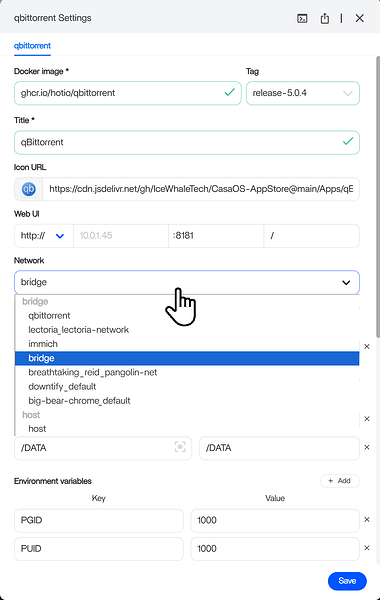
Host Mode Resolved the Original Bridge-Network Case
The author moved all affected containers to host mode and reported that internet access began working. The thread does not determine why bridge mode failed after the clean installation, so host mode should be recorded as the successful change for this setup, not as proof of a universal bridge-network defect.
A later participant noted an important side effect: after switching modes, the dashboard link may still point to the old published host port. For Jellyfin, the participant had to browse directly to port 8096 after the dashboard continued opening port 8097.
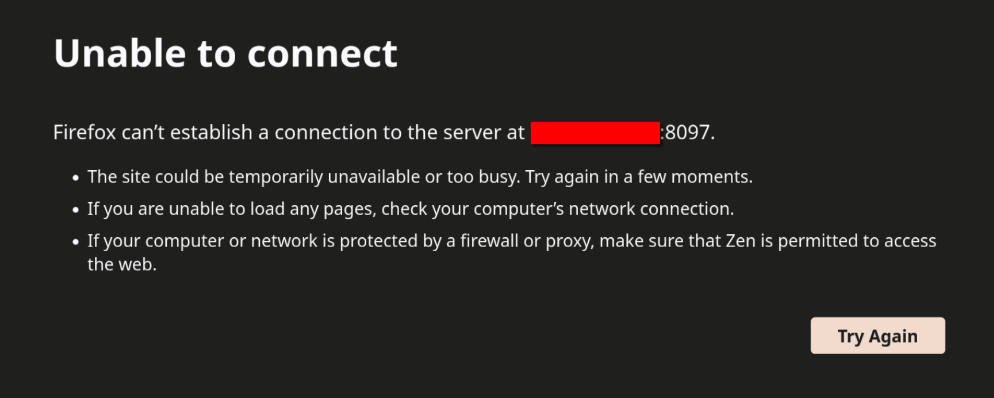
A Later Case Revealed an Incorrect Gateway
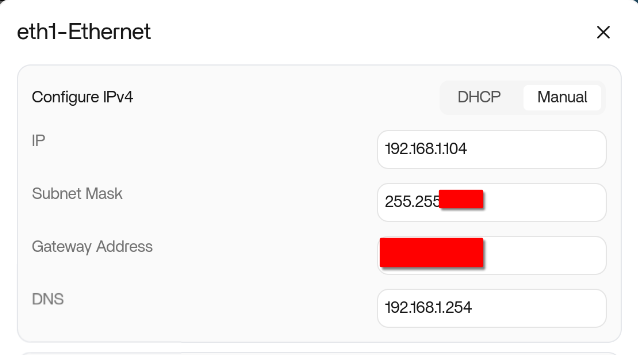
The second user's Jellyfin logs contained No route to host while contacting an external metadata service. Community members recommended testing without the VPN and checking the gateway shown in ZimaOS network settings.
A screenshot revealed that the configured gateway was the user's public WAN address. The replies explained that the gateway should instead be the local router address on the same LAN subnet. The user corrected the gateway and also enabled IPv6 alongside IPv4 in Jellyfin because their AT&T connection preferred IPv6. They then confirmed that metadata and image retrieval worked.
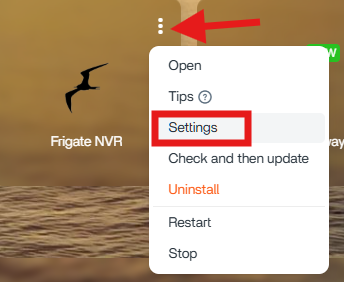
Keep the Two Community Outcomes Separate
- Original October 2025 case: bridge networking failed for the author's containers; host mode restored access.
- January 2026 follow-up case: the gateway was configured as a public IP, and Jellyfin also needed IPv6 enabled for that ISP path.
Both produced the broad symptom “apps cannot access the internet,” but they did not share one verified root cause. The thread supports checking network mode, the address used after a mode change, gateway configuration, VPN influence, and protocol availability as separate branches.
FAQ
Why can ZimaOS download apps while a container remains offline?
The host and a Docker container can use different routing and network configuration. In the original case, host connectivity remained healthy while bridge-networked applications failed.
Does changing Jellyfin to host mode preserve the old dashboard port?
Not necessarily. One participant found that the dashboard still linked to port 8097, while Jellyfin in host mode was reachable directly on 8096.


