
Yes, ComfyUI can run on ZimaOS. The strongest source evidence is a community user who could not get their App Store package working but did get ComfyUI running in a custom NVIDIA CUDA container with GPU passthrough and port 8188 exposed.
The exact one-line command from May 2026 should not be treated as a current install script. It installed Python and Git at container startup and pulled a nightly PyTorch CUDA build. ComfyUI's current upstream requirements have moved on, including newer Python and PyTorch/CUDA combinations. A cleaner current ZimaOS deployment should put dependencies in a reproducible Dockerfile/Compose stack, persist models/workflows outside the container, and pass the GPU deliberately.
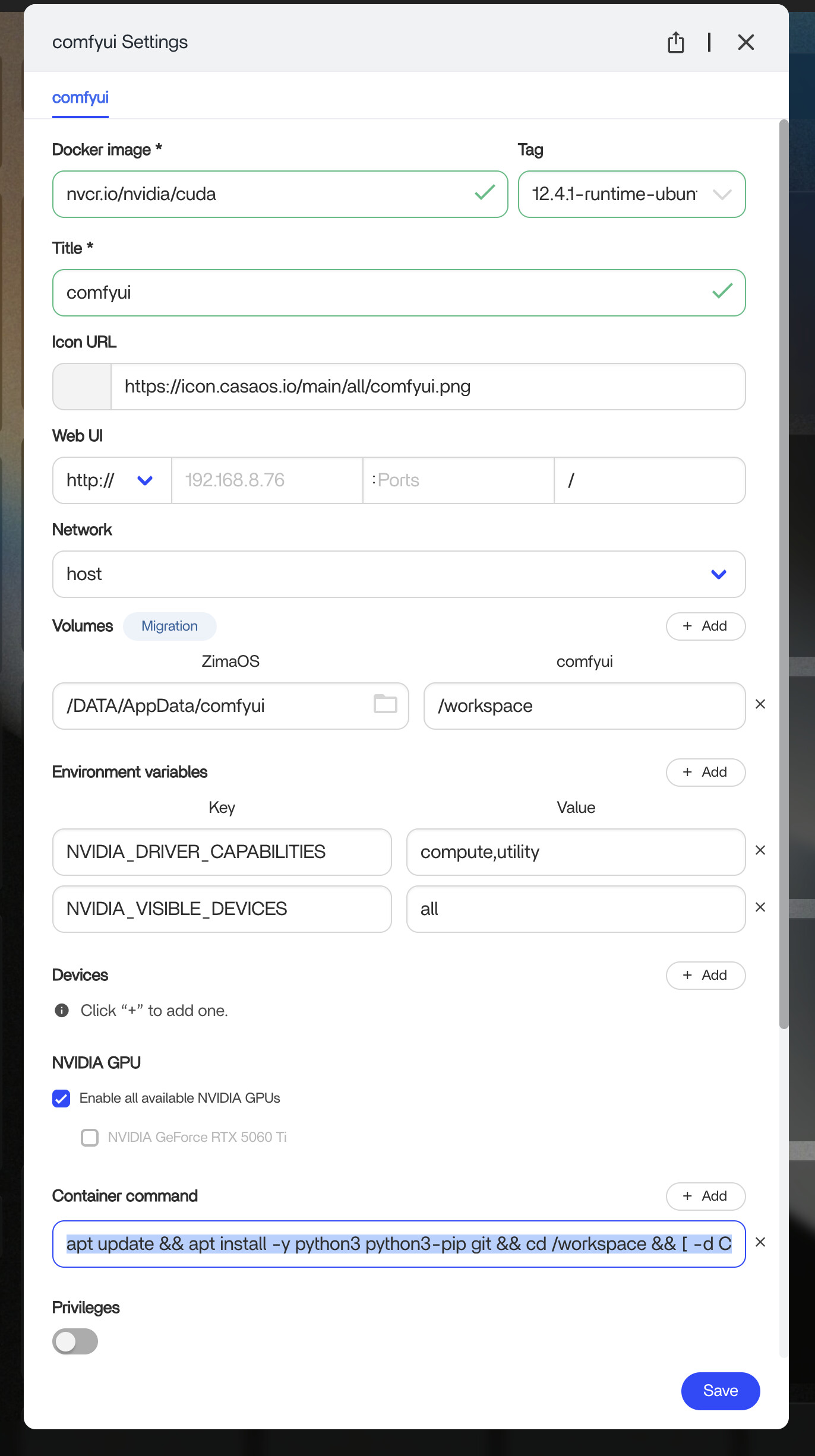
The Community Success Was a Custom Container
The working example used an NVIDIA CUDA runtime image, a persistent /DATA/AppData/comfyui host path mapped into /workspace, GPU access enabled, and ComfyUI listening on port 8188.
The source user specifically said their App Store version had not worked, so do not use that thread as proof that every current catalog package is broken—or that custom Docker is the only possible installation.
Do Not Install ComfyUI Directly into the ZimaOS Host
ZimaOS is an appliance-style OS and does not provide the normal persistent Debian/Ubuntu host package-management workflow that ComfyUI's manual Linux installation assumes. Keep Python, PyTorch, Git and custom nodes inside a container or VM.
Use Current ComfyUI Requirements, Not the Old cu124 Nightly Line
Current ComfyUI documentation recommends modern Python and hardware-specific PyTorch packages and supports NVIDIA, AMD, Intel and CPU modes.
Use the current ComfyUI system requirements when building the container.
Verify GPU Access Inside the Container
For NVIDIA, host GPU support is only the first layer. The ComfyUI container must receive the GPU and be able to load the matching CUDA/PyTorch stack. Verify from inside the container before blaming ComfyUI workflows.
A current ZimaOS NVIDIA workflow should also confirm that other GPU-enabled containers can see the same hardware.
Persist Models Outside the Disposable Container
Checkpoints, VAEs, LoRAs, ControlNet models, custom nodes and workflows can consume hundreds of gigabytes. Map them to persistent SSD/NVMe storage rather than baking them into a container layer.
Keep the model path stable across container recreation and upgrades.
Use Compose Instead of a Huge Startup Command
Current ZimaOS supports native YAML/Compose workflows. Compose makes GPU devices, volumes, environment variables, port 8188 and restart policy reviewable instead of hiding everything in one long command.
Use the current ZimaOS Compose model.
Do Not Publish Port 8188 Directly to the Internet
ComfyUI can execute workflows and custom nodes with significant filesystem/GPU access. Keep it on a trusted LAN/VPN or place it behind authenticated HTTPS access if remote use is required.
ComfyUI on ZimaOS FAQ
Did anyone in the source successfully run ComfyUI on ZimaOS?
Yes. One user reported a working custom NVIDIA container on port 8188.
Did the original poster confirm their own installation worked?
No. They later asked for more Compose/manual-install help.
Should I copy the old nightly PyTorch command exactly?
No. Use current ComfyUI/PyTorch requirements for your GPU and build a reproducible container.


