
“Built-in storage almost full” is a symptom, not a single ZimaOS bug. This source thread exposed at least three different causes: a Backup task whose USB destination disappeared and was effectively recreated under local /DATA, a runaway Docker JSON log that grew to 519 GB, and a different system where /DATA/.media consumed 409 GB.
The safest response is to measure first, identify the owning service, stop the writer, then clean only the confirmed data. Do not delete /DATA/.docker, .media, or AppData recursively just because they are large.
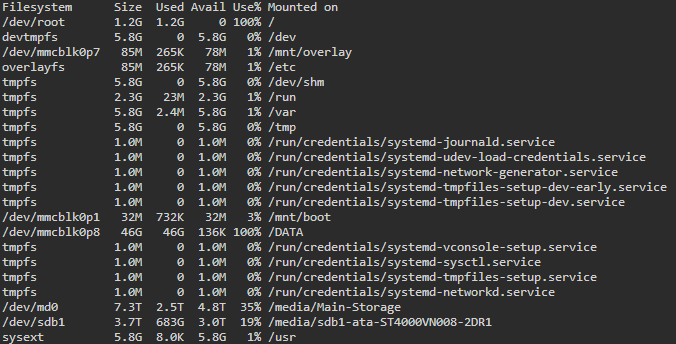
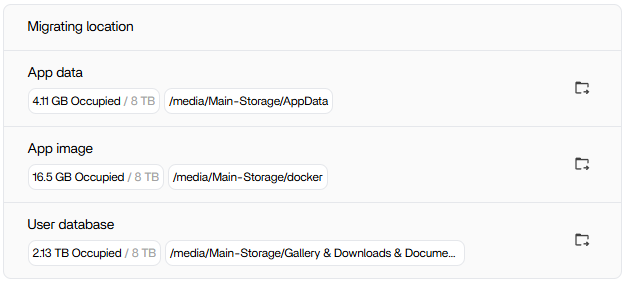
/DATA even though its large data pool still had multiple terabytes available.Migrating App Data Does Not Guarantee Every Future Write Leaves /DATA
Use Read-Only du Checks to Find the Largest Directory
The source user shared:
sudo du -x -h --max-depth=1 /DATA 2>/dev/null | sort -hrThis does not modify files. Repeat against a suspicious directory to narrow the largest subtree.
A Disconnected Backup Destination Was the First Confirmed Cause
Cobblerkid found that a Backup task expected an external USB drive. After the drive was disconnected, the backup structure was recreated under /DATA and the scheduled job kept writing until local storage filled.
Zima-Jerry agreed this appeared to be a problem and forwarded it internally. That makes this more than a community theory.
Another User Found a 519 GB Container JSON Log
A second participant inspected one Docker container directory and found a *-json.log file of roughly 519 GB, attributed to a Home Assistant container.
The user removed the container and recovered space. Do not generalize that into “delete Docker logs manually”; first identify the noisy container, inspect its logs, and fix the repeated error generating the log.
A Third System Had 409 GB Under /DATA/.media
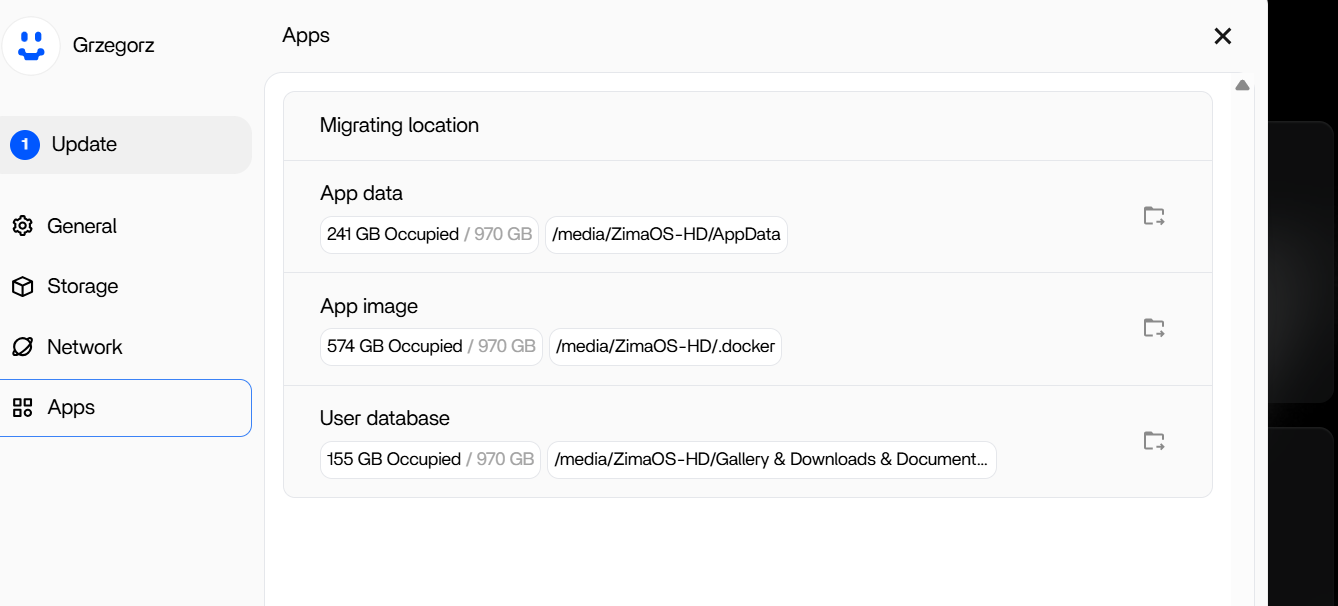
Another user posted a size breakdown where normal AppData was about 225 GB, .docker only 3.5 GB, but .media consumed 409 GB. This demonstrates why one cleanup command cannot solve every “disk full” report.
Current ZimaOS Exposes More App Storage and Cache Controls
Current IceWhale documentation says Settings → Apps shows the App data location and per-app usage/cache cleanup. Keeping AppData on the main storage array reduces pressure on the small system drive.
Use the current ZimaOS app-storage controls before attempting shell cleanup.
A Safer Recovery Order
- stop the task/app still generating data;
- measure
/DATAread-only; - identify the exact file/folder and owner;
- back up important AppData/configuration;
- use supported app/cache controls where possible;
- remove only disposable or verified erroneous data;
- confirm free space stays stable after reboot.
docker image prune Does Not Fix Every Docker Space Problem
In the source, raller1028 mentioned docker image prune -a as a way to remove images not used by containers. That can reclaim unused image layers, but it will not solve a 519 GB active container JSON log, a runaway Backup destination, or user data under .media.
Use the size scan to identify the category first. A cleanup command aimed at the wrong category may free almost nothing while creating new risk.
A Huge JSON Log Means the Container's Error Loop Still Matters
Removing the offending container freed space for one user, but the better long-term question is why the application wrote hundreds of gigabytes of logs. Inspect recent logs for repeated errors, restart loops, unavailable devices, or configuration problems before reinstalling the same workload.
If the recreated container immediately starts generating logs again, the disk-full condition will return.
Treat .media as Managed Storage, Not Disposable Cache
The 409 GB /DATA/.media example may contain real managed mount/file data rather than temporary cache. Before deleting anything there, identify which storage/share/app owns it and confirm the same files exist elsewhere.
Built-In Storage Full FAQ
Did the source prove AppData migration itself failed?
No. The original poster had migrated the managed categories; the confirmed fill came from a disconnected Backup target.
Is it safe to delete the whole .docker directory?
No. It can contain active container state, logs, images, and application dependencies.
What is the best first command from the source?
A read-only du size scan of /DATA to identify the actual large subtree.


