
The important fact in this December 2025 thread is that it did not end with a working AdGuard Home installation on the ZimaBoard 2. The source user tried the community suggestions, then reported that AdGuard Home worked on a separate Umbrel server while the ZimaOS deployment remained unavailable. That makes this a troubleshooting article, not a solved installation recipe.
The screenshots and replies still reveal several useful checks: the application had separate DNS and web-interface mappings, it was running in bridge networking, and the community focused on port conflicts rather than the UniFi gateway.
What “Service Unavailable” Does and Does Not Tell You
A Service Unavailable page proves that some HTTP path responded, but it does not identify whether the AdGuard process finished initialization, whether the reverse path points to the correct internal port, or whether DNS port 53 bound successfully.
Do not start by changing router settings when the service is not even healthy on the local ZimaOS host.
The Source Configuration Published DNS and Web Ports Separately
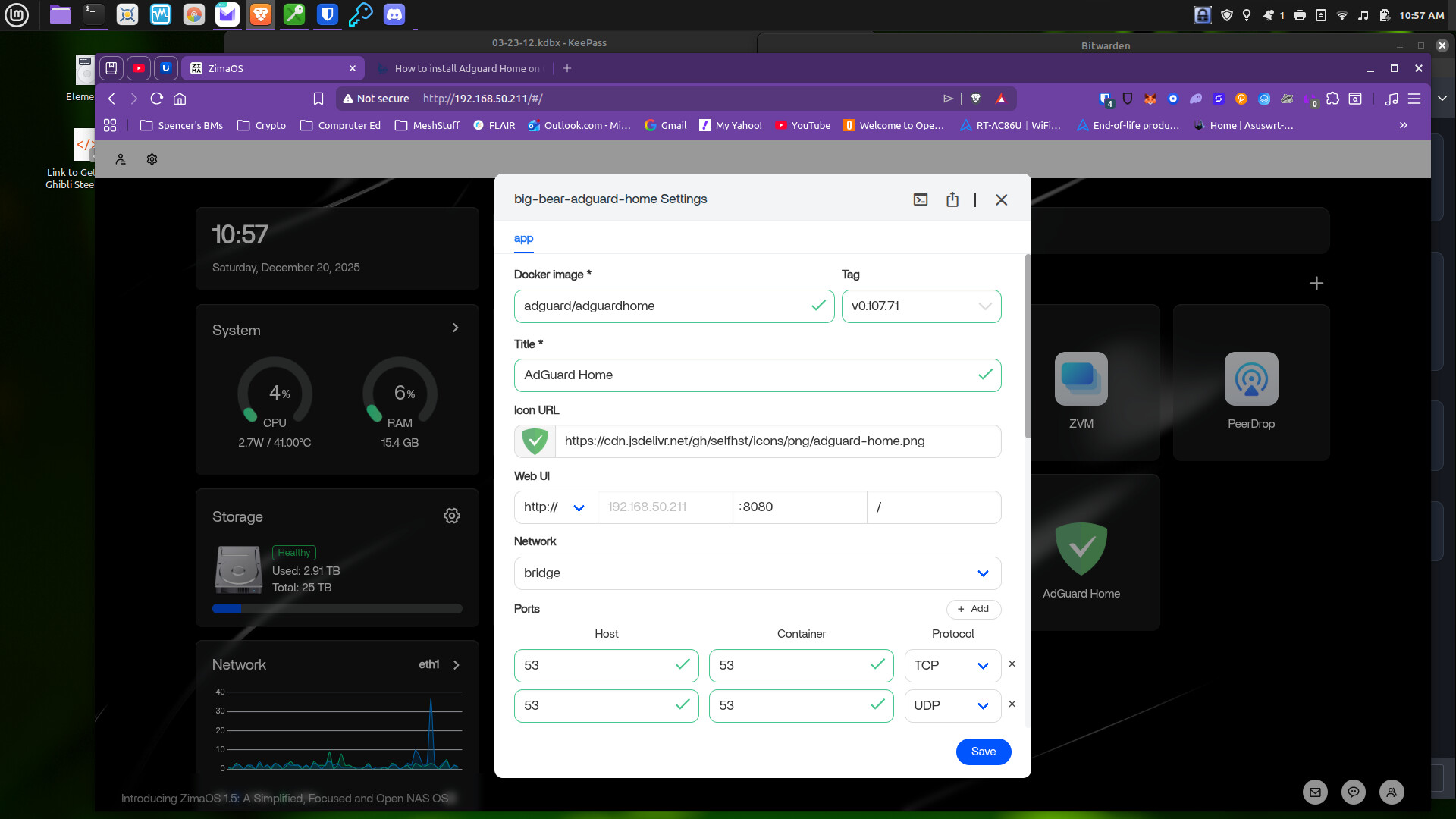
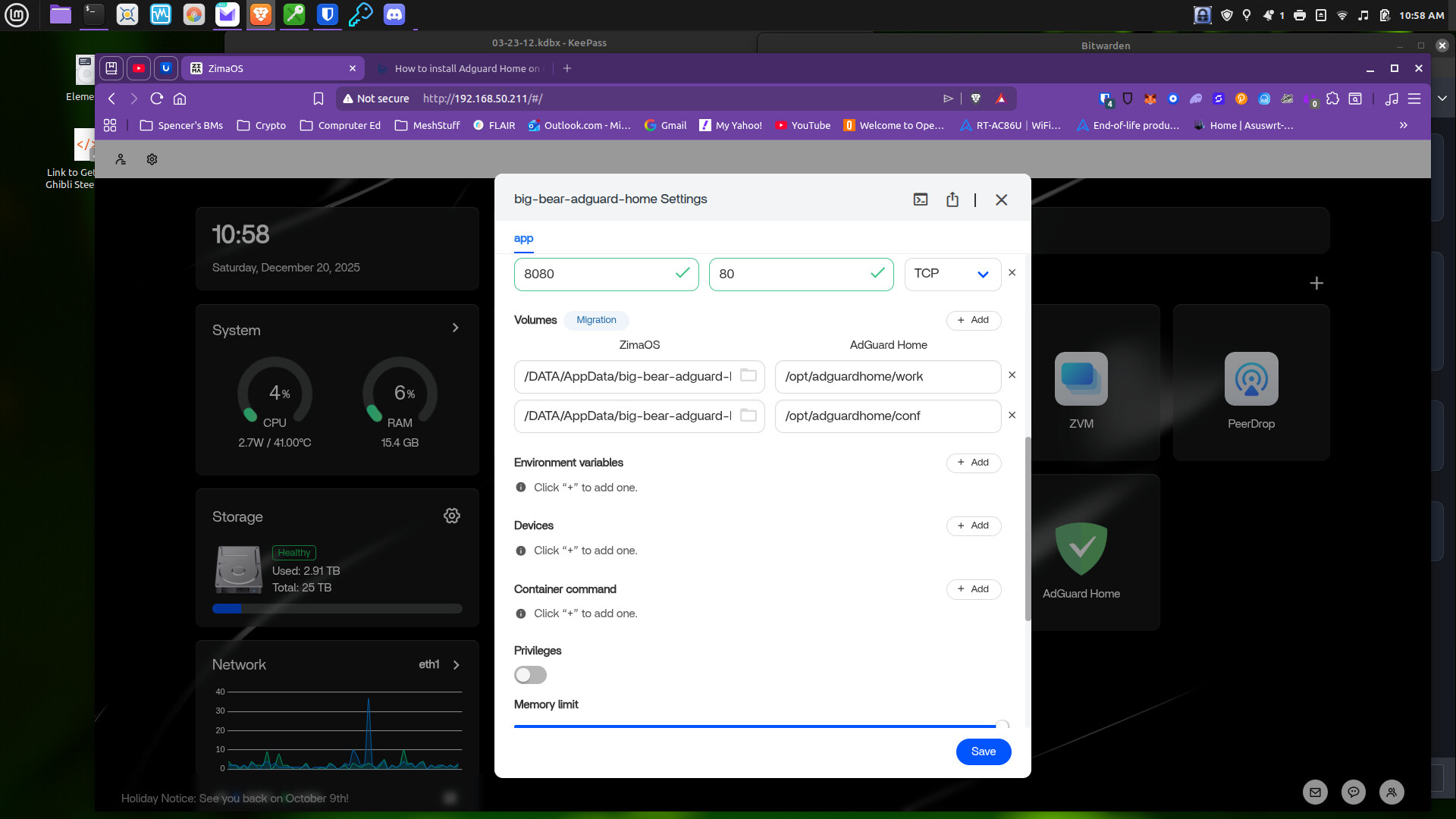
First-Time AdGuard Home Setup Uses Port 3000
Current AdGuard Home Docker guidance distinguishes the initial setup wizard from the normal admin interface. On a fresh container, TCP port 3000 is used for the first-time setup flow. After configuration, the normal HTTP interface commonly uses port 80 unless the user changes it.
That is an important detail missing from the short community reply. A host mapping such as 8080:80 can be correct for the post-setup UI while still not exposing the initial setup endpoint expected by a fresh container.
Compare the app with AdGuard Home's current Docker port and volume requirements before changing the router.
DNS Requires Port 53 over Both TCP and UDP
The community responder correctly highlighted that AdGuard Home needs port 53 for ordinary DNS service. Both TCP and UDP should be available when the container is expected to provide DNS to the LAN.
If another Pi-hole, AdGuard, system resolver, or DNS container already owns port 53, the new service cannot bind normally. Checking the host for an existing listener is more useful than repeatedly changing the WebUI port.
WebUI Port and DNS Port Are Different Problems
A conflict on port 80 or 3000 can stop you from opening the administrative interface while DNS itself is still healthy. A conflict on port 53 can prevent the DNS service from starting even when the dashboard opens. Keep these branches separate during diagnosis.
Host Mode Was Suggested, but It Was Not Proven Necessary
The community responder recommended trying host network mode, arguing that bridge mode sometimes complicates DNS ports. The original poster never returned with a successful ZimaOS result after that change.
Therefore, do not present host networking as mandatory. AdGuard Home's maintained Docker deployment supports explicit port mappings. Bridge mode can work when the required ports are free and mapped correctly.
The UniFi Cloud Gateway Was Not Identified as the Cause
The user specifically asked whether the UniFi Cloud Gateway Max needed changes. The community answer was that no router change should be necessary merely to open and configure AdGuard Home locally.
Router changes come later, when you decide to make LAN clients use AdGuard Home for DNS or DHCP. They do not repair a container that cannot finish local initialization.
Keep /opt/adguardhome/work and /opt/adguardhome/conf Persistent
AdGuard Home stores runtime data and configuration in persistent directories. If those paths are recreated, mounted read-only, or pointed somewhere unexpected, a container can behave like a new installation or lose settings after recreation.
The source screenshots already showed persistent volumes, so a complete reinstallation should verify whether those existing folders are being reused rather than assuming the application is starting clean.
A Better Diagnostic Order
- Check the container log for startup or binding errors.
- Confirm whether the first-time setup port 3000 is needed.
- Confirm the normal WebUI mapping separately.
- Check that TCP and UDP port 53 are free on the host.
- Verify the persistent configuration and work volumes are writable.
- Only then experiment with bridge versus host networking.
- Leave router DNS changes until the local service is healthy.
The Source Case Remained Unresolved on ZimaOS
On December 24, the user reported that they had AdGuard Home working on an Umbrel server but still could not get the ZimaBoard 2 deployment running. They closed the help request because the service was available elsewhere, not because the ZimaOS installation had been fixed.
AdGuard Home Service Unavailable FAQ
Which port is used for first-time setup?
Current AdGuard Home Docker instructions use TCP port 3000 for the initial configuration wizard.
Which ports are used for ordinary DNS?
Port 53 over both TCP and UDP.
Does AdGuard Home require host networking on ZimaOS?
The source thread did not prove that. It was a community troubleshooting suggestion.
Was the original ZimaOS case solved?
No. The user moved the service to another server and ended the thread without a working ZimaOS configuration.


