
When ZimaOS Files shows Error Loading but Windows SMB access still works, do not immediately assume the RAID or data has disappeared. That was the pattern in this February 2026 thread: the Files UI failed after the 1.5.4 update, while other apps and Samba file access remained functional.
IceWhale staff later supplied the most important root-cause boundary. raller1028 said that in ZimaOS 1.5.4, when the system disk is full, the Files service can stop working correctly. The official recovery was to free space on the system disk and restart icewhale-files. A separate community database-renaming workaround helped multiple users, but IceWhale did not present that as the first-line fix.
Working SMB Is Strong Evidence the Data and Mounts Still Exist
The original poster could still access the files through a Windows Samba share. That means the host storage and data path were alive even though the Files web application could not render them.
This is an important distinction between:
- storage/data loss;
- Files service failure;
- browser/UI failure.
Files Is Not a Normal App Store Docker Container
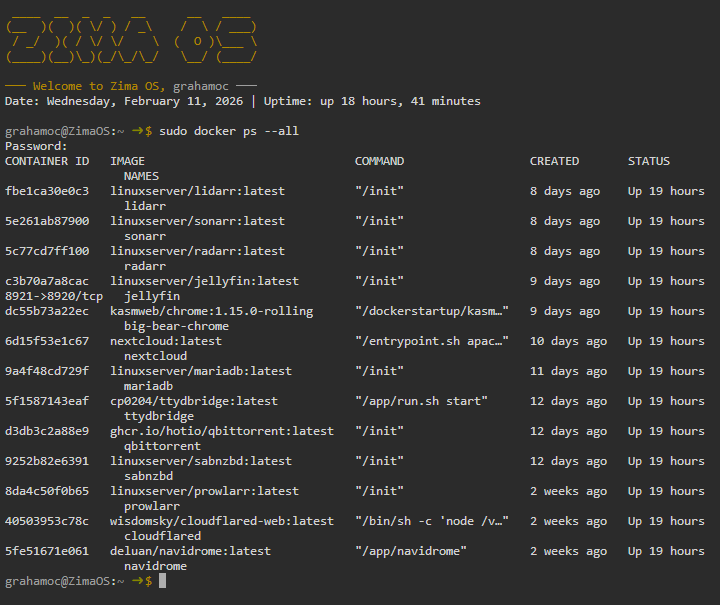
Therefore docker ps not showing a Files container is expected. Restarting random Docker containers will not repair the native Files service.
IceWhale Identified Full System Storage as the 1.5.4 Trigger
On February 26, raller1028 from IceWhale wrote that the problem “should be” caused by the system disk being full in version 1.5.4.
The official recovery sequence was:
- free some space on the system disk through the command line;
- restart the Files service:
systemctl restart icewhale-filesUsers unfamiliar with command-line cleanup were told to contact support rather than delete files blindly.
Why a Full System Disk Can Break Files While SMB Still Works
Native services need working space for databases, state, temporary files, logs, or service operations. The large user data can remain intact on another storage array while a small system partition reaches 100% usage and causes a service-specific failure.
That is why checking only “my RAID has free space” is not enough.
Keep Growing App Data Off the System Drive
Current ZimaOS documentation recommends moving application data to a real storage space rather than letting Docker databases, thumbnails, and caches fill the system disk.
Use the current ZimaOS app-storage guidance to prevent a different source of system-drive pressure.
The Community files.db Rename Worked for Multiple Users
A community user later posted:
mv /var/lib/casaos_data/.casaos/files.db /var/lib/casaos_data/.casaos/files.db.bak
systemctl restart icewhale-files
Several participants replied that this restored Files.
This should still be treated as a secondary community recovery path. IceWhale staff immediately asked what the significance of removing the Files database was, and did not replace the official “free system space + restart service” guidance with this command.
Renaming a Database Is Safer Than Deleting It, but Still Changes Application State
The community command keeps a .bak copy instead of erasing the database. That is better for rollback, but rebuilding the Files database can change indexed metadata or other service state.
Do not use it as the first action when the system disk is simply full.
Do Not Assume the 1.5.4 Bug Persists on Current ZimaOS
Current ZimaOS is 1.7.x and has continued to receive Files, storage, memory, security, and application-storage fixes. The historical issue is useful because it teaches how to distinguish service failure from data loss, not because every modern Files error has the same cause.
If the issue reappears today, first capture current system free space, current version, service status, and whether SMB/other file access still works.
Free Space Deliberately
Do not run broad cleanup scripts against unknown system directories. Identify large app caches, Docker data, backups, or logs and use current ZimaOS cleanup/migration controls when possible.
Files Error Loading FAQ
Did SMB still work in the source case?
Yes, which strongly suggested the data and mounts were still present.
What did IceWhale staff identify as the 1.5.4 problem?
A full system disk causing the Files service to stop working correctly.
What was the official service restart command?
systemctl restart icewhale-files.
Was renaming files.db official first-line guidance?
No. It was a community workaround that several users confirmed, while IceWhale's first-line guidance was to free space and restart the Files service.


