
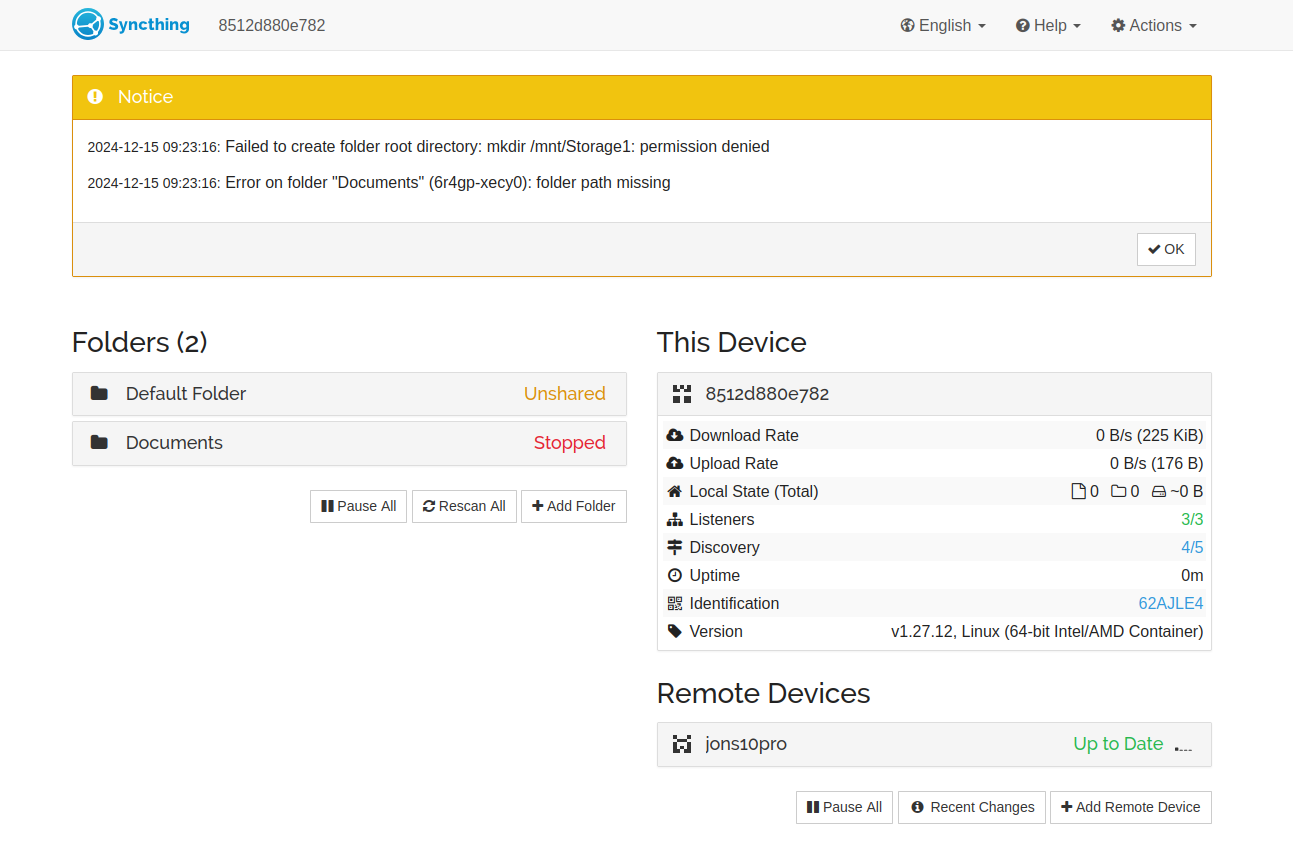
The source user had Syncthing working for phone-photo sync, but the files kept landing on the system drive instead of the storage disk. Copying a path from the Files app and pasting that path directly into Syncthing caused Syncthing to recreate the same-looking directory tree inside its own container filesystem.
The eventual solution was conceptual rather than a magic filesystem command: Docker has a host path and a container path. Syncthing must use the path visible inside the container, not the raw path visible to CasaOS or ZimaOS.
Why the External Path Was Being Recreated in the Wrong Place
If Syncthing is told to use a path it cannot actually see, it may create that path inside its own writable filesystem or inside a mapped config location. The source user interpreted the folder name as an external-disk path, while the container interpreted it as a path relative to its own filesystem.
Find the Real Host Mount Point
The community used lsblk to identify where the operating system mounted the external drive. In the responder's example the drive appeared under a path similar to /media/devmon/...; the original poster's drives later appeared under /mnt/Storage1 and /mnt/Storage2.
Those exact historical mount paths are CasaOS/ZimaBlade examples and should not be treated as current universal ZimaOS paths.
Map the Host Drive into Syncthing
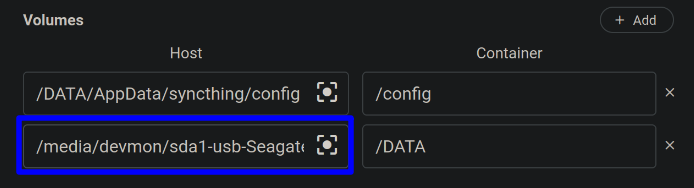
The responder used /DATA as the Syncthing-side path. Once that mapping exists, Syncthing should refer to folders beneath /DATA rather than the original host mount path.
The User Initially Entered the Host Path Inside Syncthing
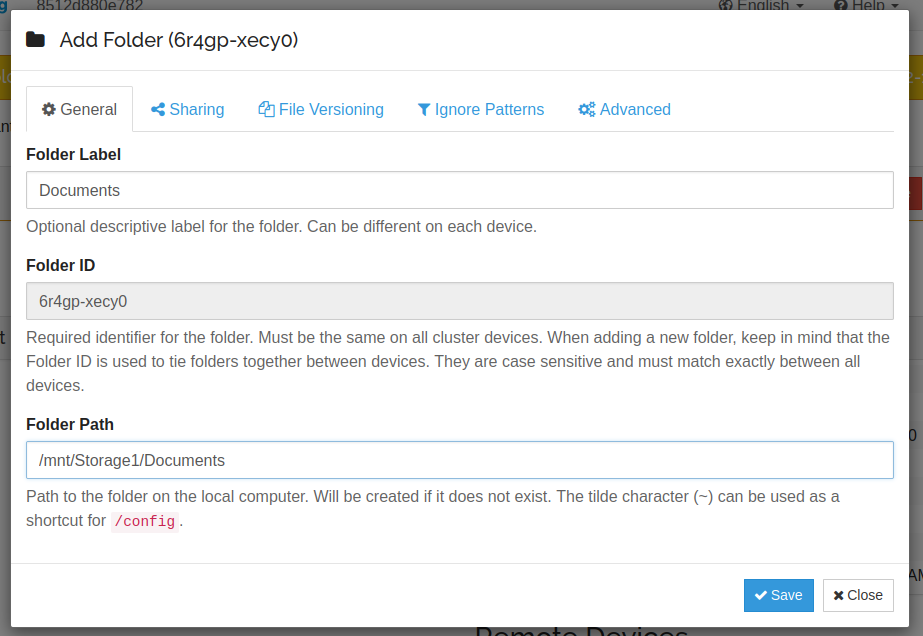
Syncthing then returned a permission/path error because that internal path did not correspond to the mapped volume.
The Final Working Path Was /DATA/Documents
The responder explained that after mapping the host drive to /DATA, Syncthing should use:
/DATA/Documentsor the equivalent ~/Documents shorthand when Syncthing's home points at that mapped data location.
The original poster returned the next day and confirmed success.
Recursive chown Was Part of the Community Workflow, Not the Core Fix
The thread also used a recursive chown on the external drive. That can be appropriate on a Linux-owned filesystem, but it changes ownership across the whole target and was not an IceWhale-authored requirement.
Do not run a recursive ownership change on an existing shared disk until you know which users and applications already depend on its permissions.
Current ZimaOS Makes App Storage Mapping Easier
Current ZimaOS documents host-versus-container paths directly in the application settings and recommends setting app data to managed storage rather than letting applications fill the system drive.
Use the current ZimaOS app-path model for Docker volumes instead of relying on old CasaOS mount locations.
The Source User Reinstalled Syncthing and Rebuilt the Mapping
After the first attempts remained confusing, the original poster performed a fresh Syncthing install, re-added the storage drives, and mapped /mnt/Storage1 on the host to /DATA inside the container. This clean retest removed old container settings from the diagnosis.
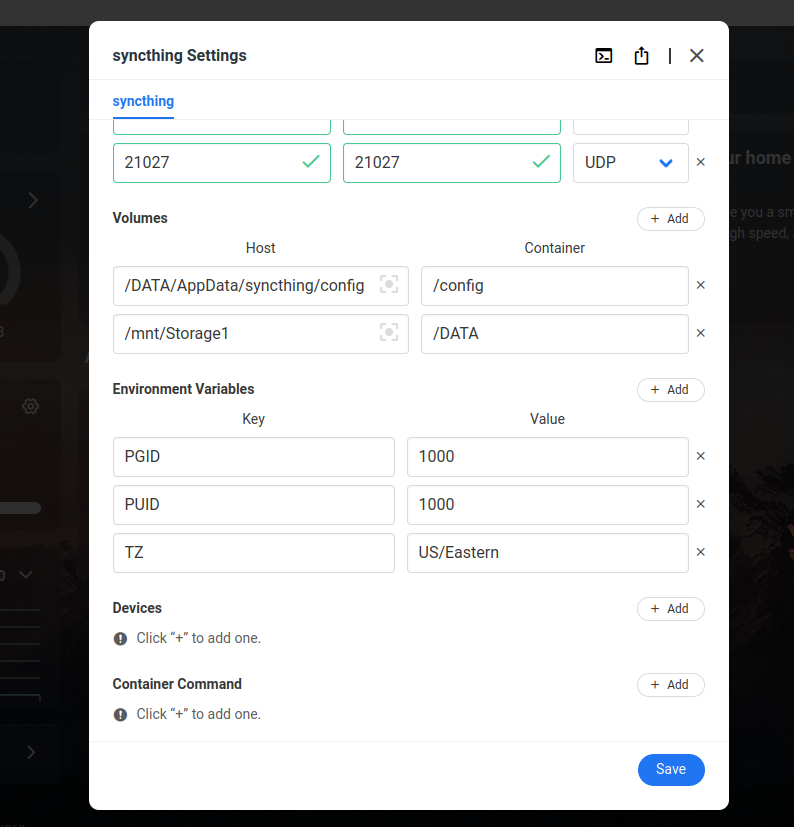
Host Permission Alone Did Not Make the Wrong Container Path Work
The user could SSH into the storage drive and create directories, yet Syncthing still failed when asked to use /mnt/Storage1/Documents internally. That negative result is valuable: being able to write as the host user does not mean the container can see the same namespace.
Container visibility has to be correct before permission tuning can solve anything.
Current ZimaOS Should Prefer Managed Storage Paths
The thread is from a ZimaBlade that shipped with CasaOS-style storage paths. Current ZimaOS has different managed storage behavior and a clearer application-volume interface. On a current server, use the storage path selected through ZimaOS rather than assuming /mnt/Storage1 or /media/devmon will exist.
Change Only the Permissions the App Actually Needs
Syncthing usually needs read and write access to its sync folder. If a mapped folder is visible but unwritable, inspect ownership and group permissions on that specific folder. Avoid changing ownership recursively across an entire multi-purpose drive unless every other service using that drive has been considered.
Syncthing External HDD FAQ
Why did Syncthing create the external-drive path inside the system disk?
The host path was not the path Syncthing could see inside its container.
What path worked after the drive was mapped to /DATA?
The source user confirmed /DATA/Documents worked.
Was recursive chown the only fix?
No. The decisive understanding was host path versus container path.


