
A ZimaOS user running Jellyfin on an Intel N100 system with 16GB of RAM reported a clear split in playback behavior: media up to 1080p worked normally, but a 4K stream that required transcoding drove CPU usage to 100% and became too jerky to watch. Jellyfin was running with Host networking, and the server had no dedicated GPU.
The community discussion did not produce a single confirmed final fix. Instead, it developed into a practical investigation of software transcoding, Intel integrated graphics, VA-API, codec compatibility, HDR tone mapping, and the correct place to verify an active transcode. The original user eventually enabled hardware acceleration and could play one transcoded stream, although CPU usage remained around 95–98%.
The Original Jellyfin 4K Transcoding Problem
The server used an Intel N100 processor and 16GB of memory. Jellyfin functioned as the local media server, and its Docker network type was set to Host. Ordinary 1080p playback was not a problem.
The failure appeared only when a 4K file required transcoding. At that point, processor usage rose to 100%, playback stuttered, and the stream was effectively unwatchable. The user therefore wanted to know which Jellyfin settings could improve transcoding performance without a dedicated graphics card.
This difference between 1080p and 4K became the central clue in the replies. Community members focused less on networking and memory and more on what Jellyfin was converting, whether the N100's integrated graphics were involved, and whether the selected client could play the source format directly.
Why Codec and Client Compatibility Entered the Discussion
goultron described 4K transcoding on an N100-class system as a demanding workload, especially when the server falls back to the CPU. Their own approach was to avoid maintaining a 4K library and prefer H.264 media because it plays directly on a wider range of devices.
The reply also highlighted an important practical point: even an H.264 video can still require some form of conversion. The receiving device, its supported audio formats, and the available network speed can all affect the final playback path. goultron suspected that audio conversion was responsible for some streams that still transcoded despite using H.264 video.
They contrasted this with much of the available 4K content, which commonly uses H.265/HEVC. Some smaller playback devices and televisions may not handle every H.265 profile directly. In those cases, Jellyfin must convert the source for the client, returning the workload to the server.
gelbuilding’s Main Diagnosis: Check the N100 iGPU First
gelbuilding considered the N100 behavior expected if Jellyfin was performing 4K software transcoding. Their explanation was straightforward: a small CPU can be pushed to full utilization by this workload, which accounts for the original user's smooth 1080p playback and unusable 4K transcode.
The proposed first check was whether Jellyfin was actually using the Intel media engine built into the N100. The N100 does not need a separate graphics card to expose an iGPU, but Jellyfin must have hardware acceleration enabled and must be able to access that device from its container.
The settings path shared in the reply was:
- Open the Jellyfin administration interface.
- Open Playback.
- Open Transcoding.
- Enable hardware acceleration.
- Select VA-API for the configuration discussed in the thread.
The expected result was that work would move away from software processing on the CPU and toward the Intel iGPU. gelbuilding also warned that the N100 iGPU could not be expected to convert every 4K source smoothly. They specifically identified some high-bitrate HEVC files as workloads that could still fall back to software.
The Community Corrected Where to Check VA-API
The initial reply suggested checking Dashboard → Activity for an H.264 or HEVC VA-API label. goultron tested that advice in Jellyfin 10.10.7 and found that the Activity page only displayed events such as VideoPlayback and VideoPlaybackStopped.
gelbuilding then corrected the instruction. The Activity page was not expected to display whether the transcode used VA-API or software. The relevant information should be checked while the 4K stream is actively transcoding under:
- Dashboard
- Playback
- Transcoding
The active session should show a line under the codec. A VA-API label indicates that hardware acceleration is participating; a Software label indicates that the CPU is doing the conversion. If the transcode area is empty, the file may be Direct Playing or Direct Streaming, meaning that no active video transcode is taking place.
Why btop Did Not Give the Thread a Clear Answer
goultron also tried to verify iGPU activity through btop. The Intel iGPU did not appear clearly in the GPU area, even though the same iGPU had already been passed successfully to Frigate and Frigate showed that it was using the device.
gelbuilding replied that btop primarily exposed dedicated GPUs in this ZimaOS context and therefore might not display the Intel iGPU even when it was active. On that basis, they recommended treating Jellyfin's active Transcoding view as the direct confirmation method.
Zima-Jerry later added that btop could be used to observe GPU usage. These two statements were not reconciled before the discussion ended. The community thread therefore supports using btop as an additional observation tool, but not as the only proof; the active Jellyfin transcode information remains necessary for identifying VA-API versus software processing.
Zima-Jerry’s HDR Tone-Mapping Configuration
Zima-Jerry linked another community configuration focused on Jellyfin hardware acceleration and HDR tone mapping on the Intel N100. In that earlier case, the Jellyfin version then available in the App Store was reported to have a color tone-conversion problem.
The suggested alternative was the nyanmisaka Jellyfin container image together with a custom YAML configuration. This was a community workaround tied to the Jellyfin and ZimaOS versions used at that time, so it should be compared with the current App Store version before replacing an existing installation.
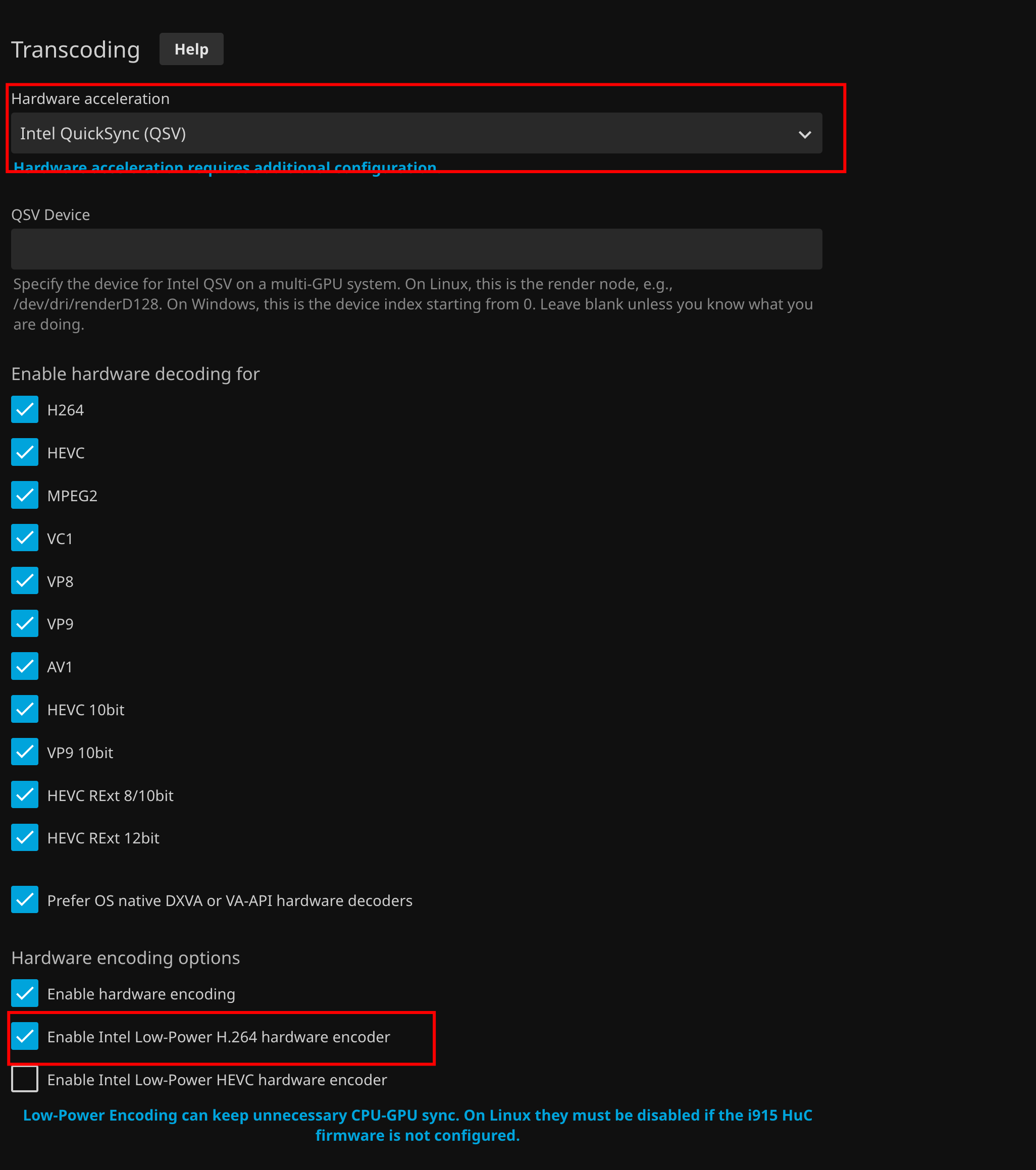
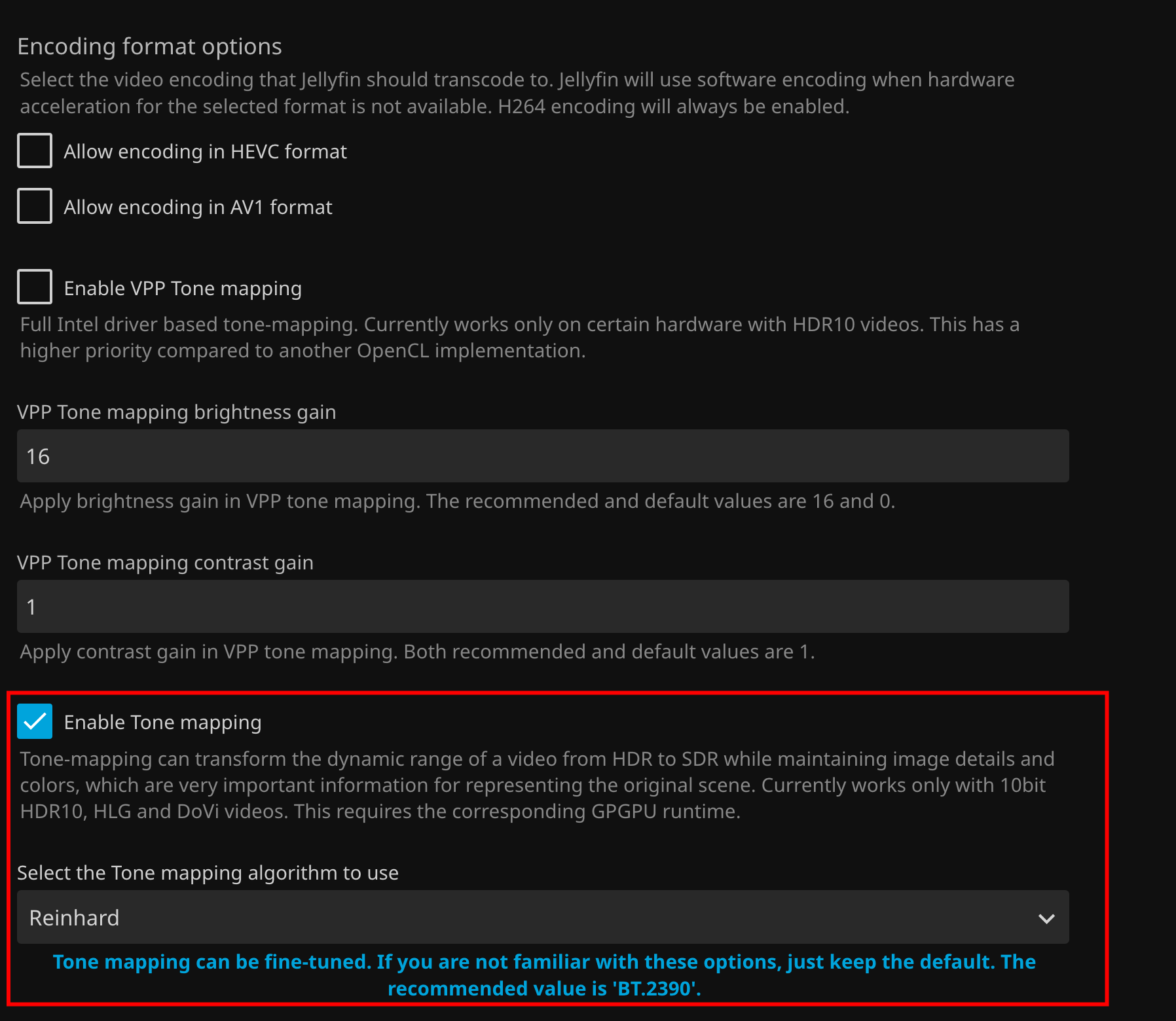
The result shared in that related post was not unlimited 4K transcoding. Zima-Jerry estimated that the N100 integrated graphics could smoothly convert Dolby Vision video at approximately 4K 30fps or below in the tested configuration.

What Changed After the Original User Enabled Hardware Acceleration
After reviewing the replies, Heimwerkerking enabled hardware acceleration for transcoding. This produced a meaningful improvement: at least one transcoded stream became playable.
The active playback information shown in the dashboard was 48.7 Mbps MP4 H264 AAC. However, CPU usage remained between 95% and 98%, so the user was still unsure whether the Intel iGPU was actually handling the video conversion.
This result did not prove that the problem was fully resolved. It showed that the configuration change improved playback, but the thread still lacked a confirmed VA-API label, a complete FFmpeg result, or a reconciled iGPU reading. The final reply again suggested observing GPU usage with btop, and no later confirmation was posted.
What This Community Thread Actually Establishes
The discussion strongly supports software 4K transcoding as the first explanation for an N100 reaching 100% CPU. It also establishes a corrected verification path: start a 4K transcode and inspect the active session under Jellyfin's Playback and Transcoding area rather than the Activity history.
The replies add several workload boundaries. H.265 client compatibility, audio conversion, high source bitrate, HDR tone mapping, and the specific Jellyfin container can all change the result. Enabling VA-API improved the original user's ability to play one transcoded stream, but high CPU usage remained.
The thread does not establish a universal N100 stream count or prove that an Intel Arc GPU is required. gelbuilding presented two possible next steps for users who still need stable 4K conversion: lower the source bitrate or add a small Intel Arc GPU. The discussion ended before either option was tested by the original poster.
FAQ From the Community Discussion
Why did 1080p work while 4K transcoding stuttered?
The community attributed the difference to the much heavier software workload created when the 4K file required conversion. The original N100 reached full CPU utilization during that path.
Where should VA-API be checked in Jellyfin?
Start a 4K stream that forces transcoding, then inspect the active session under Dashboard, Playback, and Transcoding. The Activity event history was shown not to provide the necessary VA-API or Software label.
What does an empty active-transcoding view mean?
According to gelbuilding's correction, it may mean the file is Direct Playing or Direct Streaming and no video transcode is currently active.
Did enabling hardware acceleration completely solve the case?
No. It made one transcoded stream playable, but the reported CPU load remained at 95–98% and the thread ended without a final confirmation that the iGPU handled the complete pipeline.
What options did the community suggest if 4K remained unstable?
The replies suggested preferring compatible H.264 media where practical, lowering the 4K source bitrate, testing the custom Jellyfin configuration shared by Zima-Jerry, or adding a small Intel Arc GPU for a more capable hardware-transcoding path.


