
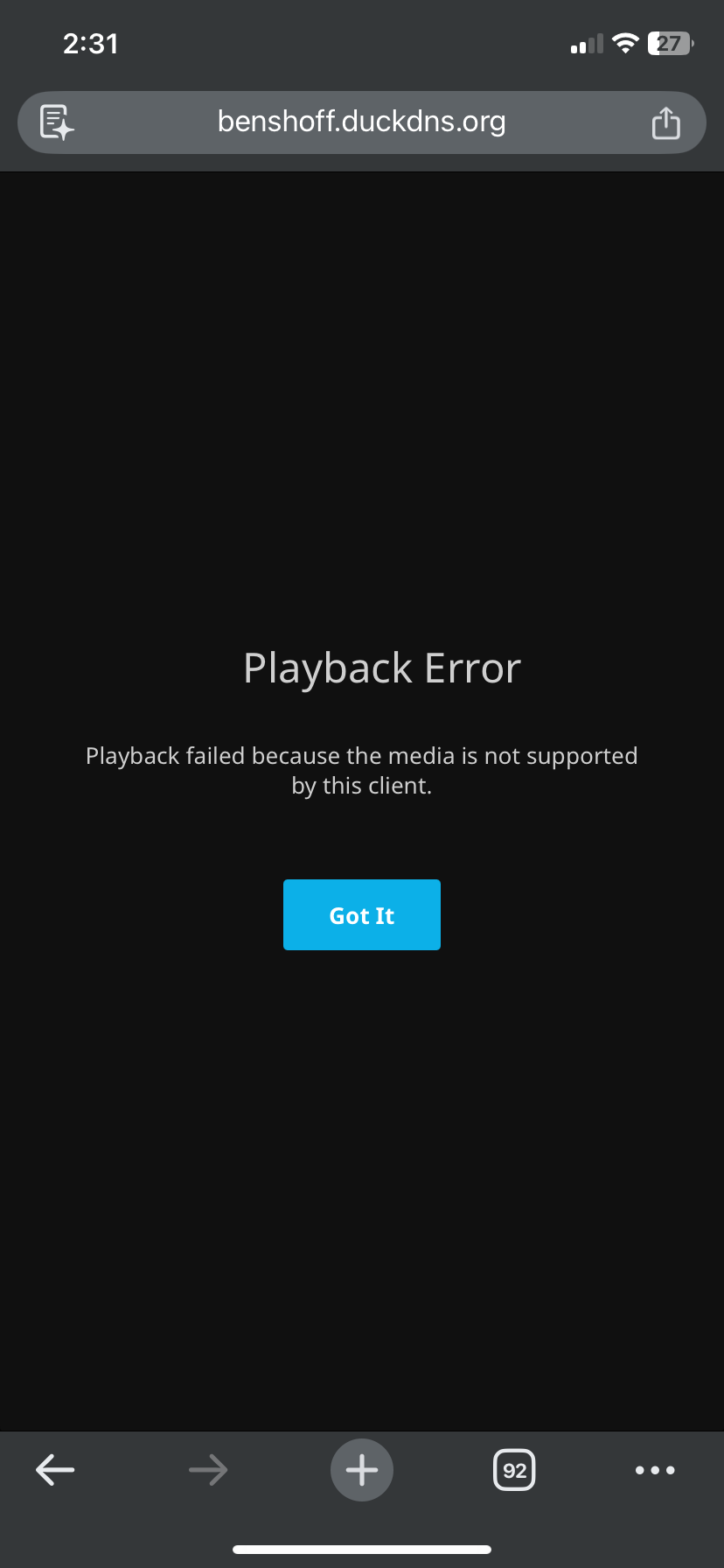
A ZimaOS user saw the Jellyfin message “Playback failed because the media is not supported by this client” for movies and MP3 files on every tested device. Because the message mentioned media support, the initial suspects were browser cache, codecs, transcoding, or permissions.
The logs told a different story. Jellyfin had started correctly, found FFmpeg, exposed multiple audio and video decoders, and reported good permissions for the graphics devices. When playback started, the server repeatedly logged Could not find file. Community member gelbuilding traced that message to a Docker volume path that mounted only the Music directory at /Media, while the Jellyfin libraries still expected files below /Media/Music, /Media/Movies, and /Media/TV Shows.
The Playback Error Shown to Every Client
MrPenguin reported that Jellyfin and the user's DNS setup had remained stable after earlier support sessions. A backup had also been created. The new failure affected both movies and music from any device, which made it reasonable to ask whether the cause was cache, codec support, or file permissions.
Users separating hardware limits from storage-path failures can consult the Jellyfin hardware requirements. In this case, however, the decisive evidence came from the file-not-found lines rather than the client message.
The Logs Showed a Missing File, Not an Unsupported Codec
The startup log identified Jellyfin 10.10.7 on Ubuntu 24.04.3 LTS inside an x64 LinuxServer.io container. It also showed Jellyfin FFmpeg 7.1.2, numerous available decoders and encoders, and hardware-acceleration interfaces including CUDA, VA-API, QSV, DRM, OpenCL, and Vulkan.
The graphics-device checks were also positive:
permissions for /dev/dri/renderD128 are good
permissions for /dev/dri/card0 are good
The playback request then produced the line that changed the diagnosis:
Could not find file '/Media/Music/Beyonce/Unknown Album/Single Ladies ... .mp3'A missing Folder.jpg path appeared as well. This meant Jellyfin's database still referenced library paths that were not present inside the current container. Codec compatibility could not help when the server could not open the source file at all.
The official Jellyfin troubleshooting guide also recommends starting playback diagnosis with the server and FFmpeg logs rather than relying only on the message shown by the client.
Commands Used to Check the Container Paths
Gelbuilding asked the author to confirm what the running Jellyfin container could actually see:
docker exec -it jellyfin ls -lah /Media
docker exec -it jellyfin ls -lah "/Media/Music"
docker exec -it jellyfin ls -lah "/Media/Music/Beyonce/Unknown Album" | head
The reply also requested the active Docker mounts:
docker inspect jellyfin --format '{{json .Mounts}}' | sed 's/},/},\n/g'These checks answer two different questions. The docker exec commands show whether the paths exist from Jellyfin's point of view, while docker inspect shows which host directories are mapped into the container. The official Jellyfin container documentation provides the broader context for persistent configuration and media volume mappings.
The Actual Volume Mapping Problem
The author's inspection output showed this media mapping:
Host:      /media/2 TB Master Drive/Media/Music
Container: /Media
That mapping places the contents of the host's Music folder directly inside container path /Media. It does not create /Media/Music inside the container. The listing therefore showed artist folders immediately under /Media.
At the same time, Jellyfin tried to open paths beginning with:
/Media/Music/.../Media/Movies/.../Media/TV Shows/...
The library database and the active container mapping no longer described the same directory structure. That is why media items could remain visible in Jellyfin while playback failed at zero seconds.
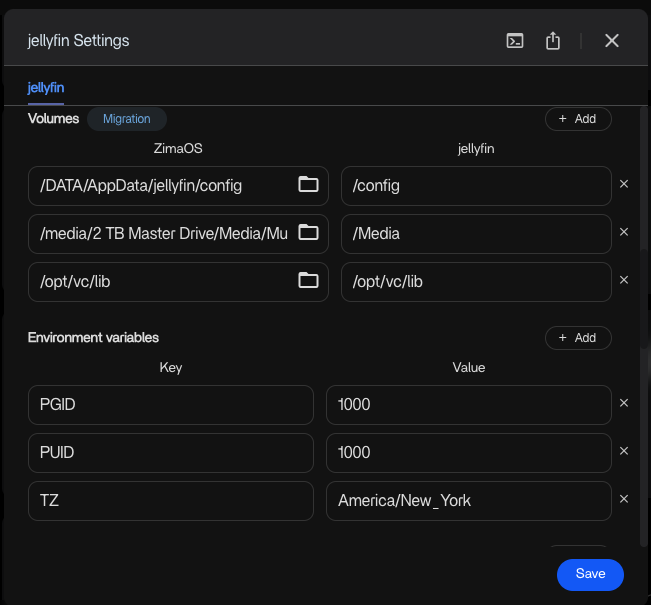
/Media, while Jellyfin expected separate Music, Movies, and TV Shows paths below that container directory.The Mapping Change Suggested by the Community
Gelbuilding recommended mounting the parent Media folder instead of only the Music subfolder:
Change from:
/media/2 TB Master Drive/Media/Music  →  /Media

Change to:
/media/2 TB Master Drive/Media        →  /Media
With the parent folder mounted, the container can expose /Media/Music, /Media/Movies, and /Media/TV Shows using the paths already stored in Jellyfin. Spaces and capitalization must match exactly; even a missing space in TV Shows changes the path.
After saving the corrected volume mapping, the reply instructed the author to restart Jellyfin and run Dashboard → Libraries → Scan all libraries. The official Jellyfin library guide documents where libraries are managed in the server dashboard.
Before modifying or rebuilding the application, keep the existing configuration backup. The Shop article on backing up Jellyfin before maintenance explains why application state and the media library should be treated as separate recovery concerns.
Other Log Lines Were Not the Confirmed Playback Cause
The log also contained a NextPVR connection refusal on localhost:8866 and a static WebRootPath warning. Those entries may deserve separate attention for Live TV or web assets, but the failed MP3 requests ended with explicit file-not-found errors. The thread did not connect the NextPVR failure to the missing music and movie files.
Likewise, this was not evidence that hardware transcoding was broken. The log showed FFmpeg and multiple codecs were available. For a genuine transcoding case, the ZimaOS hardware-accelerated streaming guide is relevant, but changing acceleration settings would not repair an incorrect Docker mount.
What the Thread Confirmed and What It Did Not
The log evidence and Docker inspection strongly identified a path-mapping mismatch, and the final reply provided a precise corrected mapping. However, the thread ended before MrPenguin posted a final playback test after applying the change. The page should therefore describe the mapping correction as the community's evidence-based fix, not as a confirmed success reported by the original author.
Jellyfin Playback and Docker Path FAQ
Why did Jellyfin say the media was unsupported when the file was missing?
The client displayed a generic playback failure. The server log provided the specific cause: Jellyfin could not find the source file at the library path stored in its database.
Would reinstalling FFmpeg or changing codecs fix this case?
No. The log already showed Jellyfin FFmpeg and many decoders and encoders. A codec cannot process a source file that is absent from the container path.
Why could Jellyfin display library items that it could no longer play?
Jellyfin can retain scanned metadata in its database after a mount changes. The item remains visible, but playback fails when Jellyfin tries to open the old filesystem path.
Should the parent Media folder be mounted?
For the folder structure shown in this thread, yes. Mapping the host's parent Media directory to container path /Media preserves the Music, Movies, and TV Shows subdirectories expected by the existing libraries.
Did the original author confirm that playback worked afterward?
No final confirmation appears in the visible thread. The last reply identified the mismatch and supplied the corrected mapping and rescan steps.


