
CasaOS and ZimaOS are different operating systems, so moving between them is a migration rather than an in-place upgrade. Files, standard app data, and many Docker Compose configurations can be transferred, but system users, network settings, storage mounts, shares, and deeply customized containers may need to be recreated manually.
The answer also changed after the community question was first posted. In July 2025, the official reply described copying files over a LAN and manually reinstalling apps. By September 2025, IceWhale had published a migration guide. The current guide, updated in September 2026, adds the CTOZ tool for transferring many CasaOS App Store containers and their data.
CasaOS to ZimaOS Is a Migration, Not an In-Place Upgrade
An in-place upgrade would replace CasaOS while preserving its system configuration automatically. That is not the model described by the ZimaOS team. Installing ZimaOS creates a different operating-system environment, so the safe plan is to inventory, back up, install, migrate, verify, and only then retire the original environment.
Do not overwrite the only copy of your CasaOS system until personal files, application data, Compose definitions, credentials, and configuration notes have been copied to verified storage.
Record App Paths and Settings Before Starting
The first official response recommended opening each app’s settings panel and recording its existing folder paths. This remains useful even when an automated migration tool is available because a container can start successfully while pointing at the wrong data directory.
For each app, record:
- Container image and version.
- Host and container volume paths.
- Ports and network mode.
- Environment variables and user/group IDs.
- AppData, database, media, and configuration folders.
- Any manually created Docker networks or devices.
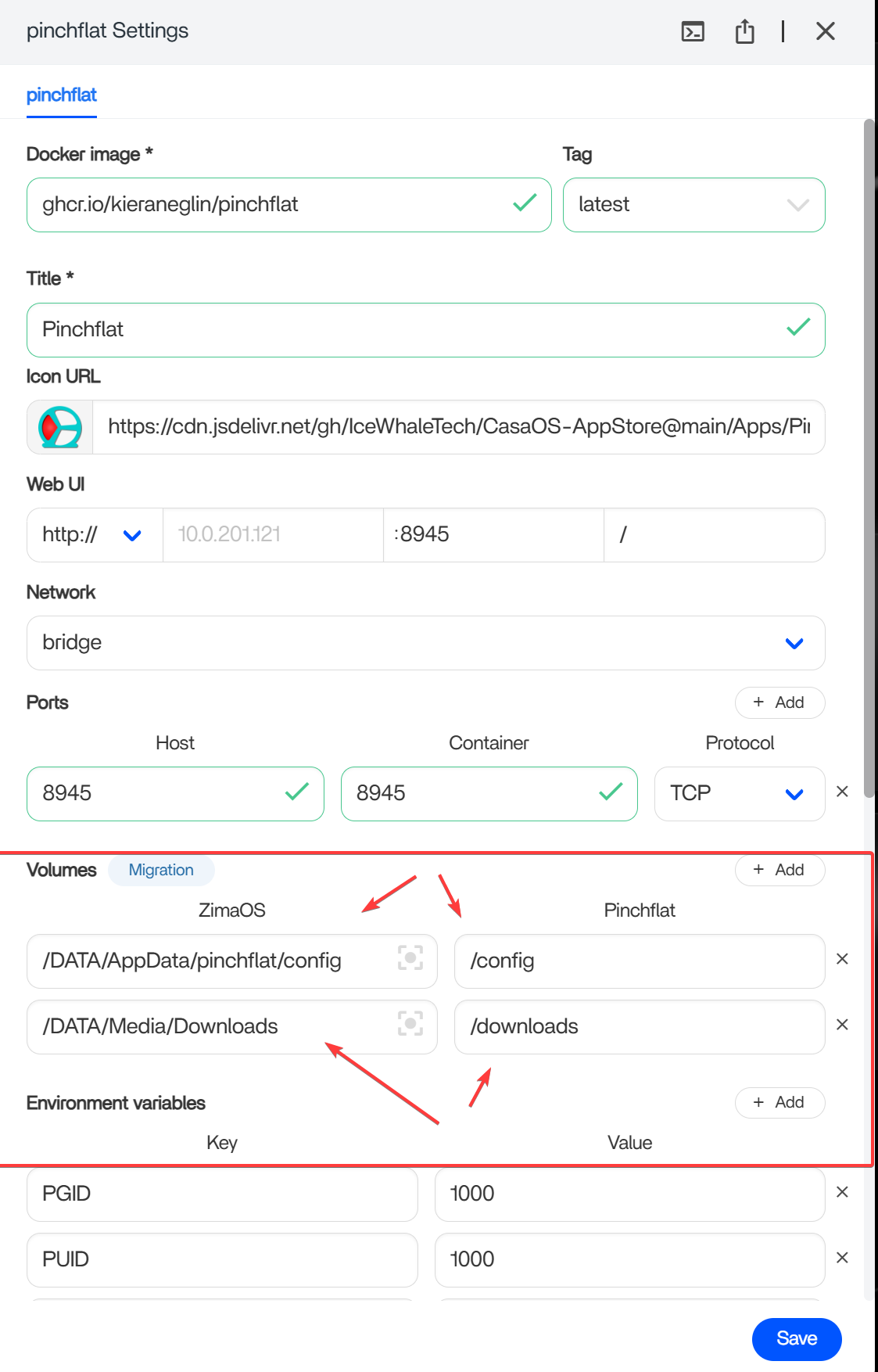
Migration When CasaOS and ZimaOS Can Run at the Same Time
The simplest path is to keep the CasaOS source and ZimaOS destination available on the same LAN. Share the required CasaOS folders over SMB, mount that share in ZimaOS Files, and copy or migrate the data to the destination storage.
For apps installed through the CasaOS App Store, the current CasaOS-to-ZimaOS migration guide recommends the community-developed CTOZ tool. CTOZ can transfer the CasaOS AppData directory and corresponding Docker Compose YAML, then reinstall supported apps in ZimaOS.
What CTOZ Migrates
- AppData associated with supported CasaOS apps.
- Docker Compose YAML used to recreate the containers.
- Standard app data and configuration covered by those mapped folders.
What CTOZ Does Not Migrate Automatically
- CasaOS users and system-level settings.
- Network configuration, storage mounts, and sharing configuration.
- Non-standard containers deployed outside the CasaOS App Store.
- Custom host changes that are not represented in AppData or Compose files.
Migration When You Have Only One Server
The 2025 thread highlighted the hardest topology: CasaOS and ZimaOS cannot run side by side on the same server during a bare-metal reinstall. The team suggested copying files to a Windows PC first and returning them after ZimaOS is installed, with each application and its data handled individually.
The current guide also describes CTOZ export/import for offline or standalone situations. This can reduce manual container reconstruction, but it does not remove the need for independent backup storage. Before replacing CasaOS, export the supported app material and copy it—together with personal files and a separate record of system settings—to a Windows PC, external disk, NAS, or another verified destination.
Recommended CasaOS-to-ZimaOS Migration Order
- Inventory: List files, shares, apps, volumes, ports, credentials, databases, users, and custom containers.
- Back up: Create at least one verified copy outside the CasaOS system disk. Databases may require app-specific exports in addition to copying files.
- Export supported apps: Use the current CTOZ workflow where applicable and retain the Docker Compose YAML.
- Install ZimaOS: Perform the clean installation only after the backup can be opened from another device.
- Restore files: Copy personal files and app data into their intended ZimaOS storage locations.
- Import or reinstall apps: Use CTOZ or ZimaOS manual Compose import, then correct ports and volume paths as required.
- Recreate system settings: Configure users, shares, networking, mounts, and permissions in ZimaOS.
- Validate: Open every app, confirm its data, test writes and permissions, and check remote access before deleting the backup.
If an App Does Not Reinstall Automatically
The current ZimaOS documentation says CTOZ transfers AppData even when automated container installation fails. If a destination folder already has the same name, the tool can append a number rather than overwrite it. The exported Compose YAML can then be imported manually through the ZimaOS App Store.
After any automated migration, inspect the app’s settings and verify that volume paths point to the transferred folders. A running container is not sufficient proof that its database, media library, or configuration was restored correctly.
Handle CLI and Non-Standard Containers Manually
Containers created outside the CasaOS App Store are outside CTOZ’s documented automatic scope. Locate their bind mounts, named volumes, AppData, Compose files, environment variables, and secrets. After installing ZimaOS, redeploy the image or Compose project and attach the restored data using the correct ZimaOS host paths.
The open-source CTOZ project on GitHub provides the tool source and current installation information referenced by the official guide.
CasaOS to ZimaOS Migration FAQ
Can CasaOS be upgraded directly to ZimaOS?
No. The ZimaOS team described them as different operating systems. Plan a migration with backups and a clean ZimaOS installation rather than an in-place upgrade.
Can CasaOS apps and their data be moved to ZimaOS?
Many standard CasaOS App Store containers can be migrated with CTOZ, including their AppData and Docker Compose YAML. Unsupported or custom containers require manual backup and redeployment.
Do I need two servers?
Two simultaneously running systems make LAN transfer and CTOZ online migration easier, but the current documentation also describes export/import for offline or standalone migration. A one-server migration still requires another safe place to hold the backup while CasaOS is replaced.
Can a Windows PC act as the temporary migration destination?
Yes. The official community reply suggested copying files to Windows before installing ZimaOS and then copying them back. Preserve app data, Compose definitions, and configuration records as well as personal files.
Will CasaOS users, mounts, and network settings transfer automatically?
No. Current guidance says system users, network configuration, storage mounts, and shares must be recreated or checked manually in ZimaOS.
What CasaOS version does CTOZ require?
The current official guide specifies CasaOS 0.4.4 or later because CTOZ depends on the standardized Docker Compose configurations used by newer CasaOS versions.


