
qBittorrent이 ZimaOS에서 폴더를 볼 수 있지만 모든 토렌트가 즉시 실패한다면, qBittorrent 내부의 다운로드 경로만 변경하는 것으로는 충분하지 않습니다. 먼저 호스트 폴더를 Docker 컨테이너에 마운트해야 하며, 해당 컨테이너에서 실행되는 qBittorrent 사용자가 마운트된 호스트 디렉터리에 쓸 권한을 가지고 있어야 합니다.
2026년 1월 IceWhale 커뮤니티 스레드에서 발생한 문제도 바로 이것이었습니다. 원 글 작성자는 미디어 폴더를 /Movies-TV에 매핑했지만, qBittorrent 실행 로그에는 Permission denied가 표시되었습니다. 전용 하위 폴더를 만들고 호스트 권한을 쓰기 가능하게 설정하자 해당 사례의 문제가 해결되었습니다. 커뮤니티에서는 빠른 해결 방법으로 chmod -R 777을 사용했지만, 현재 LinuxServer 가이드는 디렉터리를 모든 사용자가 쓸 수 있게 두기보다는 PUID/PGID를 호스트 소유권에 맞추는 방식을 권장합니다.
호스트 경로와 컨테이너 경로
ZimaOS 경로가 자동으로 qBittorrent 내부에 표시되는 것은 아닙니다. 일반적인 매핑은 다음과 같습니다.
호스트: /DATA/Downloads
컨테이너: /downloads
그런 다음 qBittorrent는 /downloads/qbittorrent와 같은 컨테이너 경로에 저장하도록 설정해야 합니다.
원래 매핑
호스트: /media/Main Storage/Media/Movies
컨테이너: /Movies-TV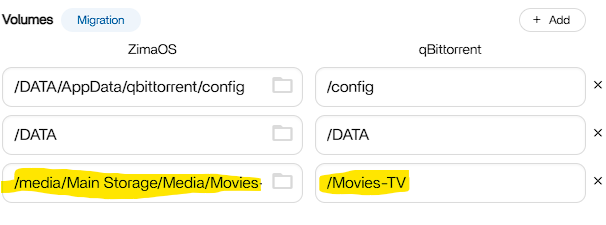
전용 다운로드 폴더 만들기
커뮤니티에서 문제가 해결된 구성은 다음 폴더를 만들었습니다.
/media/Main Storage/Media/Movies/qbittorrent-downloads그리고 qBittorrent 내부에서는 다음 경로를 사용했습니다.
/Movies-TV/qbittorrent-downloads권한 확인
ls -ld "/media/Main Storage/Media/Movies"
ls -ld "/media/Main Storage/Media/Movies/qbittorrent-downloads"
디렉터리가 존재하지만 로그에 Permission denied가 표시된다면, 컨테이너의 실행 주체에 쓰기 권한이 없는 것입니다.
커뮤니티에서 확인된 빠른 해결 방법
chmod -R 777 "/media/Main Storage/Media/Movies/qbittorrent-downloads"원 글 작성자는 이 방법으로 문제가 해결되었다고 확인했습니다. 하지만 777은 모든 사용자에게 광범위한 읽기/쓰기/실행 권한을 부여하므로, 이상적인 영구 권한 설정이라기보다는 진단 또는 임시 해결 방법으로 사용하는 것이 좋습니다.
권장되는 장기 해결 방법: PUID 및 PGID 맞추기
최신 LinuxServer qBittorrent 이미지는 바인드 마운트 권한 충돌을 방지하기 위해 PUID와 PGID를 지원합니다. 설명서에서는 컨테이너에 지정한 ID와 호스트 디렉터리의 소유권이 호환되도록 설정할 것을 권장합니다.
PUID=1000
PGID=1000
위 값은 예시일 뿐입니다. id USERNAME을 사용해 해당 호스트 계정을 확인하고, 실제 ID 또는 호환되는 공유 그룹을 사용하세요.
재시작 및 테스트
- 볼륨 매핑을 저장합니다.
- qBittorrent를 재시작하거나 다시 생성합니다.
- 기본 저장 경로를 매핑된 컨테이너 경로로 설정합니다.
- 작은 테스트 다운로드를 시작합니다.
- 계속 실패하면 도구 → 실행 로그를 확인합니다.
오류 메시지의 의미
- Permission denied: 경로는 존재하지만 쓰기 권한이 없습니다.
- No such file or directory: 컨테이너 경로가 없거나 잘못 매핑되었습니다.
qBittorrent 다운로드 경로 FAQ
qBittorrent에서 ZimaOS 호스트 경로를 사용해야 하나요?
아니요. 일반적으로 볼륨 매핑에 정의된 컨테이너 측 경로를 사용해야 합니다.
원래 스레드의 문제는 chmod 777로 해결되었나요?
예. 작성자가 해결되었다고 확인했지만, 장기적으로는 더 제한적인 PUID/PGID 또는 그룹 권한을 사용하는 편이 안전합니다.
qBittorrent가 폴더를 볼 수 있는데도 쓸 수 없는 이유는 무엇인가요?
Docker 마운트 표시 여부와 파일 시스템 쓰기 권한은 별개입니다. 매핑된 폴더가 컨테이너 사용자에게 읽기 가능하더라도 쓰기는 불가능할 수 있습니다.


