
A permanent Tailscale container should remain the same machine in the Tailscale admin console after a ZimaOS reboot or application edit. In the September 2025 source thread, that was not happening: every restart or redeploy created another Tailscale node even though the Compose file already mounted /var/lib/tailscale to persistent ZimaOS AppData.
The final source result is important because it narrows the cause. The original poster said the persistent storage was already correct; deleting the continuously supplied auth-key environment variable was the only change they needed. After that, the Tailscale node identity persisted.
Tailscale Needs Persistent Machine State
Tailscale stores node identity, keys, and connection state under its state directory. In Docker, the path is commonly configured with:
TS_STATE_DIR=/var/lib/tailscaleIf that directory exists only inside the disposable container filesystem, recreating the container creates a fresh Tailscale identity.
The Source Already Mounted the State Directory
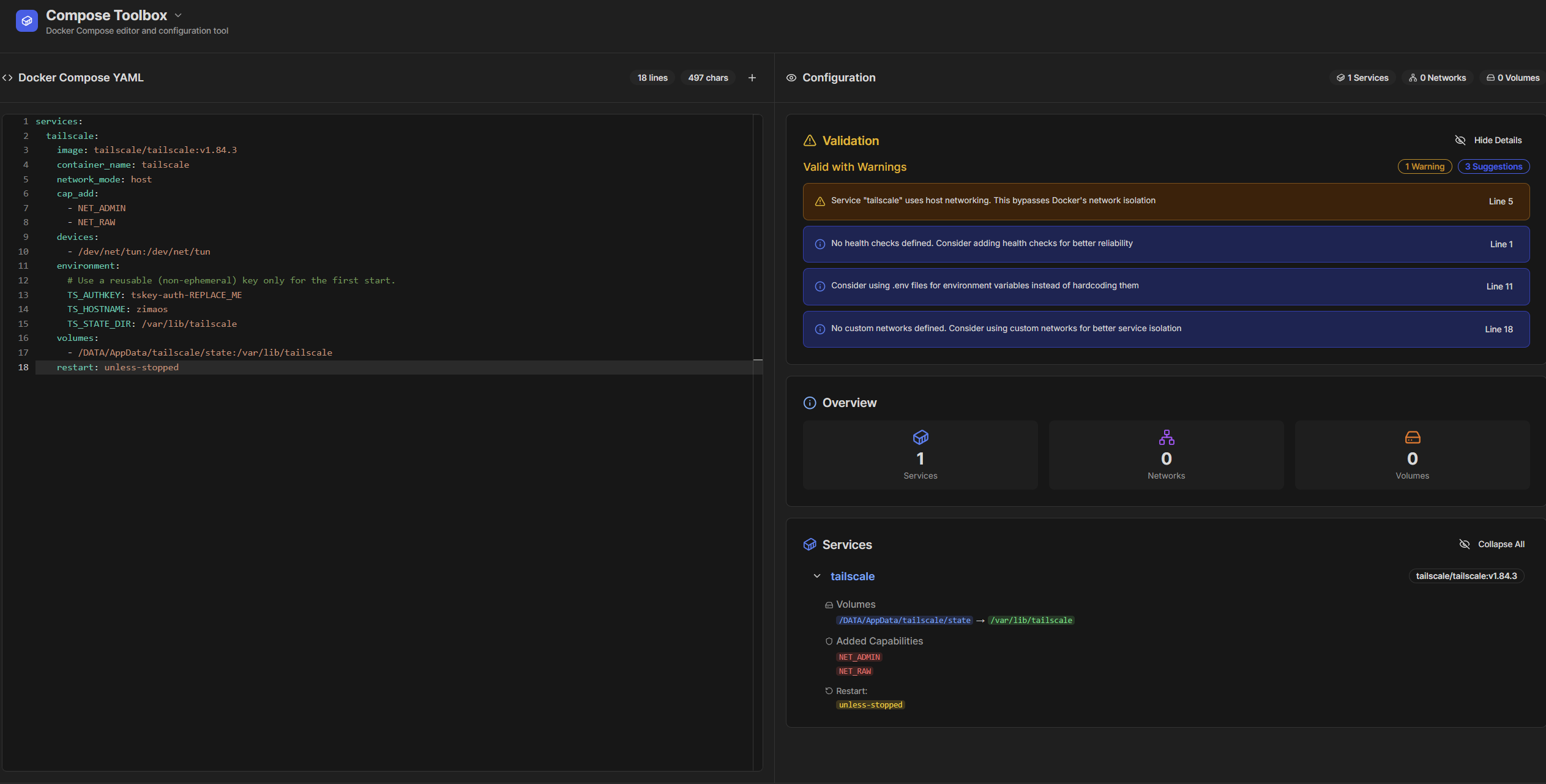
The original Compose file included:
/DATA/AppData/tailscale:/var/lib/tailscalealong with TS_STATE_DIR=/var/lib/tailscale, host networking, NET_ADMIN, NET_RAW, and access to /dev/net/tun. On paper, that should preserve the state.
An Auth Key Is for Enrollment, Not Necessarily Every Restart
The Compose file also supplied TS_AUTHKEY on every container start. A community responder explained that re-authentication can create a new machine when the existing node state is not being reused as expected.
The responder suggested using a reusable non-ephemeral auth key for the first start, waiting for the node to appear in the admin console, then removing the auth-key line and redeploying so the saved machine state becomes the source of identity.
The Original Poster Confirmed Removing the Auth Key Fixed Their Case
The final source reply says the other persistence pieces were already in place and only the auth-key environment variable had to be deleted. The machine name then persisted across restarts.
That confirmation is stronger than a generic guess about permissions. For this particular installation, repeated authentication was the practical trigger.
Current Tailscale Provides TS_AUTH_ONCE
Modern Tailscale Docker deployments can use TS_AUTH_ONCE=true. When persistent state already exists, this tells the container not to force another login every time it starts.
Review the current Tailscale Docker state and authentication parameters before reusing a 2025 Compose file unchanged.
Use a Dedicated Host Folder for State
A dedicated host directory such as a Tailscale AppData/state folder makes it easier to verify that the machine keys survive redeployment. The source responder also recommended ensuring that the folder is writable by the process that stores Tailscale state.
Permissions matter because a volume can be mounted correctly while the process still cannot update its files. In that situation, Tailscale may behave as if the machine has no reusable state.
Avoid Ephemeral Auth Keys for a Permanent Server
Tailscale supports ephemeral nodes that are intentionally temporary. That is useful for short-lived CI jobs or disposable containers, but it is the opposite of what a permanent ZimaOS server needs.
When creating a credential, verify that it matches the intended lifecycle. A persistent home server should normally retain the same identity until you deliberately revoke or replace it.
TS_HOSTNAME Does Not Define Machine Identity
The source container used TS_HOSTNAME=zimaos. That setting controls the friendly name presented to the tailnet, but preserving the same hostname string does not preserve the cryptographic machine identity. Two newly authenticated machines can both attempt to use similar names while still being separate nodes.
Test Both Reboot and App Redeploy
The original problem occurred after both full OS reboots and edits to the ZimaOS app. A correct fix should therefore survive both:
- restart the Tailscale container;
- edit and redeploy the app without changing the state volume;
- reboot ZimaOS;
- verify the same machine remains online in the Tailscale admin console.
If a duplicate appears after only one of those events, compare what happens to the state directory during that specific lifecycle operation.
Persistent Tailscale FAQ
Why was a new Tailscale machine created after every reboot?
In the source case, the state volume already existed and repeated auth-key use was the remaining practical problem.
Which path must persist?
The path configured by TS_STATE_DIR, commonly /var/lib/tailscale inside the container.
Should TS_AUTHKEY stay in the environment forever?
Not necessarily. The source user fixed duplicate nodes by removing it after enrollment, and current Tailscale also provides TS_AUTH_ONCE.
Does TS_HOSTNAME preserve the node identity?
No. The stored Tailscale machine state is what preserves identity.


