
The July 2025 source thread began with a qBittorrent App Store installation failure and ended with a manually installed LinuxServer.io container. The short version of this page previously jumped too quickly from “pull failed” to “use LinuxServer.” The full thread contains an important version detour: IceWhale asked the user to test ZimaOS 1.4.2 beta1 because app-installation behavior had been improved there, the beta installed but created a new GPU-related problem for the user's GTX 1070, and the user ultimately returned to 1.4.1.
The manual qBittorrent container worked well enough for the source user, but their historical WebUI workaround disabled Host Header Validation and CSRF protection. That should not be carried into a current installation as a default fix.
The Original Failure Was an Image Pull Problem
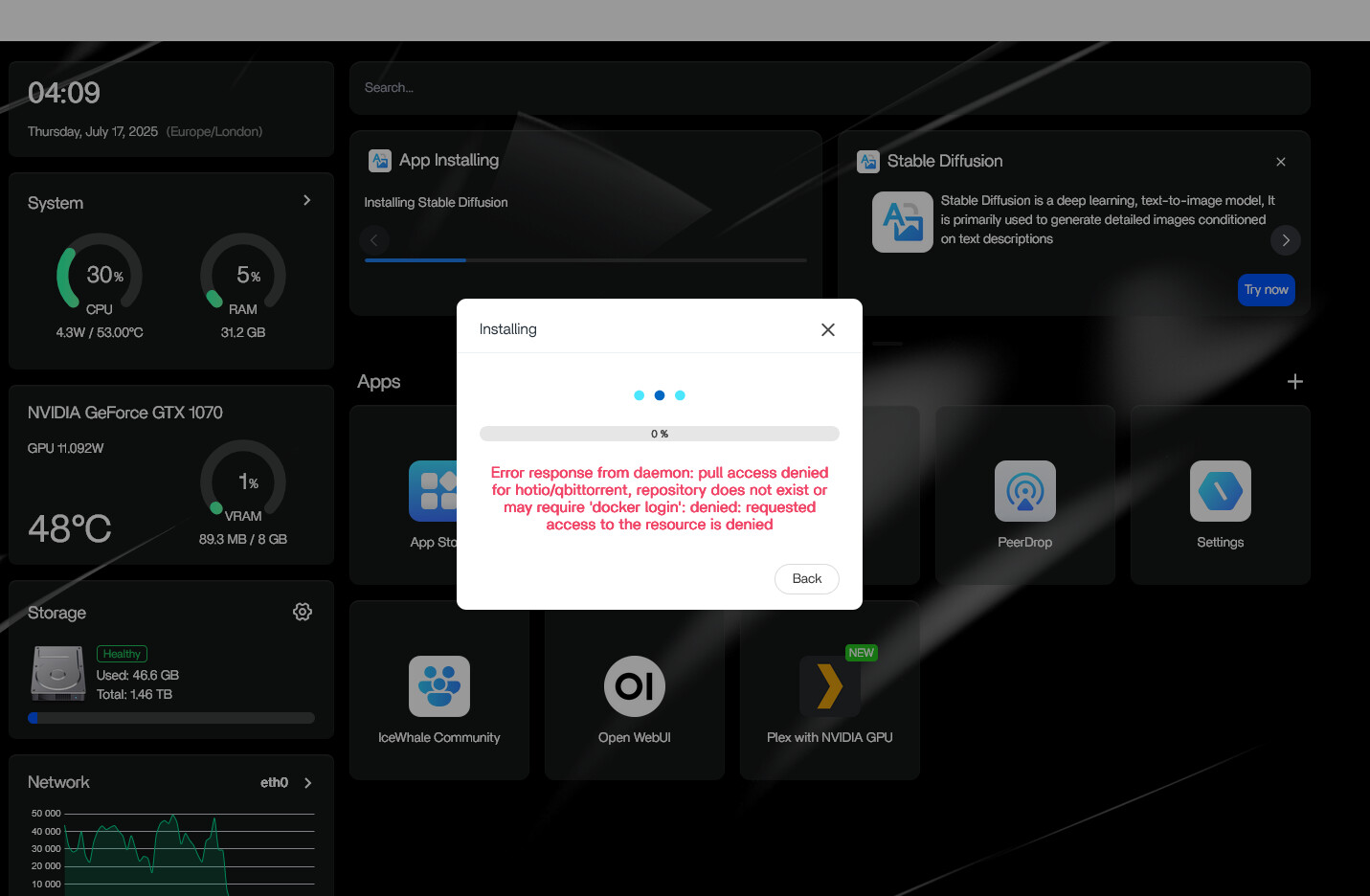
An image-pull error is different from a container that starts and then crashes. The troubleshooting target is the image reference, registry access, App Store definition, or ZimaOS app-installation layer.
IceWhale Suggested ZimaOS 1.4.2 Beta1
Zima-Giorgio asked the user to try the then-latest 1.4.2 beta1 because that release improved the app-installation experience and might fix the issue. When the update did not appear automatically, Giorgio provided the official offline-update route for that historical beta.
Those commands belong to a 2025 pre-release build and should not be reused on a current server. Their significance is historical: IceWhale treated the App Store pull failure as potentially related to the ZimaOS version.
The Beta Created a Different Problem for the User
The user installed the beta but later reverted to 1.4.1 because, in their words, the beta ignored the GTX 1070 GPU. That illustrates why upgrading to a beta solely to repair one app should include regression checks for the rest of the server.
A current system should use the current stable ZimaOS release unless there is a specific support reason to test a prerelease build.
The User Then Installed the LinuxServer.io qBittorrent Image
Current LinuxServer.io qBittorrent uses lscr.io/linuxserver/qbittorrent. Its important persistent and network settings include:
-
/configfor qBittorrent configuration; - a host downloads folder mapped into the container;
- PUID and PGID for file ownership;
- a WebUI port;
- a BitTorrent listening port over TCP and UDP.
Use the current LinuxServer.io qBittorrent container settings instead of rebuilding the 2025 configuration from memory.
Keep WEBUI_PORT and Docker Port Mapping in Sync
The current image normally serves the WebUI on port 8080. If you want another host port, you can map that host port to the container service. If the internal WebUI port itself is changed, LinuxServer.io requires the WEBUI_PORT environment value and Docker mapping to match.
A mismatched WebUI port can produce connection failures that look like authentication or security-header problems.
Use the Temporary Password from the Startup Log
The source user correctly noted that the first password can be found in the logs. Current LinuxServer.io behavior generates a temporary password for the admin account on startup.
Open the qBittorrent container log, use the temporary value for the first login, and immediately set a permanent password from the WebUI.
Do Not Disable HostHeaderValidation and CSRFProtection by Default
The historical source user added:
WebUI\HostHeaderValidation=false
WebUI\CSRFProtection=false
to the qBittorrent configuration file. They reported that the application then appeared to work, but those options deliberately weaken browser-facing security checks.
A current installation should first solve the correct port, WebUI URL, reverse-proxy headers, and authentication configuration. Do not make “disable CSRF” the standard answer to a WebUI access problem.
If a Reverse Proxy Is Involved, Configure It Properly
Host-header errors often appear when an application is accessed through a hostname or proxy that the WebUI does not expect. The correct fix is normally to configure the proxy and qBittorrent's WebUI settings consistently, not to disable all validation globally.
WebUI Traffic and BitTorrent Peer Traffic Use Different Ports
The port used to administer qBittorrent in a browser is not the port used for incoming peer connections. Publish the chosen torrent listening port over TCP and UDP and make qBittorrent's own listening-port setting match.
If the server sits behind NAT and inbound peer connectivity is desired, router or VPN design is a separate decision from the Docker port mapping.
Map Downloads to Real ZimaOS Storage
Do not let large torrents accumulate inside the disposable container layer or a small system disk. Map the downloads directory to the intended ZimaOS storage space and confirm the container user can write there before starting a large download.
Preserve /config Before Recreating the Container
The qBittorrent preferences, categories, paths, and application state live under the persistent configuration directory. Back it up before changing images or replacing an App Store deployment with a custom container.
qBittorrent on ZimaOS FAQ
Was the original problem a qBittorrent crash?
No. The App Store installation failed at the Docker image-pull stage.
Why did the user return from the beta to ZimaOS 1.4.1?
They reported that the beta did not handle their GTX 1070 as expected.
Where does the first qBittorrent password come from?
Current LinuxServer.io containers print a temporary admin password in the startup log.
Should CSRF protection be disabled to make the WebUI work?
No as a default approach. Fix the current port, proxy, hostname, and authentication configuration first.


