
The most important lesson from this part of the ProtonVPN/Gluetun thread is simple: putting qBittorrent on a Docker network called gluetun is not the same thing as routing all of qBittorrent's traffic through the Gluetun VPN container. The source user could download test torrents successfully while public-IP checks inside qBittorrent still returned the ISP address.
The community eventually narrowed the issue to Docker networking semantics. To share Gluetun's network stack, qBittorrent needs a Compose relationship such as network_mode: "service:gluetun", and the ZimaOS UI can overwrite or drop that setting if the stack is later edited in incompatible ways.
Gluetun Itself Was Already Connected
The source troubleshooting had already reached a point where Gluetun logs showed a VPN public IP and successful tunnel startup. That means the VPN container itself was not the remaining problem.
The next question was whether qBittorrent actually used the same network namespace.
qBittorrent Was Not Managing Its Own VPN
The ZimaOS Network Dropdown Selected a Docker Network
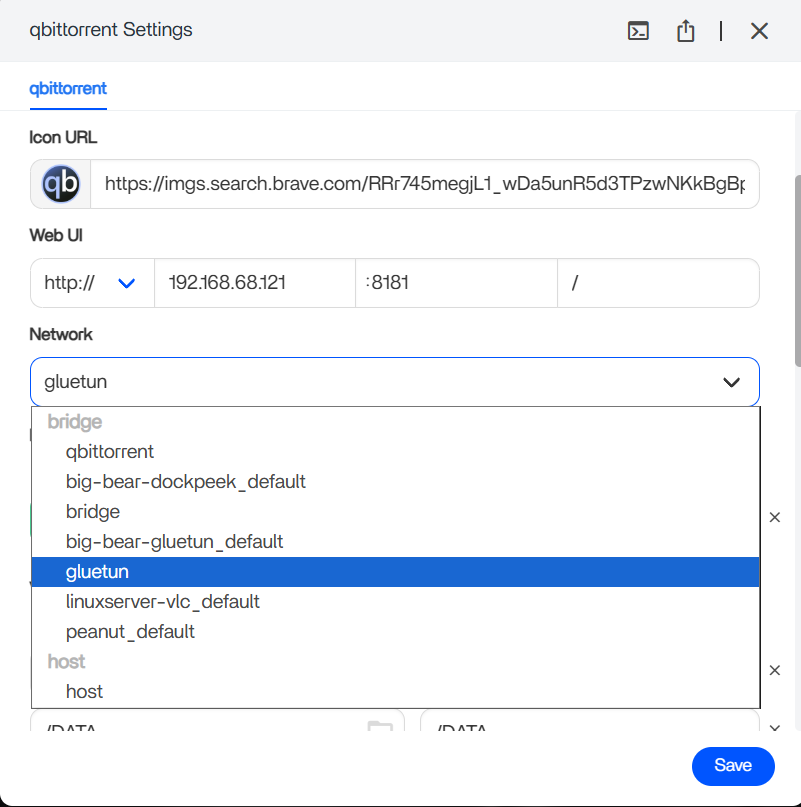
gluetun made qBittorrent share a network segment, but not Gluetun's network namespace.The source responder correctly separated two Docker concepts:
- joining the same user-defined Docker network;
- sharing another service's network namespace through
network_mode: service:gluetun.
Only the second model forces all qBittorrent network traffic through Gluetun's stack.
The Public-IP Test Proved qBittorrent Was Bypassing the VPN
The community recommended checking the public IP from inside the qBittorrent container and comparing it with the VPN IP shown in Gluetun logs.
The source user ran the tests and both returned the normal ISP IP. That was the strongest evidence in the page-2 discussion because it measured the actual traffic path instead of inferring it from interface names.
network_mode Must Survive the ZimaOS Compose Import
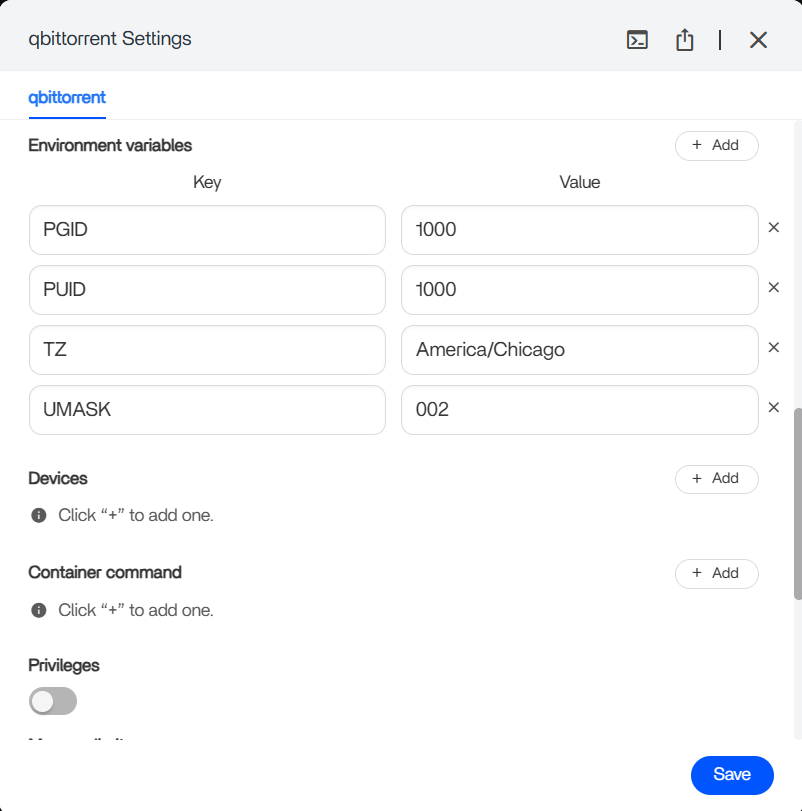
A later participant discovered that exporting the app after ZimaOS UI edits could show the network_mode line missing. They reported success after importing a Compose definition that kept the network-mode relationship and avoided incompatible ports/networks settings on the qBittorrent service.
This is community-verified ZimaOS behavior from 2026, not an official IceWhale guarantee about every current App Store YAML editor.
Keep Gluetun and qBittorrent in One Compose Project
In the source thread, the community explained that service:gluetun works when both services are part of the same Compose project. qBittorrent then shares Gluetun's network namespace, so qBittorrent's WebUI and inbound ports are published on the Gluetun service instead.
The upstream Gluetun community uses the same Docker Compose architecture. See the current Gluetun project and provider configuration before copying old environment variables.
Use ProtonVPN WireGuard Credentials, Not the Normal Proton Account Password
The broader thread established another frequent mistake: Gluetun's WireGuard configuration needs the appropriate Proton VPN WireGuard key/configuration values, not the ordinary account login password.
Never post a WireGuard private key in a public forum. The original user accidentally exposed one and correctly revoked it afterward.
Verify the Kill-Path, Not Only the Happy Path
After the combined stack is running, verify:
- Gluetun logs show the expected VPN public IP;
- qBittorrent's outbound public IP matches it;
- qBittorrent loses Internet access if the Gluetun tunnel is stopped or unhealthy;
- the WebUI remains reachable through the port published on Gluetun.
This confirms the application is not silently falling back to the ISP connection.
ARR Apps Do Not All Need to Be Behind the VPN
The long source thread also discussed putting the entire ARR stack behind the VPN as a way to simplify communication. That can work, but it is not always necessary. Many users route only the download client through Gluetun while Sonarr/Radarr remain on normal Docker networking and communicate through explicit host/container paths and ports.
Choose the architecture deliberately instead of moving every service behind the tunnel merely because it fixes one communication issue.
Publish qBittorrent Ports on Gluetun, Not on qBittorrent
When qBittorrent uses network_mode: "service:gluetun", it no longer owns an independent network namespace. That means its WebUI and any incoming BitTorrent ports must be published on the Gluetun service instead of the qBittorrent service.
If the qBittorrent WebUI disappears after moving to shared network mode, check the Gluetun port list before concluding the application failed to start.
Be Careful Editing the Imported Stack in the ZimaOS UI
The later community report is particularly important for ZimaOS users: the imported Compose file originally contained network_mode, but after UI changes the exported definition no longer did. The same participant said removing conflicting ports and networks entries and reimporting the stack preserved the working relationship.
This does not prove every current ZimaOS YAML edit behaves that way, but it does mean the generated Compose should be re-checked after changing networking through the graphical editor.
The Docker Topology Is Reusable Across VPN Providers, but Credentials Are Not
Page 2 includes a Surfshark troubleshooting example while the original thread began with ProtonVPN. The Docker networking lesson is shared: Gluetun provides the tunnel and qBittorrent must route through its namespace. Provider-specific keys, server selectors, port-forwarding options, and authentication values are not interchangeable.
Always build the Gluetun environment from the current provider configuration rather than copying another user's Surfshark or Proton values.
Do Not Paste WireGuard Private Keys into Public Screenshots or Forum Posts
The original poster accidentally exposed a private WireGuard key and revoked it after another participant warned them. Treat any published VPN key as compromised and rotate it immediately.
When requesting help, redact private keys, tokens, passwords, cookies, and provider account identifiers while leaving non-secret logs and error messages visible.
Gluetun Routing FAQ
Does joining a Docker network named gluetun route traffic through the VPN?
No. The source proved qBittorrent could remain on the ISP path while attached to that network.
What setting shares Gluetun's network namespace?
The source and upstream Compose pattern use network_mode: "service:gluetun".
How do you verify the route?
Compare the public IP seen from inside qBittorrent with the VPN IP reported by Gluetun.


