
Disk-usage tools can be misleading on a NAS because a directory may be either ordinary local storage or the place where another filesystem is mounted. This January 2026 thread began with a 1 TB ZimaOS drive showing roughly 915 GB used even though the user believed only about 450 GB of media existed. The first assumption was Docker cache. The command output instead pointed toward /DATA/.media, where backup and remote-storage mount points were involved.
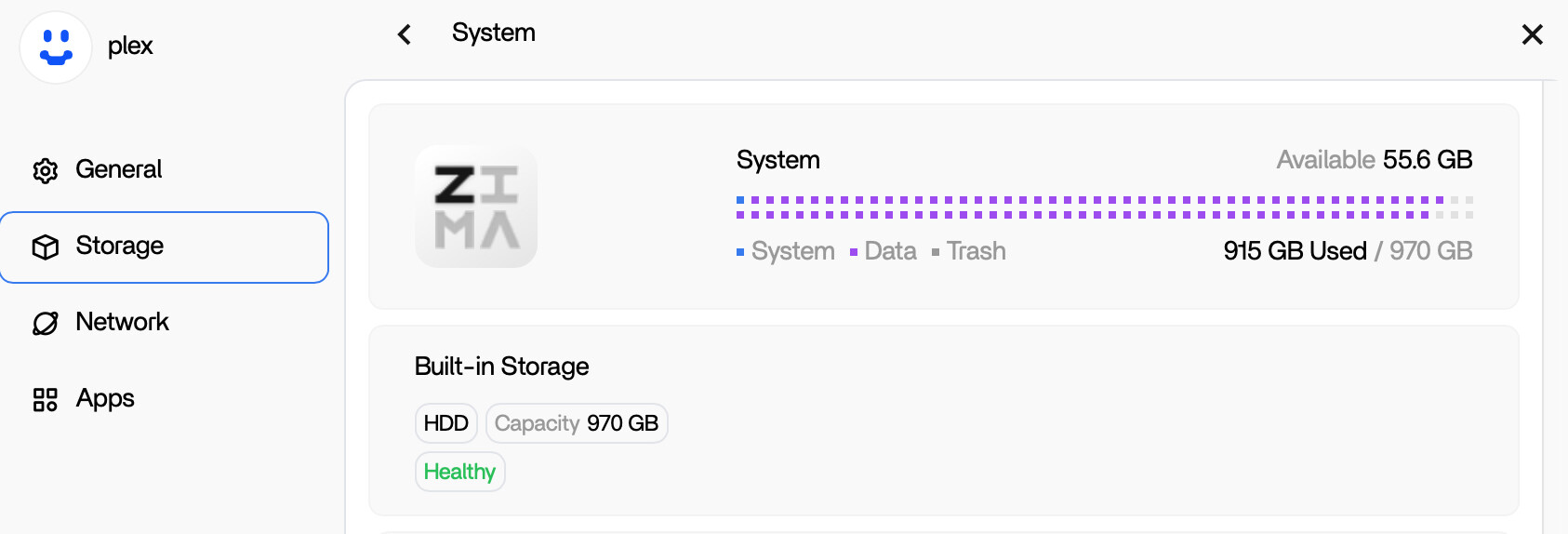
Measure Before Pruning Docker
The first community response suggested inspecting the largest folders under /DATA and checking Docker's own accounting. That was reasonable, but the user's result showed only about 2.1 GB under the Docker tree and about 2 GB of AppData.
Docker therefore could not explain hundreds of missing gigabytes.
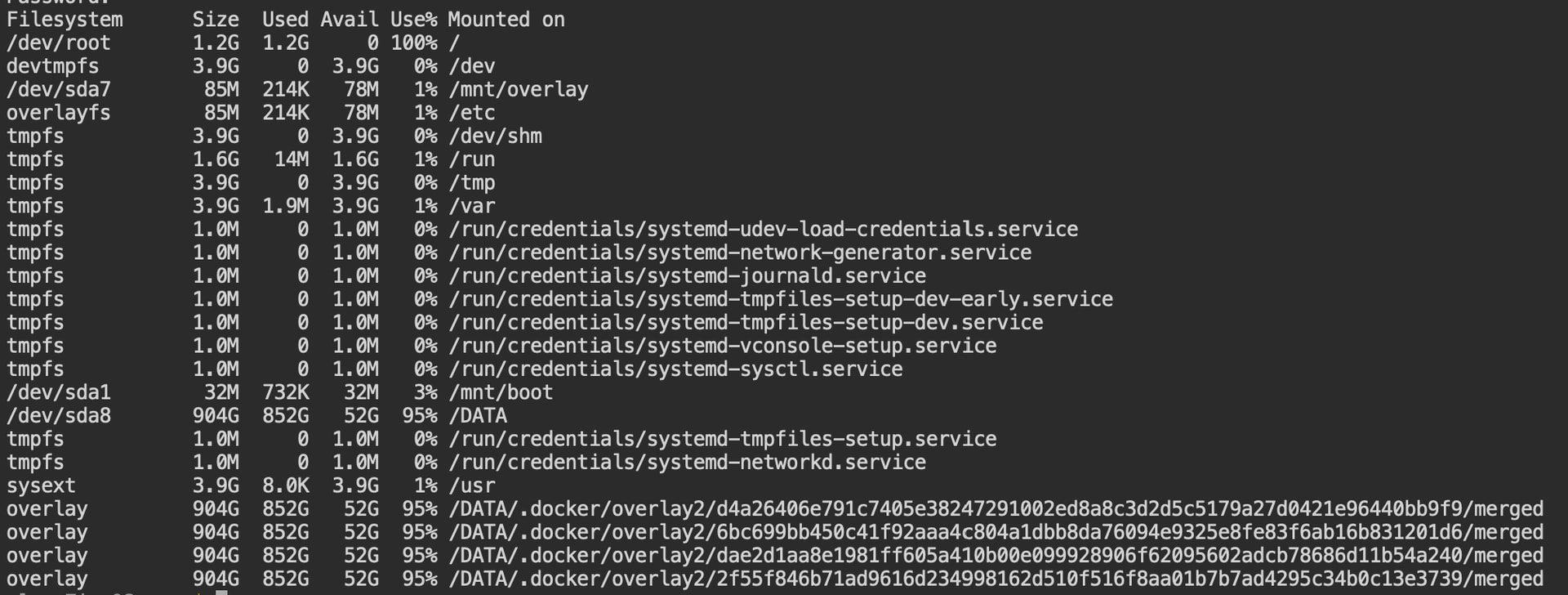
/DATA partition was almost full.The First User Found 424 GB Under /DATA/.media/UNTITLED 2
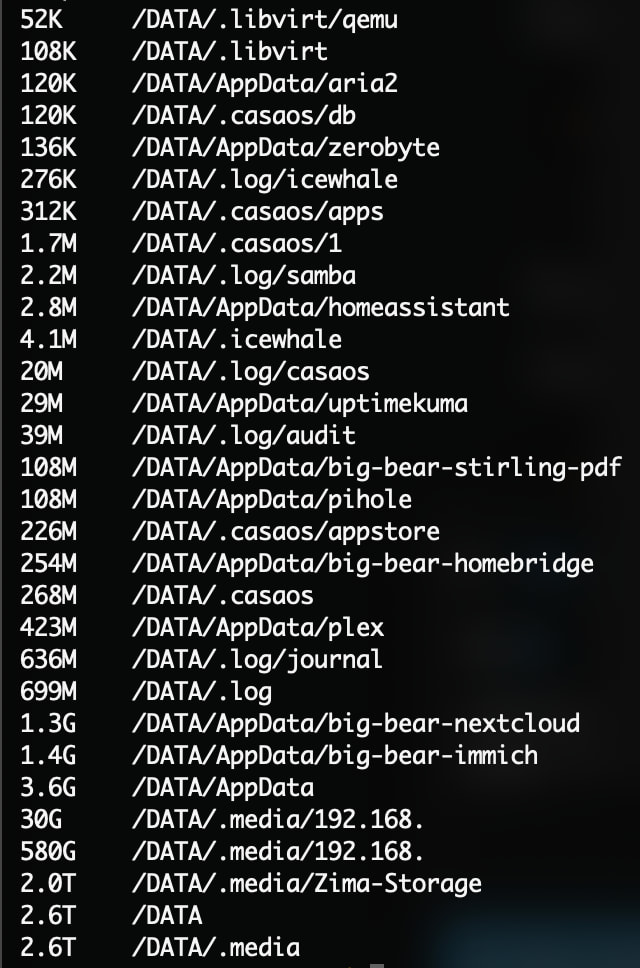
The size scan showed roughly 419 GB of normal media plus another 424 GB under /DATA/.media/UNTITLED 2. The user recognized that name as the SSD previously used as a ZimaOS Backup destination.
The confusing part was that the physical backup drive was no longer attached.
A Mount Point Can Become an Ordinary Local Folder
Linux mount points are directories. When a USB drive or SMB share is mounted, accesses to the directory reach the external filesystem. If the external filesystem disappears and an application continues writing to the same directory, those writes can land on the local filesystem underneath.
This creates the classic “my backup target is external, so why did the system disk fill?” failure mode.
Do Not Delete a .media Directory Until You Know Whether It Is Mounted
The source troubleshooting proposed destructive removal commands after checking mount state. That order matters. Deleting files from a live mounted backup target can erase the actual external backup rather than reclaim local hidden data.
Because the delete command was community guidance rather than an IceWhale support instruction, this page does not present it as a generic cleanup recipe.
A Second User Reproduced the Same Pattern After a Power Outage
Later in the thread, another user with a small ZimaOS-HD system/data partition lost all remaining free space after a power outage interrupted backup activity. Their raw du output looked enormous because it also counted mounted RAID and SMB data beneath /DATA/.media.
Use a Same-Filesystem Scan to Separate Local Data from Mounts
The community recommended a du scan that stays on the same filesystem so mounted network shares are excluded. In the second case, this exposed about 30 GB of genuinely local data under an IP-named directory inside /DATA/.media.
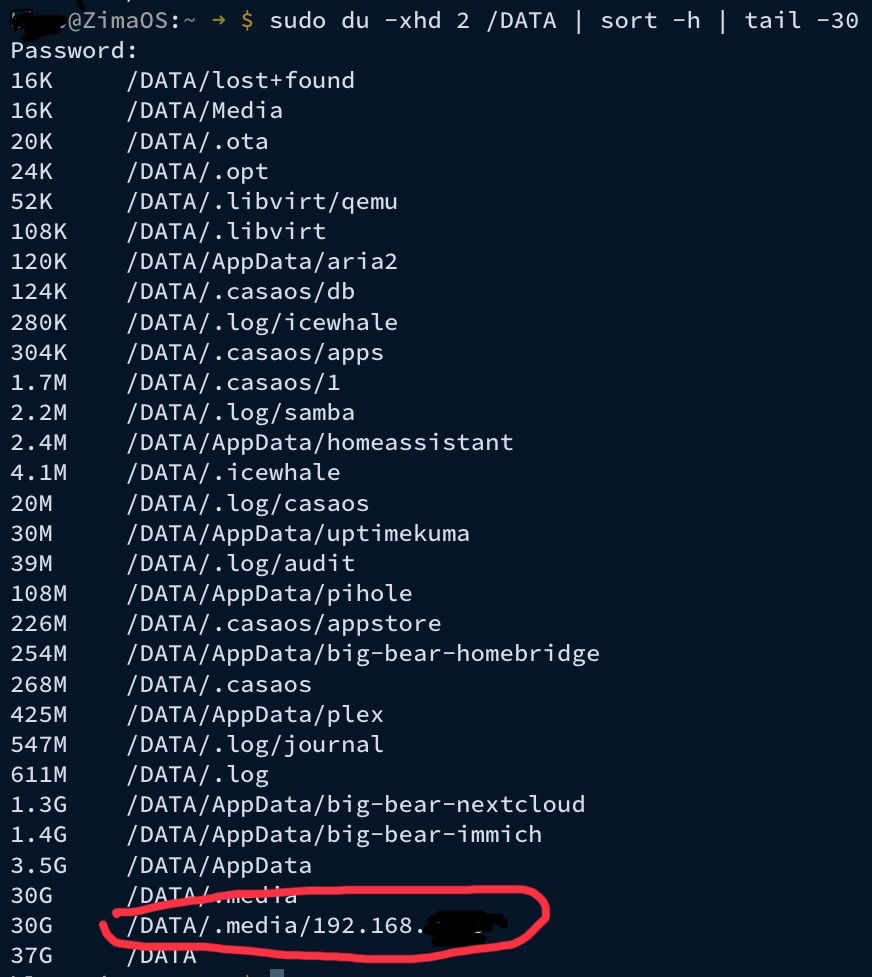
The Second User Recovered 30 GB
After confirming that the IP-named directory was not a live SMB mount and identifying it as local data left underneath the mount point, the user removed the unwanted contents and reported recovering 30 GB.
That is the strongest confirmed outcome in the thread.
The Community Theory Was Backup Writing While the Target Was Unmounted
The responder believed the backup process continued writing to the expected SMB path when the share was not correctly mounted, causing Linux to write into the local directory instead.
The confirmed 30 GB recovery supports the existence of local files under the mount point, but the exact backup race was community diagnosis rather than an IceWhale engineering post in this thread.
Current ZimaOS Backup and Storage Handling Has Changed
Current ZimaOS documents managed backup tasks and broader storage management. Use the current ZimaOS backup workflow for new jobs, and verify that the intended destination is actually mounted before large writes begin.
A Safer Missing-Space Workflow
- Use
dfto confirm which local filesystem is full. - Scan only that filesystem so SMB, USB, and RAID mounts do not inflate the totals.
- Check Docker and AppData separately.
- Inspect
/DATA/.mediafor mount-point directories that contain real local files. - Confirm the target is not mounted before deleting anything underneath a mount point.
- After cleanup, verify free space and test the backup destination again.
The First User's 424 GB Case Was More Ambiguous Than the Later 30 GB Case
The original poster saw roughly 424 GB under a directory named for the disconnected backup SSD and believed it was redundant. The discussion then moved through mount checks and proposed cleanup, but the thread's clearest verified recovery came from the later user who reclaimed 30 GB.
That distinction matters because a directory under /DATA/.media can represent a live mount, a stale mount point, or real local files. The same-looking path does not imply the same safe cleanup action on every system.
Use df and du for Different Questions
df answers “which filesystem is actually full?” while du answers “which visible directories contain files?” On a NAS with nested mounts, the two tools can appear to disagree because du may walk into other filesystems unless told not to.
The thread became much clearer only after the troubleshooting separated the local ZimaOS-HD filesystem from mounted SMB and RAID content.
Unexpected Power Loss Makes Mount-Point Bugs More Dangerous
The later 30 GB case started after a power failure while backups were active. If a remote destination is not remounted cleanly after boot but a backup job resumes or is restarted, the path can still exist as an ordinary local directory.
For important backup jobs, verify the destination is mounted and writable after a reboot or power event before assuming the old path still points to the external target.
Do Not Manually Delete Docker overlay2 to Reclaim Space
Early in the thread, Docker overlay paths looked visually prominent in filesystem output. The community specifically warned against deleting arbitrary files from overlay2. Docker's storage layer should be managed through Docker or the application lifecycle, not by removing random layer directories.
Current ZimaOS Also Exposes App Storage Usage
Current ZimaOS App settings show application storage consumption and provide cache cleanup for supported apps. That is useful for distinguishing normal application growth from mount-point data before going to the terminal.
The explanation of where current ZimaOS applications store data and cache provides a safer first map of the filesystem.
Missing Space FAQ
Was Docker overlay2 responsible for the first user's hundreds of missing gigabytes?
No. Docker accounted for only a small fraction of the used space in the posted output.
Why can du report terabytes on a much smaller local disk?
It can recursively count mounted remote or RAID filesystems unless the scan is constrained to the local filesystem.
Was any recovery confirmed?
Yes. The later user recovered 30 GB from local data stored beneath an SMB mount-point directory.


