
Do not downgrade ZimaOS to 1.4.2 just to recover JBOD. Current September 2026 ZimaOS documentation again lists JBOD as a supported storage layout, so the correct path is to update to the current stable release and check the Storage → Combine menu there.
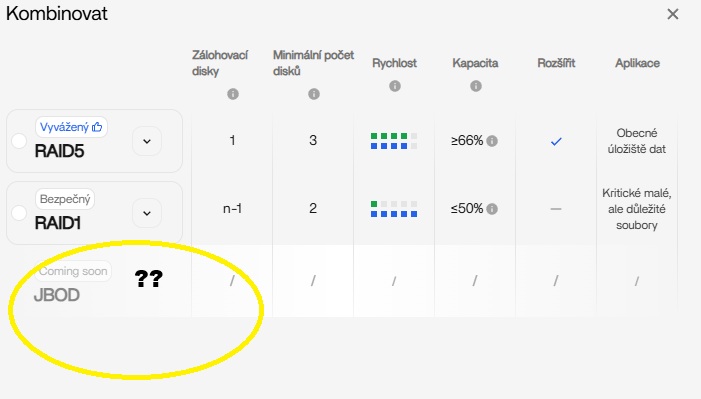
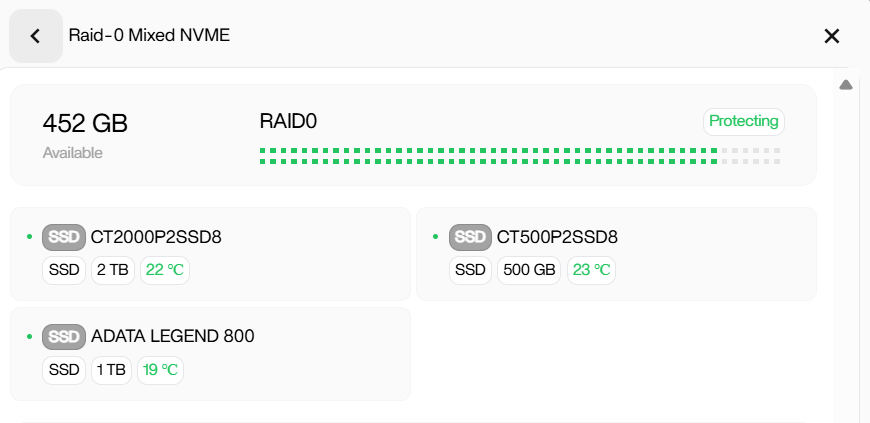
The source thread captured a temporary gap: JBOD existed in 1.4.2, disappeared from the 1.5.4 UI as “Coming soon,” and users experimented with RAID0 as a workaround. That historical workaround is no longer the right recommendation.

Current ZimaOS Supports JBOD Again
The current ZimaOS RAID and JBOD guide explicitly lists JBOD and describes it as concatenating disks into one large volume with no redundancy.
Why RAID0 Was a Bad Substitute
RAID0 stripes data across drives and usually wastes capacity when member sizes are mismatched. The source user's 2TB, 1TB, and 500GB NVMe example showed only 452GB available despite 3.5TB raw capacity.
When JBOD Makes Sense
JBOD is useful when you want one large namespace from mixed-size drives and capacity matters more than fault tolerance. It is not suitable for the only copy of important data.
JBOD Has No Redundancy
Current ZimaOS documentation warns that if one JBOD member fails, the combined volume can become unusable. Back up important data before creating or rebuilding the volume.
How to Check the Current Storage Menu
Open Settings → Storage → Combine. If JBOD is available, select the intended disks and verify the estimated capacity before creating anything.
If JBOD Is Still Missing
Record the current ZimaOS version, disk models, connection type, controller, and whether all drives appear as available disks. Do not assume missing JBOD means a hardware failure until basic detection is verified.
Do Not Reformat Just to Make the Button Appear
Formatting destroys data and does not install a missing UI feature. Update first, verify hardware detection, and only initialize disks after you intentionally choose a storage layout.
The backup planning guide is the right companion step before changing disk layout.
Write Down the Raw Capacity Before Creating JBOD
Record each drive's model and size and compare the total with the capacity estimate in the current wizard. This catches accidental RAID0 selection or a missing disk before destructive creation begins.
Consider Separate Disks Instead of One JBOD Volume
If the disks hold unrelated data, separate storage spaces reduce the failure blast radius. You can expose multiple folders over SMB without combining every drive into one non-redundant volume.
Verify the Pool After Reboot
After creation, reboot once and confirm the JBOD volume returns Healthy/available and all member disks are present. Do this before loading the volume with the only copy of important data.
FAQ
Which current ZimaOS version has JBOD?
The current September 2026 documentation lists JBOD in the current storage feature set, so use the latest stable release rather than downgrading to 1.4.2.
Is JBOD safer than RAID0?
No. Neither provides redundancy.
Does JBOD use all mixed-size disk capacity?
It is designed to concatenate capacity, making it more suitable than RAID0 for mismatched sizes.
Should I downgrade to 1.4.2?
No. That was a historical workaround for a period when the newer UI temporarily lacked JBOD.


