
Changing PUID and PGID inside a Docker app does not guarantee that the container can write to every host filesystem. In this February 2026 thread, HandBrake could not write to an SSD mounted under /media/sda2 even after the user tried several user and group IDs.
The decisive detail was the filesystem: the drive was exFAT and was mounted as owned by root. exFAT does not provide normal Linux per-file UID/GID ownership in the same way ext4 does, so changing the container user alone could not fix the host mount permissions.
The Problem Was Not Just the Container User
The user showed that the HandBrake container already had PUID and PGID values, but the host folder still appeared under root ownership. A community responder correctly separated Docker identity from host filesystem semantics.
This distinction applies to many self-hosted apps: the container can only exercise the permissions the host mount exposes.
exFAT Uses Mount-Level Permission Mapping
exFAT is useful for moving disks between operating systems, but it does not store Linux ownership and mode bits like ext4. UID, GID, and mask behavior is established when the filesystem is mounted.
That is why ordinary chown or chmod attempts may appear ineffective on an exFAT disk even though the same commands behave normally on ext4.
Current ZimaOS lists exFAT as a supported read/write filesystem. That describes basic filesystem access, not Docker-specific POSIX permission behavior. Use the current filesystem support table when deciding whether portability or Linux-native permissions matter more for a server disk.
Reformatting Through the UI Also Failed in This Case

Later inspection showed that the disk was mounted in several ZimaOS-managed locations and remained busy through the Files service. The thread never reached an official IceWhale repair sequence, so destructive unmount or fstab commands from community replies should not be republished as official instructions.
Map the Host Folder Explicitly into the Container
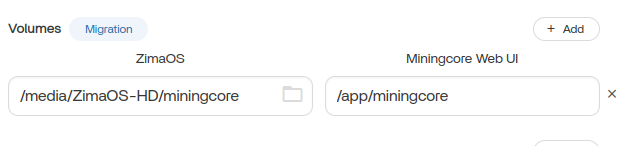
A later reply illustrated the correct conceptual volume mapping: choose a real host directory and map it to the application's expected container path.
Why ext4 Is Simpler for Linux-Only Container Storage
The community recommendation was to use ext4 for a disk dedicated to Docker workloads because ext4 supports normal Linux ownership and permission bits. That is a practical Linux administration recommendation, not an IceWhale requirement that every ZimaOS data disk must use ext4.
If cross-platform portability is more important, exFAT can still be appropriate, but the mount-level ownership model needs to match the users running your containers.
Keep App Storage Away from the System Drive
Current ZimaOS lets users choose the app-data location and map real storage folders into containers. The explanation of how host folders become container volumes is useful before changing ownership or reformatting a disk.
Docker Folder Permission FAQ
Why did changing PUID and PGID not fix the exFAT drive?
Because exFAT does not store normal Linux file ownership. The mount's UID/GID and mask determine how the filesystem appears to Linux processes.
Does ZimaOS support exFAT read and write?
Yes. Current ZimaOS lists exFAT as read/write, but that does not make it equivalent to ext4 for POSIX ownership.
Should every Docker data disk be ext4?
Not universally, but ext4 is simpler when the disk is dedicated to Linux containers that depend on normal ownership and permissions.
Was the formatting error solved in the thread?
No official final fix was posted. The disk remained busy through ZimaOS-managed mounts and services.


